---
title: Docker Desktop for Mac代替のOrbStackがすごい
tags: ["Docker", "OrbStack", "kind", "MetalLB"]
categories: ["Dev", "Infrastructure", "Docker", "OrbStack"]
date: 2023-06-16T04:09:56Z
updated: 2023-06-18T23:45:47Z
---
OrbStackは軽量・高速を謳うDocker Desktop for Macの代替です。
drop-in replacementであり、Docker Desktop for Macと同じく`docker`コマンドが使えます。
https://orbstack.dev/
* リソース消費が少ない & 起動が速い
* DockerだけでなくLinux Machineも使える
* Macのホストからコンテナ/Linux Machineに直接アクセスできる(!)
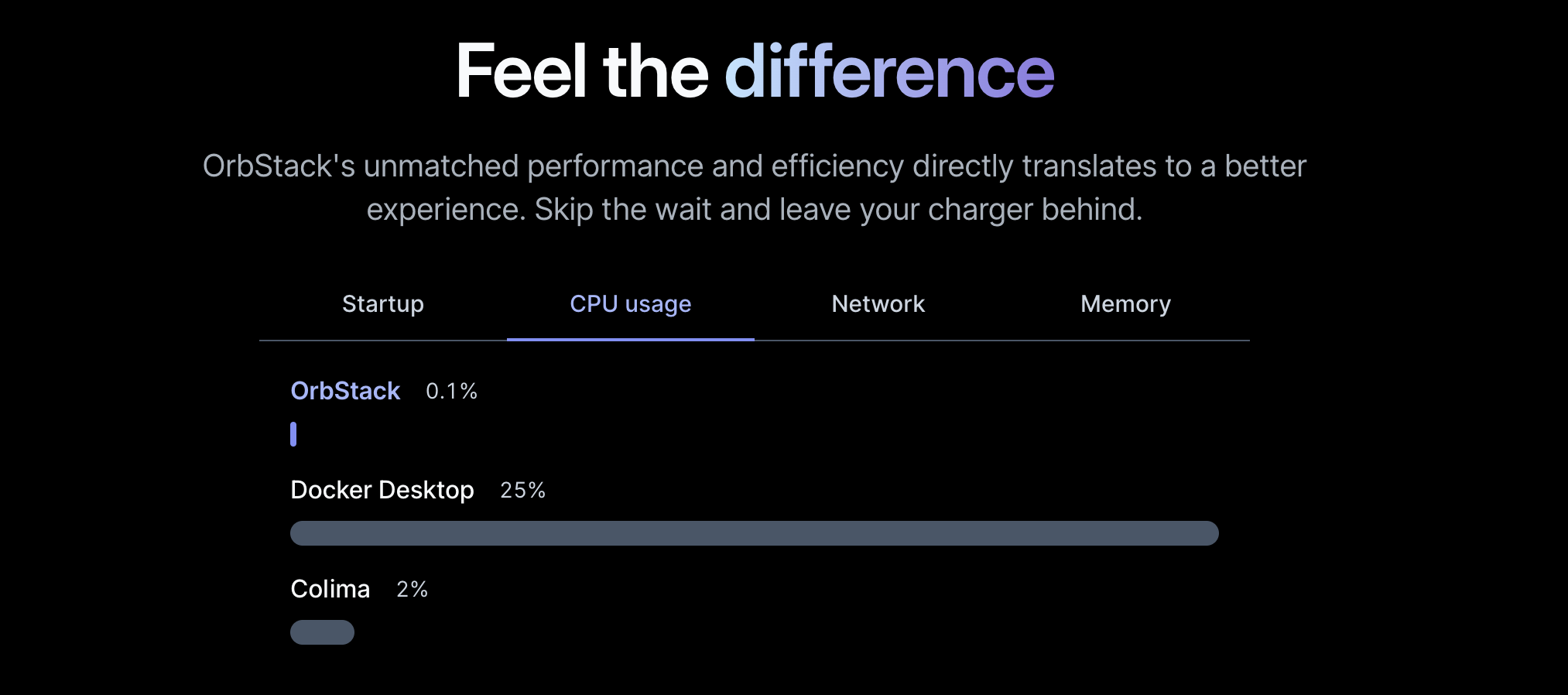
自分はDocker DesktopのCPU使用率の高さが嫌でした。Docker Desktopを使っていると、Laptopが熱かったです。コンテナを使わないときはわざわざDocker Desktopを終了していました。
そこで軽量なOrbStackが気になり、乗り換えてみました。Docker Desktopに比べると確かにリソース消費量が少なく、快適に使えています。
OrbStackのWebサイトではCPU使用率の比較が次のように示されています。
 実際のOrbStackはこんな感じです。
 Docker Desktopはもう開きたくないので、比較はしていません。
そして、先日、MacホストからコンテナのIPにダイレクトアクセスする機能が実装されました。これはDocker Desktop for Macでは制約としてできなかったことです。
https://github.com/orbstack/orbstack/issues/33
これはDocker Desktopに対するkiller featureと言えるのではないかと思います。この機能はOrbStack 0.12で追加される予定で、~記事執筆時点での最新0.11では実装されていません~ 0.12リリースされました🎉。
上記のissueにRC版のリンクが記載されているので、この機能を先行で試すことができます。
コンテナのIPにダイレクトアクセスできると[KindでMetalLBを使って](https://kind.sigs.k8s.io/docs/user/loadbalancer/)Type=LoadBalancerで公開したk8sのServiceにMacから直接アクセスできます。
今までこれができなかったため、Kind上のアプリにアクセスするには、port-forwardを使い、Ingressを経由するなどする必要がありました。
複数のIngress Controllerを使いたいとか、コンテナの中からIngressのホスト名でアクセスすると言ったことが困難でした。
OrbStackを使うとこの問題が解消されます。
OrbStackは現在Public Beta版という位置付けで、無料で試せます。将来的には有償になるみたいです。
この機能であれば個人的にはお金を払っても使いたいと思っています。
### Install方法
```
brew install orbstack
```
~0.12.0-rc2を使う場合は以下のリンクからdmgファイルを取得してください~。 0.12リリースされました🎉
Docker Desktopはもう開きたくないので、比較はしていません。
そして、先日、MacホストからコンテナのIPにダイレクトアクセスする機能が実装されました。これはDocker Desktop for Macでは制約としてできなかったことです。
https://github.com/orbstack/orbstack/issues/33
これはDocker Desktopに対するkiller featureと言えるのではないかと思います。この機能はOrbStack 0.12で追加される予定で、~記事執筆時点での最新0.11では実装されていません~ 0.12リリースされました🎉。
上記のissueにRC版のリンクが記載されているので、この機能を先行で試すことができます。
コンテナのIPにダイレクトアクセスできると[KindでMetalLBを使って](https://kind.sigs.k8s.io/docs/user/loadbalancer/)Type=LoadBalancerで公開したk8sのServiceにMacから直接アクセスできます。
今までこれができなかったため、Kind上のアプリにアクセスするには、port-forwardを使い、Ingressを経由するなどする必要がありました。
複数のIngress Controllerを使いたいとか、コンテナの中からIngressのホスト名でアクセスすると言ったことが困難でした。
OrbStackを使うとこの問題が解消されます。
OrbStackは現在Public Beta版という位置付けで、無料で試せます。将来的には有償になるみたいです。
この機能であれば個人的にはお金を払っても使いたいと思っています。
### Install方法
```
brew install orbstack
```
~0.12.0-rc2を使う場合は以下のリンクからdmgファイルを取得してください~。 0.12リリースされました🎉
https://github.com/orbstack/orbstack/issues/33#issuecomment-1589159604
インストールすると`docker`コマンドの他に`orb`コマンドも使えます。以下のバージョンでIntell版Macで試しています。
```
$ orb version
Version: 0.12.0-rc2 (119952)
Commit: 01e4342fe1a0228b3b442be9741d21f33b53213e (v0.12.0-rc2)
```
docker contextを見ると、`desktop-linux`の他に`orbstack`が追加されています。contextを切り替えることでDocker Desktopに戻すこともできます。
```
$ docker context ls
NAME DESCRIPTION DOCKER ENDPOINT ERROR
default Current DOCKER_HOST based configuration unix:///var/run/docker.sock
desktop-linux unix:///Users/toshiaki/.docker/run/docker.sock
orbstack * OrbStack unix:///Users/toshiaki/.orbstack/run/docker.sock
```
default contextは次のようにOrbStackを指しています。
```
$ ls -l /var/run/docker.sock
lrwxr-xr-x 1 root daemon 41B Jun 1 09:16 /var/run/docker.sock -> /Users/toshiaki/.orbstack/run/docker.sock
```
### Dockerコンテナにアクセス
定番のNginxを立ち上げます。0.12からはコンテナに直接アクセスできるのでポートフォワードが不要です。
```
docker run --rm --name nginx nginx:alpine
```
```
$ docker inspect nginx -f '{{.NetworkSettings.IPAddress}}'
198.19.192.2
```
Mac上でこのIPに対して、curlでアクセスします。
```
$ curl http://198.19.192.2
Welcome to nginx!
Welcome to nginx!
If you see this page, the nginx web server is successfully installed and
working. Further configuration is required.
For online documentation and support please refer to
nginx.org.
Commercial support is available at
nginx.com.
Thank you for using nginx.
```
アクセスできてNginxのWelcomeページが返りました!
Mac上でポートフォワードせずにアクセスできて感動です。
### Linux Machineの立ち上げ
OrbStackではDockerとは別にLinux Machineを立ち上げることができます。WindowsのWSLみたいな使い方ができます。
自分はこのような用途にこれまで[Multipass](https://multipass.run/)を使用していたのですが、これも代替できそうです。
`workspace`という名前のubuntu (jammy)マシーンを立ち上げます。
```
orb create ubuntu:jammy workspace
```
```
$ orb list
NAME STATE DISTRO VERSION ARCH
---- ----- ------ ------- ----
workspace running ubuntu jammy amd64
```
`orb shell`でLinuxマシーンのterminalを操作できます。
```
$ orb shell -m workspace
To run a command as administrator (user "root"), use "sudo ".
See "man sudo_root" for details.
toshiaki@workspace:/Users/toshiaki$ uname -a
Linux workspace 6.3.7-orbstack-00157-g1149ea9805fd #1 SMP Tue Jun 13 06:31:52 UTC 2023 x86_64 x86_64 x86_64 GNU/Linux
toshiaki@workspace:/Users/toshiaki$ ip addr
1: lo: mtu 65536 qdisc noqueue state UNKNOWN group default qlen 1000
link/loopback 00:00:00:00:00:00 brd 00:00:00:00:00:00
inet 127.0.0.1/8 scope host lo
valid_lft forever preferred_lft forever
inet6 ::1/128 scope host
valid_lft forever preferred_lft forever
2: eth0@if9: mtu 1500 qdisc noqueue state UP group default qlen 1000
link/ether 9e:29:b3:4a:23:ca brd ff:ff:ff:ff:ff:ff link-netnsid 0
inet 198.19.249.112/24 metric 100 brd 198.19.249.255 scope global dynamic eth0
valid_lft 172696sec preferred_lft 172696sec
inet6 fd07:b51a:cc66:0:9c29:b3ff:fe4a:23ca/64 scope global mngtmpaddr noprefixroute
valid_lft forever preferred_lft forever
inet6 fe80::9c29:b3ff:fe4a:23ca/64 scope link
valid_lft forever preferred_lft forever
```
OrbStack 0.12ではMacホストからこのLinuxのIPも到達します。
```
$ ping 198.19.249.112
PING 198.19.249.112 (198.19.249.112): 56 data bytes
64 bytes from 198.19.249.112: icmp_seq=0 ttl=64 time=0.604 ms
64 bytes from 198.19.249.112: icmp_seq=1 ttl=64 time=0.250 ms
64 bytes from 198.19.249.112: icmp_seq=2 ttl=64 time=0.290 ms
```
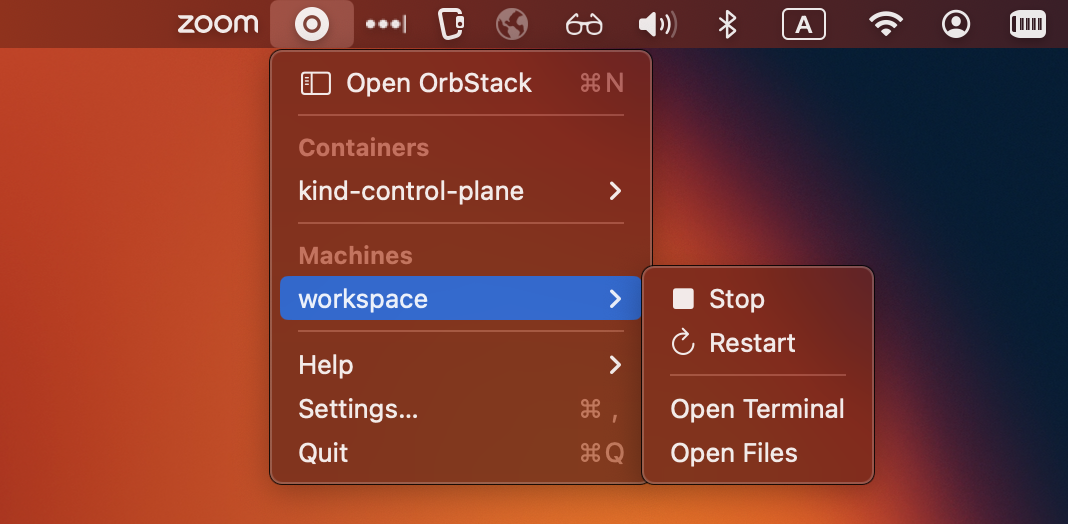
GUIからもterminalを開けるので便利です。
 ### KindでMetalLBを使用する
これまでMac上でKindを使う場合、MetalLBで公開したサービスのIPにアクセスできませんでした。
Kindのドキュメント (https://kind.sigs.k8s.io/docs/user/loadbalancer/) に次のように記載されています。
> On macOS and Windows, docker does not expose the docker network to the host. Because of this limitation, containers (including kind nodes) are only reachable from the host via port-forwards, however other containers/pods can reach other things running in docker including loadbalancers. You may want to check out the Ingress Guide as a cross-platform workaround. You can also expose pods and services using extra port mappings as shown in the extra port mappings section of the Configuration Guide.
このドキュメントのチュートリアルもDocker for Mac上で実施すると、最後のアプリに対するcurlのアクセスでrequest timeoutになります。
OrbStack (0.12+)であれば、このチュートリアルをMac上で完遂できます!
Kindクラスタ作成
```
kind create cluster
```
MetalLBインストール
```
kubectl apply -f https://raw.githubusercontent.com/metallb/metallb/v0.13.7/config/manifests/metallb-native.yaml
kubectl wait --namespace metallb-system \
--for=condition=ready pod \
--selector=app=metallb \
--timeout=90s
```
MetalLBが払い出すIP Rangeの指定
```
kubectl apply -f https://kind.sigs.k8s.io/examples/loadbalancer/metallb-config.yaml
```
> 次のコマンドの結果が`172.19.0.0/16`でない場合は、metallb-config.yamlを修正する必要があります。
>
> ```
> $ docker network inspect -f '{{.IPAM.Config}}' kind
> [{172.19.0.0/16 172.19.0.1 map[]} {fc00:f853:ccd:e793::/64 fc00:f853:ccd:e793::1 map[]}]
> ```
サンプルアプリのデプロイ
```
kubectl apply -f https://kind.sigs.k8s.io/examples/loadbalancer/usage.yaml
```
払い出された`EXTERNAL-IP`を確認。
```
$ kubectl get svc foo-service
NAME TYPE CLUSTER-IP EXTERNAL-IP PORT(S) AGE
foo-service LoadBalancer 10.96.129.85 172.19.255.200 5678:31930/TCP 39s
```
アプリにアクセス
```
LB_IP=$(kubectl get svc/foo-service -o=jsonpath='{.status.loadBalancer.ingress[0].ip}')
for _ in {1..10}; do
curl ${LB_IP}:5678
done
```
アクセスできます!
```
foo
bar
bar
foo
foo
bar
bar
foo
bar
foo
```
---
Docker Desktop for Mac代替のOrbStackを試しました。Macからコンテナへのダイレクトアクセスと言うkiller featureが追加されたことにより、Mac上で検証できることが増えそうです。
### KindでMetalLBを使用する
これまでMac上でKindを使う場合、MetalLBで公開したサービスのIPにアクセスできませんでした。
Kindのドキュメント (https://kind.sigs.k8s.io/docs/user/loadbalancer/) に次のように記載されています。
> On macOS and Windows, docker does not expose the docker network to the host. Because of this limitation, containers (including kind nodes) are only reachable from the host via port-forwards, however other containers/pods can reach other things running in docker including loadbalancers. You may want to check out the Ingress Guide as a cross-platform workaround. You can also expose pods and services using extra port mappings as shown in the extra port mappings section of the Configuration Guide.
このドキュメントのチュートリアルもDocker for Mac上で実施すると、最後のアプリに対するcurlのアクセスでrequest timeoutになります。
OrbStack (0.12+)であれば、このチュートリアルをMac上で完遂できます!
Kindクラスタ作成
```
kind create cluster
```
MetalLBインストール
```
kubectl apply -f https://raw.githubusercontent.com/metallb/metallb/v0.13.7/config/manifests/metallb-native.yaml
kubectl wait --namespace metallb-system \
--for=condition=ready pod \
--selector=app=metallb \
--timeout=90s
```
MetalLBが払い出すIP Rangeの指定
```
kubectl apply -f https://kind.sigs.k8s.io/examples/loadbalancer/metallb-config.yaml
```
> 次のコマンドの結果が`172.19.0.0/16`でない場合は、metallb-config.yamlを修正する必要があります。
>
> ```
> $ docker network inspect -f '{{.IPAM.Config}}' kind
> [{172.19.0.0/16 172.19.0.1 map[]} {fc00:f853:ccd:e793::/64 fc00:f853:ccd:e793::1 map[]}]
> ```
サンプルアプリのデプロイ
```
kubectl apply -f https://kind.sigs.k8s.io/examples/loadbalancer/usage.yaml
```
払い出された`EXTERNAL-IP`を確認。
```
$ kubectl get svc foo-service
NAME TYPE CLUSTER-IP EXTERNAL-IP PORT(S) AGE
foo-service LoadBalancer 10.96.129.85 172.19.255.200 5678:31930/TCP 39s
```
アプリにアクセス
```
LB_IP=$(kubectl get svc/foo-service -o=jsonpath='{.status.loadBalancer.ingress[0].ip}')
for _ in {1..10}; do
curl ${LB_IP}:5678
done
```
アクセスできます!
```
foo
bar
bar
foo
foo
bar
bar
foo
bar
foo
```
---
Docker Desktop for Mac代替のOrbStackを試しました。Macからコンテナへのダイレクトアクセスと言うkiller featureが追加されたことにより、Mac上で検証できることが増えそうです。