---
title: Notes on Installing VMware Greenplum® 7 with pgvector and PostgresML Support on Rocky Linux VM on vSphere
tags: ["Greenplum", "Tanzu", "PostgreSQL", "Rocky", "pgvector", "PostgresML", "vSphere", "Machine Learning"]
categories: ["Middleware", "RDBMS", "Greenplum"]
date: 2023-10-02T06:52:05Z
updated: 2023-10-31T08:01:23Z
---
> ⚠️ This article was automatically translated by OpenAI (claude-sonnet-4-20250514).
> It may be edited eventually, but please be aware that it may contain incorrect information at this time.
[VMware Greenplum®](https://network.tanzu.vmware.com/products/vmware-greenplum) 7 has been released. It supports [pgvector](https://github.com/pgvector/pgvector) and [PostgresML](https://postgresml.org/), enhancing AI capabilities.
Let's try installing VMware Greenplum® 7 on vSphere.
We'll create a configuration with 1 Coordinator (`gp-coordinator`) and 2 Segments (`gp-segment1`, `gp-segment2`). In this article, we'll install VMware Greenplum® 7.0.0.
Basically, I followed the [installation guide](https://docs.vmware.com/en/VMware-Greenplum/7/greenplum-database/install_guide-install_guide.html), but the following procedures only perform the minimum configuration to get it working and do not implement all recommended settings.
Please refer to this at your own risk.
**Table of Contents**
### Creating Rocky Linux VMs
For the Linux distribution, we'll use [supported](https://docs.vmware.com/en/VMware-Greenplum/7/greenplum-database/install_guide-platform-requirements-overview.html#operating-systems) Rocky Linux 8.
Create VMs from ISO files.
Store the ISO file from https://download.rockylinux.org/pub/rocky/8/isos/x86_64/Rocky-8.8-x86_64-minimal.iso in the content library.
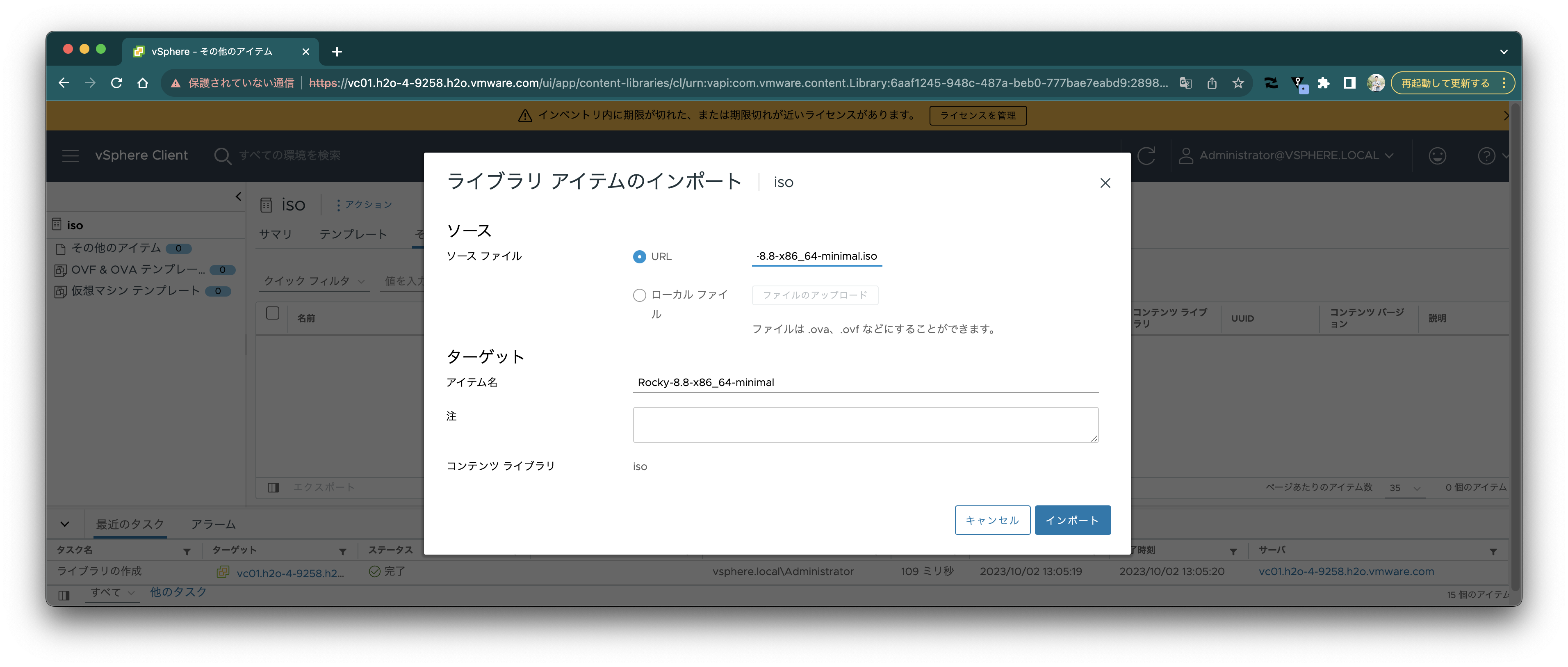
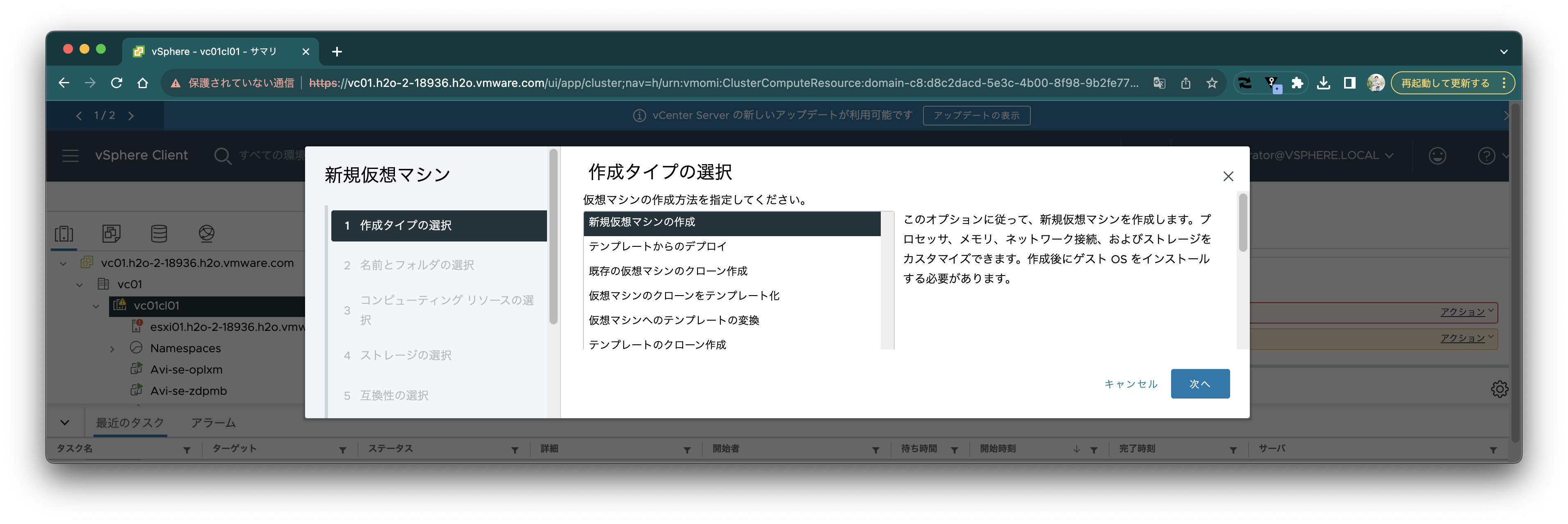
 Create a new VM.
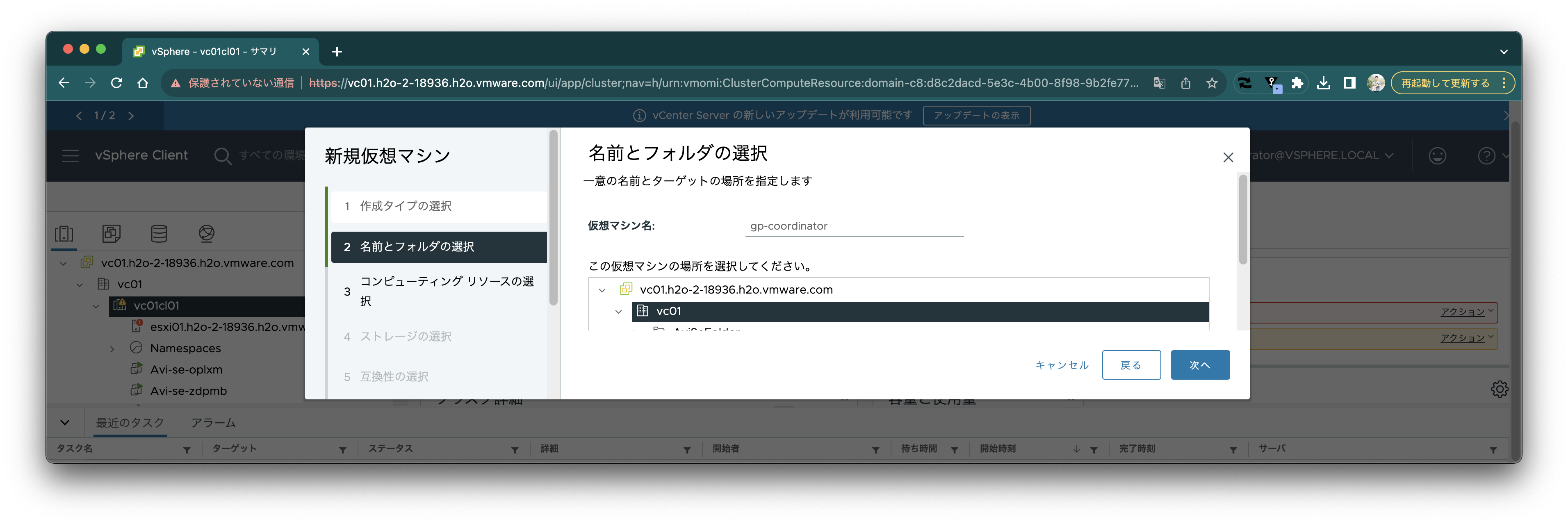
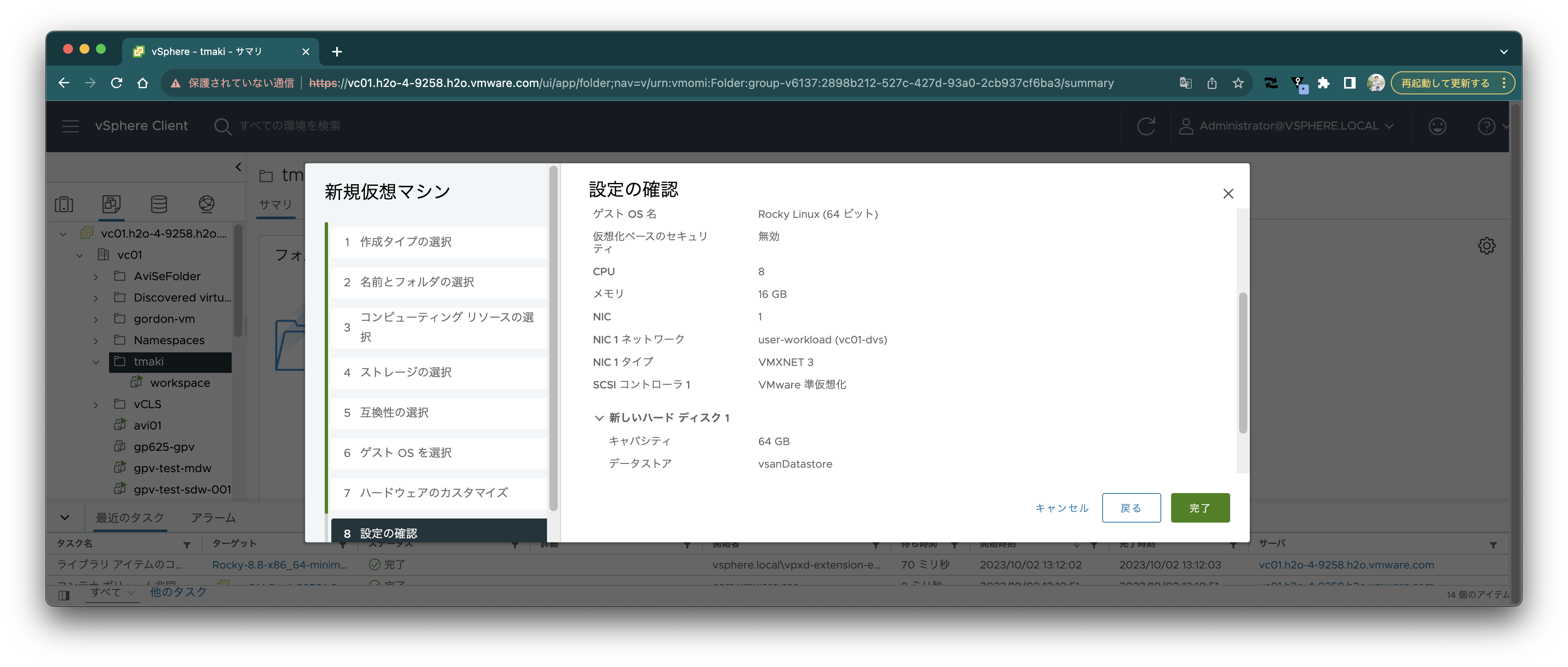
 Set the name to `gp-coordinator`.
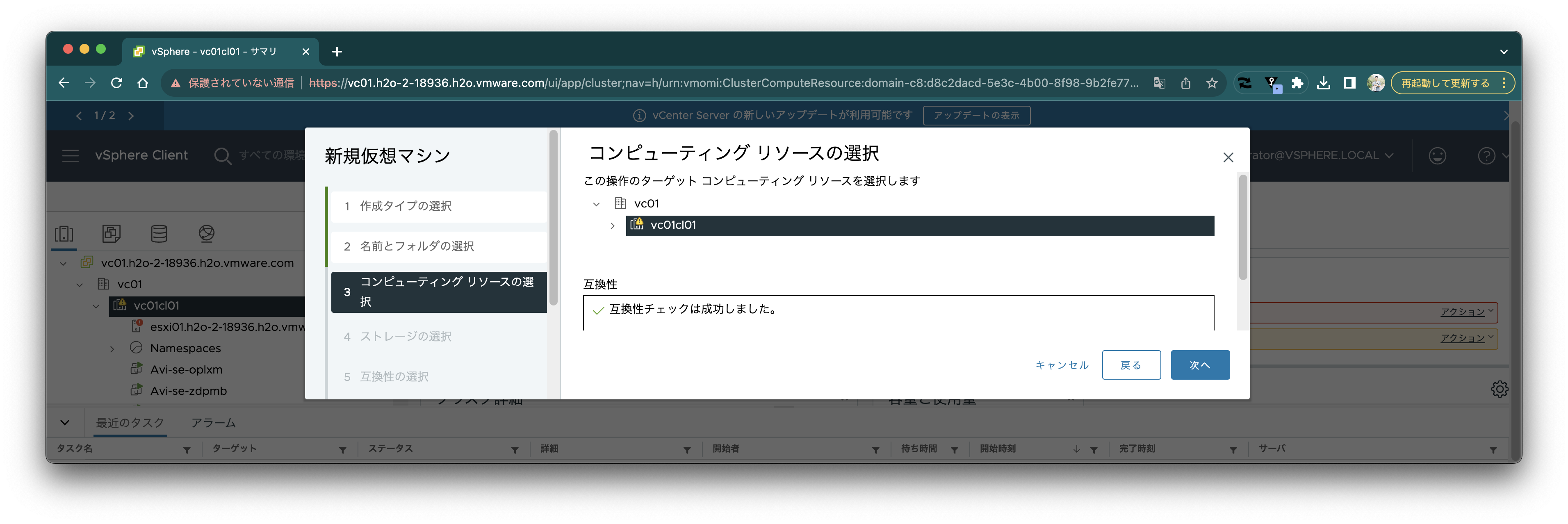
 Select appropriately as follows.
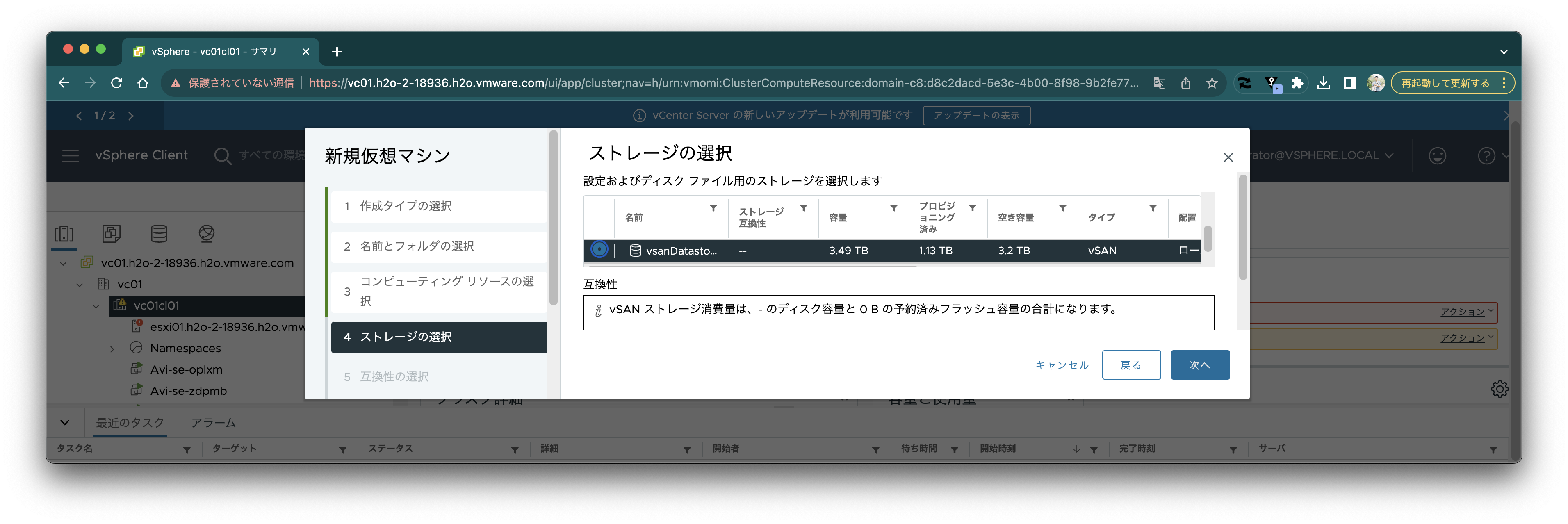
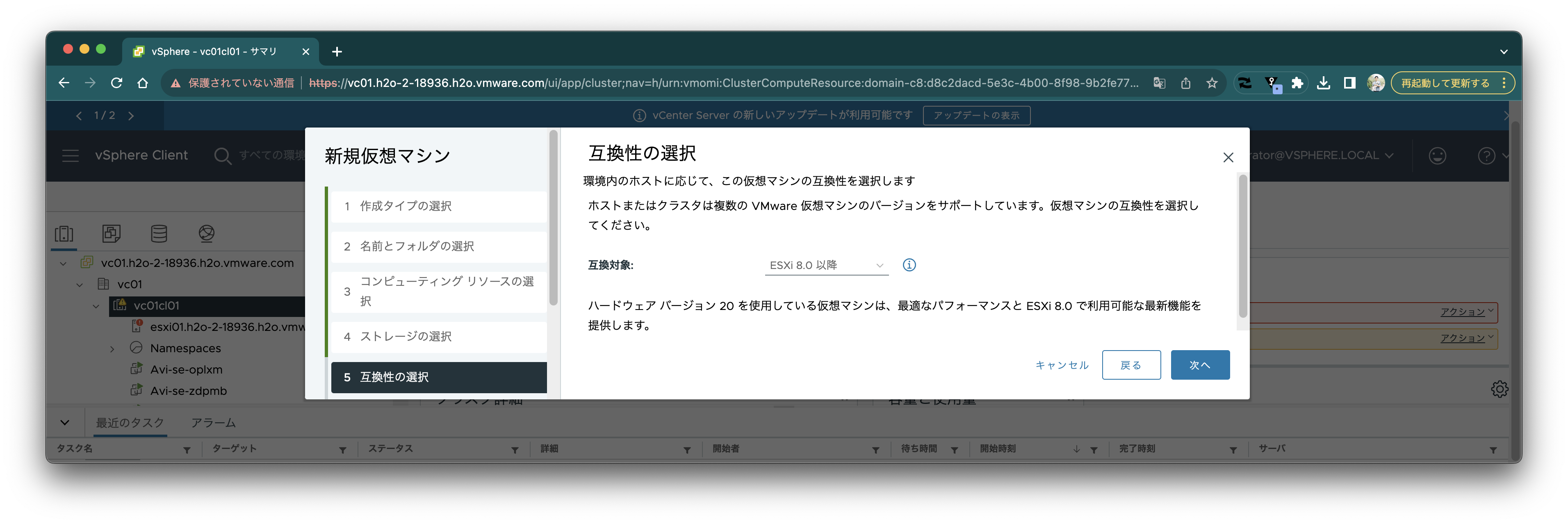
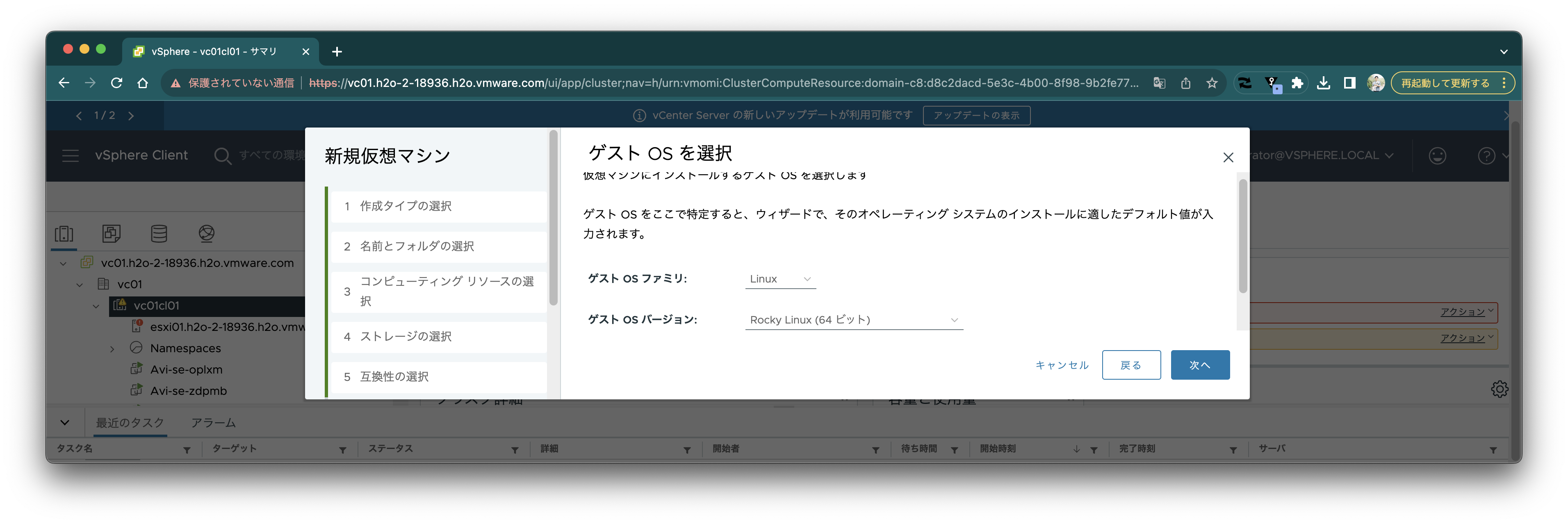 Set CPU to 8 and memory to 16GB, though it should work with smaller specs. Specify the content library for the CD/DVD drive and mount the ISO image.
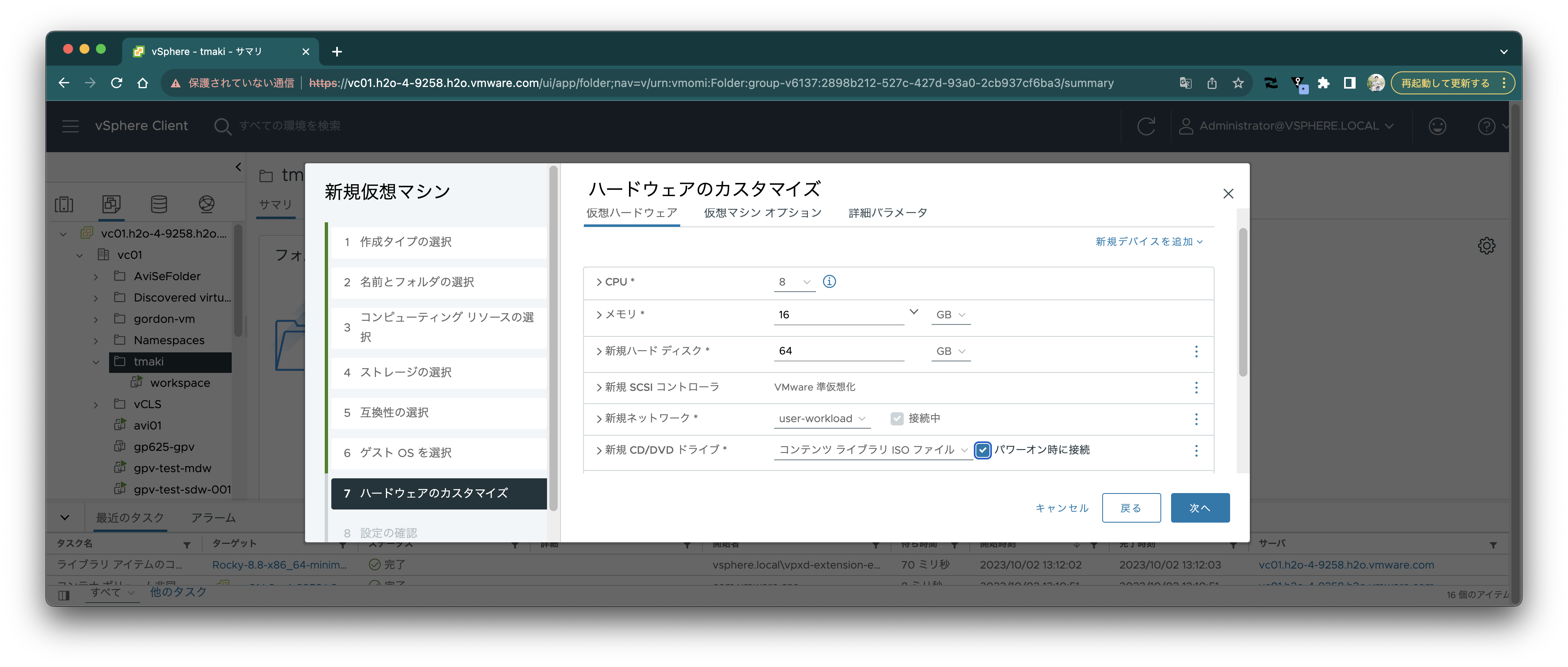
 Create the VM.
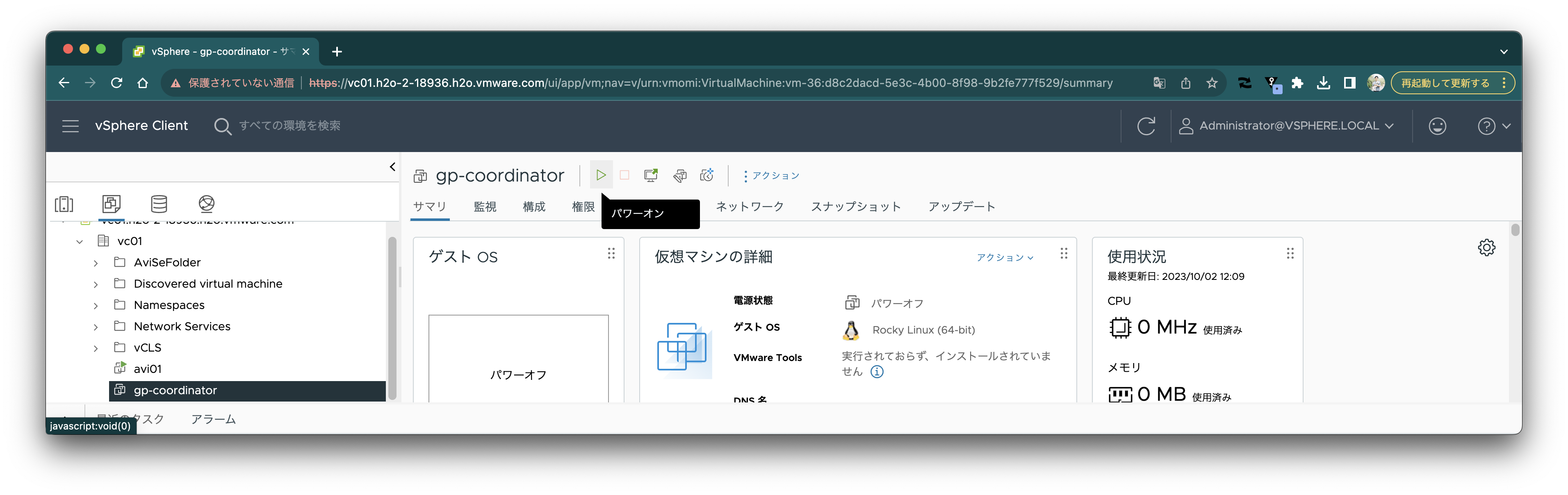
 Power on.
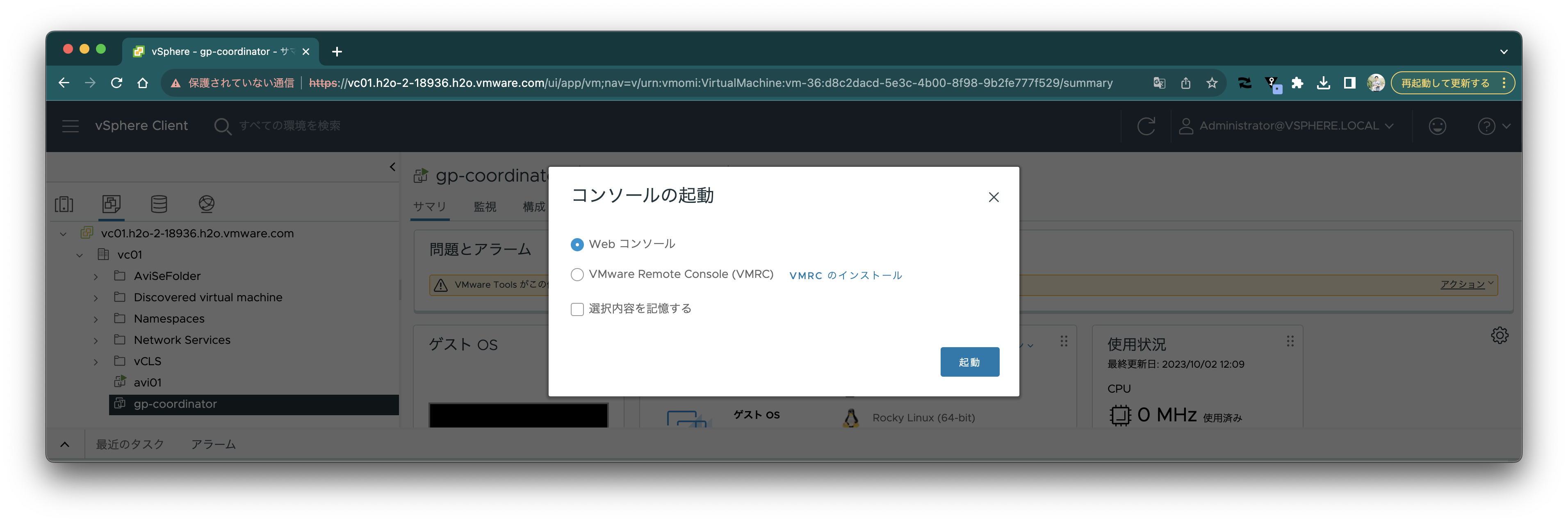
 Launch the console.

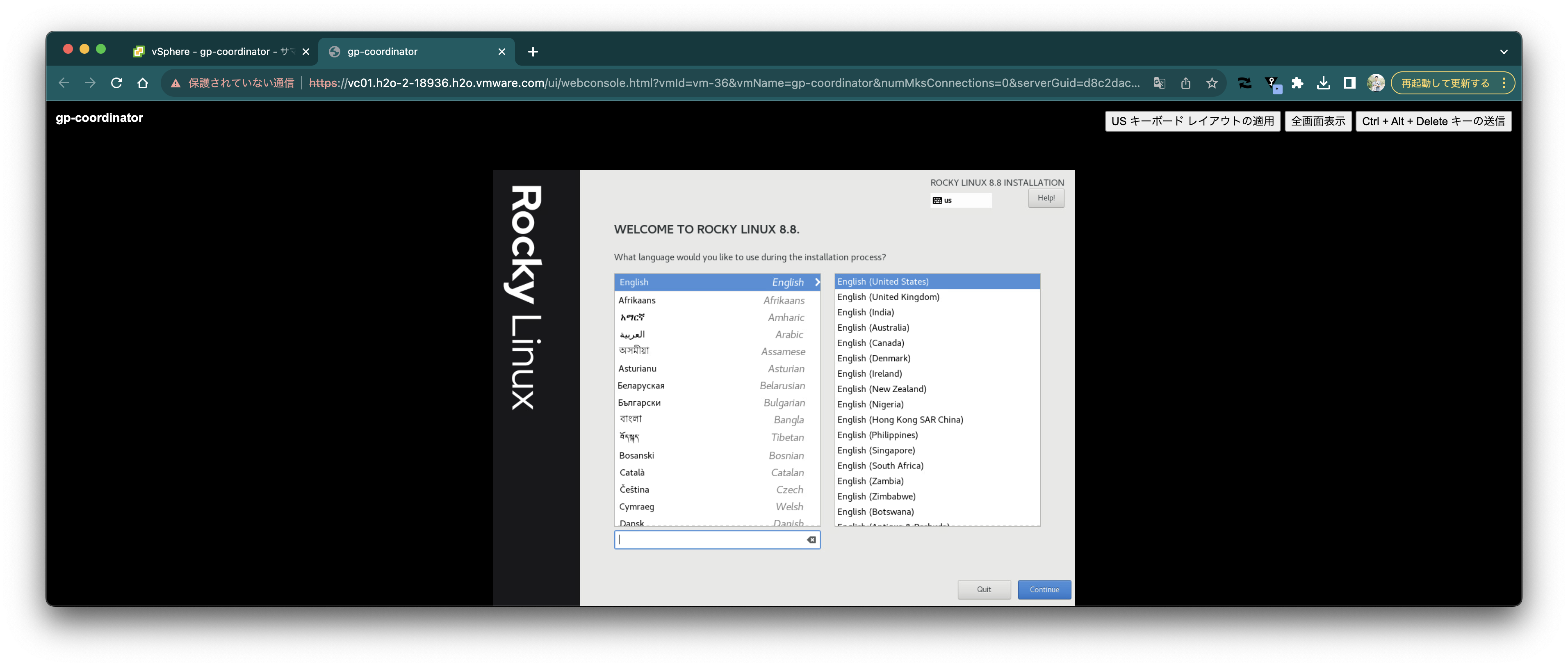
 Select "Install Rocky Linux 8.8".
 Select English.
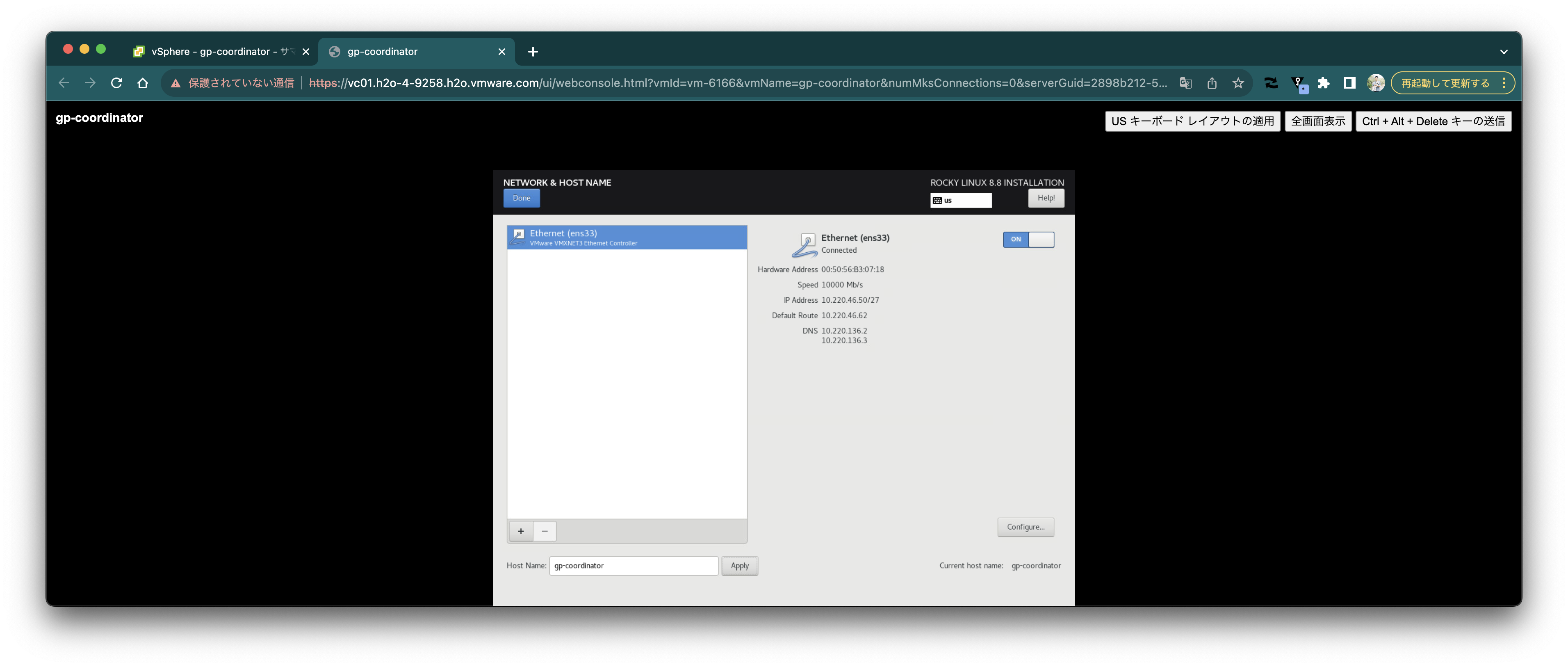
 Select Network and turn it ON. Note down the IP address (10.220.46.50 in this case). Also set the hostname to `gp-coordinator`. Click "Done".
 Set the root user password and click "Done".
 (Optional) Select timezone and click "Done".
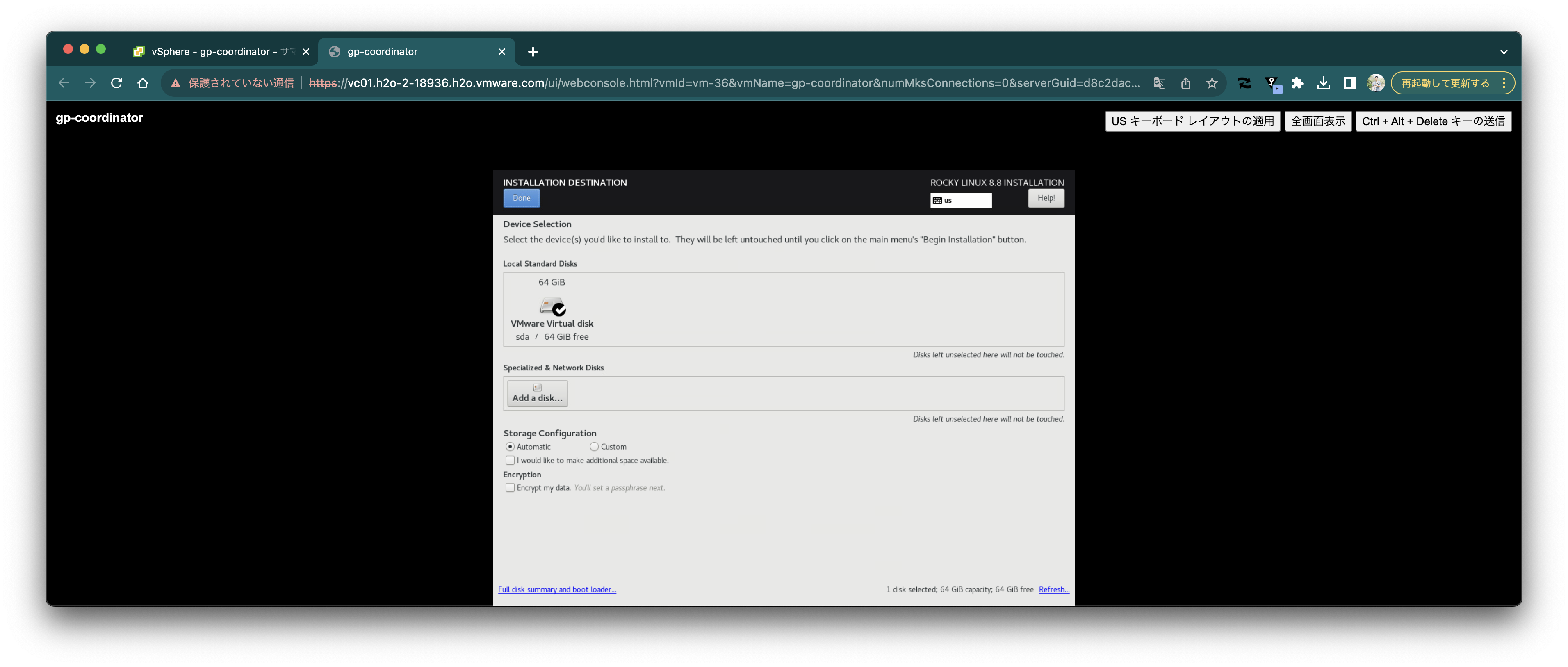
 Leave Installation Destination as default and click "Done".
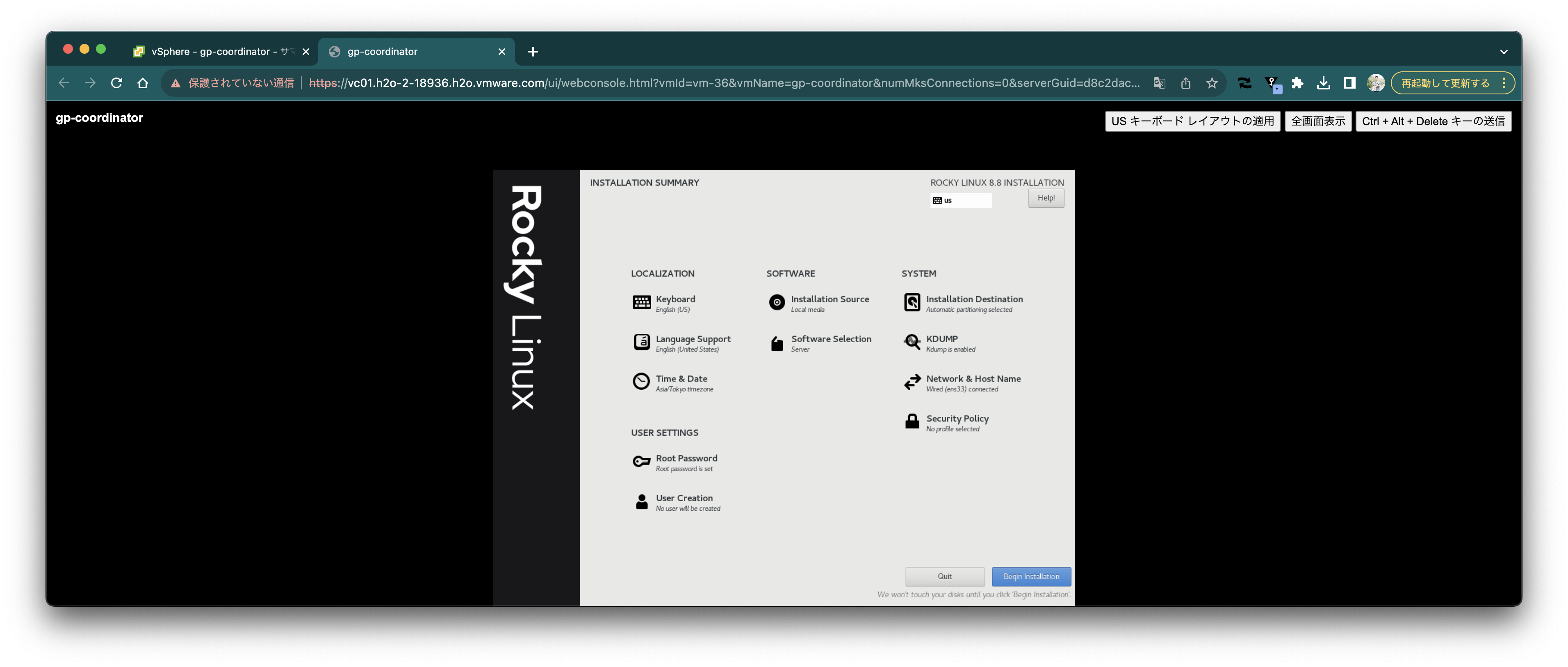
 Click "Begin Installation".
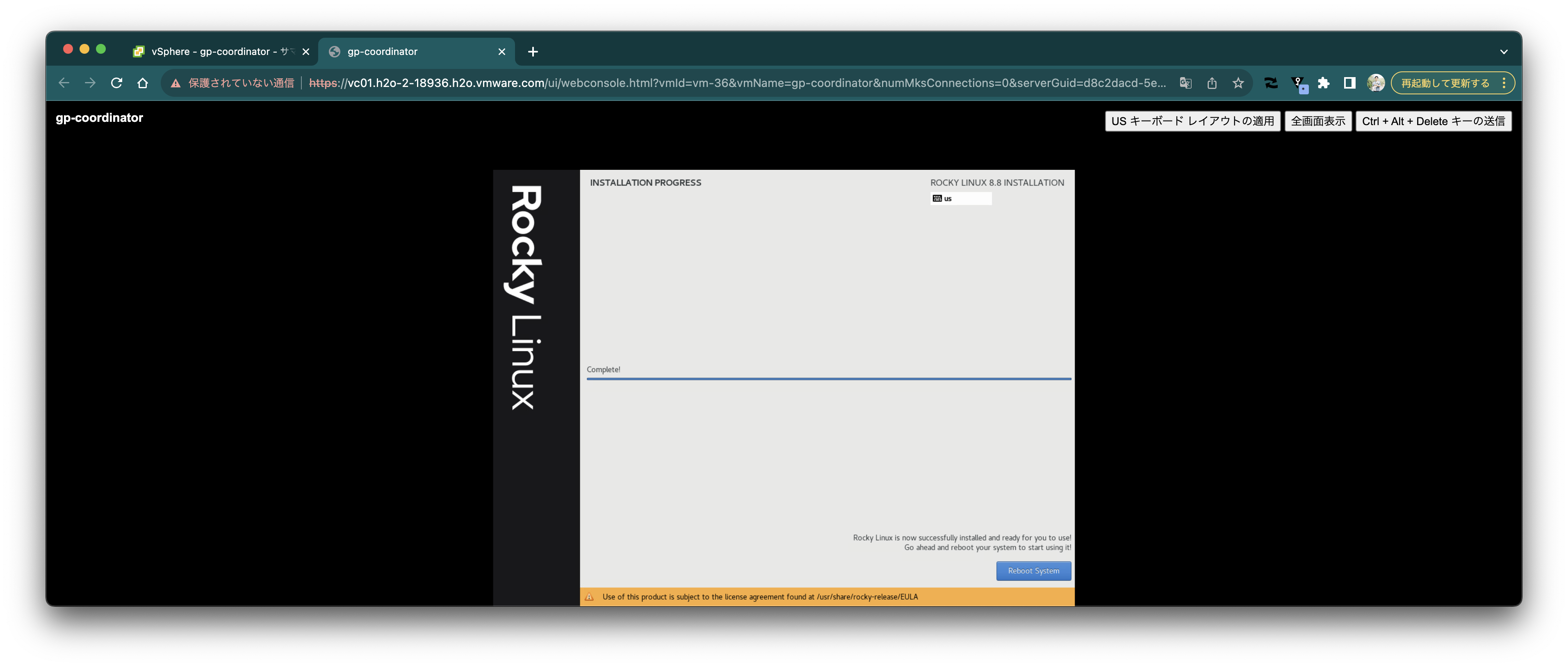
 When complete, click "Reboot System".
 Open a terminal and SSH login as root user to the noted IP address.
```
ssh root@10.220.46.50
```
### Initial OS Setup
Execute the following commands on the `gp-coordinator` VM:
```bash
sudo yum -y install epel-release
sudo yum -y config-manager --set-enabled powertools
sudo yum -y install apr \
apr-util \
bash \
bzip2 \
curl \
lsof \
cmake \
bind-utils \
krb5-libs \
libcgroup-tools \
libcurl \
libevent \
libxml2 \
libyaml \
zlib \
openldap \
openssh-clients \
openssh-server \
openssl \
openssl-libs \
sshpass \
perl \
python39 \
readline \
rsync \
R \
sed \
tar \
zip \
apr \
apr-util \
libyaml \
libevent \
java-11-openjdk-devel
echo 2 | sudo update-alternatives --config java
cat < /dev/null
net.ipv4.ip_local_reserved_ports=65330
EOF
sudo sysctl --system
cat < /dev/null
* soft nofile 65536
* hard nofile 65536
EOF
```
### Downloading VMware Greenplum®
Download the VMware Greenplum® rpm. Here we use the [`pivnet`](https://github.com/pivotal-cf/pivnet-cli) CLI. The API Token can be obtained from [here](https://network.tanzu.vmware.com/users/dashboard/edit-profile).
```bash
mkdir -p ~/Downloads/
cd ~/Downloads
curl -sL https://github.com/pivotal-cf/pivnet-cli/releases/download/v3.0.1/pivnet-linux-amd64-3.0.1 > pivnet
chmod +x pivnet
sudo mv pivnet /usr/local/bin/
pivnet login --api-token=*********************-r
pivnet download-product-files --product-slug='vmware-greenplum' --release-version='7.0.0' --glob='*.rpm'
pivnet download-product-files --product-slug='vmware-greenplum' --release-version='7.0.0' --glob='*.gppkg'
pivnet download-product-files --product-slug='vmware-greenplum' --release-version='7.0.0' --glob='*.tar.gz'
```
### Installing VMware Greenplum®
Create the `gpadmin` user and install the downloaded rpm.
Execute the following on each of `gp-coordinator`, `gp-segment1`, and `gp-segment2`:
```bash
sudo groupadd gpadmin
sudo useradd -m gpadmin -g gpadmin
echo gpadmin:Greenplum123 | sudo chpasswd
echo 'gpadmin ALL=(ALL) NOPASSWD: ALL' | sudo EDITOR='tee -a' visudo
sudo yum -y install ./greenplum-db-7.0.0-el8-x86_64.rpm
sudo chown -R gpadmin:gpadmin /usr/local/greenplum*
sudo chown -R gpadmin:gpadmin /root/Downloads
sudo chgrp -R gpadmin /usr/local/greenplum*
```
Set up the script with Greenplum environment variables to be loaded in `.bashrc`.
```bash
cat <
Select "Clone" => "Clone to Template".
Open a terminal and SSH login as root user to the noted IP address.
```
ssh root@10.220.46.50
```
### Initial OS Setup
Execute the following commands on the `gp-coordinator` VM:
```bash
sudo yum -y install epel-release
sudo yum -y config-manager --set-enabled powertools
sudo yum -y install apr \
apr-util \
bash \
bzip2 \
curl \
lsof \
cmake \
bind-utils \
krb5-libs \
libcgroup-tools \
libcurl \
libevent \
libxml2 \
libyaml \
zlib \
openldap \
openssh-clients \
openssh-server \
openssl \
openssl-libs \
sshpass \
perl \
python39 \
readline \
rsync \
R \
sed \
tar \
zip \
apr \
apr-util \
libyaml \
libevent \
java-11-openjdk-devel
echo 2 | sudo update-alternatives --config java
cat < /dev/null
net.ipv4.ip_local_reserved_ports=65330
EOF
sudo sysctl --system
cat < /dev/null
* soft nofile 65536
* hard nofile 65536
EOF
```
### Downloading VMware Greenplum®
Download the VMware Greenplum® rpm. Here we use the [`pivnet`](https://github.com/pivotal-cf/pivnet-cli) CLI. The API Token can be obtained from [here](https://network.tanzu.vmware.com/users/dashboard/edit-profile).
```bash
mkdir -p ~/Downloads/
cd ~/Downloads
curl -sL https://github.com/pivotal-cf/pivnet-cli/releases/download/v3.0.1/pivnet-linux-amd64-3.0.1 > pivnet
chmod +x pivnet
sudo mv pivnet /usr/local/bin/
pivnet login --api-token=*********************-r
pivnet download-product-files --product-slug='vmware-greenplum' --release-version='7.0.0' --glob='*.rpm'
pivnet download-product-files --product-slug='vmware-greenplum' --release-version='7.0.0' --glob='*.gppkg'
pivnet download-product-files --product-slug='vmware-greenplum' --release-version='7.0.0' --glob='*.tar.gz'
```
### Installing VMware Greenplum®
Create the `gpadmin` user and install the downloaded rpm.
Execute the following on each of `gp-coordinator`, `gp-segment1`, and `gp-segment2`:
```bash
sudo groupadd gpadmin
sudo useradd -m gpadmin -g gpadmin
echo gpadmin:Greenplum123 | sudo chpasswd
echo 'gpadmin ALL=(ALL) NOPASSWD: ALL' | sudo EDITOR='tee -a' visudo
sudo yum -y install ./greenplum-db-7.0.0-el8-x86_64.rpm
sudo chown -R gpadmin:gpadmin /usr/local/greenplum*
sudo chown -R gpadmin:gpadmin /root/Downloads
sudo chgrp -R gpadmin /usr/local/greenplum*
```
Set up the script with Greenplum environment variables to be loaded in `.bashrc`.
```bash
cat <
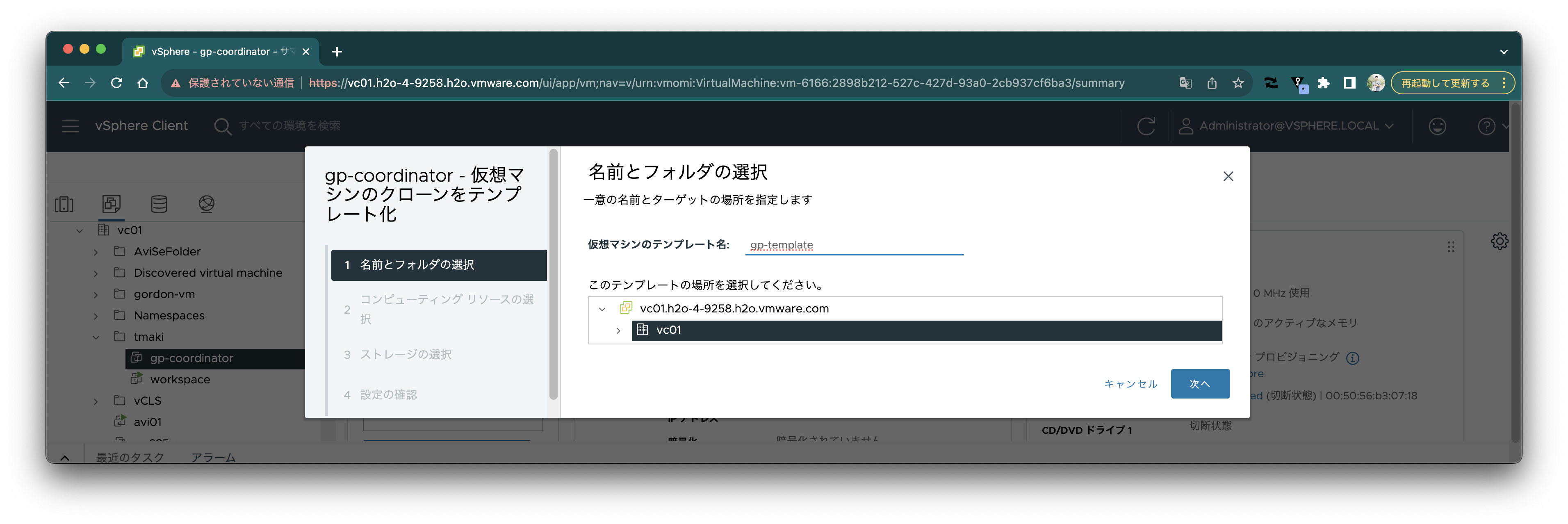
Select "Clone" => "Clone to Template".
 Set the template name to `gp-template` and save it in an appropriate location.
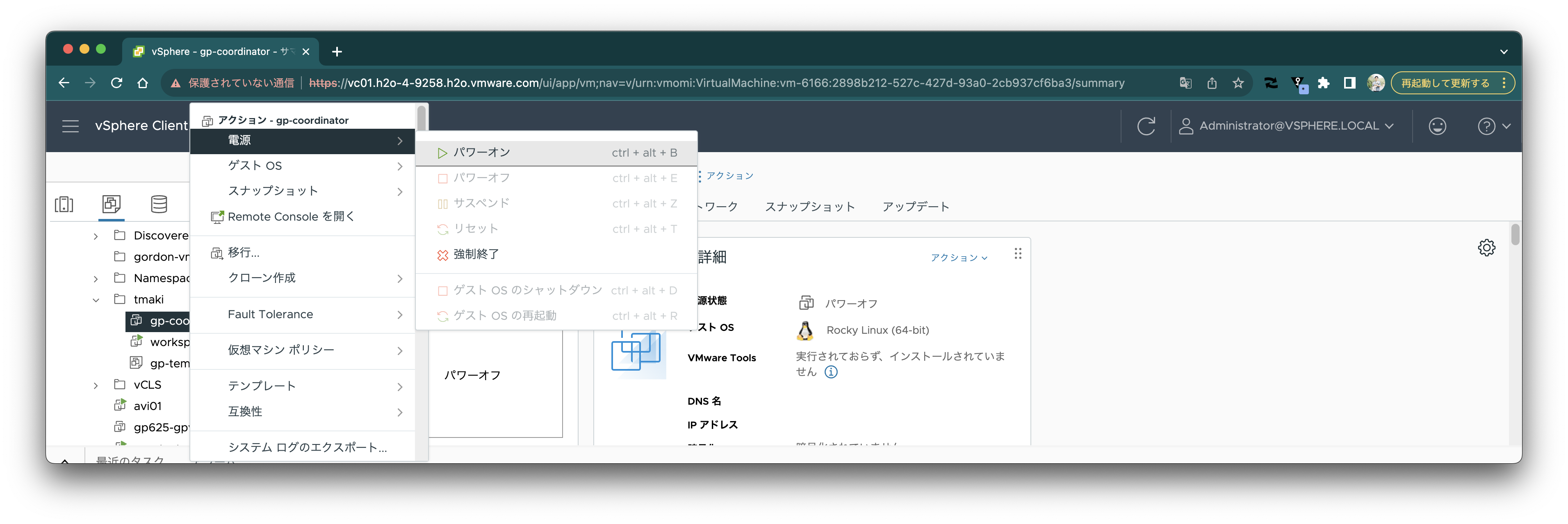
 Power on `gp-coordinator` again.
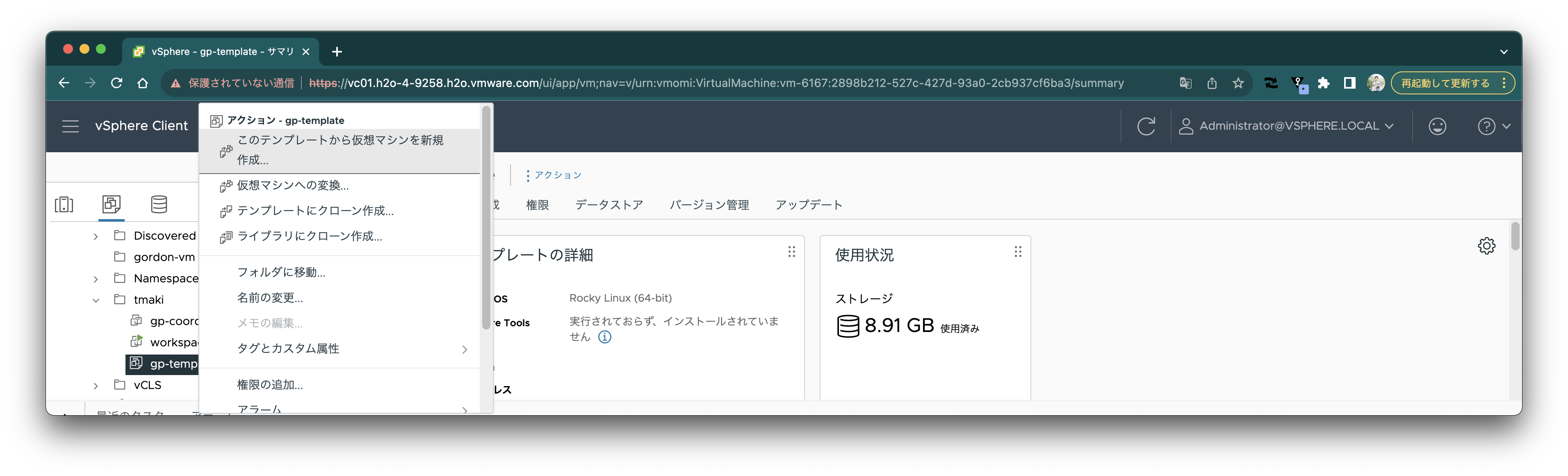
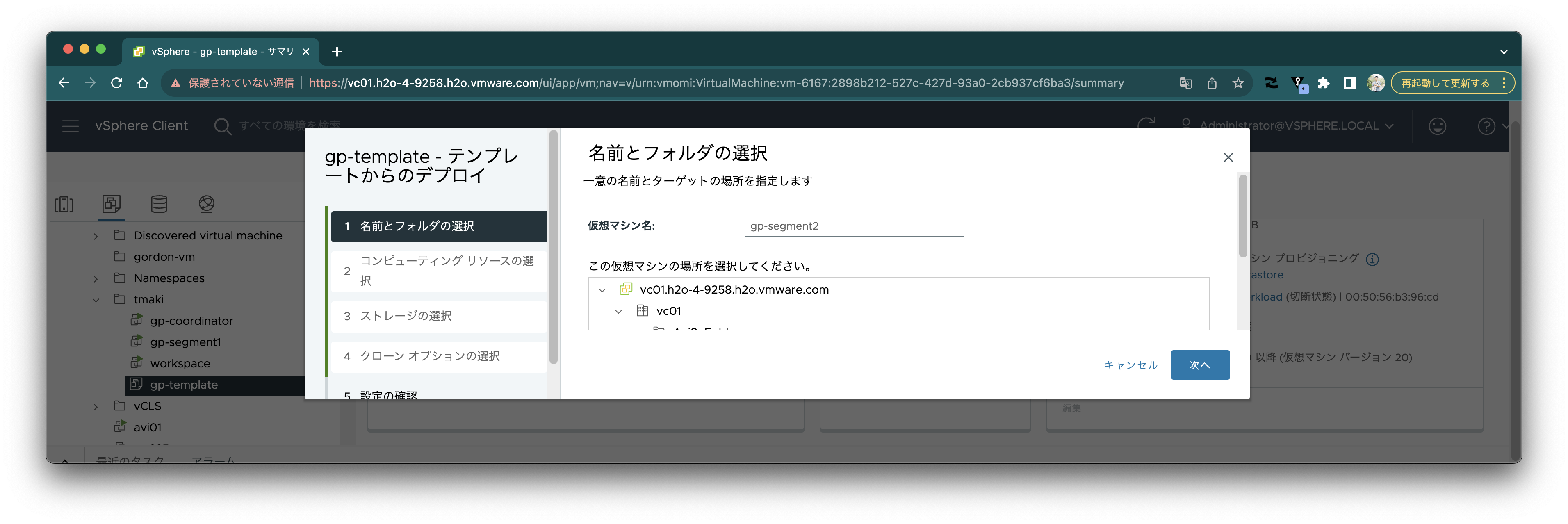
 Create virtual machines from the `gp-template` template.
 Set the name to `gp-segment1`.
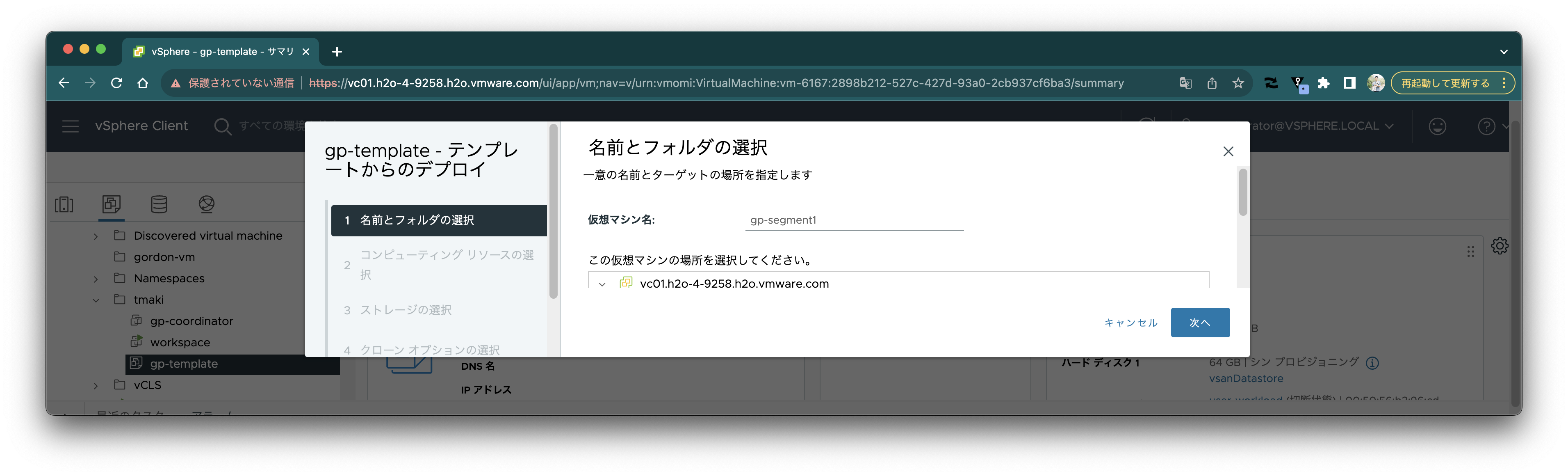 Check "Power on virtual machine after creation".
 Create the VM.
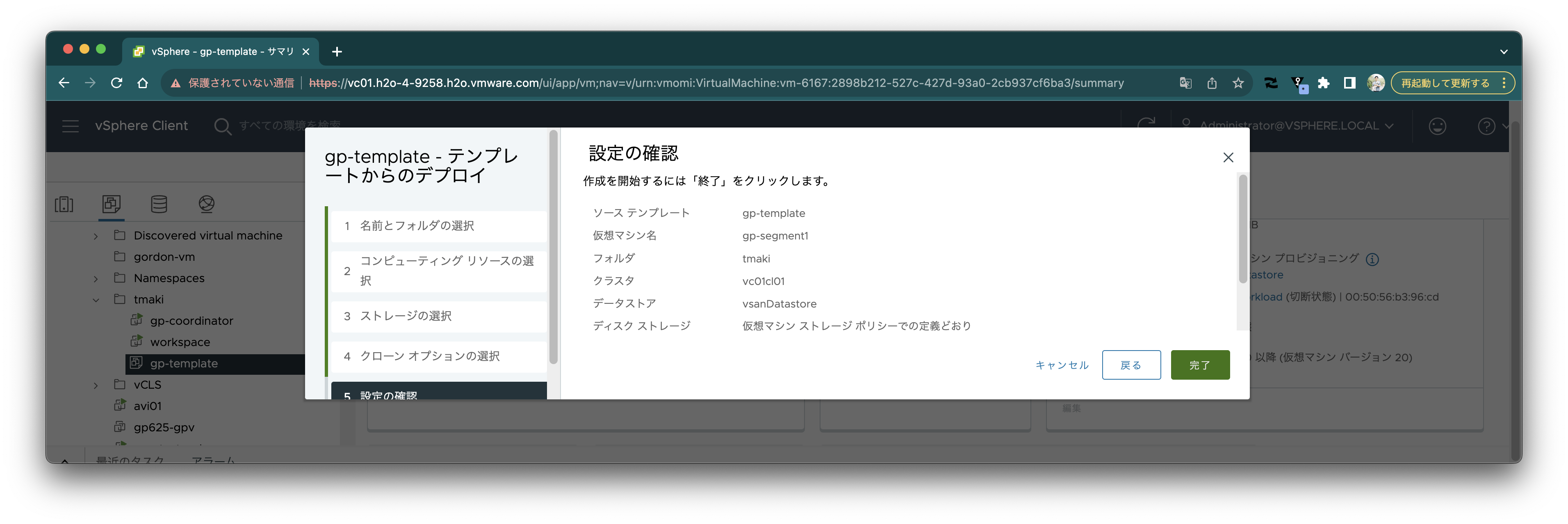 Follow the same procedure to create `gp-segment2`.
 Open the web console for `gp-segment1`.
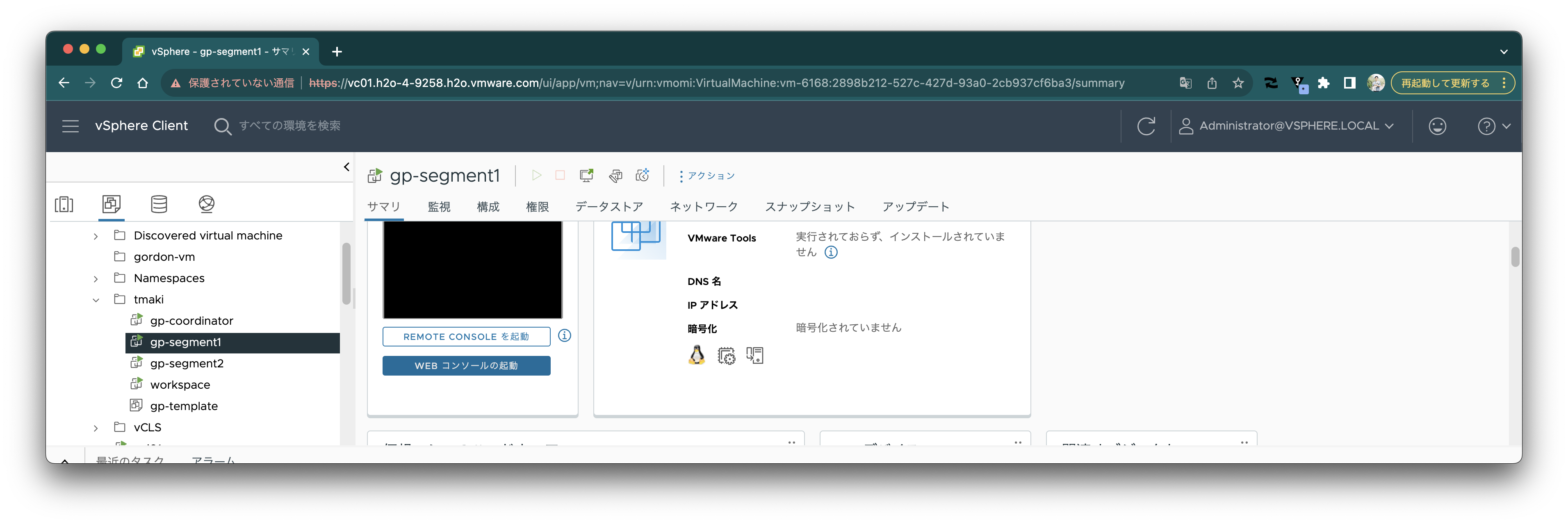 Execute the following command to change the hostname:
```
hostnamectl set-hostname gp-segment1
```
Also, check the IP address with the `ip addr` command.
Similarly, open the web console for `gp-segment2` and execute the following command to change the hostname:
```
hostnamectl set-hostname gp-segment2
```
Also, check the IP address with the `ip addr` command.
Execute the following command on each of `gp-coordinator`, `gp-segment1`, and `gp-segment2` to add each IP address to the `/etc/hosts` file. Change the IP addresses to match your environment.
```
cat < /dev/null
10.220.46.50 gp-coordinator
10.220.46.55 gp-segment1
10.220.46.56 gp-segment2
127.0.0.1 localhost
EOF
```
In this article, we work with DHCP as is, but configure static IP if necessary.
### SSH Configuration
Each node needs to be able to communicate via SSH without passwords.
First, execute the following command on each of `gp-coordinator`, `gp-segment1`, and `gp-segment2` to generate keys:
```bash
sudo su - gpadmin bash -c 'ssh-keygen -m PEM -t rsa -b 4096 -q -N "" -f /home/gpadmin/.ssh/id_rsa'
```
The following work is done only on `gp-coordinator`. Work as the `gpadmin` user.
Add the public key of `gp-coordinator` to `/home/gpadmin/.ssh/authorized_keys` on each host.
```bash
sudo su - gpadmin
SSHPASS=Greenplum123 sshpass -e ssh-copy-id -o StrictHostKeyChecking=no gp-coordinator
SSHPASS=Greenplum123 sshpass -e ssh-copy-id -o StrictHostKeyChecking=no gp-segment1
SSHPASS=Greenplum123 sshpass -e ssh-copy-id -o StrictHostKeyChecking=no gp-segment2
```
Add the public key of each host to `/home/gpadmin/.ssh/known_hosts` on each host with the following command:
```bash
cat < hostfile_exkeys
gp-coordinator
gp-segment1
gp-segment2
EOF
gpssh-exkeys -f hostfile_exkeys
```
### VMware Greenplum® Setup
The following work is done only on `gp-coordinator`. Continue working as the `gpadmin` user.
Create directories for each host with the following command:
```bash
sudo mkdir -p /data/coordinator
sudo chown gpadmin:gpadmin /data/coordinator
cat < hostfile_gpssh_segonly
gp-segment1
gp-segment2
EOF
gpssh -f hostfile_gpssh_segonly -e 'sudo mkdir -p /data/primary'
gpssh -f hostfile_gpssh_segonly -e 'sudo mkdir -p /data/mirror'
gpssh -f hostfile_gpssh_segonly -e 'sudo chown -R gpadmin /data/*'
```
Initialize VMware Greenplum® with the following command:
```bash
mkdir -p gpconfigs
cat < gpconfigs/hostfile_gpinitsystem
gp-segment1
gp-segment2
EOF
cp $GPHOME/docs/cli_help/gpconfigs/gpinitsystem_config /home/gpadmin/gpconfigs/gpinitsystem_config
sed -i.bak \
-e 's|/data1/primary /data1/primary /data1/primary /data2/primary /data2/primary /data2/primary|/data/primary|' \
-e 's|/data1/mirror /data1/mirror /data1/mirror /data2/mirror /data2/mirror /data2/mirror|/data/mirror|' \
-e 's/#MIRROR_PORT_BASE/MIRROR_PORT_BASE/' \
-e 's/#declare -a MIRROR_DATA_DIRECTORY/declare -a MIRROR_DATA_DIRECTORY/' \
-e 's/COORDINATOR_HOSTNAME=cdw/COORDINATOR_HOSTNAME=gp-coordinator/' \
gpconfigs/gpinitsystem_config
gpinitsystem -c gpconfigs/gpinitsystem_config -h gpconfigs/hostfile_gpinitsystem
```
The following log is output and confirmation is requested:
```
20231002:14:33:40:002300 gpinitsystem:gp-coordinator:gpadmin-[INFO]:-Checking configuration parameters, please wait...
20231002:14:33:40:002300 gpinitsystem:gp-coordinator:gpadmin-[INFO]:-Reading Greenplum configuration file gpconfigs/gpinitsystem_config
20231002:14:33:40:002300 gpinitsystem:gp-coordinator:gpadmin-[INFO]:-Locale has not been set in gpconfigs/gpinitsystem_config, will set to default value
20231002:14:33:40:002300 gpinitsystem:gp-coordinator:gpadmin-[INFO]:-No DATABASE_NAME set, will exit following template1 updates
20231002:14:33:40:002300 gpinitsystem:gp-coordinator:gpadmin-[INFO]:-COORDINATOR_MAX_CONNECT not set, will set to default value 250
20231002:14:33:40:002300 gpinitsystem:gp-coordinator:gpadmin-[INFO]:-Checking configuration parameters, Completed
20231002:14:33:40:002300 gpinitsystem:gp-coordinator:gpadmin-[INFO]:-Commencing multi-home checks, please wait...
..
20231002:14:33:41:002300 gpinitsystem:gp-coordinator:gpadmin-[INFO]:-Configuring build for standard array
20231002:14:33:41:002300 gpinitsystem:gp-coordinator:gpadmin-[INFO]:-Commencing multi-home checks, Completed
20231002:14:33:41:002300 gpinitsystem:gp-coordinator:gpadmin-[INFO]:-Building primary segment instance array, please wait...
..
20231002:14:33:43:002300 gpinitsystem:gp-coordinator:gpadmin-[INFO]:-Building group mirror array type , please wait...
..
20231002:14:33:45:002300 gpinitsystem:gp-coordinator:gpadmin-[INFO]:-Checking Coordinator host
20231002:14:33:45:002300 gpinitsystem:gp-coordinator:gpadmin-[INFO]:-Checking new segment hosts, please wait...
....
20231002:14:33:52:002300 gpinitsystem:gp-coordinator:gpadmin-[INFO]:-Checking new segment hosts, Completed
20231002:14:33:52:002300 gpinitsystem:gp-coordinator:gpadmin-[INFO]:-Greenplum Database Creation Parameters
20231002:14:33:52:002300 gpinitsystem:gp-coordinator:gpadmin-[INFO]:---------------------------------------
20231002:14:33:52:002300 gpinitsystem:gp-coordinator:gpadmin-[INFO]:-Coordinator Configuration
20231002:14:33:52:002300 gpinitsystem:gp-coordinator:gpadmin-[INFO]:---------------------------------------
20231002:14:33:52:002300 gpinitsystem:gp-coordinator:gpadmin-[INFO]:-Coordinator hostname = gp-coordinator
20231002:14:33:52:002300 gpinitsystem:gp-coordinator:gpadmin-[INFO]:-Coordinator port = 5432
20231002:14:33:52:002300 gpinitsystem:gp-coordinator:gpadmin-[INFO]:-Coordinator instance dir = /data/coordinator/gpseg-1
20231002:14:33:52:002300 gpinitsystem:gp-coordinator:gpadmin-[INFO]:-Coordinator LOCALE =
20231002:14:33:52:002300 gpinitsystem:gp-coordinator:gpadmin-[INFO]:-Greenplum segment prefix = gpseg
20231002:14:33:52:002300 gpinitsystem:gp-coordinator:gpadmin-[INFO]:-Coordinator Database =
20231002:14:33:52:002300 gpinitsystem:gp-coordinator:gpadmin-[INFO]:-Coordinator connections = 250
20231002:14:33:52:002300 gpinitsystem:gp-coordinator:gpadmin-[INFO]:-Coordinator buffers = 128000kB
20231002:14:33:52:002300 gpinitsystem:gp-coordinator:gpadmin-[INFO]:-Segment connections = 750
20231002:14:33:52:002300 gpinitsystem:gp-coordinator:gpadmin-[INFO]:-Segment buffers = 128000kB
20231002:14:33:52:002300 gpinitsystem:gp-coordinator:gpadmin-[INFO]:-Encoding = UNICODE
20231002:14:33:52:002300 gpinitsystem:gp-coordinator:gpadmin-[INFO]:-Postgres param file = Off
20231002:14:33:52:002300 gpinitsystem:gp-coordinator:gpadmin-[INFO]:-Initdb to be used = /usr/local/greenplum-db-7.0.0/bin/initdb
20231002:14:33:52:002300 gpinitsystem:gp-coordinator:gpadmin-[INFO]:-GP_LIBRARY_PATH is = /usr/local/greenplum-db-7.0.0/lib
20231002:14:33:52:002300 gpinitsystem:gp-coordinator:gpadmin-[INFO]:-HEAP_CHECKSUM is = on
20231002:14:33:52:002300 gpinitsystem:gp-coordinator:gpadmin-[INFO]:-HBA_HOSTNAMES is = 0
20231002:14:33:52:002300 gpinitsystem:gp-coordinator:gpadmin-[INFO]:-Ulimit check = Passed
20231002:14:33:52:002300 gpinitsystem:gp-coordinator:gpadmin-[INFO]:-Array host connect type = Single hostname per node
20231002:14:33:52:002300 gpinitsystem:gp-coordinator:gpadmin-[INFO]:-Coordinator IP address [1] = ::1
20231002:14:33:52:002300 gpinitsystem:gp-coordinator:gpadmin-[INFO]:-Coordinator IP address [2] = 10.220.46.50
20231002:14:33:52:002300 gpinitsystem:gp-coordinator:gpadmin-[INFO]:-Coordinator IP address [3] = fe80::250:56ff:feb3:718
20231002:14:33:52:002300 gpinitsystem:gp-coordinator:gpadmin-[INFO]:-Standby Coordinator = Not Configured
20231002:14:33:52:002300 gpinitsystem:gp-coordinator:gpadmin-[INFO]:-Number of primary segments = 1
20231002:14:33:52:002300 gpinitsystem:gp-coordinator:gpadmin-[INFO]:-Total Database segments = 2
20231002:14:33:52:002300 gpinitsystem:gp-coordinator:gpadmin-[INFO]:-Trusted shell = ssh
20231002:14:33:52:002300 gpinitsystem:gp-coordinator:gpadmin-[INFO]:-Number segment hosts = 2
20231002:14:33:52:002300 gpinitsystem:gp-coordinator:gpadmin-[INFO]:-Mirror port base = 7000
20231002:14:33:52:002300 gpinitsystem:gp-coordinator:gpadmin-[INFO]:-Number of mirror segments = 1
20231002:14:33:52:002300 gpinitsystem:gp-coordinator:gpadmin-[INFO]:-Mirroring config = ON
20231002:14:33:52:002300 gpinitsystem:gp-coordinator:gpadmin-[INFO]:-Mirroring type = Group
20231002:14:33:52:002300 gpinitsystem:gp-coordinator:gpadmin-[INFO]:----------------------------------------
20231002:14:33:52:002300 gpinitsystem:gp-coordinator:gpadmin-[INFO]:-Greenplum Primary Segment Configuration
20231002:14:33:52:002300 gpinitsystem:gp-coordinator:gpadmin-[INFO]:----------------------------------------
20231002:14:33:52:002300 gpinitsystem:gp-coordinator:gpadmin-[INFO]:-gp-segment1 6000 gp-segment1 /data/primary/gpseg0 2
20231002:14:33:52:002300 gpinitsystem:gp-coordinator:gpadmin-[INFO]:-gp-segment2 6000 gp-segment2 /data/primary/gpseg1 3
20231002:14:33:52:002300 gpinitsystem:gp-coordinator:gpadmin-[INFO]:---------------------------------------
20231002:14:33:52:002300 gpinitsystem:gp-coordinator:gpadmin-[INFO]:-Greenplum Mirror Segment Configuration
20231002:14:33:52:002300 gpinitsystem:gp-coordinator:gpadmin-[INFO]:---------------------------------------
20231002:14:33:52:002300 gpinitsystem:gp-coordinator:gpadmin-[INFO]:-gp-segment2 7000 gp-segment2 /data/mirror/gpseg0 4
20231002:14:33:52:002300 gpinitsystem:gp-coordinator:gpadmin-[INFO]:-gp-segment1 7000 gp-segment1 /data/mirror/gpseg1 5
Continue with Greenplum creation Yy|Nn (default=N):
>
```
Enter `y` and the following log will be output:
```
20231002:14:33:54:002300 gpinitsystem:gp-coordinator:gpadmin-[INFO]:-Building the Coordinator instance database, please wait...
20231002:14:33:57:002300 gpinitsystem:gp-coordinator:gpadmin-[INFO]:-Starting the Coordinator in admin mode
20231002:14:33:57:002300 gpinitsystem:gp-coordinator:gpadmin-[INFO]:-Commencing parallel build of primary segment instances
20231002:14:33:57:002300 gpinitsystem:gp-coordinator:gpadmin-[INFO]:-Spawning parallel processes batch [1], please wait...
..
20231002:14:33:58:002300 gpinitsystem:gp-coordinator:gpadmin-[INFO]:-Waiting for parallel processes batch [1], please wait...
............
20231002:14:34:10:002300 gpinitsystem:gp-coordinator:gpadmin-[INFO]:------------------------------------------------
20231002:14:34:10:002300 gpinitsystem:gp-coordinator:gpadmin-[INFO]:-Parallel process exit status
20231002:14:34:10:002300 gpinitsystem:gp-coordinator:gpadmin-[INFO]:------------------------------------------------
20231002:14:34:10:002300 gpinitsystem:gp-coordinator:gpadmin-[INFO]:-Total processes marked as completed = 2
20231002:14:34:10:002300 gpinitsystem:gp-coordinator:gpadmin-[INFO]:-Total processes marked as killed = 0
20231002:14:34:10:002300 gpinitsystem:gp-coordinator:gpadmin-[INFO]:-Total processes marked as failed = 0
20231002:14:34:10:002300 gpinitsystem:gp-coordinator:gpadmin-[INFO]:------------------------------------------------
20231002:14:34:10:002300 gpinitsystem:gp-coordinator:gpadmin-[INFO]:-Removing back out file
20231002:14:34:10:002300 gpinitsystem:gp-coordinator:gpadmin-[INFO]:-No errors generated from parallel processes
20231002:14:34:10:002300 gpinitsystem:gp-coordinator:gpadmin-[INFO]:-Restarting the Greenplum instance in production mode
20231002:14:34:10:005447 gpstop:gp-coordinator:gpadmin-[INFO]:-Starting gpstop with args: -a -l /home/gpadmin/gpAdminLogs -m -d /data/coordinator/gpseg-1
20231002:14:34:10:005447 gpstop:gp-coordinator:gpadmin-[INFO]:-Gathering information and validating the environment...
20231002:14:34:10:005447 gpstop:gp-coordinator:gpadmin-[INFO]:-Obtaining Greenplum Coordinator catalog information
20231002:14:34:10:005447 gpstop:gp-coordinator:gpadmin-[INFO]:-Obtaining Segment details from coordinator...
20231002:14:34:10:005447 gpstop:gp-coordinator:gpadmin-[INFO]:-Greenplum Version: 'postgres (Greenplum Database) 7.0.0 build commit:0a7a3566873325aca1789ae6f818c80f17a9402d'
20231002:14:34:10:005447 gpstop:gp-coordinator:gpadmin-[INFO]:-Commencing Coordinator instance shutdown with mode='smart'
20231002:14:34:10:005447 gpstop:gp-coordinator:gpadmin-[INFO]:-Coordinator segment instance directory=/data/coordinator/gpseg-1
20231002:14:34:11:005447 gpstop:gp-coordinator:gpadmin-[INFO]:-Stopping coordinator segment and waiting for user connections to finish ...
server shutting down
20231002:14:34:12:005447 gpstop:gp-coordinator:gpadmin-[INFO]:-Attempting forceful termination of any leftover coordinator process
20231002:14:34:12:005447 gpstop:gp-coordinator:gpadmin-[INFO]:-Terminating processes for segment /data/coordinator/gpseg-1
20231002:14:34:15:005858 gpstart:gp-coordinator:gpadmin-[INFO]:-Starting gpstart with args: -a -l /home/gpadmin/gpAdminLogs -d /data/coordinator/gpseg-1
20231002:14:34:15:005858 gpstart:gp-coordinator:gpadmin-[INFO]:-Gathering information and validating the environment...
20231002:14:34:15:005858 gpstart:gp-coordinator:gpadmin-[INFO]:-Greenplum Binary Version: 'postgres (Greenplum Database) 7.0.0 build commit:0a7a3566873325aca1789ae6f818c80f17a9402d'
20231002:14:34:15:005858 gpstart:gp-coordinator:gpadmin-[INFO]:-Greenplum Catalog Version: '302307241'
20231002:14:34:15:005858 gpstart:gp-coordinator:gpadmin-[INFO]:-Starting Coordinator instance in admin mode
20231002:14:34:15:005858 gpstart:gp-coordinator:gpadmin-[INFO]:-CoordinatorStart pg_ctl cmd is env GPSESSID=0000000000 GPERA=None $GPHOME/bin/pg_ctl -D /data/coordinator/gpseg-1 -l /data/coordinator/gpseg-1/log/startup.log -w -t 600 -o " -c gp_role=utility " start
20231002:14:34:15:005858 gpstart:gp-coordinator:gpadmin-[INFO]:-Obtaining Greenplum Coordinator catalog information
20231002:14:34:15:005858 gpstart:gp-coordinator:gpadmin-[INFO]:-Obtaining Segment details from coordinator...
20231002:14:34:15:005858 gpstart:gp-coordinator:gpadmin-[INFO]:-Setting new coordinator era
20231002:14:34:15:005858 gpstart:gp-coordinator:gpadmin-[INFO]:-Coordinator Started...
20231002:14:34:15:005858 gpstart:gp-coordinator:gpadmin-[INFO]:-Shutting down coordinator
20231002:14:34:18:005858 gpstart:gp-coordinator:gpadmin-[INFO]:-Commencing parallel segment instance startup, please wait...
20231002:14:34:19:005858 gpstart:gp-coordinator:gpadmin-[INFO]:-Process results...
20231002:14:34:19:005858 gpstart:gp-coordinator:gpadmin-[INFO]:-
20231002:14:34:19:005858 gpstart:gp-coordinator:gpadmin-[INFO]:-
20231002:14:34:19:005858 gpstart:gp-coordinator:gpadmin-[INFO]:-----------------------------------------------------
20231002:14:34:19:005858 gpstart:gp-coordinator:gpadmin-[INFO]:- Successful segment starts = 2
20231002:14:34:19:005858 gpstart:gp-coordinator:gpadmin-[INFO]:- Failed segment starts = 0
20231002:14:34:19:005858 gpstart:gp-coordinator:gpadmin-[INFO]:- Skipped segment starts (segments are marked down in configuration) = 0
20231002:14:34:19:005858 gpstart:gp-coordinator:gpadmin-[INFO]:-----------------------------------------------------
20231002:14:34:19:005858 gpstart:gp-coordinator:gpadmin-[INFO]:-Successfully started 2 of 2 segment instances
20231002:14:34:19:005858 gpstart:gp-coordinator:gpadmin-[INFO]:-----------------------------------------------------
20231002:14:34:19:005858 gpstart:gp-coordinator:gpadmin-[INFO]:-Starting Coordinator instance gp-coordinator directory /data/coordinator/gpseg-1
20231002:14:34:19:005858 gpstart:gp-coordinator:gpadmin-[INFO]:-CoordinatorStart pg_ctl cmd is env GPSESSID=0000000000 GPERA=ab03d3b04e6ea60f_231002143415 $GPHOME/bin/pg_ctl -D /data/coordinator/gpseg-1 -l /data/coordinator/gpseg-1/log/startup.log -w -t 600 -o " -c gp_role=dispatch " start
20231002:14:34:20:005858 gpstart:gp-coordinator:gpadmin-[INFO]:-Command pg_ctl reports Coordinator gp-coordinator instance active
20231002:14:34:20:005858 gpstart:gp-coordinator:gpadmin-[INFO]:-Connecting to db template1 on host localhost
20231002:14:34:20:005858 gpstart:gp-coordinator:gpadmin-[INFO]:-No standby coordinator configured. skipping...
20231002:14:34:20:005858 gpstart:gp-coordinator:gpadmin-[INFO]:-Database successfully started
20231002:14:34:20:002300 gpinitsystem:gp-coordinator:gpadmin-[INFO]:-Completed restart of Greenplum instance in production mode
20231002:14:34:20:002300 gpinitsystem:gp-coordinator:gpadmin-[INFO]:-Creating core GPDB extensions
20231002:14:34:21:002300 gpinitsystem:gp-coordinator:gpadmin-[INFO]:-Importing system collations
20231002:14:34:28:002300 gpinitsystem:gp-coordinator:gpadmin-[INFO]:-Commencing parallel build of mirror segment instances
20231002:14:34:28:002300 gpinitsystem:gp-coordinator:gpadmin-[INFO]:-Spawning parallel processes batch [1], please wait...
..
20231002:14:34:28:002300 gpinitsystem:gp-coordinator:gpadmin-[INFO]:-Waiting for parallel processes batch [1], please wait...
......
20231002:14:34:34:002300 gpinitsystem:gp-coordinator:gpadmin-[INFO]:------------------------------------------------
20231002:14:34:34:002300 gpinitsystem:gp-coordinator:gpadmin-[INFO]:-Parallel process exit status
20231002:14:34:34:002300 gpinitsystem:gp-coordinator:gpadmin-[INFO]:------------------------------------------------
20231002:14:34:34:002300 gpinitsystem:gp-coordinator:gpadmin-[INFO]:-Total processes marked as completed = 2
20231002:14:34:34:002300 gpinitsystem:gp-coordinator:gpadmin-[INFO]:-Total processes marked as killed = 0
20231002:14:34:34:002300 gpinitsystem:gp-coordinator:gpadmin-[INFO]:-Total processes marked as failed = 0
20231002:14:34:34:002300 gpinitsystem:gp-coordinator:gpadmin-[INFO]:------------------------------------------------
20231002:14:34:34:002300 gpinitsystem:gp-coordinator:gpadmin-[INFO]:-Scanning utility log file for any warning messages
20231002:14:34:34:002300 gpinitsystem:gp-coordinator:gpadmin-[INFO]:-Log file scan check passed
20231002:14:34:34:002300 gpinitsystem:gp-coordinator:gpadmin-[INFO]:-Greenplum Database instance successfully created
20231002:14:34:34:002300 gpinitsystem:gp-coordinator:gpadmin-[INFO]:-------------------------------------------------------
20231002:14:34:34:002300 gpinitsystem:gp-coordinator:gpadmin-[INFO]:-To complete the environment configuration, please
20231002:14:34:34:002300 gpinitsystem:gp-coordinator:gpadmin-[INFO]:-update gpadmin .bashrc file with the following
20231002:14:34:34:002300 gpinitsystem:gp-coordinator:gpadmin-[INFO]:-1. Ensure that the greenplum_path.sh file is sourced
20231002:14:34:34:002300 gpinitsystem:gp-coordinator:gpadmin-[INFO]:-2. Add "export COORDINATOR_DATA_DIRECTORY=/data/coordinator/gpseg-1"
20231002:14:34:34:002300 gpinitsystem:gp-coordinator:gpadmin-[INFO]:- to access the Greenplum scripts for this instance:
20231002:14:34:34:002300 gpinitsystem:gp-coordinator:gpadmin-[INFO]:- or, use -d /data/coordinator/gpseg-1 option for the Greenplum scripts
20231002:14:34:34:002300 gpinitsystem:gp-coordinator:gpadmin-[INFO]:- Example gpstate -d /data/coordinator/gpseg-1
20231002:14:34:34:002300 gpinitsystem:gp-coordinator:gpadmin-[INFO]:-Script log file = /home/gpadmin/gpAdminLogs/gpinitsystem_20231002.log
20231002:14:34:34:002300 gpinitsystem:gp-coordinator:gpadmin-[INFO]:-To remove instance, run gpdeletesystem utility
20231002:14:34:34:002300 gpinitsystem:gp-coordinator:gpadmin-[INFO]:-To initialize a Standby Coordinator Segment for this Greenplum instance
20231002:14:34:34:002300 gpinitsystem:gp-coordinator:gpadmin-[INFO]:-Review options for gpinitstandby
20231002:14:34:34:002300 gpinitsystem:gp-coordinator:gpadmin-[INFO]:-------------------------------------------------------
20231002:14:34:34:002300 gpinitsystem:gp-coordinator:gpadmin-[INFO]:-The Coordinator /data/coordinator/gpseg-1/pg_hba.conf post gpinitsystem
20231002:14:34:34:002300 gpinitsystem:gp-coordinator:gpadmin-[INFO]:-has been configured to allow all hosts within this new
20231002:14:34:34:002300 gpinitsystem:gp-coordinator:gpadmin-[INFO]:-array to intercommunicate. Any hosts external to this
20231002:14:34:34:002300 gpinitsystem:gp-coordinator:gpadmin-[INFO]:-new array must be explicitly added to this file
20231002:14:34:34:002300 gpinitsystem:gp-coordinator:gpadmin-[INFO]:-Refer to the Greenplum Admin support guide which is
20231002:14:34:34:002300 gpinitsystem:gp-coordinator:gpadmin-[INFO]:-located in the /usr/local/greenplum-db-7.0.0/docs directory
20231002:14:34:34:002300 gpinitsystem:gp-coordinator:gpadmin-[INFO]:-------------------------------------------------------
```
Since `Greenplum Database instance successfully created` was output, the setup appears to have been successful.
Add the following environment variables to `.bashrc`:
```
cat < /dev/null
export COORDINATOR_DATA_DIRECTORY=/data/coordinator/gpseg-1
export PGPORT=5432
export PGUSER=gpadmin
export PGDATABASE=gpadmin
export LD_PRELOAD=/lib64/libz.so.1 ps
EOF
source /home/gpadmin/.bashrc
```
### Database Creation
Database creation is basically the same as PostgreSQL. The following work is done only on `gp-coordinator`. Continue working as the `gpadmin` user.
```bash
createdb test
```
### Accessing VMware Greenplum®
Accessing VMware Greenplum® is basically the same as PostgreSQL. The following work is done only on `gp-coordinator`. Continue working as the `gpadmin` user.
```bash
$ psql -d test
psql (12.12)
Type "help" for help.
```
Execute the following SQL:
```sql
CREATE TABLE IF NOT EXISTS organization
(
organization_id BIGINT PRIMARY KEY,
organization_name VARCHAR(255) NOT NULL
);
INSERT INTO organization(organization_id, organization_name) VALUES(1, 'foo');
INSERT INTO organization(organization_id, organization_name) VALUES(2, 'bar');
```
By default, data seems to be distributed by Primary Key. You can check which segment the data is placed on with the `gp_segment_id` column.
```sql
test=# select organization_id,organization_name,gp_segment_id from organization;
organization_id | organization_name | gp_segment_id
-----------------+-------------------+---------------
2 | bar | 0
1 | foo | 1
(2 rows)
```
For now, we've confirmed up to this point.
### Enabling Extensions
https://docs.vmware.com/en/VMware-Greenplum/7/greenplum-database/install_guide-install_modules.html
Enable several extensions.
#### uuid-ossp
https://docs.vmware.com/en/VMware-Greenplum/7/greenplum-database/ref_guide-modules-uuid-ossp.html
```
test=# CREATE EXTENSION "uuid-ossp";
CREATE EXTENSION
test=# select uuid_generate_v4();
uuid_generate_v4
--------------------------------------
230d1dd3-aca8-4140-b2fe-83b32cacf954
(1 row)
```
#### pgvector
https://docs.vmware.com/en/VMware-Greenplum/7/greenplum-database/ref_guide-modules-pgvector-pgvector.html
```sql
test=# CREATE EXTENSION vector;
CREATE EXTENSION
```
```sql
CREATE TABLE items (id bigserial PRIMARY KEY, embedding vector(3));
INSERT INTO items (embedding) VALUES ('[1,2,3]'), ('[4,5,6]');
SELECT * FROM items ORDER BY embedding <-> '[3,1,2]' LIMIT 5;
```
```
id | embedding
----+-----------
1 | [1,2,3]
2 | [4,5,6]
(2 rows)
```
#### postgresml
https://docs.vmware.com/en/VMware-Greenplum/7/greenplum-database/ref_guide-modules-postgresml.html
The gppkg file has already been downloaded along with the rpm using the `pivnet` command.
```
sudo cp /root/Downloads/DataSciencePython3.9-2.0.0-gp7-el8_x86_64.gppkg ./
gppkg install -a DataSciencePython3.9-2.0.0-gp7-el8_x86_64.gppkg
```
```
createdb gpadmin
gpconfig -c shared_preload_libraries -v 'pgml'
```
Restart Greenplum.
```
gpstop -r -a
```
```
gpconfig -c pgml.venv -v '$GPHOME/ext/DataSciencePython3.9'
```
> If you get the following error, you missed `gpstop -r`:
>
> ```
> gpconfig:gp-coordinator:gpadmin-[CRITICAL]:-not a valid GUC: pgml.venv
> not a valid GUC: pgml.venv
> ```
Reload the configuration.
```
gpstop -u
```
```sql
test=# CREATE EXTENSION pgml;
INFO: Python version: 3.9.16 (main, Jul 3 2023, 20:07:32)
[GCC 8.5.0 20210514 (Red Hat 8.5.0-18)]
INFO: Scikit-learn 1.1.2, XGBoost 1.6.2, LightGBM 4.0.0, NumPy 1.22.1
CREATE EXTENSION
```
> If you get the following error, you missed `gpstop -u`:
>
> ```
> test=# CREATE EXTENSION IF NOT EXISTS pgml;
> INFO: Python version: 3.9.16 (main, Jul 3 2023, 20:07:32)
> [GCC 8.5.0 20210514 (Red Hat 8.5.0-18)]
> ERROR: The xgboost package is missing. Install it with `sudo pip3 install xgboost`
> ModuleNotFoundError: No module named 'xgboost' (api.rs:36)
> ```
Try PostgresML transform.
```sql
SELECT pgml.transform(
'question-answering',
inputs => ARRAY[
'{
"question": "What does the customer want?",
"context": "Dear Amazon, last week I ordered an Optimus Prime action figure from your online store in Germany. Unfortunately, when I opened the package, I discovered to my horror that I had been sent an action figure of Megatron instead! As a lifelong enemy of the Decepticons, I hope you can understand my dilemma. To resolve the issue, I demand an exchange of Megatron for the Optimus Prime figure I ordered. Enclosed are copies of my records concerning this purchase. I expect to hear from you soon. Sincerely, Bumblebee."}'
]
) AS answer;
```
The first time takes time to load the model, but subsequent times are fast.
```
answer
----------------------------------------------------------------------------------------------
{"end": 358, "score": 0.6312912106513977, "start": 335, "answer": "an exchange of Megatron"}
(1 row)
```
### Adding Users
Execute the following SQL to create the `postgresml` user and `postgresml` database. The procedure is the same as PostgreSQL.
```
psql -c "CREATE ROLE postgresml PASSWORD 'postgresml' SUPERUSER LOGIN"
createdb postgresml --owner postgresml
psql -c 'ALTER ROLE postgresml SET search_path TO public,pgml'
```
To allow external access, modify the following configuration file on `gp-coordinator` and restart Greenplum.
```
cat < /dev/null
host postgresml postgresml 0.0.0.0/0 md5
EOF
gpstop -r -a
```
Access the IP of `gp-coordinator` from outside `gp-coordinator`.
```
$ PGPASSWORD=postgresml psql -U postgresml -d postgresml -h 10.220.46.50
psql (15.3, server 12.12)
Type "help" for help.
postgresml=#
```
Execute the following SQL and if you get results, it's OK.
```sql
CREATE EXTENSION IF NOT EXISTS pgml;
SELECT pgml.transform(
'question-answering',
inputs => ARRAY[
'{
"question": "What does the customer want?",
"context": "Dear Amazon, last week I ordered an Optimus Prime action figure from your online store in Germany. Unfortunately, when I opened the package, I discovered to my horror that I had been sent an action figure of Megatron instead! As a lifelong enemy of the Decepticons, I hope you can understand my dilemma. To resolve the issue, I demand an exchange of Megatron for the Optimus Prime figure I ordered. Enclosed are copies of my records concerning this purchase. I expect to hear from you soon. Sincerely, Bumblebee."}'
]
) AS answer;
```
---
With Greenplum's strength in parallel distributed processing, the ability to use pgvector and PostgresML should be very useful for [Retrieval Augmented Generation (RAG)](https://ai.meta.com/blog/retrieval-augmented-generation-streamlining-the-creation-of-intelligent-natural-language-processing-models/) patterns.
Execute the following command to change the hostname:
```
hostnamectl set-hostname gp-segment1
```
Also, check the IP address with the `ip addr` command.
Similarly, open the web console for `gp-segment2` and execute the following command to change the hostname:
```
hostnamectl set-hostname gp-segment2
```
Also, check the IP address with the `ip addr` command.
Execute the following command on each of `gp-coordinator`, `gp-segment1`, and `gp-segment2` to add each IP address to the `/etc/hosts` file. Change the IP addresses to match your environment.
```
cat < /dev/null
10.220.46.50 gp-coordinator
10.220.46.55 gp-segment1
10.220.46.56 gp-segment2
127.0.0.1 localhost
EOF
```
In this article, we work with DHCP as is, but configure static IP if necessary.
### SSH Configuration
Each node needs to be able to communicate via SSH without passwords.
First, execute the following command on each of `gp-coordinator`, `gp-segment1`, and `gp-segment2` to generate keys:
```bash
sudo su - gpadmin bash -c 'ssh-keygen -m PEM -t rsa -b 4096 -q -N "" -f /home/gpadmin/.ssh/id_rsa'
```
The following work is done only on `gp-coordinator`. Work as the `gpadmin` user.
Add the public key of `gp-coordinator` to `/home/gpadmin/.ssh/authorized_keys` on each host.
```bash
sudo su - gpadmin
SSHPASS=Greenplum123 sshpass -e ssh-copy-id -o StrictHostKeyChecking=no gp-coordinator
SSHPASS=Greenplum123 sshpass -e ssh-copy-id -o StrictHostKeyChecking=no gp-segment1
SSHPASS=Greenplum123 sshpass -e ssh-copy-id -o StrictHostKeyChecking=no gp-segment2
```
Add the public key of each host to `/home/gpadmin/.ssh/known_hosts` on each host with the following command:
```bash
cat < hostfile_exkeys
gp-coordinator
gp-segment1
gp-segment2
EOF
gpssh-exkeys -f hostfile_exkeys
```
### VMware Greenplum® Setup
The following work is done only on `gp-coordinator`. Continue working as the `gpadmin` user.
Create directories for each host with the following command:
```bash
sudo mkdir -p /data/coordinator
sudo chown gpadmin:gpadmin /data/coordinator
cat < hostfile_gpssh_segonly
gp-segment1
gp-segment2
EOF
gpssh -f hostfile_gpssh_segonly -e 'sudo mkdir -p /data/primary'
gpssh -f hostfile_gpssh_segonly -e 'sudo mkdir -p /data/mirror'
gpssh -f hostfile_gpssh_segonly -e 'sudo chown -R gpadmin /data/*'
```
Initialize VMware Greenplum® with the following command:
```bash
mkdir -p gpconfigs
cat < gpconfigs/hostfile_gpinitsystem
gp-segment1
gp-segment2
EOF
cp $GPHOME/docs/cli_help/gpconfigs/gpinitsystem_config /home/gpadmin/gpconfigs/gpinitsystem_config
sed -i.bak \
-e 's|/data1/primary /data1/primary /data1/primary /data2/primary /data2/primary /data2/primary|/data/primary|' \
-e 's|/data1/mirror /data1/mirror /data1/mirror /data2/mirror /data2/mirror /data2/mirror|/data/mirror|' \
-e 's/#MIRROR_PORT_BASE/MIRROR_PORT_BASE/' \
-e 's/#declare -a MIRROR_DATA_DIRECTORY/declare -a MIRROR_DATA_DIRECTORY/' \
-e 's/COORDINATOR_HOSTNAME=cdw/COORDINATOR_HOSTNAME=gp-coordinator/' \
gpconfigs/gpinitsystem_config
gpinitsystem -c gpconfigs/gpinitsystem_config -h gpconfigs/hostfile_gpinitsystem
```
The following log is output and confirmation is requested:
```
20231002:14:33:40:002300 gpinitsystem:gp-coordinator:gpadmin-[INFO]:-Checking configuration parameters, please wait...
20231002:14:33:40:002300 gpinitsystem:gp-coordinator:gpadmin-[INFO]:-Reading Greenplum configuration file gpconfigs/gpinitsystem_config
20231002:14:33:40:002300 gpinitsystem:gp-coordinator:gpadmin-[INFO]:-Locale has not been set in gpconfigs/gpinitsystem_config, will set to default value
20231002:14:33:40:002300 gpinitsystem:gp-coordinator:gpadmin-[INFO]:-No DATABASE_NAME set, will exit following template1 updates
20231002:14:33:40:002300 gpinitsystem:gp-coordinator:gpadmin-[INFO]:-COORDINATOR_MAX_CONNECT not set, will set to default value 250
20231002:14:33:40:002300 gpinitsystem:gp-coordinator:gpadmin-[INFO]:-Checking configuration parameters, Completed
20231002:14:33:40:002300 gpinitsystem:gp-coordinator:gpadmin-[INFO]:-Commencing multi-home checks, please wait...
..
20231002:14:33:41:002300 gpinitsystem:gp-coordinator:gpadmin-[INFO]:-Configuring build for standard array
20231002:14:33:41:002300 gpinitsystem:gp-coordinator:gpadmin-[INFO]:-Commencing multi-home checks, Completed
20231002:14:33:41:002300 gpinitsystem:gp-coordinator:gpadmin-[INFO]:-Building primary segment instance array, please wait...
..
20231002:14:33:43:002300 gpinitsystem:gp-coordinator:gpadmin-[INFO]:-Building group mirror array type , please wait...
..
20231002:14:33:45:002300 gpinitsystem:gp-coordinator:gpadmin-[INFO]:-Checking Coordinator host
20231002:14:33:45:002300 gpinitsystem:gp-coordinator:gpadmin-[INFO]:-Checking new segment hosts, please wait...
....
20231002:14:33:52:002300 gpinitsystem:gp-coordinator:gpadmin-[INFO]:-Checking new segment hosts, Completed
20231002:14:33:52:002300 gpinitsystem:gp-coordinator:gpadmin-[INFO]:-Greenplum Database Creation Parameters
20231002:14:33:52:002300 gpinitsystem:gp-coordinator:gpadmin-[INFO]:---------------------------------------
20231002:14:33:52:002300 gpinitsystem:gp-coordinator:gpadmin-[INFO]:-Coordinator Configuration
20231002:14:33:52:002300 gpinitsystem:gp-coordinator:gpadmin-[INFO]:---------------------------------------
20231002:14:33:52:002300 gpinitsystem:gp-coordinator:gpadmin-[INFO]:-Coordinator hostname = gp-coordinator
20231002:14:33:52:002300 gpinitsystem:gp-coordinator:gpadmin-[INFO]:-Coordinator port = 5432
20231002:14:33:52:002300 gpinitsystem:gp-coordinator:gpadmin-[INFO]:-Coordinator instance dir = /data/coordinator/gpseg-1
20231002:14:33:52:002300 gpinitsystem:gp-coordinator:gpadmin-[INFO]:-Coordinator LOCALE =
20231002:14:33:52:002300 gpinitsystem:gp-coordinator:gpadmin-[INFO]:-Greenplum segment prefix = gpseg
20231002:14:33:52:002300 gpinitsystem:gp-coordinator:gpadmin-[INFO]:-Coordinator Database =
20231002:14:33:52:002300 gpinitsystem:gp-coordinator:gpadmin-[INFO]:-Coordinator connections = 250
20231002:14:33:52:002300 gpinitsystem:gp-coordinator:gpadmin-[INFO]:-Coordinator buffers = 128000kB
20231002:14:33:52:002300 gpinitsystem:gp-coordinator:gpadmin-[INFO]:-Segment connections = 750
20231002:14:33:52:002300 gpinitsystem:gp-coordinator:gpadmin-[INFO]:-Segment buffers = 128000kB
20231002:14:33:52:002300 gpinitsystem:gp-coordinator:gpadmin-[INFO]:-Encoding = UNICODE
20231002:14:33:52:002300 gpinitsystem:gp-coordinator:gpadmin-[INFO]:-Postgres param file = Off
20231002:14:33:52:002300 gpinitsystem:gp-coordinator:gpadmin-[INFO]:-Initdb to be used = /usr/local/greenplum-db-7.0.0/bin/initdb
20231002:14:33:52:002300 gpinitsystem:gp-coordinator:gpadmin-[INFO]:-GP_LIBRARY_PATH is = /usr/local/greenplum-db-7.0.0/lib
20231002:14:33:52:002300 gpinitsystem:gp-coordinator:gpadmin-[INFO]:-HEAP_CHECKSUM is = on
20231002:14:33:52:002300 gpinitsystem:gp-coordinator:gpadmin-[INFO]:-HBA_HOSTNAMES is = 0
20231002:14:33:52:002300 gpinitsystem:gp-coordinator:gpadmin-[INFO]:-Ulimit check = Passed
20231002:14:33:52:002300 gpinitsystem:gp-coordinator:gpadmin-[INFO]:-Array host connect type = Single hostname per node
20231002:14:33:52:002300 gpinitsystem:gp-coordinator:gpadmin-[INFO]:-Coordinator IP address [1] = ::1
20231002:14:33:52:002300 gpinitsystem:gp-coordinator:gpadmin-[INFO]:-Coordinator IP address [2] = 10.220.46.50
20231002:14:33:52:002300 gpinitsystem:gp-coordinator:gpadmin-[INFO]:-Coordinator IP address [3] = fe80::250:56ff:feb3:718
20231002:14:33:52:002300 gpinitsystem:gp-coordinator:gpadmin-[INFO]:-Standby Coordinator = Not Configured
20231002:14:33:52:002300 gpinitsystem:gp-coordinator:gpadmin-[INFO]:-Number of primary segments = 1
20231002:14:33:52:002300 gpinitsystem:gp-coordinator:gpadmin-[INFO]:-Total Database segments = 2
20231002:14:33:52:002300 gpinitsystem:gp-coordinator:gpadmin-[INFO]:-Trusted shell = ssh
20231002:14:33:52:002300 gpinitsystem:gp-coordinator:gpadmin-[INFO]:-Number segment hosts = 2
20231002:14:33:52:002300 gpinitsystem:gp-coordinator:gpadmin-[INFO]:-Mirror port base = 7000
20231002:14:33:52:002300 gpinitsystem:gp-coordinator:gpadmin-[INFO]:-Number of mirror segments = 1
20231002:14:33:52:002300 gpinitsystem:gp-coordinator:gpadmin-[INFO]:-Mirroring config = ON
20231002:14:33:52:002300 gpinitsystem:gp-coordinator:gpadmin-[INFO]:-Mirroring type = Group
20231002:14:33:52:002300 gpinitsystem:gp-coordinator:gpadmin-[INFO]:----------------------------------------
20231002:14:33:52:002300 gpinitsystem:gp-coordinator:gpadmin-[INFO]:-Greenplum Primary Segment Configuration
20231002:14:33:52:002300 gpinitsystem:gp-coordinator:gpadmin-[INFO]:----------------------------------------
20231002:14:33:52:002300 gpinitsystem:gp-coordinator:gpadmin-[INFO]:-gp-segment1 6000 gp-segment1 /data/primary/gpseg0 2
20231002:14:33:52:002300 gpinitsystem:gp-coordinator:gpadmin-[INFO]:-gp-segment2 6000 gp-segment2 /data/primary/gpseg1 3
20231002:14:33:52:002300 gpinitsystem:gp-coordinator:gpadmin-[INFO]:---------------------------------------
20231002:14:33:52:002300 gpinitsystem:gp-coordinator:gpadmin-[INFO]:-Greenplum Mirror Segment Configuration
20231002:14:33:52:002300 gpinitsystem:gp-coordinator:gpadmin-[INFO]:---------------------------------------
20231002:14:33:52:002300 gpinitsystem:gp-coordinator:gpadmin-[INFO]:-gp-segment2 7000 gp-segment2 /data/mirror/gpseg0 4
20231002:14:33:52:002300 gpinitsystem:gp-coordinator:gpadmin-[INFO]:-gp-segment1 7000 gp-segment1 /data/mirror/gpseg1 5
Continue with Greenplum creation Yy|Nn (default=N):
>
```
Enter `y` and the following log will be output:
```
20231002:14:33:54:002300 gpinitsystem:gp-coordinator:gpadmin-[INFO]:-Building the Coordinator instance database, please wait...
20231002:14:33:57:002300 gpinitsystem:gp-coordinator:gpadmin-[INFO]:-Starting the Coordinator in admin mode
20231002:14:33:57:002300 gpinitsystem:gp-coordinator:gpadmin-[INFO]:-Commencing parallel build of primary segment instances
20231002:14:33:57:002300 gpinitsystem:gp-coordinator:gpadmin-[INFO]:-Spawning parallel processes batch [1], please wait...
..
20231002:14:33:58:002300 gpinitsystem:gp-coordinator:gpadmin-[INFO]:-Waiting for parallel processes batch [1], please wait...
............
20231002:14:34:10:002300 gpinitsystem:gp-coordinator:gpadmin-[INFO]:------------------------------------------------
20231002:14:34:10:002300 gpinitsystem:gp-coordinator:gpadmin-[INFO]:-Parallel process exit status
20231002:14:34:10:002300 gpinitsystem:gp-coordinator:gpadmin-[INFO]:------------------------------------------------
20231002:14:34:10:002300 gpinitsystem:gp-coordinator:gpadmin-[INFO]:-Total processes marked as completed = 2
20231002:14:34:10:002300 gpinitsystem:gp-coordinator:gpadmin-[INFO]:-Total processes marked as killed = 0
20231002:14:34:10:002300 gpinitsystem:gp-coordinator:gpadmin-[INFO]:-Total processes marked as failed = 0
20231002:14:34:10:002300 gpinitsystem:gp-coordinator:gpadmin-[INFO]:------------------------------------------------
20231002:14:34:10:002300 gpinitsystem:gp-coordinator:gpadmin-[INFO]:-Removing back out file
20231002:14:34:10:002300 gpinitsystem:gp-coordinator:gpadmin-[INFO]:-No errors generated from parallel processes
20231002:14:34:10:002300 gpinitsystem:gp-coordinator:gpadmin-[INFO]:-Restarting the Greenplum instance in production mode
20231002:14:34:10:005447 gpstop:gp-coordinator:gpadmin-[INFO]:-Starting gpstop with args: -a -l /home/gpadmin/gpAdminLogs -m -d /data/coordinator/gpseg-1
20231002:14:34:10:005447 gpstop:gp-coordinator:gpadmin-[INFO]:-Gathering information and validating the environment...
20231002:14:34:10:005447 gpstop:gp-coordinator:gpadmin-[INFO]:-Obtaining Greenplum Coordinator catalog information
20231002:14:34:10:005447 gpstop:gp-coordinator:gpadmin-[INFO]:-Obtaining Segment details from coordinator...
20231002:14:34:10:005447 gpstop:gp-coordinator:gpadmin-[INFO]:-Greenplum Version: 'postgres (Greenplum Database) 7.0.0 build commit:0a7a3566873325aca1789ae6f818c80f17a9402d'
20231002:14:34:10:005447 gpstop:gp-coordinator:gpadmin-[INFO]:-Commencing Coordinator instance shutdown with mode='smart'
20231002:14:34:10:005447 gpstop:gp-coordinator:gpadmin-[INFO]:-Coordinator segment instance directory=/data/coordinator/gpseg-1
20231002:14:34:11:005447 gpstop:gp-coordinator:gpadmin-[INFO]:-Stopping coordinator segment and waiting for user connections to finish ...
server shutting down
20231002:14:34:12:005447 gpstop:gp-coordinator:gpadmin-[INFO]:-Attempting forceful termination of any leftover coordinator process
20231002:14:34:12:005447 gpstop:gp-coordinator:gpadmin-[INFO]:-Terminating processes for segment /data/coordinator/gpseg-1
20231002:14:34:15:005858 gpstart:gp-coordinator:gpadmin-[INFO]:-Starting gpstart with args: -a -l /home/gpadmin/gpAdminLogs -d /data/coordinator/gpseg-1
20231002:14:34:15:005858 gpstart:gp-coordinator:gpadmin-[INFO]:-Gathering information and validating the environment...
20231002:14:34:15:005858 gpstart:gp-coordinator:gpadmin-[INFO]:-Greenplum Binary Version: 'postgres (Greenplum Database) 7.0.0 build commit:0a7a3566873325aca1789ae6f818c80f17a9402d'
20231002:14:34:15:005858 gpstart:gp-coordinator:gpadmin-[INFO]:-Greenplum Catalog Version: '302307241'
20231002:14:34:15:005858 gpstart:gp-coordinator:gpadmin-[INFO]:-Starting Coordinator instance in admin mode
20231002:14:34:15:005858 gpstart:gp-coordinator:gpadmin-[INFO]:-CoordinatorStart pg_ctl cmd is env GPSESSID=0000000000 GPERA=None $GPHOME/bin/pg_ctl -D /data/coordinator/gpseg-1 -l /data/coordinator/gpseg-1/log/startup.log -w -t 600 -o " -c gp_role=utility " start
20231002:14:34:15:005858 gpstart:gp-coordinator:gpadmin-[INFO]:-Obtaining Greenplum Coordinator catalog information
20231002:14:34:15:005858 gpstart:gp-coordinator:gpadmin-[INFO]:-Obtaining Segment details from coordinator...
20231002:14:34:15:005858 gpstart:gp-coordinator:gpadmin-[INFO]:-Setting new coordinator era
20231002:14:34:15:005858 gpstart:gp-coordinator:gpadmin-[INFO]:-Coordinator Started...
20231002:14:34:15:005858 gpstart:gp-coordinator:gpadmin-[INFO]:-Shutting down coordinator
20231002:14:34:18:005858 gpstart:gp-coordinator:gpadmin-[INFO]:-Commencing parallel segment instance startup, please wait...
20231002:14:34:19:005858 gpstart:gp-coordinator:gpadmin-[INFO]:-Process results...
20231002:14:34:19:005858 gpstart:gp-coordinator:gpadmin-[INFO]:-
20231002:14:34:19:005858 gpstart:gp-coordinator:gpadmin-[INFO]:-
20231002:14:34:19:005858 gpstart:gp-coordinator:gpadmin-[INFO]:-----------------------------------------------------
20231002:14:34:19:005858 gpstart:gp-coordinator:gpadmin-[INFO]:- Successful segment starts = 2
20231002:14:34:19:005858 gpstart:gp-coordinator:gpadmin-[INFO]:- Failed segment starts = 0
20231002:14:34:19:005858 gpstart:gp-coordinator:gpadmin-[INFO]:- Skipped segment starts (segments are marked down in configuration) = 0
20231002:14:34:19:005858 gpstart:gp-coordinator:gpadmin-[INFO]:-----------------------------------------------------
20231002:14:34:19:005858 gpstart:gp-coordinator:gpadmin-[INFO]:-Successfully started 2 of 2 segment instances
20231002:14:34:19:005858 gpstart:gp-coordinator:gpadmin-[INFO]:-----------------------------------------------------
20231002:14:34:19:005858 gpstart:gp-coordinator:gpadmin-[INFO]:-Starting Coordinator instance gp-coordinator directory /data/coordinator/gpseg-1
20231002:14:34:19:005858 gpstart:gp-coordinator:gpadmin-[INFO]:-CoordinatorStart pg_ctl cmd is env GPSESSID=0000000000 GPERA=ab03d3b04e6ea60f_231002143415 $GPHOME/bin/pg_ctl -D /data/coordinator/gpseg-1 -l /data/coordinator/gpseg-1/log/startup.log -w -t 600 -o " -c gp_role=dispatch " start
20231002:14:34:20:005858 gpstart:gp-coordinator:gpadmin-[INFO]:-Command pg_ctl reports Coordinator gp-coordinator instance active
20231002:14:34:20:005858 gpstart:gp-coordinator:gpadmin-[INFO]:-Connecting to db template1 on host localhost
20231002:14:34:20:005858 gpstart:gp-coordinator:gpadmin-[INFO]:-No standby coordinator configured. skipping...
20231002:14:34:20:005858 gpstart:gp-coordinator:gpadmin-[INFO]:-Database successfully started
20231002:14:34:20:002300 gpinitsystem:gp-coordinator:gpadmin-[INFO]:-Completed restart of Greenplum instance in production mode
20231002:14:34:20:002300 gpinitsystem:gp-coordinator:gpadmin-[INFO]:-Creating core GPDB extensions
20231002:14:34:21:002300 gpinitsystem:gp-coordinator:gpadmin-[INFO]:-Importing system collations
20231002:14:34:28:002300 gpinitsystem:gp-coordinator:gpadmin-[INFO]:-Commencing parallel build of mirror segment instances
20231002:14:34:28:002300 gpinitsystem:gp-coordinator:gpadmin-[INFO]:-Spawning parallel processes batch [1], please wait...
..
20231002:14:34:28:002300 gpinitsystem:gp-coordinator:gpadmin-[INFO]:-Waiting for parallel processes batch [1], please wait...
......
20231002:14:34:34:002300 gpinitsystem:gp-coordinator:gpadmin-[INFO]:------------------------------------------------
20231002:14:34:34:002300 gpinitsystem:gp-coordinator:gpadmin-[INFO]:-Parallel process exit status
20231002:14:34:34:002300 gpinitsystem:gp-coordinator:gpadmin-[INFO]:------------------------------------------------
20231002:14:34:34:002300 gpinitsystem:gp-coordinator:gpadmin-[INFO]:-Total processes marked as completed = 2
20231002:14:34:34:002300 gpinitsystem:gp-coordinator:gpadmin-[INFO]:-Total processes marked as killed = 0
20231002:14:34:34:002300 gpinitsystem:gp-coordinator:gpadmin-[INFO]:-Total processes marked as failed = 0
20231002:14:34:34:002300 gpinitsystem:gp-coordinator:gpadmin-[INFO]:------------------------------------------------
20231002:14:34:34:002300 gpinitsystem:gp-coordinator:gpadmin-[INFO]:-Scanning utility log file for any warning messages
20231002:14:34:34:002300 gpinitsystem:gp-coordinator:gpadmin-[INFO]:-Log file scan check passed
20231002:14:34:34:002300 gpinitsystem:gp-coordinator:gpadmin-[INFO]:-Greenplum Database instance successfully created
20231002:14:34:34:002300 gpinitsystem:gp-coordinator:gpadmin-[INFO]:-------------------------------------------------------
20231002:14:34:34:002300 gpinitsystem:gp-coordinator:gpadmin-[INFO]:-To complete the environment configuration, please
20231002:14:34:34:002300 gpinitsystem:gp-coordinator:gpadmin-[INFO]:-update gpadmin .bashrc file with the following
20231002:14:34:34:002300 gpinitsystem:gp-coordinator:gpadmin-[INFO]:-1. Ensure that the greenplum_path.sh file is sourced
20231002:14:34:34:002300 gpinitsystem:gp-coordinator:gpadmin-[INFO]:-2. Add "export COORDINATOR_DATA_DIRECTORY=/data/coordinator/gpseg-1"
20231002:14:34:34:002300 gpinitsystem:gp-coordinator:gpadmin-[INFO]:- to access the Greenplum scripts for this instance:
20231002:14:34:34:002300 gpinitsystem:gp-coordinator:gpadmin-[INFO]:- or, use -d /data/coordinator/gpseg-1 option for the Greenplum scripts
20231002:14:34:34:002300 gpinitsystem:gp-coordinator:gpadmin-[INFO]:- Example gpstate -d /data/coordinator/gpseg-1
20231002:14:34:34:002300 gpinitsystem:gp-coordinator:gpadmin-[INFO]:-Script log file = /home/gpadmin/gpAdminLogs/gpinitsystem_20231002.log
20231002:14:34:34:002300 gpinitsystem:gp-coordinator:gpadmin-[INFO]:-To remove instance, run gpdeletesystem utility
20231002:14:34:34:002300 gpinitsystem:gp-coordinator:gpadmin-[INFO]:-To initialize a Standby Coordinator Segment for this Greenplum instance
20231002:14:34:34:002300 gpinitsystem:gp-coordinator:gpadmin-[INFO]:-Review options for gpinitstandby
20231002:14:34:34:002300 gpinitsystem:gp-coordinator:gpadmin-[INFO]:-------------------------------------------------------
20231002:14:34:34:002300 gpinitsystem:gp-coordinator:gpadmin-[INFO]:-The Coordinator /data/coordinator/gpseg-1/pg_hba.conf post gpinitsystem
20231002:14:34:34:002300 gpinitsystem:gp-coordinator:gpadmin-[INFO]:-has been configured to allow all hosts within this new
20231002:14:34:34:002300 gpinitsystem:gp-coordinator:gpadmin-[INFO]:-array to intercommunicate. Any hosts external to this
20231002:14:34:34:002300 gpinitsystem:gp-coordinator:gpadmin-[INFO]:-new array must be explicitly added to this file
20231002:14:34:34:002300 gpinitsystem:gp-coordinator:gpadmin-[INFO]:-Refer to the Greenplum Admin support guide which is
20231002:14:34:34:002300 gpinitsystem:gp-coordinator:gpadmin-[INFO]:-located in the /usr/local/greenplum-db-7.0.0/docs directory
20231002:14:34:34:002300 gpinitsystem:gp-coordinator:gpadmin-[INFO]:-------------------------------------------------------
```
Since `Greenplum Database instance successfully created` was output, the setup appears to have been successful.
Add the following environment variables to `.bashrc`:
```
cat < /dev/null
export COORDINATOR_DATA_DIRECTORY=/data/coordinator/gpseg-1
export PGPORT=5432
export PGUSER=gpadmin
export PGDATABASE=gpadmin
export LD_PRELOAD=/lib64/libz.so.1 ps
EOF
source /home/gpadmin/.bashrc
```
### Database Creation
Database creation is basically the same as PostgreSQL. The following work is done only on `gp-coordinator`. Continue working as the `gpadmin` user.
```bash
createdb test
```
### Accessing VMware Greenplum®
Accessing VMware Greenplum® is basically the same as PostgreSQL. The following work is done only on `gp-coordinator`. Continue working as the `gpadmin` user.
```bash
$ psql -d test
psql (12.12)
Type "help" for help.
```
Execute the following SQL:
```sql
CREATE TABLE IF NOT EXISTS organization
(
organization_id BIGINT PRIMARY KEY,
organization_name VARCHAR(255) NOT NULL
);
INSERT INTO organization(organization_id, organization_name) VALUES(1, 'foo');
INSERT INTO organization(organization_id, organization_name) VALUES(2, 'bar');
```
By default, data seems to be distributed by Primary Key. You can check which segment the data is placed on with the `gp_segment_id` column.
```sql
test=# select organization_id,organization_name,gp_segment_id from organization;
organization_id | organization_name | gp_segment_id
-----------------+-------------------+---------------
2 | bar | 0
1 | foo | 1
(2 rows)
```
For now, we've confirmed up to this point.
### Enabling Extensions
https://docs.vmware.com/en/VMware-Greenplum/7/greenplum-database/install_guide-install_modules.html
Enable several extensions.
#### uuid-ossp
https://docs.vmware.com/en/VMware-Greenplum/7/greenplum-database/ref_guide-modules-uuid-ossp.html
```
test=# CREATE EXTENSION "uuid-ossp";
CREATE EXTENSION
test=# select uuid_generate_v4();
uuid_generate_v4
--------------------------------------
230d1dd3-aca8-4140-b2fe-83b32cacf954
(1 row)
```
#### pgvector
https://docs.vmware.com/en/VMware-Greenplum/7/greenplum-database/ref_guide-modules-pgvector-pgvector.html
```sql
test=# CREATE EXTENSION vector;
CREATE EXTENSION
```
```sql
CREATE TABLE items (id bigserial PRIMARY KEY, embedding vector(3));
INSERT INTO items (embedding) VALUES ('[1,2,3]'), ('[4,5,6]');
SELECT * FROM items ORDER BY embedding <-> '[3,1,2]' LIMIT 5;
```
```
id | embedding
----+-----------
1 | [1,2,3]
2 | [4,5,6]
(2 rows)
```
#### postgresml
https://docs.vmware.com/en/VMware-Greenplum/7/greenplum-database/ref_guide-modules-postgresml.html
The gppkg file has already been downloaded along with the rpm using the `pivnet` command.
```
sudo cp /root/Downloads/DataSciencePython3.9-2.0.0-gp7-el8_x86_64.gppkg ./
gppkg install -a DataSciencePython3.9-2.0.0-gp7-el8_x86_64.gppkg
```
```
createdb gpadmin
gpconfig -c shared_preload_libraries -v 'pgml'
```
Restart Greenplum.
```
gpstop -r -a
```
```
gpconfig -c pgml.venv -v '$GPHOME/ext/DataSciencePython3.9'
```
> If you get the following error, you missed `gpstop -r`:
>
> ```
> gpconfig:gp-coordinator:gpadmin-[CRITICAL]:-not a valid GUC: pgml.venv
> not a valid GUC: pgml.venv
> ```
Reload the configuration.
```
gpstop -u
```
```sql
test=# CREATE EXTENSION pgml;
INFO: Python version: 3.9.16 (main, Jul 3 2023, 20:07:32)
[GCC 8.5.0 20210514 (Red Hat 8.5.0-18)]
INFO: Scikit-learn 1.1.2, XGBoost 1.6.2, LightGBM 4.0.0, NumPy 1.22.1
CREATE EXTENSION
```
> If you get the following error, you missed `gpstop -u`:
>
> ```
> test=# CREATE EXTENSION IF NOT EXISTS pgml;
> INFO: Python version: 3.9.16 (main, Jul 3 2023, 20:07:32)
> [GCC 8.5.0 20210514 (Red Hat 8.5.0-18)]
> ERROR: The xgboost package is missing. Install it with `sudo pip3 install xgboost`
> ModuleNotFoundError: No module named 'xgboost' (api.rs:36)
> ```
Try PostgresML transform.
```sql
SELECT pgml.transform(
'question-answering',
inputs => ARRAY[
'{
"question": "What does the customer want?",
"context": "Dear Amazon, last week I ordered an Optimus Prime action figure from your online store in Germany. Unfortunately, when I opened the package, I discovered to my horror that I had been sent an action figure of Megatron instead! As a lifelong enemy of the Decepticons, I hope you can understand my dilemma. To resolve the issue, I demand an exchange of Megatron for the Optimus Prime figure I ordered. Enclosed are copies of my records concerning this purchase. I expect to hear from you soon. Sincerely, Bumblebee."}'
]
) AS answer;
```
The first time takes time to load the model, but subsequent times are fast.
```
answer
----------------------------------------------------------------------------------------------
{"end": 358, "score": 0.6312912106513977, "start": 335, "answer": "an exchange of Megatron"}
(1 row)
```
### Adding Users
Execute the following SQL to create the `postgresml` user and `postgresml` database. The procedure is the same as PostgreSQL.
```
psql -c "CREATE ROLE postgresml PASSWORD 'postgresml' SUPERUSER LOGIN"
createdb postgresml --owner postgresml
psql -c 'ALTER ROLE postgresml SET search_path TO public,pgml'
```
To allow external access, modify the following configuration file on `gp-coordinator` and restart Greenplum.
```
cat < /dev/null
host postgresml postgresml 0.0.0.0/0 md5
EOF
gpstop -r -a
```
Access the IP of `gp-coordinator` from outside `gp-coordinator`.
```
$ PGPASSWORD=postgresml psql -U postgresml -d postgresml -h 10.220.46.50
psql (15.3, server 12.12)
Type "help" for help.
postgresml=#
```
Execute the following SQL and if you get results, it's OK.
```sql
CREATE EXTENSION IF NOT EXISTS pgml;
SELECT pgml.transform(
'question-answering',
inputs => ARRAY[
'{
"question": "What does the customer want?",
"context": "Dear Amazon, last week I ordered an Optimus Prime action figure from your online store in Germany. Unfortunately, when I opened the package, I discovered to my horror that I had been sent an action figure of Megatron instead! As a lifelong enemy of the Decepticons, I hope you can understand my dilemma. To resolve the issue, I demand an exchange of Megatron for the Optimus Prime figure I ordered. Enclosed are copies of my records concerning this purchase. I expect to hear from you soon. Sincerely, Bumblebee."}'
]
) AS answer;
```
---
With Greenplum's strength in parallel distributed processing, the ability to use pgvector and PostgresML should be very useful for [Retrieval Augmented Generation (RAG)](https://ai.meta.com/blog/retrieval-augmented-generation-streamlining-the-creation-of-intelligent-natural-language-processing-models/) patterns.