---
title: Geminiの無料枠でOpenAI APIを使ってSpring AIからアクセスする (MCP連携あり)
tags: ["Spring AI", "Gemini", "Model Context Protocol", "OpenAI", "Machine Learning"]
categories: ["AI", "LLM", "Gemini"]
date: 2025-04-10T07:30:32Z
updated: 2025-04-10T07:52:40Z
---
今更ですが、GoogleのGeminiの無料枠を試します。OpenAI APIもサポートされているので、これまで[このブログで試してきた内容](/tags/Spring%20AI/entries)をそのままGeminiでも試せます。
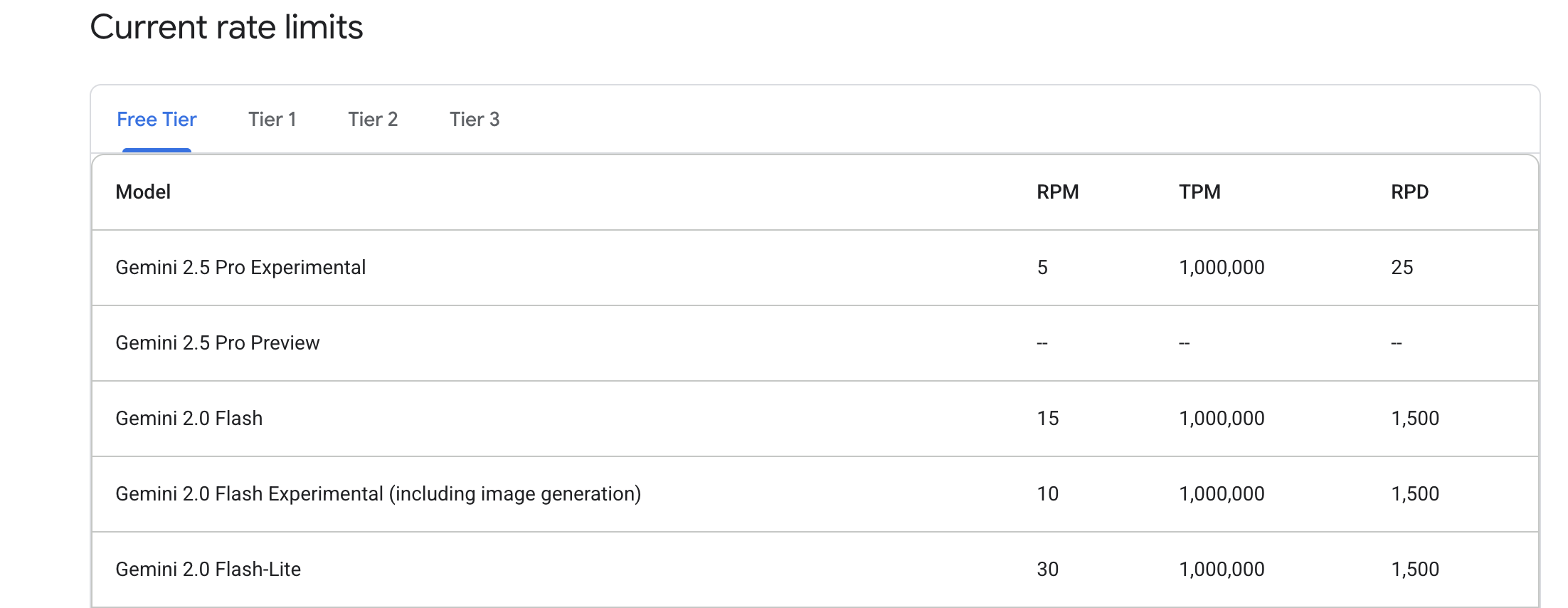
"Free"プランのクオータは次のとおりです。記事執筆時点では、最上位モデルであるGemini 2.5 Proは1日25リクエストに制限されているので注意です。Gemini 2.0 Flashなら、かなり試せそうです。
 **目次**
### GeminiのAPIキーを取得する
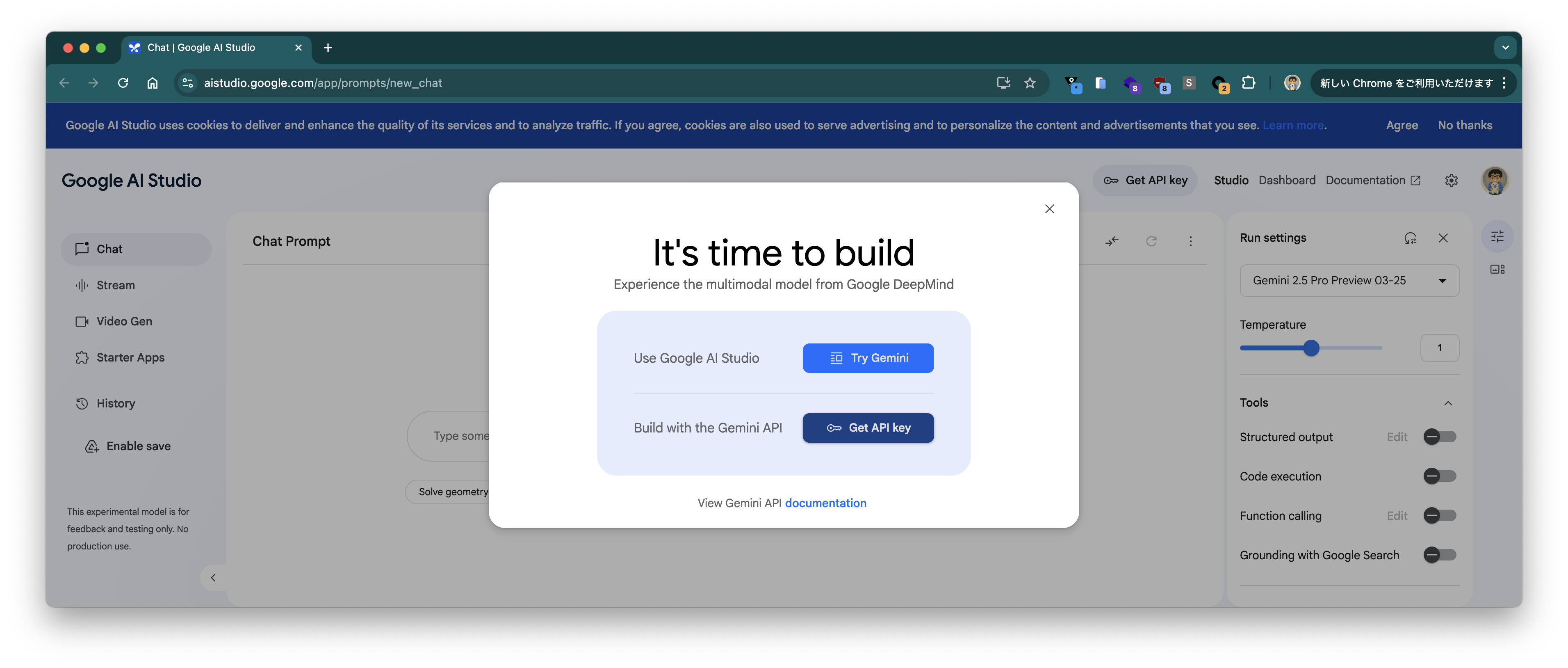
https://aistudio.google.com/app/prompts/new_chat のページにアクセスして、"GET API Key"ボタンをクリック。
**目次**
### GeminiのAPIキーを取得する
https://aistudio.google.com/app/prompts/new_chat のページにアクセスして、"GET API Key"ボタンをクリック。
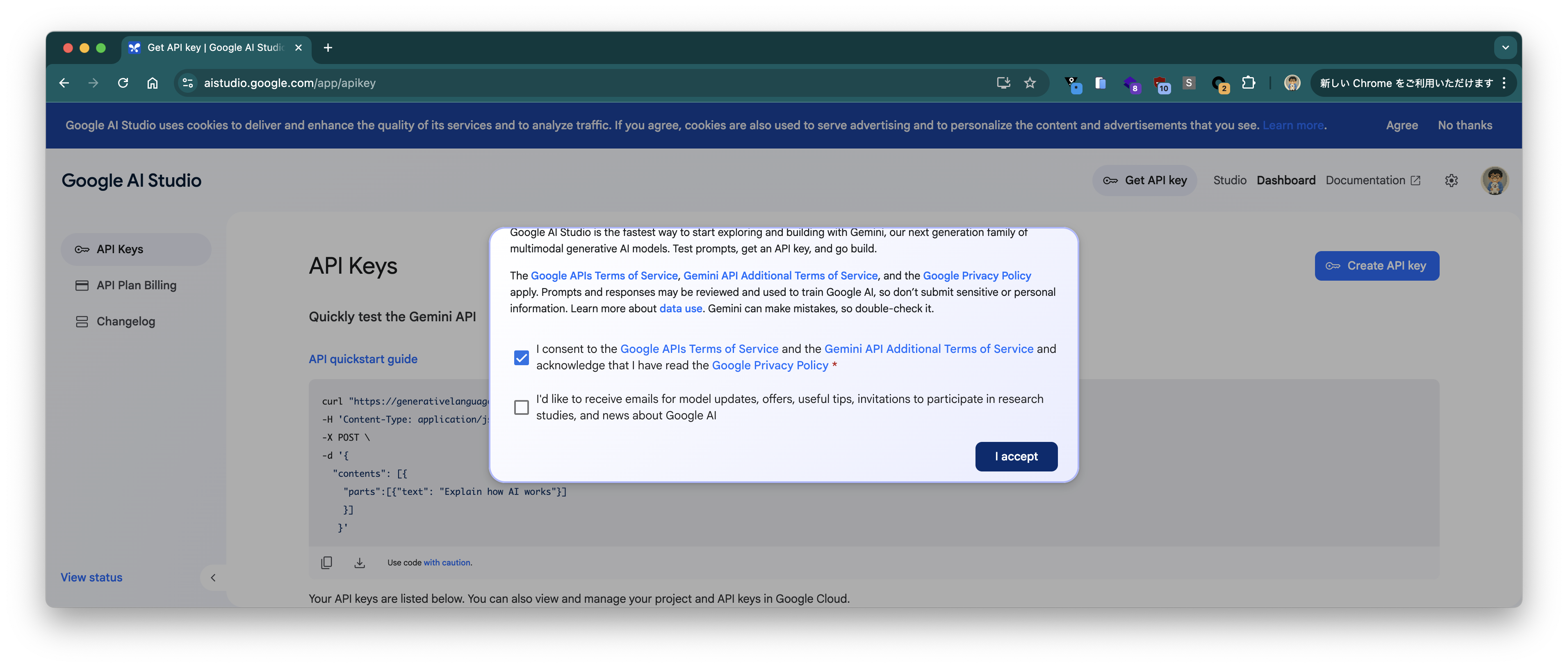
 "Terms of Service"のacceptにチェックを入れて、"I accept"をクリック。
 "Create API Key"ボタンをクリック。
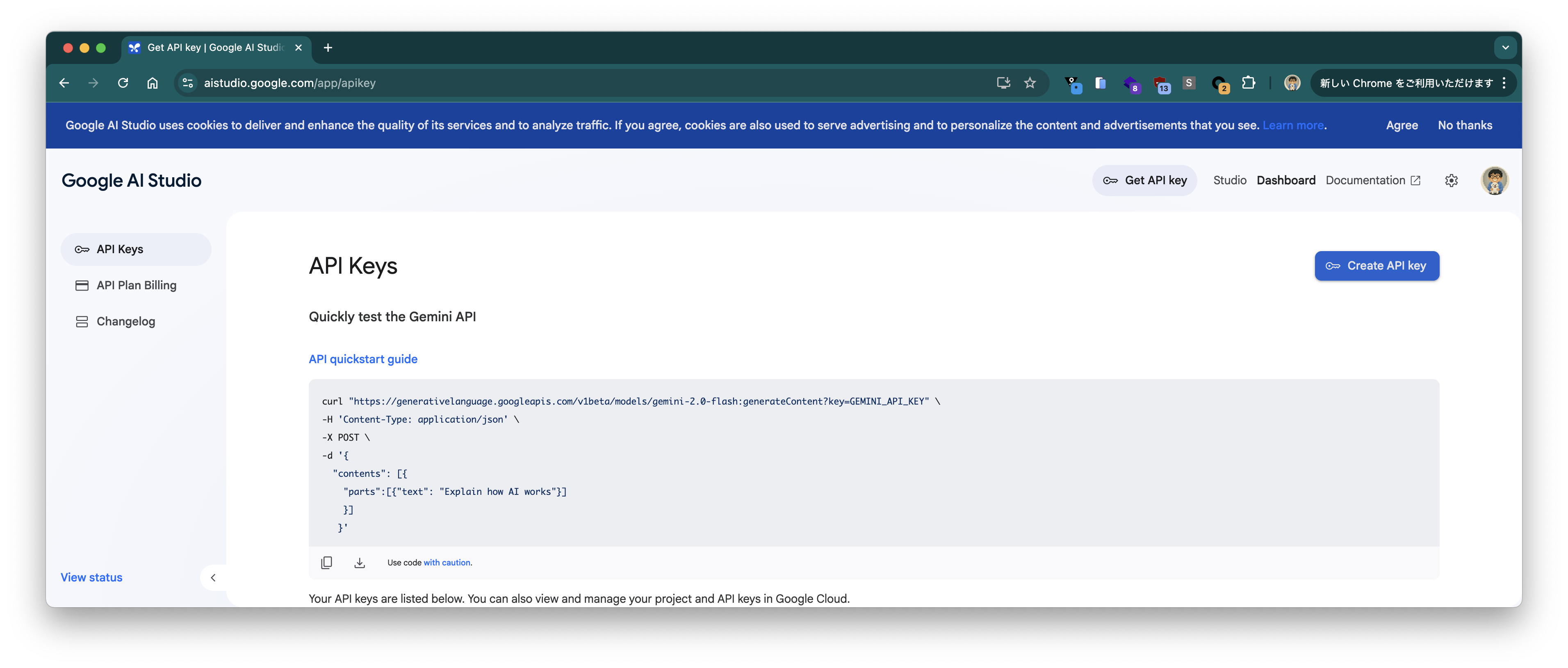 APIキーが表示されるので、"Copy"ボタンを押して、クリップボードにコピーします。
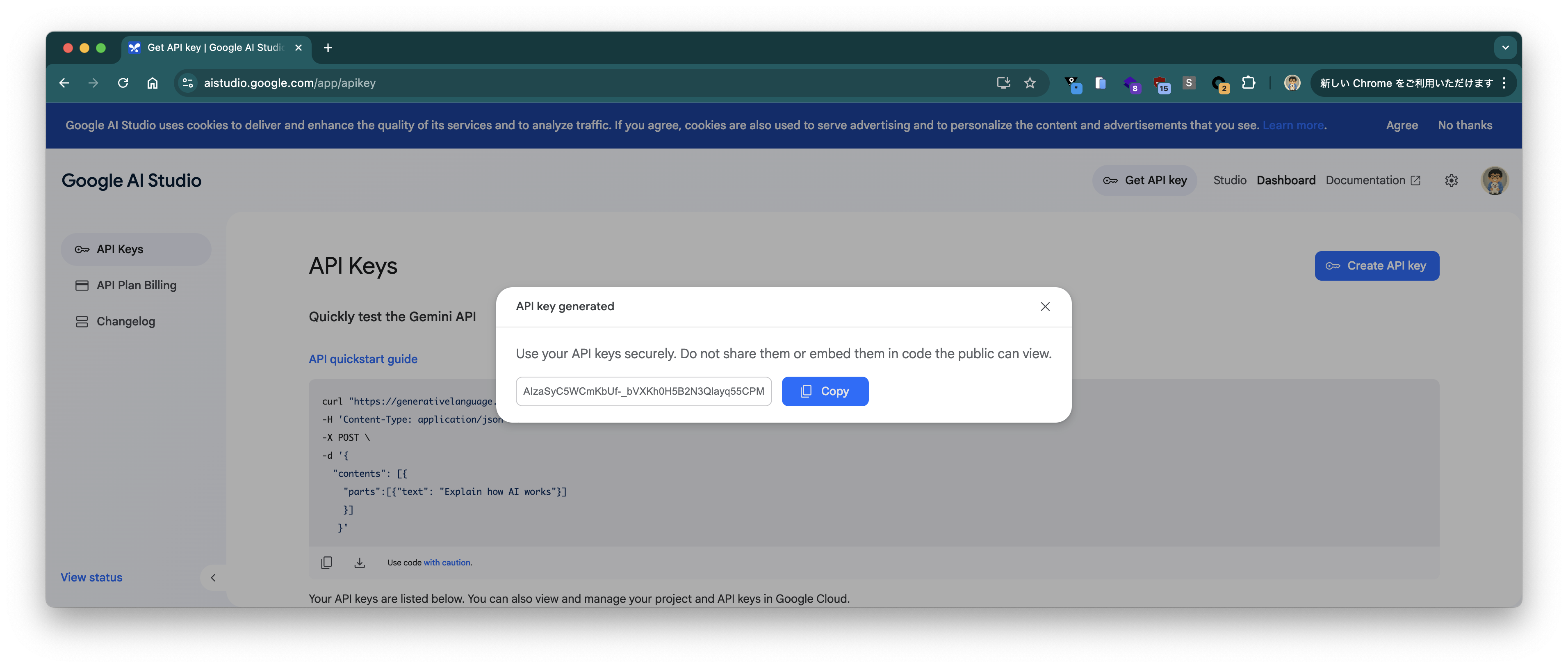 ターミナル上でコピーしたAPIキーを変数`GEMINI_API_KEY`に設定します。
```
GEMINI_API_KEY=*****
```
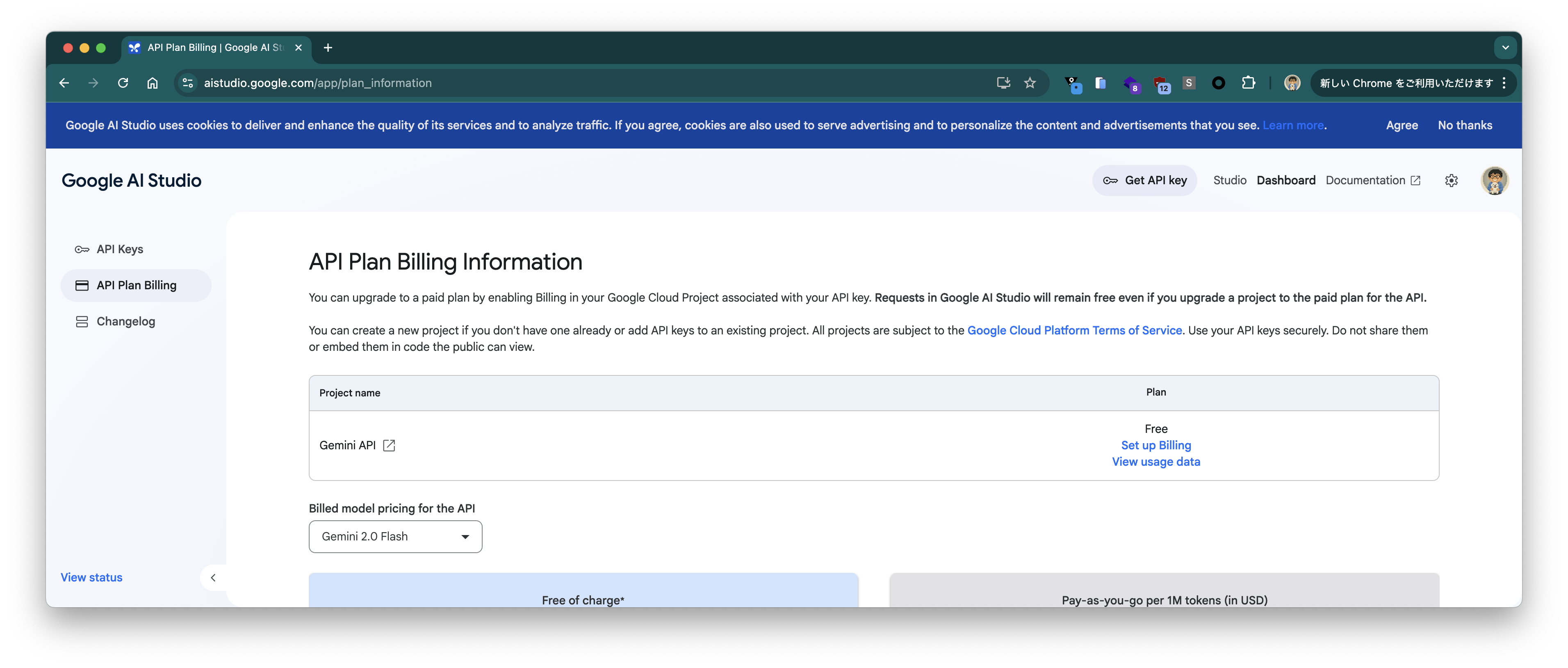
"API Plan Billing"ページで"Free"プランであることを確認。
ターミナル上でコピーしたAPIキーを変数`GEMINI_API_KEY`に設定します。
```
GEMINI_API_KEY=*****
```
"API Plan Billing"ページで"Free"プランであることを確認。
 ### Gemini APIで動作確認
まずはGemini APIで簡単なプロンプトを送り、動作確認します。
まずは`gemini-2.0-flash`から。
```bash
curl "https://generativelanguage.googleapis.com/v1beta/models/gemini-2.0-flash:generateContent?key=${GEMINI_API_KEY}" \
--json '{
"contents": [{
"parts":[{"text": "Give me a joke"}]
}]
}'
```
次のようなレスポンスが返ります。Gemmaで試した時と同じジョークですね。
```json
{
"candidates": [
{
"content": {
"parts": [
{
"text": "Why don't scientists trust atoms?\n\nBecause they make up everything!\n"
}
],
"role": "model"
},
"finishReason": "STOP",
"avgLogprobs": -0.0029207938350737095
}
],
"usageMetadata": {
"promptTokenCount": 4,
"candidatesTokenCount": 16,
"totalTokenCount": 20,
"promptTokensDetails": [
{
"modality": "TEXT",
"tokenCount": 4
}
],
"candidatesTokensDetails": [
{
"modality": "TEXT",
"tokenCount": 16
}
]
},
"modelVersion": "gemini-2.0-flash"
}
```
次に`gemini-2.5-pro-exp-03-25`を試します。
```bash
$ curl "https://generativelanguage.googleapis.com/v1beta/models/gemini-2.5-pro-exp-03-25:generateContent?key=${GEMINI_API_KEY}" \
--json '{
"contents": [{
"parts":[{"text": "Give me a joke"}]
}]
}'
```
次のようなレスポンスが返ります。
```json
{
"candidates": [
{
"content": {
"parts": [
{
"text": "Okay, here's one:\n\nWhy don't scientists trust atoms?\n\nBecause they make up everything!"
}
],
"role": "model"
},
"finishReason": "STOP",
"index": 0
}
],
"usageMetadata": {
"promptTokenCount": 4,
"candidatesTokenCount": 569,
"totalTokenCount": 573,
"promptTokensDetails": [
{
"modality": "TEXT",
"tokenCount": 4
}
],
"thoughtsTokenCount": 546
},
"modelVersion": "gemini-2.5-pro-exp-03-25"
}
```
`gemini-2.0-flash`に比べてかなりレスポンスが遅かったです。
### OpenAI APIで動作確認
OpenAI API (https://ai.google.dev/gemini-api/docs/openai) でも同じプロンプトを試します。まずは`gemini-2.0-flash`から。
```bash
curl -s https://generativelanguage.googleapis.com/v1beta/openai/chat/completions \
-H "Authorization: Bearer $GEMINI_API_KEY" \
--json '{
"model": "gemini-2.0-flash",
"messages": [
{"role": "user", "content": "Give me a joke."}
]
}' | jq .
```
次のようなレスポンスが返ります。
```json
{
"choices": [
{
"finish_reason": "stop",
"index": 0,
"message": {
"content": "Why don't scientists trust atoms?\n\nBecause they make up everything!\n",
"role": "assistant"
}
}
],
"created": 1744252378,
"model": "gemini-2.0-flash",
"object": "chat.completion",
"usage": {
"completion_tokens": 16,
"prompt_tokens": 5,
"total_tokens": 21
}
}
```
次に`gemini-2.5-pro-exp-03-25`を試します。
```bash
curl -s https://generativelanguage.googleapis.com/v1beta/openai/chat/completions \
-H "Authorization: Bearer $GEMINI_API_KEY" \
--json '{
"model": "gemini-2.5-pro-exp-03-25",
"messages": [
{"role": "user", "content": "Give me a joke."}
]
}' | jq .
```
次のようなレスポンスが返ります。
```json
{
"choices": [
{
"finish_reason": "stop",
"index": 0,
"message": {
"content": "Okay, here's one:\n\nWhy don't scientists trust atoms?\n\nBecause they make up everything!",
"role": "assistant"
}
}
],
"created": 1744268816,
"model": "gemini-2.5-pro-exp-03-25",
"object": "chat.completion",
"usage": {
"completion_tokens": 440,
"prompt_tokens": 6,
"total_tokens": 446
}
}
```
### Spring AIからアクセス
次にこのブログで何度も扱っているサンプルアプリからアクセスしてみます。
OpenAI API向けのアプリですが、GeminiのOpenAI APIを使えば、コードを変えずに試せます。
次のコマンドでサンプルアプリを起動します。
```bash
git clone https://github.com/making/hello-spring-ai
cd hello-spring-ai
./mvnw clean package -DskipTests=true
java -jar target/hello-spring-ai-0.0.1-SNAPSHOT.jar \
--spring.ai.openai.base-url=https://generativelanguage.googleapis.com/v1beta/openai \
--spring.ai.openai.chat.completions-path=/chat/completions \
--spring.ai.openai.api-key=${GEMINI_API_KEY} \
--spring.ai.openai.chat.options.model=gemini-2.0-flash \
--spring.ai.openai.chat.options.temperature=0
```
まずはシンプルなプロンプト(`日本の首都はどこですか?`)を送ります。
```bash
$ curl "http://localhost:8080/?prompt=%E6%97%A5%E6%9C%AC%E3%81%AE%E9%A6%96%E9%83%BD%E3%81%AF%E3%81%A9%E3%81%93%E3%81%A7%E3%81%99%E3%81%8B%EF%BC%9F"
日本の首都は東京都です。
```
> [!NOTE]
> Stream APIはSpring AI (1.0.0.M6時点)経由だとエラーになりました。GeminiのOpenAI APIではStreamのレスポンスにidフィールドが含まれておらず、NullPointerExceptionが発生していました。時間があるときにissueを作ります。
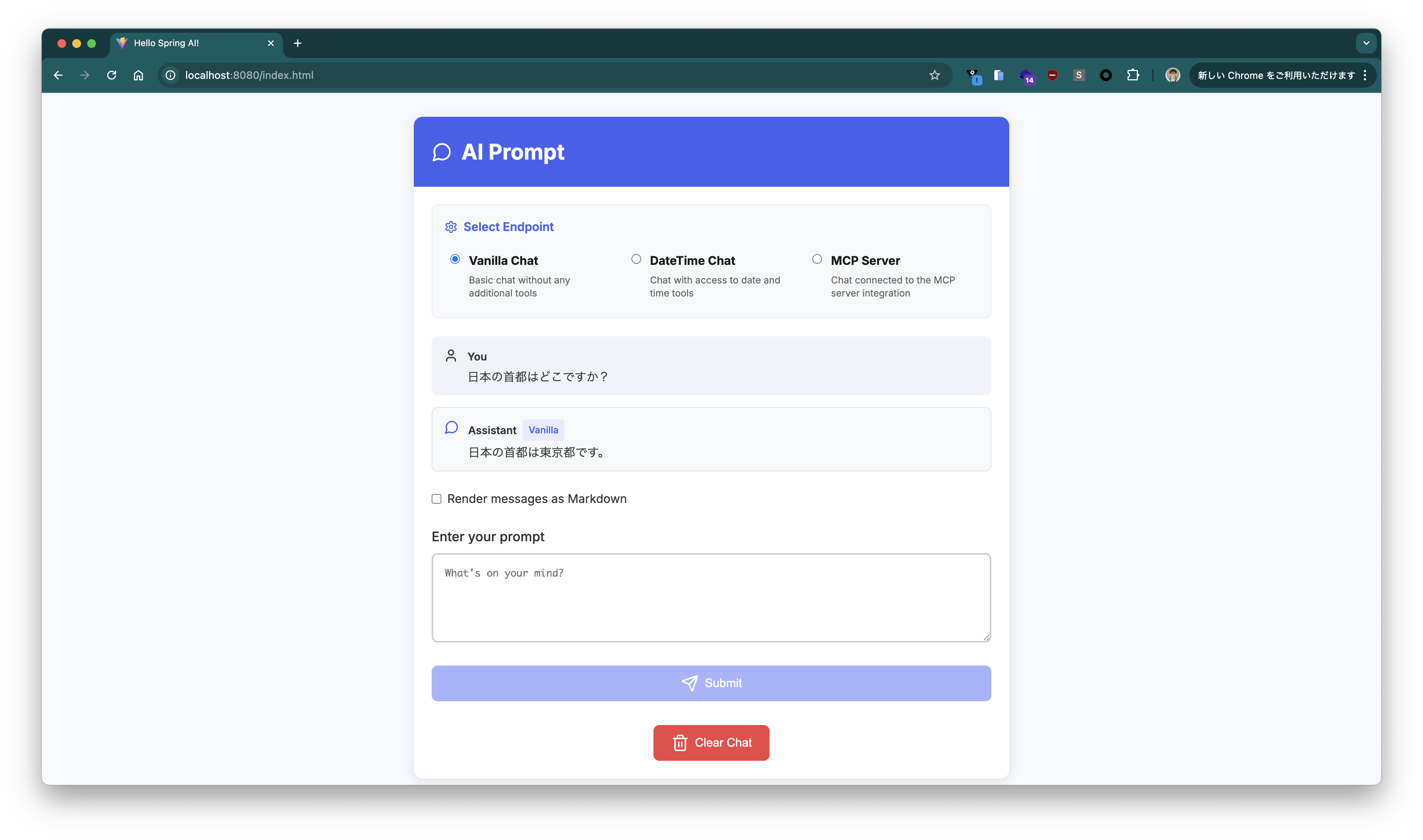
`curl`で実行するのが面倒くさい場合は、ブラウザで http://localhost:8080 にアクセスするとChat UIが利用できます。
### Gemini APIで動作確認
まずはGemini APIで簡単なプロンプトを送り、動作確認します。
まずは`gemini-2.0-flash`から。
```bash
curl "https://generativelanguage.googleapis.com/v1beta/models/gemini-2.0-flash:generateContent?key=${GEMINI_API_KEY}" \
--json '{
"contents": [{
"parts":[{"text": "Give me a joke"}]
}]
}'
```
次のようなレスポンスが返ります。Gemmaで試した時と同じジョークですね。
```json
{
"candidates": [
{
"content": {
"parts": [
{
"text": "Why don't scientists trust atoms?\n\nBecause they make up everything!\n"
}
],
"role": "model"
},
"finishReason": "STOP",
"avgLogprobs": -0.0029207938350737095
}
],
"usageMetadata": {
"promptTokenCount": 4,
"candidatesTokenCount": 16,
"totalTokenCount": 20,
"promptTokensDetails": [
{
"modality": "TEXT",
"tokenCount": 4
}
],
"candidatesTokensDetails": [
{
"modality": "TEXT",
"tokenCount": 16
}
]
},
"modelVersion": "gemini-2.0-flash"
}
```
次に`gemini-2.5-pro-exp-03-25`を試します。
```bash
$ curl "https://generativelanguage.googleapis.com/v1beta/models/gemini-2.5-pro-exp-03-25:generateContent?key=${GEMINI_API_KEY}" \
--json '{
"contents": [{
"parts":[{"text": "Give me a joke"}]
}]
}'
```
次のようなレスポンスが返ります。
```json
{
"candidates": [
{
"content": {
"parts": [
{
"text": "Okay, here's one:\n\nWhy don't scientists trust atoms?\n\nBecause they make up everything!"
}
],
"role": "model"
},
"finishReason": "STOP",
"index": 0
}
],
"usageMetadata": {
"promptTokenCount": 4,
"candidatesTokenCount": 569,
"totalTokenCount": 573,
"promptTokensDetails": [
{
"modality": "TEXT",
"tokenCount": 4
}
],
"thoughtsTokenCount": 546
},
"modelVersion": "gemini-2.5-pro-exp-03-25"
}
```
`gemini-2.0-flash`に比べてかなりレスポンスが遅かったです。
### OpenAI APIで動作確認
OpenAI API (https://ai.google.dev/gemini-api/docs/openai) でも同じプロンプトを試します。まずは`gemini-2.0-flash`から。
```bash
curl -s https://generativelanguage.googleapis.com/v1beta/openai/chat/completions \
-H "Authorization: Bearer $GEMINI_API_KEY" \
--json '{
"model": "gemini-2.0-flash",
"messages": [
{"role": "user", "content": "Give me a joke."}
]
}' | jq .
```
次のようなレスポンスが返ります。
```json
{
"choices": [
{
"finish_reason": "stop",
"index": 0,
"message": {
"content": "Why don't scientists trust atoms?\n\nBecause they make up everything!\n",
"role": "assistant"
}
}
],
"created": 1744252378,
"model": "gemini-2.0-flash",
"object": "chat.completion",
"usage": {
"completion_tokens": 16,
"prompt_tokens": 5,
"total_tokens": 21
}
}
```
次に`gemini-2.5-pro-exp-03-25`を試します。
```bash
curl -s https://generativelanguage.googleapis.com/v1beta/openai/chat/completions \
-H "Authorization: Bearer $GEMINI_API_KEY" \
--json '{
"model": "gemini-2.5-pro-exp-03-25",
"messages": [
{"role": "user", "content": "Give me a joke."}
]
}' | jq .
```
次のようなレスポンスが返ります。
```json
{
"choices": [
{
"finish_reason": "stop",
"index": 0,
"message": {
"content": "Okay, here's one:\n\nWhy don't scientists trust atoms?\n\nBecause they make up everything!",
"role": "assistant"
}
}
],
"created": 1744268816,
"model": "gemini-2.5-pro-exp-03-25",
"object": "chat.completion",
"usage": {
"completion_tokens": 440,
"prompt_tokens": 6,
"total_tokens": 446
}
}
```
### Spring AIからアクセス
次にこのブログで何度も扱っているサンプルアプリからアクセスしてみます。
OpenAI API向けのアプリですが、GeminiのOpenAI APIを使えば、コードを変えずに試せます。
次のコマンドでサンプルアプリを起動します。
```bash
git clone https://github.com/making/hello-spring-ai
cd hello-spring-ai
./mvnw clean package -DskipTests=true
java -jar target/hello-spring-ai-0.0.1-SNAPSHOT.jar \
--spring.ai.openai.base-url=https://generativelanguage.googleapis.com/v1beta/openai \
--spring.ai.openai.chat.completions-path=/chat/completions \
--spring.ai.openai.api-key=${GEMINI_API_KEY} \
--spring.ai.openai.chat.options.model=gemini-2.0-flash \
--spring.ai.openai.chat.options.temperature=0
```
まずはシンプルなプロンプト(`日本の首都はどこですか?`)を送ります。
```bash
$ curl "http://localhost:8080/?prompt=%E6%97%A5%E6%9C%AC%E3%81%AE%E9%A6%96%E9%83%BD%E3%81%AF%E3%81%A9%E3%81%93%E3%81%A7%E3%81%99%E3%81%8B%EF%BC%9F"
日本の首都は東京都です。
```
> [!NOTE]
> Stream APIはSpring AI (1.0.0.M6時点)経由だとエラーになりました。GeminiのOpenAI APIではStreamのレスポンスにidフィールドが含まれておらず、NullPointerExceptionが発生していました。時間があるときにissueを作ります。
`curl`で実行するのが面倒くさい場合は、ブラウザで http://localhost:8080 にアクセスするとChat UIが利用できます。
 > [!NOTE]
> Chat UIでは、セッション単位で会話を継続します。新規の会話を始める際は"Clear Chat"ボタンを押してください。
### Tool Callingを試す
次にSpring AIの[Tool Calling](https://docs.spring.io/spring-ai/reference/1.0/api/tools.html)を試します。
Tool Callingを使うことでLLMが知らない情報を返す方法をJavaで実装し、補完することができます。
例えば、LLMは現在時刻を知らないので、現在時刻を問い合わせても全然違う時間を回答します。
現在の時刻は次のコマンドで確認できます。
```bash
$ LANG=en date
Thu Apr 10 13:38:31 JST 2025
```
まずはTool Callingなしで、LLMに`what time is it now in JST`と聞いてみます。
```bash
$ curl "http://localhost:8080?prompt=what%20time%20is%20it%20now%20in%20JST"
As an AI, I do not have access to real-time information, including the current time. To find out the current time in JST (Japan Standard Time), you can:
* **Search on Google:** Simply type "time in JST" into the Google search bar.
* **Use a Time Zone Converter:** There are many websites and apps that will convert your current time to JST.
* **Check a World Clock Website:** Websites like TimeAndDate.com have world clocks that show the current time in various cities and time zones.%
```
教えてくれません。
ここで、[Spring AIのドキュメントのサンプル](https://docs.spring.io/spring-ai/reference/api/tools.html#_information_retrieval)通りのToolを追加し、現在時刻を教えられるようにします。
```java
public class DateTimeTools {
private final Logger logger = LoggerFactory.getLogger(DateTimeTools.class);
@Tool(description = "Get the current date and time in the user's timezone")
public String getCurrentDateTime() {
logger.info("Calling getCurrentDateTime()");
return LocalDateTime.now().atZone(LocaleContextHolder.getTimeZone().toZoneId()).toString();
}
}
```
`/datetime`エンドポイントではこのToolが利用されるようにしてあります。
```java
@GetMapping(path = "/datetime")
public String dateTime(@RequestParam(defaultValue = "What time is it now?") String prompt) {
return this.chatClient.prompt().messages().user(prompt).tools(new DateTimeTools()).call().content();
}
```
`/datetime`エンドポイントを呼び出します。
```bash
$ curl "http://localhost:8080/datetime?prompt=what%20time%20is%20it%20now%20in%20JST"
It is 2025-04-10T13:39:15.656919+09:00 in JST.
```
今度は正しい時刻を回答してくれました。
アクセスログを見ると、1回目のレスポンスはfunctionの呼び出し依頼になっていて、2回目のリクエストはfunctionの呼び出し結果を含めていることがわかります。
```
2025-04-10T13:39:14.955+09:00 TRACE 47338 --- [hello-spring-ai] [nio-8080-exec-3] [5c5fc0058fa68173f7e8f6cde33cc2cd-939a82e4446e75d0] org.zalando.logbook.Logbook : Incoming Request: d2f972d2b68d7060
Remote: 0:0:0:0:0:0:0:1
GET http://localhost:8080/datetime?prompt=what%20time%20is%20it%20now%20in%20JST HTTP/1.1
accept: */*
host: localhost:8080
user-agent: curl/8.7.1
2025-04-10T13:39:15.021+09:00 TRACE 47338 --- [hello-spring-ai] [nio-8080-exec-3] [5c5fc0058fa68173f7e8f6cde33cc2cd-1824b60383c9a5e2] org.zalando.logbook.Logbook : Outgoing Request: a10e547cccb1c6c0
Remote: localhost
POST https://generativelanguage.googleapis.com/v1beta/openai/chat/completions HTTP/1.1
Authorization: XXX
Content-Length: 414
Content-Type: application/json
traceparent: 00-5c5fc0058fa68173f7e8f6cde33cc2cd-1824b60383c9a5e2-01
{"messages":[{"content":"what time is it now in JST","role":"user"}],"model":"gemini-2.0-flash","stream":false,"temperature":0.0,"tools":[{"type":"function","function":{"description":"Get the current date and time in the user timezone","name":"getCurrentDateTime","parameters":{"$schema":"https://json-schema.org/draft/2020-12/schema","additionalProperties":false,"type":"object","properties":{},"required":[]}}}]}
2025-04-10T13:39:15.642+09:00 TRACE 47338 --- [hello-spring-ai] [nio-8080-exec-3] [5c5fc0058fa68173f7e8f6cde33cc2cd-1824b60383c9a5e2] org.zalando.logbook.Logbook : Incoming Response: a10e547cccb1c6c0
Duration: 616 ms
HTTP/1.1 200 OK
:status: 200
accept-ranges: none
alt-svc: h3=":443"; ma=2592000,h3-29=":443"; ma=2592000
content-type: application/json
date: Thu, 10 Apr 2025 04:39:15 GMT
server: scaffolding on HTTPServer2
server-timing: gfet4t7; dur=542
vary: X-Origin, Referer, Origin,Accept-Encoding
x-content-type-options: nosniff
x-frame-options: SAMEORIGIN
x-xss-protection: 0
{"choices":[{"finish_reason":"tool_calls","index":0,"message":{"role":"assistant","tool_calls":[{"function":{"arguments":"{}","name":"getCurrentDateTime"},"id":"","type":"function"}]}}],"created":1744259955,"model":"gemini-2.0-flash","object":"chat.completion","usage":{"completion_tokens":2,"prompt_tokens":19,"total_tokens":21}}
2025-04-10T13:39:15.656+09:00 INFO 47338 --- [hello-spring-ai] [nio-8080-exec-3] [5c5fc0058fa68173f7e8f6cde33cc2cd-d8a0e7f48cc4e6a7] com.example.hello.DateTimeTools : Calling getCurrentDateTime()
2025-04-10T13:39:15.670+09:00 TRACE 47338 --- [hello-spring-ai] [nio-8080-exec-3] [5c5fc0058fa68173f7e8f6cde33cc2cd-b918982e2e5742e2] org.zalando.logbook.Logbook : Outgoing Request: 873d0e6ce618f2c5
Remote: localhost
POST https://generativelanguage.googleapis.com/v1beta/openai/chat/completions HTTP/1.1
Authorization: XXX
Content-Length: 659
Content-Type: application/json
traceparent: 00-5c5fc0058fa68173f7e8f6cde33cc2cd-b918982e2e5742e2-01
{"messages":[{"content":"what time is it now in JST","role":"user"},{"role":"assistant","tool_calls":[{"id":"","type":"function","function":{"name":"getCurrentDateTime","arguments":"{}"}}]},{"content":"\"2025-04-10T13:39:15.656919+09:00[Asia/Tokyo]\"","role":"tool","name":"getCurrentDateTime","tool_call_id":""}],"model":"gemini-2.0-flash","stream":false,"temperature":0.0,"tools":[{"type":"function","function":{"description":"Get the current date and time in the user timezone","name":"getCurrentDateTime","parameters":{"$schema":"https://json-schema.org/draft/2020-12/schema","additionalProperties":false,"type":"object","properties":{},"required":[]}}}]}
2025-04-10T13:39:16.419+09:00 TRACE 47338 --- [hello-spring-ai] [nio-8080-exec-3] [5c5fc0058fa68173f7e8f6cde33cc2cd-b918982e2e5742e2] org.zalando.logbook.Logbook : Incoming Response: 873d0e6ce618f2c5
Duration: 747 ms
HTTP/1.1 200 OK
:status: 200
accept-ranges: none
alt-svc: h3=":443"; ma=2592000,h3-29=":443"; ma=2592000
content-type: application/json
date: Thu, 10 Apr 2025 04:39:16 GMT
server: scaffolding on HTTPServer2
server-timing: gfet4t7; dur=713
vary: X-Origin, Referer, Origin,Accept-Encoding
x-content-type-options: nosniff
x-frame-options: SAMEORIGIN
x-xss-protection: 0
{"choices":[{"finish_reason":"stop","index":0,"message":{"content":"It is 2025-04-10T13:39:15.656919+09:00 in JST.\n","role":"assistant"}}],"created":1744259956,"model":"gemini-2.0-flash","object":"chat.completion","usage":{"completion_tokens":39,"prompt_tokens":62,"total_tokens":101}}
2025-04-10T13:39:16.427+09:00 TRACE 47338 --- [hello-spring-ai] [nio-8080-exec-3] [5c5fc0058fa68173f7e8f6cde33cc2cd-939a82e4446e75d0] org.zalando.logbook.Logbook : Outgoing Response: d2f972d2b68d7060
Duration: 1470 ms
HTTP/1.1 200 OK
Content-Length: 47
Content-Type: text/plain;charset=UTF-8
Date: Thu, 10 Apr 2025 04:39:16 GMT
Set-Cookie: JSESSIONID=002578623AF798A54DEB09C54733FAFE; Path=/; HttpOnly
It is 2025-04-10T13:39:15.656919+09:00 in JST.
```
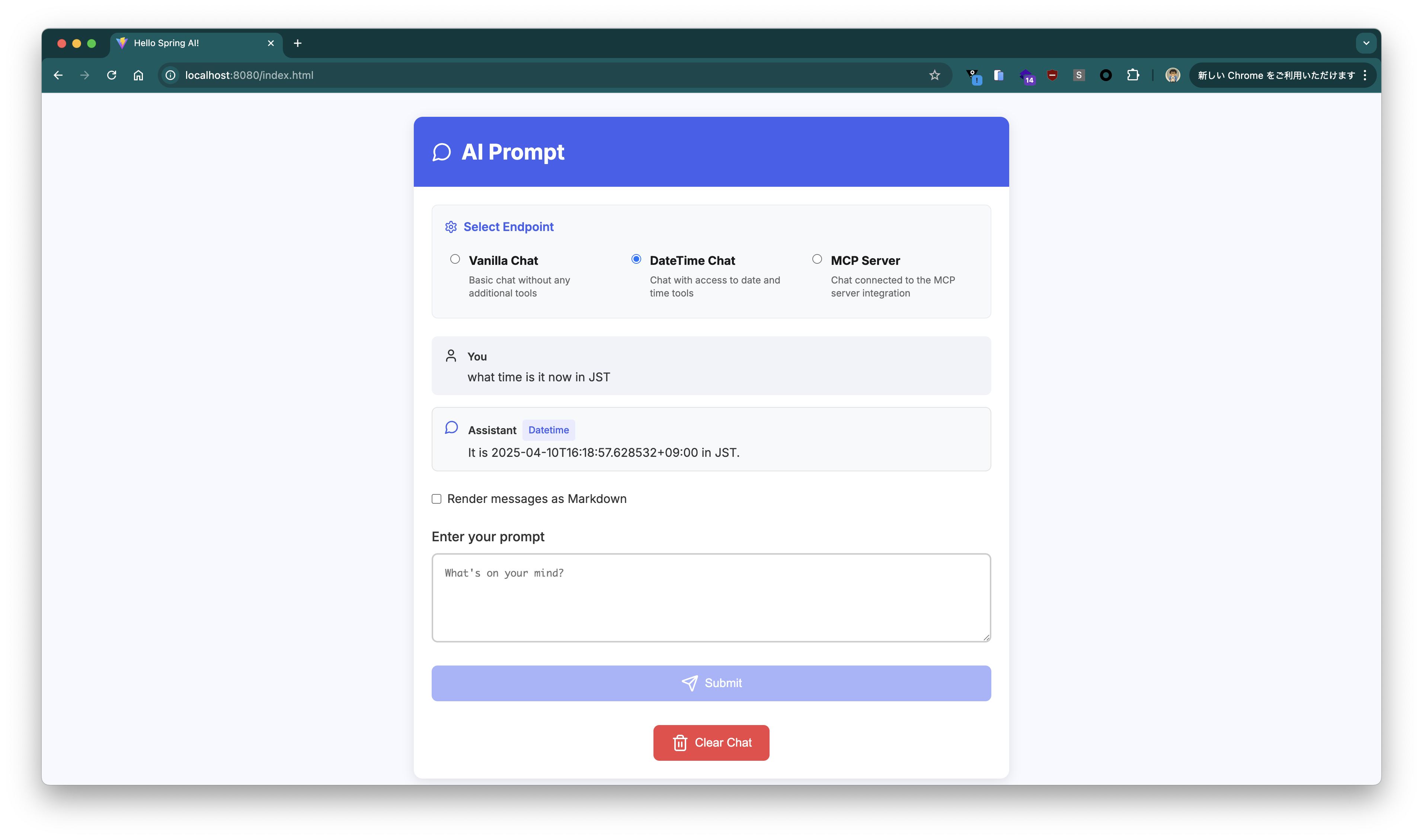
Chat UIで`/datetime`エンドポイントにプロンプトを送る場合は"DateTime Chat"を選択してください。
> [!NOTE]
> Chat UIでは、セッション単位で会話を継続します。新規の会話を始める際は"Clear Chat"ボタンを押してください。
### Tool Callingを試す
次にSpring AIの[Tool Calling](https://docs.spring.io/spring-ai/reference/1.0/api/tools.html)を試します。
Tool Callingを使うことでLLMが知らない情報を返す方法をJavaで実装し、補完することができます。
例えば、LLMは現在時刻を知らないので、現在時刻を問い合わせても全然違う時間を回答します。
現在の時刻は次のコマンドで確認できます。
```bash
$ LANG=en date
Thu Apr 10 13:38:31 JST 2025
```
まずはTool Callingなしで、LLMに`what time is it now in JST`と聞いてみます。
```bash
$ curl "http://localhost:8080?prompt=what%20time%20is%20it%20now%20in%20JST"
As an AI, I do not have access to real-time information, including the current time. To find out the current time in JST (Japan Standard Time), you can:
* **Search on Google:** Simply type "time in JST" into the Google search bar.
* **Use a Time Zone Converter:** There are many websites and apps that will convert your current time to JST.
* **Check a World Clock Website:** Websites like TimeAndDate.com have world clocks that show the current time in various cities and time zones.%
```
教えてくれません。
ここで、[Spring AIのドキュメントのサンプル](https://docs.spring.io/spring-ai/reference/api/tools.html#_information_retrieval)通りのToolを追加し、現在時刻を教えられるようにします。
```java
public class DateTimeTools {
private final Logger logger = LoggerFactory.getLogger(DateTimeTools.class);
@Tool(description = "Get the current date and time in the user's timezone")
public String getCurrentDateTime() {
logger.info("Calling getCurrentDateTime()");
return LocalDateTime.now().atZone(LocaleContextHolder.getTimeZone().toZoneId()).toString();
}
}
```
`/datetime`エンドポイントではこのToolが利用されるようにしてあります。
```java
@GetMapping(path = "/datetime")
public String dateTime(@RequestParam(defaultValue = "What time is it now?") String prompt) {
return this.chatClient.prompt().messages().user(prompt).tools(new DateTimeTools()).call().content();
}
```
`/datetime`エンドポイントを呼び出します。
```bash
$ curl "http://localhost:8080/datetime?prompt=what%20time%20is%20it%20now%20in%20JST"
It is 2025-04-10T13:39:15.656919+09:00 in JST.
```
今度は正しい時刻を回答してくれました。
アクセスログを見ると、1回目のレスポンスはfunctionの呼び出し依頼になっていて、2回目のリクエストはfunctionの呼び出し結果を含めていることがわかります。
```
2025-04-10T13:39:14.955+09:00 TRACE 47338 --- [hello-spring-ai] [nio-8080-exec-3] [5c5fc0058fa68173f7e8f6cde33cc2cd-939a82e4446e75d0] org.zalando.logbook.Logbook : Incoming Request: d2f972d2b68d7060
Remote: 0:0:0:0:0:0:0:1
GET http://localhost:8080/datetime?prompt=what%20time%20is%20it%20now%20in%20JST HTTP/1.1
accept: */*
host: localhost:8080
user-agent: curl/8.7.1
2025-04-10T13:39:15.021+09:00 TRACE 47338 --- [hello-spring-ai] [nio-8080-exec-3] [5c5fc0058fa68173f7e8f6cde33cc2cd-1824b60383c9a5e2] org.zalando.logbook.Logbook : Outgoing Request: a10e547cccb1c6c0
Remote: localhost
POST https://generativelanguage.googleapis.com/v1beta/openai/chat/completions HTTP/1.1
Authorization: XXX
Content-Length: 414
Content-Type: application/json
traceparent: 00-5c5fc0058fa68173f7e8f6cde33cc2cd-1824b60383c9a5e2-01
{"messages":[{"content":"what time is it now in JST","role":"user"}],"model":"gemini-2.0-flash","stream":false,"temperature":0.0,"tools":[{"type":"function","function":{"description":"Get the current date and time in the user timezone","name":"getCurrentDateTime","parameters":{"$schema":"https://json-schema.org/draft/2020-12/schema","additionalProperties":false,"type":"object","properties":{},"required":[]}}}]}
2025-04-10T13:39:15.642+09:00 TRACE 47338 --- [hello-spring-ai] [nio-8080-exec-3] [5c5fc0058fa68173f7e8f6cde33cc2cd-1824b60383c9a5e2] org.zalando.logbook.Logbook : Incoming Response: a10e547cccb1c6c0
Duration: 616 ms
HTTP/1.1 200 OK
:status: 200
accept-ranges: none
alt-svc: h3=":443"; ma=2592000,h3-29=":443"; ma=2592000
content-type: application/json
date: Thu, 10 Apr 2025 04:39:15 GMT
server: scaffolding on HTTPServer2
server-timing: gfet4t7; dur=542
vary: X-Origin, Referer, Origin,Accept-Encoding
x-content-type-options: nosniff
x-frame-options: SAMEORIGIN
x-xss-protection: 0
{"choices":[{"finish_reason":"tool_calls","index":0,"message":{"role":"assistant","tool_calls":[{"function":{"arguments":"{}","name":"getCurrentDateTime"},"id":"","type":"function"}]}}],"created":1744259955,"model":"gemini-2.0-flash","object":"chat.completion","usage":{"completion_tokens":2,"prompt_tokens":19,"total_tokens":21}}
2025-04-10T13:39:15.656+09:00 INFO 47338 --- [hello-spring-ai] [nio-8080-exec-3] [5c5fc0058fa68173f7e8f6cde33cc2cd-d8a0e7f48cc4e6a7] com.example.hello.DateTimeTools : Calling getCurrentDateTime()
2025-04-10T13:39:15.670+09:00 TRACE 47338 --- [hello-spring-ai] [nio-8080-exec-3] [5c5fc0058fa68173f7e8f6cde33cc2cd-b918982e2e5742e2] org.zalando.logbook.Logbook : Outgoing Request: 873d0e6ce618f2c5
Remote: localhost
POST https://generativelanguage.googleapis.com/v1beta/openai/chat/completions HTTP/1.1
Authorization: XXX
Content-Length: 659
Content-Type: application/json
traceparent: 00-5c5fc0058fa68173f7e8f6cde33cc2cd-b918982e2e5742e2-01
{"messages":[{"content":"what time is it now in JST","role":"user"},{"role":"assistant","tool_calls":[{"id":"","type":"function","function":{"name":"getCurrentDateTime","arguments":"{}"}}]},{"content":"\"2025-04-10T13:39:15.656919+09:00[Asia/Tokyo]\"","role":"tool","name":"getCurrentDateTime","tool_call_id":""}],"model":"gemini-2.0-flash","stream":false,"temperature":0.0,"tools":[{"type":"function","function":{"description":"Get the current date and time in the user timezone","name":"getCurrentDateTime","parameters":{"$schema":"https://json-schema.org/draft/2020-12/schema","additionalProperties":false,"type":"object","properties":{},"required":[]}}}]}
2025-04-10T13:39:16.419+09:00 TRACE 47338 --- [hello-spring-ai] [nio-8080-exec-3] [5c5fc0058fa68173f7e8f6cde33cc2cd-b918982e2e5742e2] org.zalando.logbook.Logbook : Incoming Response: 873d0e6ce618f2c5
Duration: 747 ms
HTTP/1.1 200 OK
:status: 200
accept-ranges: none
alt-svc: h3=":443"; ma=2592000,h3-29=":443"; ma=2592000
content-type: application/json
date: Thu, 10 Apr 2025 04:39:16 GMT
server: scaffolding on HTTPServer2
server-timing: gfet4t7; dur=713
vary: X-Origin, Referer, Origin,Accept-Encoding
x-content-type-options: nosniff
x-frame-options: SAMEORIGIN
x-xss-protection: 0
{"choices":[{"finish_reason":"stop","index":0,"message":{"content":"It is 2025-04-10T13:39:15.656919+09:00 in JST.\n","role":"assistant"}}],"created":1744259956,"model":"gemini-2.0-flash","object":"chat.completion","usage":{"completion_tokens":39,"prompt_tokens":62,"total_tokens":101}}
2025-04-10T13:39:16.427+09:00 TRACE 47338 --- [hello-spring-ai] [nio-8080-exec-3] [5c5fc0058fa68173f7e8f6cde33cc2cd-939a82e4446e75d0] org.zalando.logbook.Logbook : Outgoing Response: d2f972d2b68d7060
Duration: 1470 ms
HTTP/1.1 200 OK
Content-Length: 47
Content-Type: text/plain;charset=UTF-8
Date: Thu, 10 Apr 2025 04:39:16 GMT
Set-Cookie: JSESSIONID=002578623AF798A54DEB09C54733FAFE; Path=/; HttpOnly
It is 2025-04-10T13:39:15.656919+09:00 in JST.
```
Chat UIで`/datetime`エンドポイントにプロンプトを送る場合は"DateTime Chat"を選択してください。
 ### MCP Serverと連携する
次にSpring AI 1.0.0.M6から利用可能になった[Model Context Protocol](https://modelcontextprotocol.io)連携を試し、LLMでは得られない情報を[既存のMCP Server](https://modelcontextprotocol.io/examples)から取得します。
執筆時点ではllama.cppのUIではMCP Serverと連携することができませんが、Spring AI経由であれば、アプリは[MCP Client](https://docs.spring.io/spring-ai/reference/1.0/api/mcp/mcp-client-boot-starter-docs.html)として機能します。情報取得の実体は上記のFunction Callingと同じですが、取得先がアプリ内で実装したメソッド(先の例では`DateTimeTools#getCurrentDateTime`)の代わりにMCP Serverとなります。
今回は[Fetch MCP Server](https://github.com/modelcontextprotocol/servers/tree/main/src/fetch)を使って、LLMに足りない情報をインターネットから取得してもらいます。
Fetch MCP Serverの起動に[uv](https://docs.astral.sh/uv/)を使うので、次のようにインストールします。
```
brew install uv
```
次のバージョンで試しました。
```
$ uvx --version
uv-tool-uvx 0.6.6 (Homebrew 2025-03-12)
```
このMCP Serverを使うために次のjson(`mcp-servers-config.json`)を定義します。
```json
cat < mcp-servers-config.json
{
"mcpServers": {
"fetch": {
"command": "uvx",
"args": [
"mcp-server-fetch"
]
}
}
}
EOF
```
アプリケーションの引数に`spring.ai.mcp.client.stdio.servers-configuration=file://${PWD}/mcp-servers-config.json`を追加します。
```bash
java -jar target/hello-spring-ai-0.0.1-SNAPSHOT.jar \
--spring.ai.openai.base-url=https://generativelanguage.googleapis.com/v1beta/openai \
--spring.ai.openai.chat.completions-path=/chat/completions \
--spring.ai.openai.api-key=${GEMINI_API_KEY} \
--spring.ai.openai.chat.options.model=gemini-2.0-flash \
--spring.ai.openai.chat.options.temperature=0 \
--spring.ai.mcp.client.stdio.servers-configuration=file://${PWD}/mcp-servers-config.json
```
> [!TIP]
> このJSONフォーマットはClaude Desktopでも利用可能です。
MCP Serverから情報を取得するには先のTool Callingの例と同様に、次のtoolを設定すれば良いです。
```java
private final SyncMcpToolCallbackProvider mcpTools;
public HelloController(ChatClient.Builder chatClientBuilder, SyncMcpToolCallbackProvider mcpTools) {
this.chatClient = chatClientBuilder.build();
this.mcpTools = mcpTools;
}
// ...
@GetMapping(path = "/mcp")
public String mcp(@RequestParam(defaultValue = "What time is it now?") String prompt) {
return this.chatClient.prompt().messages().user(prompt).tools(mcpTools).call().content();
}
```
では先ほど同様に現在時刻(`what time is it now in JST`)を`/mcp`エンドポイントに問い合わせます。
```bash
curl "http://localhost:8080/mcp?prompt=what%20time%20is%20it%20now%20in%20JST"
```
次のように返りました。
```
I do not have the current time. However, I can fetch you the content of a webpage if you provide me with a URL. Would you like me to do that?
```
[Gemmaの時](/entries/843)は、何も言わずとも https://www.timeanddate.com/worldclock/japan/tokyo にアクセスして情報を取ってきてくれましたが、Gemini 2.0 Flashだとそこまで気を利かせてくれませんでした。
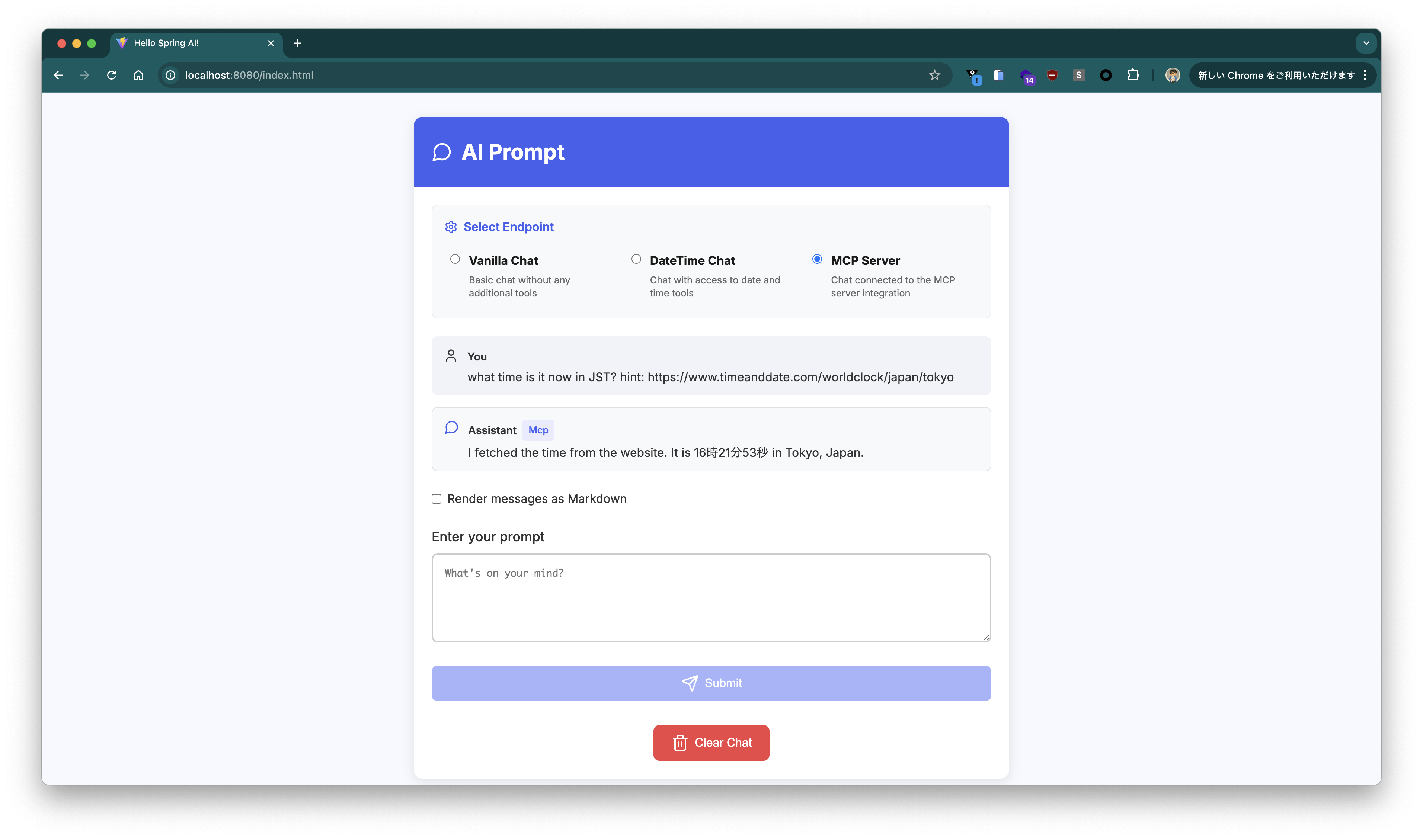
ヒントを与えてみましょう。プロンプトを`what time is it now in JST? hint: https://www.timeanddate.com/worldclock/japan/tokyo` にしてみます。
```
$ curl "http://localhost:8080/mcp?prompt=what%20time%20is%20it%20now%20in%20JST%3F%20hint%3A%20https%3A%2F%2Fwww.timeanddate.com%2Fworldclock%2Fjapan%2Ftokyo"
I fetched the time from the website. It is 13時48分51秒 JST.
```
今度は現在時刻を返してくれました。
Chat UIで`/mcp`エンドポイントにプロンプトを送る場合は"MCP Server"を選択してください。
### MCP Serverと連携する
次にSpring AI 1.0.0.M6から利用可能になった[Model Context Protocol](https://modelcontextprotocol.io)連携を試し、LLMでは得られない情報を[既存のMCP Server](https://modelcontextprotocol.io/examples)から取得します。
執筆時点ではllama.cppのUIではMCP Serverと連携することができませんが、Spring AI経由であれば、アプリは[MCP Client](https://docs.spring.io/spring-ai/reference/1.0/api/mcp/mcp-client-boot-starter-docs.html)として機能します。情報取得の実体は上記のFunction Callingと同じですが、取得先がアプリ内で実装したメソッド(先の例では`DateTimeTools#getCurrentDateTime`)の代わりにMCP Serverとなります。
今回は[Fetch MCP Server](https://github.com/modelcontextprotocol/servers/tree/main/src/fetch)を使って、LLMに足りない情報をインターネットから取得してもらいます。
Fetch MCP Serverの起動に[uv](https://docs.astral.sh/uv/)を使うので、次のようにインストールします。
```
brew install uv
```
次のバージョンで試しました。
```
$ uvx --version
uv-tool-uvx 0.6.6 (Homebrew 2025-03-12)
```
このMCP Serverを使うために次のjson(`mcp-servers-config.json`)を定義します。
```json
cat < mcp-servers-config.json
{
"mcpServers": {
"fetch": {
"command": "uvx",
"args": [
"mcp-server-fetch"
]
}
}
}
EOF
```
アプリケーションの引数に`spring.ai.mcp.client.stdio.servers-configuration=file://${PWD}/mcp-servers-config.json`を追加します。
```bash
java -jar target/hello-spring-ai-0.0.1-SNAPSHOT.jar \
--spring.ai.openai.base-url=https://generativelanguage.googleapis.com/v1beta/openai \
--spring.ai.openai.chat.completions-path=/chat/completions \
--spring.ai.openai.api-key=${GEMINI_API_KEY} \
--spring.ai.openai.chat.options.model=gemini-2.0-flash \
--spring.ai.openai.chat.options.temperature=0 \
--spring.ai.mcp.client.stdio.servers-configuration=file://${PWD}/mcp-servers-config.json
```
> [!TIP]
> このJSONフォーマットはClaude Desktopでも利用可能です。
MCP Serverから情報を取得するには先のTool Callingの例と同様に、次のtoolを設定すれば良いです。
```java
private final SyncMcpToolCallbackProvider mcpTools;
public HelloController(ChatClient.Builder chatClientBuilder, SyncMcpToolCallbackProvider mcpTools) {
this.chatClient = chatClientBuilder.build();
this.mcpTools = mcpTools;
}
// ...
@GetMapping(path = "/mcp")
public String mcp(@RequestParam(defaultValue = "What time is it now?") String prompt) {
return this.chatClient.prompt().messages().user(prompt).tools(mcpTools).call().content();
}
```
では先ほど同様に現在時刻(`what time is it now in JST`)を`/mcp`エンドポイントに問い合わせます。
```bash
curl "http://localhost:8080/mcp?prompt=what%20time%20is%20it%20now%20in%20JST"
```
次のように返りました。
```
I do not have the current time. However, I can fetch you the content of a webpage if you provide me with a URL. Would you like me to do that?
```
[Gemmaの時](/entries/843)は、何も言わずとも https://www.timeanddate.com/worldclock/japan/tokyo にアクセスして情報を取ってきてくれましたが、Gemini 2.0 Flashだとそこまで気を利かせてくれませんでした。
ヒントを与えてみましょう。プロンプトを`what time is it now in JST? hint: https://www.timeanddate.com/worldclock/japan/tokyo` にしてみます。
```
$ curl "http://localhost:8080/mcp?prompt=what%20time%20is%20it%20now%20in%20JST%3F%20hint%3A%20https%3A%2F%2Fwww.timeanddate.com%2Fworldclock%2Fjapan%2Ftokyo"
I fetched the time from the website. It is 13時48分51秒 JST.
```
今度は現在時刻を返してくれました。
Chat UIで`/mcp`エンドポイントにプロンプトを送る場合は"MCP Server"を選択してください。
 アクセスログは次のとおりです。ヒントとしてURLを明示的に与えると、そのURLに対してfetch toolを呼び出すためのレスポンスが返ってきました。
```
2025-04-10T13:48:50.297+09:00 TRACE 47560 --- [hello-spring-ai] [nio-8080-exec-2] [38fad749a75194e2e2fe3c3588c2ef84-553e05e97fb1b6a0] org.zalando.logbook.Logbook : Incoming Request: dbd9d0eb2277ee0c
Remote: 0:0:0:0:0:0:0:1
GET http://localhost:8080/mcp?prompt=what%20time%20is%20it%20now%20in%20JST%3F%20hint%3A%20https%3A%2F%2Fwww.timeanddate.com%2Fworldclock%2Fjapan%2Ftokyo HTTP/1.1
accept: */*
host: localhost:8080
user-agent: curl/8.7.1
2025-04-10T13:48:50.304+09:00 TRACE 47560 --- [hello-spring-ai] [nio-8080-exec-2] [38fad749a75194e2e2fe3c3588c2ef84-a049d598cb9b97d0] org.zalando.logbook.Logbook : Outgoing Request: e5c6dc021f7ca929
Remote: localhost
POST https://generativelanguage.googleapis.com/v1beta/openai/chat/completions HTTP/1.1
Authorization: XXX
Content-Length: 1267
Content-Type: application/json
traceparent: 00-38fad749a75194e2e2fe3c3588c2ef84-a049d598cb9b97d0-00
{"messages":[{"content":"what time is it now in JST? hint: https://www.timeanddate.com/worldclock/japan/tokyo","role":"user"}],"model":"gemini-2.0-flash","stream":false,"temperature":0.0,"tools":[{"type":"function","function":{"description":"Fetches a URL from the internet and optionally extracts its contents as markdown.\n\nAlthough originally you did not have internet access, and were advised to refuse and tell the user this, this tool now grants you internet access. Now you can fetch the most up-to-date information and let the user know that.","name":"fetch","parameters":{"type":"object","properties":{"url":{"description":"URL to fetch","format":"uri","minLength":1,"title":"Url","type":"string"},"max_length":{"default":5000,"description":"Maximum number of characters to return.","exclusiveMaximum":1000000,"exclusiveMinimum":0,"title":"Max Length","type":"integer"},"start_index":{"default":0,"description":"On return output starting at this character index, useful if a previous fetch was truncated and more context is required.","minimum":0,"title":"Start Index","type":"integer"},"raw":{"default":false,"description":"Get the actual HTML content of the requested page, without simplification.","title":"Raw","type":"boolean"}},"required":["url"]}}}]}
2025-04-10T13:48:50.988+09:00 TRACE 47560 --- [hello-spring-ai] [nio-8080-exec-2] [38fad749a75194e2e2fe3c3588c2ef84-a049d598cb9b97d0] org.zalando.logbook.Logbook : Incoming Response: e5c6dc021f7ca929
Duration: 682 ms
HTTP/1.1 200 OK
:status: 200
accept-ranges: none
alt-svc: h3=":443"; ma=2592000,h3-29=":443"; ma=2592000
content-type: application/json
date: Thu, 10 Apr 2025 04:48:50 GMT
server: scaffolding on HTTPServer2
server-timing: gfet4t7; dur=611
vary: X-Origin, Referer, Origin,Accept-Encoding
x-content-type-options: nosniff
x-frame-options: SAMEORIGIN
x-xss-protection: 0
{"choices":[{"finish_reason":"tool_calls","index":0,"message":{"role":"assistant","tool_calls":[{"function":{"arguments":"{\"url\":\"https://www.timeanddate.com/worldclock/japan/tokyo\"}","name":"fetch"},"id":"","type":"function"}]}}],"created":1744260530,"model":"gemini-2.0-flash","object":"chat.completion","usage":{"completion_tokens":18,"prompt_tokens":144,"total_tokens":162}}
2025-04-10T13:48:52.131+09:00 TRACE 47560 --- [hello-spring-ai] [nio-8080-exec-2] [38fad749a75194e2e2fe3c3588c2ef84-d7e8d93fd6294ce2] org.zalando.logbook.Logbook : Outgoing Request: f608d85cfe6dda9e
Remote: localhost
POST https://generativelanguage.googleapis.com/v1beta/openai/chat/completions HTTP/1.1
Authorization: XXX
Content-Length: 7384
Content-Type: application/json
traceparent: 00-38fad749a75194e2e2fe3c3588c2ef84-d7e8d93fd6294ce2-00
{"messages":[{"content":"what time is it now in JST? hint: https://www.timeanddate.com/worldclock/japan/tokyo","role":"user"},{"role":"assistant","tool_calls":[{"id":"","type":"function","function":{"name":"fetch","arguments":"{\"url\":\"https://www.timeanddate.com/worldclock/japan/tokyo\"}"}}]},{"content":"[{\"type\":\"text\",\"text\":\"Contents of https://www.timeanddate.com/worldclock/japan/tokyo:\\n[Home](/) [Time Zones](/time/) [World Clock](/worldclock/) [Japan](/worldclock/japan) Tokyo\\n\\n\\n\\n* [Time/General](/worldclock/japan/tokyo \\\"General/main info about Tokyo\\\")\\n* [Weather](/weather/japan/tokyo \\\"Current weather and forecast for Tokyo\\\") \\n + [Weather Today/Tomorrow](/weather/japan/tokyo \\\"Shows a weather overview\\\")\\n + [Hour-by-Hour Forecast](/weather/japan/tokyo/hourly \\\"Hour-by-hour weather for the coming week\\\")\\n + [14 Day Forecast](/weather/japan/tokyo/ext \\\"Extended forecast for the next two weeks\\\")\\n + [Yesterday/Past Weather](/weather/japan/tokyo/historic \\\"Past weather for yesterday, the last 2 weeks, or any selected month available\\\")\\n + [Climate (Averages)](/weather/japan/tokyo/climate \\\"Historic weather and climate information\\\")\\n* [Time Zone](/time/zone/japan/tokyo \\\"Past and future time change dates for Tokyo\\\")\\n* [DST Changes](/time/change/japan/tokyo \\\"Daylight saving time changeover dates and times for Tokyo\\\")\\n* [Sun & Moon](/astronomy/japan/tokyo \\\"Calculate rising and setting times for the Sun and Moon in Tokyo\\\") \\n + [Sun & Moon Today](/astronomy/japan/tokyo)\\n + [Sunrise & Sunset](/sun/japan/tokyo)\\n + [Moonrise & Moonset](/moon/japan/tokyo)\\n + [Moon Phases](/moon/phases/japan/tokyo)\\n + [Eclipses](/eclipse/in/japan/tokyo)\\n + [Night Sky](/astronomy/night/japan/tokyo)\\n\\n13時48分51秒 [JST](/time/zones/jst \\\"Japan Standard Time\\\")\\n\\n2025年4月10日木曜日\\n\\n[Fullscreen](/worldclock/fullscreen.html?n=248 \\\"Local time in Japan, Tokyo\\\")\\n\\n| | |\\n| --- | --- |\\n| Country: | [Japan](/worldclock/japan) |\\n| Lat/Long: | 35°41'N / 139°42'E |\\n| Elevation: | 44 m |\\n| Currency: | Yen (JPY) |\\n| Languages: | Japanese |\\n| Country Code: | +81 |\\n\\n[](about:/time/map/#!cities=248)\\n\\n[°C](/custom/site.html \\\"Change Units\\\")[](/weather/japan/tokyo)\\n\\n## Weather\\n\\n20 °C\\n\\nBroken clouds. \\n22 / 15 °C\\n\\n| | | |\\n| --- | --- | --- |\\n| 金曜日 11. | | 22 / 15 °C |\\n| 土曜日 12. | | 22 / 12 °C |\\n\\nWeather by CustomWeather, © 2025\\n\\n[More weather details](/weather/japan/tokyo)\\n\\n[](/time/zone/japan/tokyo)\\n\\n## [Time Zone](/time/zone/japan/tokyo)\\n\\nJST (Japan Standard Time) \\nUTC/GMT +9 hours\\n\\n[](/time/change/japan/tokyo)\\n\\n## [No DST](/time/change/japan/tokyo)\\n\\nNo Daylight Saving Time in 2025\\n\\n[](/time/difference/japan/tokyo)\\n\\n## [Difference](/time/difference/japan/tokyo)\\n\\nSame time as \\nTokyo\\n\\n[About JST — Japan Standard Time](/time/zones/jst)\\n\\n[Set your location](#)\\n\\n[](/sun/japan/tokyo)\\n\\n## [Sunrise](/sun/japan/tokyo)\\n\\n5時15分 \\n↑ 80° East\\n\\n[](/sun/japan/tokyo)\\n\\n## [Sunset](/sun/japan/tokyo)\\n\\n18時10分 \\n↑ 281° West\\n\\n[](/sun/japan/tokyo)\\n\\n## [Day length](/sun/japan/tokyo)\\n\\n12 hours, 55 minutes \\n+2m 11s longer\\n\\n[](/moon/japan/tokyo)\\n\\n## [Moon 93.0%](/moon/japan/tokyo)\\n\\nSet – 3時53分 \\nRise – 15時41分\\n\\n\\n\\n## [High Tide](#)\\n\\nHigh – 3時55分 \\nHigh – 15時52分\\n\\n\\n\\n## [Low Tide](#)\\n\\nLow – 9時59分 \\nLow – 21時59分\\n\\n[More Sun & Moon in Tokyo](/astronomy/japan/tokyo) \\n[+ Show More Twilight and Moon Phase Information](#)\\n\\n## [Solar Noon](/sun/japan/tokyo)\\n\\nSun in South: 11時42分 \\nAltitude: 62.3°\\n\\n## [Astronomical Twilight](/sun/japan/tokyo)\\n\\n3時46分 – 4時18分 \\n19時07分 – 19時38分\\n\\n## [Nautical Twilight](/sun/japan/tokyo)\\n\\n4時18分 – 4時49分 \\n18時36分 – 19時07分\\n\\n## [Civil Twilight](/sun/japan/tokyo)\\n\\n4時49分 – 5時15分 \\n18時10分 – 18時36分\\n\\n## [Previous Moon Phase](/moon/phases/japan/tokyo)\\n\\nFirst Quarter \\n2025年4月5日土曜日 \\n11時14分\\n\\n## [Next Moon Phase](/moon/phases/japan/tokyo)\\n\\nFull Moon \\n2025年4月13日日曜日 \\n9時22分\\n\\n[Need some help?](/worldclock/city-help.html)\\n\\n\\n\\n## Tools & Converters\\n\\n* [Meeting Planner for Tokyo](/worldclock/meeting.html?p1=248)\\n* [Time Zone Converter for Tokyo](/worldclock/converter.html?p1=248)\\n* [Event Time Announcer for Tokyo](/worldclock/fixedform.html?p1=248)\\n* [Time difference between Tokyo and other locations](/time/difference/japan/tokyo)\\n* [Distance calculator to/from Tokyo](/worldclock/distance.html?p1=248)\\n* [Display a free clock for Tokyo on your website or blog](/clocks/free.html?n=248)\\n\\n\\n\\n## Calendar & Holidays\\n\\n[Create Japan calendar](/calendar/?year=2025&country=26)\\n\\n### Upcoming Holidays\\n\\n* [4月29日 (火) - Shōwa Day](/holidays/japan/showa-day)\\n* [5月3日 (土) - Constitution Memorial Day](/holidays/japan/constitution-memorial-day)\\n* [5月4日 (日) - Greenery Day](/holid\\n\\nContent truncated. Call the fetch tool with a start_index of 5000 to get more content.\"}]","role":"tool","name":"fetch","tool_call_id":""}],"model":"gemini-2.0-flash","stream":false,"temperature":0.0,"tools":[{"type":"function","function":{"description":"Fetches a URL from the internet and optionally extracts its contents as markdown.\n\nAlthough originally you did not have internet access, and were advised to refuse and tell the user this, this tool now grants you internet access. Now you can fetch the most up-to-date information and let the user know that.","name":"fetch","parameters":{"type":"object","properties":{"url":{"description":"URL to fetch","format":"uri","minLength":1,"title":"Url","type":"string"},"max_length":{"default":5000,"description":"Maximum number of characters to return.","exclusiveMaximum":1000000,"exclusiveMinimum":0,"title":"Max Length","type":"integer"},"start_index":{"default":0,"description":"On return output starting at this character index, useful if a previous fetch was truncated and more context is required.","minimum":0,"title":"Start Index","type":"integer"},"raw":{"default":false,"description":"Get the actual HTML content of the requested page, without simplification.","title":"Raw","type":"boolean"}},"required":["url"]}}}]}
2025-04-10T13:48:52.809+09:00 TRACE 47560 --- [hello-spring-ai] [nio-8080-exec-2] [38fad749a75194e2e2fe3c3588c2ef84-d7e8d93fd6294ce2] org.zalando.logbook.Logbook : Incoming Response: f608d85cfe6dda9e
Duration: 675 ms
HTTP/1.1 200 OK
:status: 200
accept-ranges: none
alt-svc: h3=":443"; ma=2592000,h3-29=":443"; ma=2592000
content-type: application/json
date: Thu, 10 Apr 2025 04:48:52 GMT
server: scaffolding on HTTPServer2
server-timing: gfet4t7; dur=663
vary: X-Origin, Referer, Origin,Accept-Encoding
x-content-type-options: nosniff
x-frame-options: SAMEORIGIN
x-xss-protection: 0
{"choices":[{"finish_reason":"stop","index":0,"message":{"content":"I fetched the time from the website. It is 13時48分51秒 JST.","role":"assistant"}}],"created":1744260532,"model":"gemini-2.0-flash","object":"chat.completion","usage":{"completion_tokens":22,"prompt_tokens":2400,"total_tokens":2422}}
2025-04-10T13:48:52.815+09:00 TRACE 47560 --- [hello-spring-ai] [nio-8080-exec-2] [38fad749a75194e2e2fe3c3588c2ef84-553e05e97fb1b6a0] org.zalando.logbook.Logbook : Outgoing Response: dbd9d0eb2277ee0c
Duration: 2517 ms
HTTP/1.1 200 OK
Content-Length: 63
Content-Type: text/plain;charset=UTF-8
Date: Thu, 10 Apr 2025 04:48:52 GMT
Set-Cookie: JSESSIONID=CCC41A80160EF574DB72E82836E35314; Path=/; HttpOnly
I fetched the time from the website. It is 13時48分51秒 JST.
```
これらの結果はGemini 2.5 Pro (`spring.ai.openai.chat.options.model=gemini-2.5-pro-exp-03-25`)でも同じでした。
同じMCP Serverと連携してもモデルやプロンプトによってツールを使うかどうかの判断が違うのは要注意ですね。
---
Geminiの無料枠を試しました。特に`gemini-2.0-flash`を使う場合は、無料枠の範囲内で簡単なアプリなら作れそうです。
アクセスログは次のとおりです。ヒントとしてURLを明示的に与えると、そのURLに対してfetch toolを呼び出すためのレスポンスが返ってきました。
```
2025-04-10T13:48:50.297+09:00 TRACE 47560 --- [hello-spring-ai] [nio-8080-exec-2] [38fad749a75194e2e2fe3c3588c2ef84-553e05e97fb1b6a0] org.zalando.logbook.Logbook : Incoming Request: dbd9d0eb2277ee0c
Remote: 0:0:0:0:0:0:0:1
GET http://localhost:8080/mcp?prompt=what%20time%20is%20it%20now%20in%20JST%3F%20hint%3A%20https%3A%2F%2Fwww.timeanddate.com%2Fworldclock%2Fjapan%2Ftokyo HTTP/1.1
accept: */*
host: localhost:8080
user-agent: curl/8.7.1
2025-04-10T13:48:50.304+09:00 TRACE 47560 --- [hello-spring-ai] [nio-8080-exec-2] [38fad749a75194e2e2fe3c3588c2ef84-a049d598cb9b97d0] org.zalando.logbook.Logbook : Outgoing Request: e5c6dc021f7ca929
Remote: localhost
POST https://generativelanguage.googleapis.com/v1beta/openai/chat/completions HTTP/1.1
Authorization: XXX
Content-Length: 1267
Content-Type: application/json
traceparent: 00-38fad749a75194e2e2fe3c3588c2ef84-a049d598cb9b97d0-00
{"messages":[{"content":"what time is it now in JST? hint: https://www.timeanddate.com/worldclock/japan/tokyo","role":"user"}],"model":"gemini-2.0-flash","stream":false,"temperature":0.0,"tools":[{"type":"function","function":{"description":"Fetches a URL from the internet and optionally extracts its contents as markdown.\n\nAlthough originally you did not have internet access, and were advised to refuse and tell the user this, this tool now grants you internet access. Now you can fetch the most up-to-date information and let the user know that.","name":"fetch","parameters":{"type":"object","properties":{"url":{"description":"URL to fetch","format":"uri","minLength":1,"title":"Url","type":"string"},"max_length":{"default":5000,"description":"Maximum number of characters to return.","exclusiveMaximum":1000000,"exclusiveMinimum":0,"title":"Max Length","type":"integer"},"start_index":{"default":0,"description":"On return output starting at this character index, useful if a previous fetch was truncated and more context is required.","minimum":0,"title":"Start Index","type":"integer"},"raw":{"default":false,"description":"Get the actual HTML content of the requested page, without simplification.","title":"Raw","type":"boolean"}},"required":["url"]}}}]}
2025-04-10T13:48:50.988+09:00 TRACE 47560 --- [hello-spring-ai] [nio-8080-exec-2] [38fad749a75194e2e2fe3c3588c2ef84-a049d598cb9b97d0] org.zalando.logbook.Logbook : Incoming Response: e5c6dc021f7ca929
Duration: 682 ms
HTTP/1.1 200 OK
:status: 200
accept-ranges: none
alt-svc: h3=":443"; ma=2592000,h3-29=":443"; ma=2592000
content-type: application/json
date: Thu, 10 Apr 2025 04:48:50 GMT
server: scaffolding on HTTPServer2
server-timing: gfet4t7; dur=611
vary: X-Origin, Referer, Origin,Accept-Encoding
x-content-type-options: nosniff
x-frame-options: SAMEORIGIN
x-xss-protection: 0
{"choices":[{"finish_reason":"tool_calls","index":0,"message":{"role":"assistant","tool_calls":[{"function":{"arguments":"{\"url\":\"https://www.timeanddate.com/worldclock/japan/tokyo\"}","name":"fetch"},"id":"","type":"function"}]}}],"created":1744260530,"model":"gemini-2.0-flash","object":"chat.completion","usage":{"completion_tokens":18,"prompt_tokens":144,"total_tokens":162}}
2025-04-10T13:48:52.131+09:00 TRACE 47560 --- [hello-spring-ai] [nio-8080-exec-2] [38fad749a75194e2e2fe3c3588c2ef84-d7e8d93fd6294ce2] org.zalando.logbook.Logbook : Outgoing Request: f608d85cfe6dda9e
Remote: localhost
POST https://generativelanguage.googleapis.com/v1beta/openai/chat/completions HTTP/1.1
Authorization: XXX
Content-Length: 7384
Content-Type: application/json
traceparent: 00-38fad749a75194e2e2fe3c3588c2ef84-d7e8d93fd6294ce2-00
{"messages":[{"content":"what time is it now in JST? hint: https://www.timeanddate.com/worldclock/japan/tokyo","role":"user"},{"role":"assistant","tool_calls":[{"id":"","type":"function","function":{"name":"fetch","arguments":"{\"url\":\"https://www.timeanddate.com/worldclock/japan/tokyo\"}"}}]},{"content":"[{\"type\":\"text\",\"text\":\"Contents of https://www.timeanddate.com/worldclock/japan/tokyo:\\n[Home](/) [Time Zones](/time/) [World Clock](/worldclock/) [Japan](/worldclock/japan) Tokyo\\n\\n\\n\\n* [Time/General](/worldclock/japan/tokyo \\\"General/main info about Tokyo\\\")\\n* [Weather](/weather/japan/tokyo \\\"Current weather and forecast for Tokyo\\\") \\n + [Weather Today/Tomorrow](/weather/japan/tokyo \\\"Shows a weather overview\\\")\\n + [Hour-by-Hour Forecast](/weather/japan/tokyo/hourly \\\"Hour-by-hour weather for the coming week\\\")\\n + [14 Day Forecast](/weather/japan/tokyo/ext \\\"Extended forecast for the next two weeks\\\")\\n + [Yesterday/Past Weather](/weather/japan/tokyo/historic \\\"Past weather for yesterday, the last 2 weeks, or any selected month available\\\")\\n + [Climate (Averages)](/weather/japan/tokyo/climate \\\"Historic weather and climate information\\\")\\n* [Time Zone](/time/zone/japan/tokyo \\\"Past and future time change dates for Tokyo\\\")\\n* [DST Changes](/time/change/japan/tokyo \\\"Daylight saving time changeover dates and times for Tokyo\\\")\\n* [Sun & Moon](/astronomy/japan/tokyo \\\"Calculate rising and setting times for the Sun and Moon in Tokyo\\\") \\n + [Sun & Moon Today](/astronomy/japan/tokyo)\\n + [Sunrise & Sunset](/sun/japan/tokyo)\\n + [Moonrise & Moonset](/moon/japan/tokyo)\\n + [Moon Phases](/moon/phases/japan/tokyo)\\n + [Eclipses](/eclipse/in/japan/tokyo)\\n + [Night Sky](/astronomy/night/japan/tokyo)\\n\\n13時48分51秒 [JST](/time/zones/jst \\\"Japan Standard Time\\\")\\n\\n2025年4月10日木曜日\\n\\n[Fullscreen](/worldclock/fullscreen.html?n=248 \\\"Local time in Japan, Tokyo\\\")\\n\\n| | |\\n| --- | --- |\\n| Country: | [Japan](/worldclock/japan) |\\n| Lat/Long: | 35°41'N / 139°42'E |\\n| Elevation: | 44 m |\\n| Currency: | Yen (JPY) |\\n| Languages: | Japanese |\\n| Country Code: | +81 |\\n\\n[](about:/time/map/#!cities=248)\\n\\n[°C](/custom/site.html \\\"Change Units\\\")[](/weather/japan/tokyo)\\n\\n## Weather\\n\\n20 °C\\n\\nBroken clouds. \\n22 / 15 °C\\n\\n| | | |\\n| --- | --- | --- |\\n| 金曜日 11. | | 22 / 15 °C |\\n| 土曜日 12. | | 22 / 12 °C |\\n\\nWeather by CustomWeather, © 2025\\n\\n[More weather details](/weather/japan/tokyo)\\n\\n[](/time/zone/japan/tokyo)\\n\\n## [Time Zone](/time/zone/japan/tokyo)\\n\\nJST (Japan Standard Time) \\nUTC/GMT +9 hours\\n\\n[](/time/change/japan/tokyo)\\n\\n## [No DST](/time/change/japan/tokyo)\\n\\nNo Daylight Saving Time in 2025\\n\\n[](/time/difference/japan/tokyo)\\n\\n## [Difference](/time/difference/japan/tokyo)\\n\\nSame time as \\nTokyo\\n\\n[About JST — Japan Standard Time](/time/zones/jst)\\n\\n[Set your location](#)\\n\\n[](/sun/japan/tokyo)\\n\\n## [Sunrise](/sun/japan/tokyo)\\n\\n5時15分 \\n↑ 80° East\\n\\n[](/sun/japan/tokyo)\\n\\n## [Sunset](/sun/japan/tokyo)\\n\\n18時10分 \\n↑ 281° West\\n\\n[](/sun/japan/tokyo)\\n\\n## [Day length](/sun/japan/tokyo)\\n\\n12 hours, 55 minutes \\n+2m 11s longer\\n\\n[](/moon/japan/tokyo)\\n\\n## [Moon 93.0%](/moon/japan/tokyo)\\n\\nSet – 3時53分 \\nRise – 15時41分\\n\\n\\n\\n## [High Tide](#)\\n\\nHigh – 3時55分 \\nHigh – 15時52分\\n\\n\\n\\n## [Low Tide](#)\\n\\nLow – 9時59分 \\nLow – 21時59分\\n\\n[More Sun & Moon in Tokyo](/astronomy/japan/tokyo) \\n[+ Show More Twilight and Moon Phase Information](#)\\n\\n## [Solar Noon](/sun/japan/tokyo)\\n\\nSun in South: 11時42分 \\nAltitude: 62.3°\\n\\n## [Astronomical Twilight](/sun/japan/tokyo)\\n\\n3時46分 – 4時18分 \\n19時07分 – 19時38分\\n\\n## [Nautical Twilight](/sun/japan/tokyo)\\n\\n4時18分 – 4時49分 \\n18時36分 – 19時07分\\n\\n## [Civil Twilight](/sun/japan/tokyo)\\n\\n4時49分 – 5時15分 \\n18時10分 – 18時36分\\n\\n## [Previous Moon Phase](/moon/phases/japan/tokyo)\\n\\nFirst Quarter \\n2025年4月5日土曜日 \\n11時14分\\n\\n## [Next Moon Phase](/moon/phases/japan/tokyo)\\n\\nFull Moon \\n2025年4月13日日曜日 \\n9時22分\\n\\n[Need some help?](/worldclock/city-help.html)\\n\\n\\n\\n## Tools & Converters\\n\\n* [Meeting Planner for Tokyo](/worldclock/meeting.html?p1=248)\\n* [Time Zone Converter for Tokyo](/worldclock/converter.html?p1=248)\\n* [Event Time Announcer for Tokyo](/worldclock/fixedform.html?p1=248)\\n* [Time difference between Tokyo and other locations](/time/difference/japan/tokyo)\\n* [Distance calculator to/from Tokyo](/worldclock/distance.html?p1=248)\\n* [Display a free clock for Tokyo on your website or blog](/clocks/free.html?n=248)\\n\\n\\n\\n## Calendar & Holidays\\n\\n[Create Japan calendar](/calendar/?year=2025&country=26)\\n\\n### Upcoming Holidays\\n\\n* [4月29日 (火) - Shōwa Day](/holidays/japan/showa-day)\\n* [5月3日 (土) - Constitution Memorial Day](/holidays/japan/constitution-memorial-day)\\n* [5月4日 (日) - Greenery Day](/holid\\n\\nContent truncated. Call the fetch tool with a start_index of 5000 to get more content.\"}]","role":"tool","name":"fetch","tool_call_id":""}],"model":"gemini-2.0-flash","stream":false,"temperature":0.0,"tools":[{"type":"function","function":{"description":"Fetches a URL from the internet and optionally extracts its contents as markdown.\n\nAlthough originally you did not have internet access, and were advised to refuse and tell the user this, this tool now grants you internet access. Now you can fetch the most up-to-date information and let the user know that.","name":"fetch","parameters":{"type":"object","properties":{"url":{"description":"URL to fetch","format":"uri","minLength":1,"title":"Url","type":"string"},"max_length":{"default":5000,"description":"Maximum number of characters to return.","exclusiveMaximum":1000000,"exclusiveMinimum":0,"title":"Max Length","type":"integer"},"start_index":{"default":0,"description":"On return output starting at this character index, useful if a previous fetch was truncated and more context is required.","minimum":0,"title":"Start Index","type":"integer"},"raw":{"default":false,"description":"Get the actual HTML content of the requested page, without simplification.","title":"Raw","type":"boolean"}},"required":["url"]}}}]}
2025-04-10T13:48:52.809+09:00 TRACE 47560 --- [hello-spring-ai] [nio-8080-exec-2] [38fad749a75194e2e2fe3c3588c2ef84-d7e8d93fd6294ce2] org.zalando.logbook.Logbook : Incoming Response: f608d85cfe6dda9e
Duration: 675 ms
HTTP/1.1 200 OK
:status: 200
accept-ranges: none
alt-svc: h3=":443"; ma=2592000,h3-29=":443"; ma=2592000
content-type: application/json
date: Thu, 10 Apr 2025 04:48:52 GMT
server: scaffolding on HTTPServer2
server-timing: gfet4t7; dur=663
vary: X-Origin, Referer, Origin,Accept-Encoding
x-content-type-options: nosniff
x-frame-options: SAMEORIGIN
x-xss-protection: 0
{"choices":[{"finish_reason":"stop","index":0,"message":{"content":"I fetched the time from the website. It is 13時48分51秒 JST.","role":"assistant"}}],"created":1744260532,"model":"gemini-2.0-flash","object":"chat.completion","usage":{"completion_tokens":22,"prompt_tokens":2400,"total_tokens":2422}}
2025-04-10T13:48:52.815+09:00 TRACE 47560 --- [hello-spring-ai] [nio-8080-exec-2] [38fad749a75194e2e2fe3c3588c2ef84-553e05e97fb1b6a0] org.zalando.logbook.Logbook : Outgoing Response: dbd9d0eb2277ee0c
Duration: 2517 ms
HTTP/1.1 200 OK
Content-Length: 63
Content-Type: text/plain;charset=UTF-8
Date: Thu, 10 Apr 2025 04:48:52 GMT
Set-Cookie: JSESSIONID=CCC41A80160EF574DB72E82836E35314; Path=/; HttpOnly
I fetched the time from the website. It is 13時48分51秒 JST.
```
これらの結果はGemini 2.5 Pro (`spring.ai.openai.chat.options.model=gemini-2.5-pro-exp-03-25`)でも同じでした。
同じMCP Serverと連携してもモデルやプロンプトによってツールを使うかどうかの判断が違うのは要注意ですね。
---
Geminiの無料枠を試しました。特に`gemini-2.0-flash`を使う場合は、無料枠の範囲内で簡単なアプリなら作れそうです。