Tanzu for Postgres on Kubernetes 4.3をインストールしてSpring Bootアプリからアクセスするメモ
以前の記事でTanzu for Postgres on Kubernetes 4.0を試しました。
Tanzu for Postgres on Kubernetes 4.3がリリースされ、 インストールの方法が若干変わったため、ほぼ同じ内容で再度メモします。
目次
Tanzu for Postgres on Kubernetes Docker Registryのアクセストークン取得
まずはこのHelmチャートが配布されているDocker Registryにアクセスするためのアクセストークンを取得します。
Broadcom Supportにログインして、"My Downloads"を選択し、"postgres"で検索します。
検索結果から"VMware Tanzu for Postgres on Kubernetes"をクリックします。
バージョン"4.3.1"の"Token Download"アイコンをクリックします。

次のようなダイアログが現れます。
下にスクロールするとRegistryの情報の記載が見えます。
次のコマンドでtanzu-sql-postgres.packages.broadcom.comにログインします。認証情報を自分のものに置き換えてください。
BC_SUPPORT_USERNAME=toshiaki.maki@broadcom.com
BC_SUPPORT_PASSWORD=eyJ2ZXI*************************************
docker login tanzu-sql-postgres.packages.broadcom.com -u ${BC_SUPPORT_USERNAME} -p ${BC_SUPPORT_PASSWORD}
これで次のコマンドでtanzu-sql-postgres.packages.broadcom.comからHelm Chartをpullできます。
helm pull oci://tanzu-sql-postgres.packages.broadcom.com/vmware-sql-postgres-operator --version v4.3.1 --untar --untardir /tmp
ただし、このトークンは有効期限があり、期限が切れるたびにローテートするのが面倒くさいので、今回はこのRegistryから直接Pullするのではなく、内部ネットワーク内のPrivate Registryであるregistry.example.comにリロケートした上で使用することとします。registry.example.comは自分の環境に変えてください。
Warning
ライセンスの期限を超えて、このソフトウェアを使用することは禁止されています。リロケートした後も、ライセンス条件に従って使用してください。
Helm ChartとコンテナイメージをPrivate Registryへリロケート
次のコマンドでregistry.example.comにログインします。認証情報を自分のものに置き換えてください。registry.example.com以外のRegistryでも良いです。
REGISTRY_USERNAME=username
REGISTRY_PASSWORD=changeme
docker login registry.example.com -u ${REGISTRY_USERNAME} -p ${REGISTRY_PASSWORD}
リロケートにはimgpkgを使用します。
imgpkg copy -i tanzu-sql-postgres.packages.broadcom.com/vmware-sql-postgres-operator:v4.3.1 --to-repo registry.example.com/tanzu-sql-postgres/vmware-sql-postgres-operator
リロケート後のHelm Chartにアクセスして設定可能なvaluesを確認します。
$ helm show values oci://registry.example.com/tanzu-sql-postgres/vmware-sql-postgres-operator --version v4.3.1
Pulled: registry.example.com/tanzu-sql-postgres/vmware-sql-postgres-operator:v4.3.1
Digest: sha256:20cd8e22a7d0c903e608c3b21f9b344f81f19730047372e7bc499f5f0425b638
---
# specify the url for the docker image for the operator, e.g. gcr.io/<my_project>/postgres-operator
operatorImage: tanzu-sql-postgres.packages.broadcom.com/postgres-operator:v4.3.1

# specify the docker image repository for postgres instance, e.g. gcr.io/<my_project>/postgres-instance
instanceRegistryRepo: tanzu-sql-postgres.packages.broadcom.com/postgres-instance

# specify the docker image repository for ferretdb instances (optional - only needed if deploying FerretDB instances)
# e.g. gcr.io/<my_project>/ferret-db
ferretDBImageRepo: ""

# specify the name of the docker-registry secret to allow the cluster to authenticate with the container registry for pulling images
dockerRegistrySecretName: regsecret

# override the default self-signed cert-manager cluster issuer
certManagerClusterIssuerName: postgres-operator-ca-certificate-cluster-issuer

# override the namespace of the cert-manager installation namespace
certManagerNamespace: cert-manager

# set the resources for the postgres operator deployment
resources: { }
#  limits:
#    cpu: 500m
#    memory: 300Mi
#  requests:
#    cpu: 500m
#    memory: 300Mi

# enabled security context for the postgres-operator deployment and the managed instances, typically disabled on OpenShift clusters
enableSecurityContext: true
OperatorのImageとPostgres InstanceのImageもtanzu-sql-postgres.packages.broadcom.comからregistry.example.comにリロケートします。
4.3から、バージョン毎にPostgresインスタンス用のコンテナイメージが用意されるようになったため、必要なバージョン分をリロケートします。各バージョン毎に、full版とlite版のイメージがあります。
Note
full版とlite版ではインストールされているextensionに違いがあります。違いはこちらのドキュメントを参照してください。
次のコマンドでイメージをリロケートします。ここでは最新のPostgres 17.5のfull版とlite版をリロケートしています。
imgpkg copy -i tanzu-sql-postgres.packages.broadcom.com/postgres-operator:v4.3.1 --to-repo registry.example.com/tanzu-sql-postgres/postgres-operator
imgpkg copy -i tanzu-sql-postgres.packages.broadcom.com/postgres-instance:v17.5-v4.3.1 --to-repo registry.example.com/tanzu-sql-postgres/postgres-instance
imgpkg copy -i tanzu-sql-postgres.packages.broadcom.com/postgres-instance:v17.5-lite-v4.3.1 --to-repo registry.example.com/tanzu-sql-postgres/postgres-instance
他にサポートされているバージョンはリリースノートに記載されています。 必要であれば、次のようにまとめてリロケートします。
for ver in 17.4 16.9 16.8 15.13 15.12 14.18 14.17 13.21 13.20; do
  imgpkg copy -i tanzu-sql-postgres.packages.broadcom.com/postgres-instance:v${ver}-v4.3.1 --to-repo registry.example.com/tanzu-sql-postgres/postgres-instance
  imgpkg copy -i tanzu-sql-postgres.packages.broadcom.com/postgres-instance:v${ver}-lite-v4.3.1 --to-repo registry.example.com/tanzu-sql-postgres/postgres-instance
done
本記事では扱いませんが、FerretDBも使えるようになったので、FerretDB用のコンテナイメージもリロケートしておきます。
imgpkg copy -i tanzu-sql-postgres.packages.broadcom.com/ferretdb:v2.3.1 --to-repo registry.example.com/tanzu-sql-postgres/ferretdb
Postgres Operatorのインストール
ここではpostgres-system namespaceにPostgres Operatorをインストールします。
Docker Pull Secretの名前はデフォルトでregsecretです。
次のコマンドでnamespaceとsecretを作成します。
kubectl create namespace postgres-system
kubectl create secret docker-registry regsecret \
    --docker-server=registry.example.com \
    --docker-username=${REGISTRY_USERNAME} \
    --docker-password="${REGISTRY_PASSWORD}" \
    -n  postgres-system
Postgres Operatorの前提条件としてcert-managerが必要なので、cert-managerが未インストールの場合は次のコマンドでインストールします。
kubectl apply -f https://github.com/cert-manager/cert-manager/releases/download/v1.19.1/cert-manager.yaml
次のコマンドでPostgres Operatorをインストールします。リロケート後のChartとコンテナイメージを指定します。
helm upgrade --install \
  -n postgres-system \
  postgres-operator \
  oci://registry.example.com/tanzu-sql-postgres/vmware-sql-postgres-operator \
  --version v4.3.1 \
  --set operatorImage=registry.example.com/tanzu-sql-postgres/postgres-operator:v4.3.1 \
  --set instanceRegistryRepo=registry.example.com/tanzu-sql-postgres/postgres-instance \
  --wait
しばらくするとインストールが完了します。helm listでインストール状態を確認できます。
$ helm list -n postgres-system
NAME             	NAMESPACE      	REVISION	UPDATED                             	STATUS  	CHART                              	APP VERSION
postgres-operator	postgres-system	1       	2025-11-28 11:25:22.277037 +0900 JST	deployed	vmware-sql-postgres-operator-v4.3.1	latest
次のコマンドで、Postgres OperatorのPodの状態を確認します。
$ kubectl get pod -n postgres-system
NAME                                 READY   STATUS    RESTARTS   AGE
postgres-operator-559d4b6478-qs6rz   1/1     Running   0          35s
次のコマンドで、このPostgres Operatorで利用可能なカスタムリソースを確認します。
$ kubectl api-resources --api-group=sql.tanzu.vmware.com
NAME                        SHORTNAMES   APIVERSION                NAMESPACED   KIND
postgres                    pg           sql.tanzu.vmware.com/v1   true         Postgres
postgresbackuplocations     pgbkpl       sql.tanzu.vmware.com/v1   true         PostgresBackupLocation
postgresbackups             pgbkp        sql.tanzu.vmware.com/v1   true         PostgresBackup
postgresbackupschedules                  sql.tanzu.vmware.com/v1   true         PostgresBackupSchedule
postgresferretdocumentdbs                sql.tanzu.vmware.com/v1   true         PostgresFerretDocumentDB
postgresmigrations          pgmigr       sql.tanzu.vmware.com/v1   true         PostgresMigration
postgresrestores            pgrstr       sql.tanzu.vmware.com/v1   true         PostgresRestore
postgresversions            pgver        sql.tanzu.vmware.com/v1   false        PostgresVersion
postgresversionupgrades                  sql.tanzu.vmware.com/v1   true         PostgresVersionUpgrade
次のコマンドで、利用可能なPostgresのバージョンを確認します。
$ kubectl get postgresversion
NAME                  DB VERSION
postgres-13.20        13.20
postgres-13.20-lite   13.20
postgres-13.21        13.21
postgres-13.21-lite   13.21
postgres-14.17        14.17
postgres-14.17-lite   14.17
postgres-14.18        14.18
postgres-14.18-lite   14.18
postgres-15.12        15.12
postgres-15.12-lite   15.12
postgres-15.13        15.13
postgres-15.13-lite   15.13
postgres-16.8         16.8
postgres-16.8-lite    16.8
postgres-16.9         16.9
postgres-16.9-lite    16.9
postgres-17.4         17.4
postgres-17.4-lite    17.4
postgres-17.5         17.5
postgres-17.5-lite    17.5
次のコマンドで、Postgres 17.5のPostgresVersionリソースの内容を確認します。instanceImageにリロケート後のコンテナイメージが指定されていることを確認してください。
$ kubectl get postgresversion postgres-17.5 -oyaml
apiVersion: sql.tanzu.vmware.com/v1
kind: PostgresVersion
metadata:
  annotations:
    meta.helm.sh/release-name: postgres-operator
    meta.helm.sh/release-namespace: postgres-system
  creationTimestamp: "2025-11-28T02:25:25Z"
  generation: 2
  labels:
    app.kubernetes.io/managed-by: Helm
  name: postgres-17.5
  resourceVersion: "34248"
  uid: abd8b13b-63b3-4a16-af3e-4dd8999e0248
spec:
  dbVersion: "17.5"
  instanceImage: registry.example.com/tanzu-sql-postgres/postgres-instance:v17.5-v4.3.1
Postgresインスタンスの作成
Postgres Operatorを使ってdemo namespaceにPostgresインスタンスの作成します。
次のコマンドでnamespaceとdocker pull secretを作成します。
kubectl create namespace demo
kubectl create secret docker-registry regsecret \
    --docker-server=registry.example.com \
    --docker-username=${REGISTRY_USERNAME} \
    --docker-password="${REGISTRY_PASSWORD}" \
    -n  demo
次のコマンドでPostgresインスタンスを作成します。Postgresバージョンは17.5を指定し、ストレージサイズは1Gi、HAモードを有効にしています。
cat <<EOF > /tmp/demo-postgres.yaml
---
apiVersion: sql.tanzu.vmware.com/v1
kind: Postgres
metadata:
  name: demo
spec:
  postgresVersion:
    name: postgres-17.5
  storageSize: 1Gi
  highAvailability:
    enabled: true
---
EOF

kubectl apply -f /tmp/demo-postgres.yaml -n demo
しばらくすると次のリソースが作成されます。
$ kubectl get postgres,sts,pod,svc,secret,certificate,pvc -n demo -l app=postgres
NAME                                 STATUS    POSTGRES VERSION   BACKUP LOCATION   AGE
postgres.sql.tanzu.vmware.com/demo   Running   17.5                                 11m

NAME                    READY   AGE
statefulset.apps/demo   2/2     11m

NAME         READY   STATUS    RESTARTS   AGE
pod/demo-0   4/4     Running   0          11m
pod/demo-1   4/4     Running   0          11m

NAME                     TYPE        CLUSTER-IP     EXTERNAL-IP   PORT(S)    AGE
service/demo             ClusterIP   10.43.31.204   <none>        5432/TCP   11m
service/demo-agent       ClusterIP   None           <none>        <none>     11m
service/demo-read-only   ClusterIP   10.43.243.24   <none>        5432/TCP   11m

NAME                                         TYPE                           DATA   AGE
secret/demo-additional-db-creds              Opaque                         1      11m
secret/demo-app-user-db-secret               servicebinding.io/postgresql   8      11m
secret/demo-ca-bundle-secret                 Opaque                         3      11m
secret/demo-db-secret                        Opaque                         5      11m
secret/demo-empty-secret                     Opaque                         0      11m
secret/demo-internal-ssl-secret              kubernetes.io/tls              3      11m
secret/demo-metrics-secret                   Opaque                         4      11m
secret/demo-metrics-tls-secret               kubernetes.io/tls              3      11m
secret/demo-mounted-replication-ssl-secret   Opaque                         3      11m
secret/demo-pgbackrest-secret                Opaque                         3      11m
secret/demo-read-only-user-db-secret         servicebinding.io/postgresql   8      11m
secret/demo-read-write-user-db-secret        servicebinding.io/postgresql   8      11m
secret/demo-replication-ssl-secret           kubernetes.io/tls              3      11m

NAME                                                           READY   SECRET                        AGE
certificate.cert-manager.io/demo-internal-ssl-certificate      True    demo-internal-ssl-secret      11m
certificate.cert-manager.io/demo-metrics-tls-certificate       True    demo-metrics-tls-secret       11m
certificate.cert-manager.io/demo-replication-ssl-certificate   True    demo-replication-ssl-secret   11m

NAME                                       STATUS   VOLUME                                     CAPACITY   ACCESS MODES   STORAGECLASS             VOLUMEATTRIBUTESCLASS   AGE
persistentvolumeclaim/demo-pgdata-demo-0   Bound    pvc-89b7ef87-610c-4f5d-9abe-03c806c797e7   1Gi        RWO            synology-iscsi-storage   <unset>                 11m
persistentvolumeclaim/demo-pgdata-demo-1   Bound    pvc-e6ad273e-501c-4f3e-88ae-7ba3d920b134   1Gi        RWO            synology-iscsi-storage   <unset>                 11m
persistentvolumeclaim/demo-pgwal-demo-0    Bound    pvc-fee7725c-8943-4c8c-856f-8cb54298e680   1Gi        RWO            synology-iscsi-storage   <unset>                 11m
persistentvolumeclaim/demo-pgwal-demo-1    Bound    pvc-f18d19bd-15f0-40bf-9ca2-7309d331400e   1Gi        RWO            synology-iscsi-storage   <unset>                 11m
作成したPostgresインスタンスにコンテナの中からpsqlでアクセスします。
$ kubectl exec -it -n demo demo-0 -c pg-container -- psql demo
psql (17.5 (VMware Postgres 17.5.0))
Type "help" for help.

demo=#
初期状態は次の通りです。
demo=# \l
                                                     List of databases
   Name    |  Owner   | Encoding | Locale Provider | Collate |  Ctype  | Locale | ICU Rules |      Access privileges
-----------+----------+----------+-----------------+---------+---------+--------+-----------+------------------------------
 demo      | postgres | UTF8     | libc            | C.UTF-8 | C.UTF-8 |        |           | postgres=CTc/postgres       +
           |          |          |                 |         |         |        |           | postgres_exporter=c/postgres+
           |          |          |                 |         |         |        |           | pgappuser=CTc/postgres      +
           |          |          |                 |         |         |        |           | pgrouser=c/postgres         +
           |          |          |                 |         |         |        |           | pgrwuser=c/postgres
 postgres  | postgres | UTF8     | libc            | C.UTF-8 | C.UTF-8 |        |           | postgres=CTc/postgres       +
           |          |          |                 |         |         |        |           | replication=CTc/postgres    +
           |          |          |                 |         |         |        |           | postgres_exporter=c/postgres
 template0 | postgres | UTF8     | libc            | C.UTF-8 | C.UTF-8 |        |           | =c/postgres                 +
           |          |          |                 |         |         |        |           | postgres=CTc/postgres
 template1 | postgres | UTF8     | libc            | C.UTF-8 | C.UTF-8 |        |           | =c/postgres                 +
           |          |          |                 |         |         |        |           | postgres=CTc/postgres
(4 rows)

demo=# \d
Did not find any relations.
利用可能なExtensionは次の通りです。ベクトル検索のためのpgvectorやUberで使われている地理インデックスシステムであるh3などが利用可能です。 その他、時系列データベースのTimescaleDBやMongoDB互換機能を提供するDocumentDBも含まれています。
demo=# SELECT * FROM pg_available_extensions ORDER BY name;
             name             | default_version | installed_version |                                                                                                                          comment
------------------------------+-----------------+-------------------+-----------------------------------------------------------------------------------------------------------------------------------------------------------------------------------------------------------------------------------------------------------
 address_standardizer         | 3.5.0           |                   | Used to parse an address into constituent elements. Generally used to support geocoding address normalization step.
 address_standardizer_data_us | 3.5.0           |                   | Address Standardizer US dataset example
 advanced_password_check      | 1.4             |                   | Advanced Password Check
 amcheck                      | 1.4             |                   | functions for verifying relation integrity
 autoinc                      | 1.0             |                   | functions for autoincrementing fields
 bloom                        | 1.0             |                   | bloom access method - signature file based index
 bool_plperl                  | 1.0             |                   | transform between bool and plperl
 bool_plperlu                 | 1.0             |                   | transform between bool and plperlu
 btree_gin                    | 1.3             |                   | support for indexing common datatypes in GIN
 btree_gist                   | 1.7             |                   | support for indexing common datatypes in GiST
 citext                       | 1.6             |                   | data type for case-insensitive character strings
 cube                         | 1.5             |                   | data type for multidimensional cubes
 dblink                       | 1.2             |                   | connect to other PostgreSQL databases from within a database
 dict_int                     | 1.0             |                   | text search dictionary template for integers
 dict_xsyn                    | 1.0             |                   | text search dictionary template for extended synonym processing
 diskquota                    | 3.1             |                   | diskquota
 documentdb                   | 0.104-0         |                   | API surface for DocumentDB for PostgreSQL
 documentdb_core              | 0.104-0         |                   | Core API surface for DocumentDB on PostgreSQL
 earthdistance                | 1.2             |                   | calculate great-circle distances on the surface of the Earth
 file_fdw                     | 1.0             |                   | foreign-data wrapper for flat file access
 fuzzystrmatch                | 1.2             |                   | determine similarities and distance between strings
 h3                           | 4.2.2           |                   | H3 bindings for PostgreSQL
 h3_postgis                   | 4.2.2           |                   | H3 PostGIS integration
 hstore                       | 1.8             |                   | data type for storing sets of (key, value) pairs
 hstore_plperl                | 1.0             |                   | transform between hstore and plperl
 hstore_plperlu               | 1.0             |                   | transform between hstore and plperlu
 hstore_plpython3u            | 1.0             |                   | transform between hstore and plpython3u
 insert_username              | 1.0             |                   | functions for tracking who changed a table
 intagg                       | 1.1             |                   | integer aggregator and enumerator (obsolete)
 intarray                     | 1.5             |                   | functions, operators, and index support for 1-D arrays of integers
 isn                          | 1.2             |                   | data types for international product numbering standards
 jsonb_plperl                 | 1.0             |                   | transform between jsonb and plperl
 jsonb_plperlu                | 1.0             |                   | transform between jsonb and plperlu
 jsonb_plpython3u             | 1.0             |                   | transform between jsonb and plpython3u
 libversion                   | 2.0.0           |                   | libversion extension
 lo                           | 1.1             |                   | Large Object maintenance
 login_hook                   | 1.6             |                   | login_hook - hook to execute login_hook.login() at login time
 ltree                        | 1.3             |                   | data type for hierarchical tree-like structures
 ltree_plpython3u             | 1.0             |                   | transform between ltree and plpython3u
 moddatetime                  | 1.0             |                   | functions for tracking last modification time
 orafce                       | 4.10            |                   | Functions and operators that emulate a subset of functions and packages from the Oracle RDBMS
 pageinspect                  | 1.12            |                   | inspect the contents of database pages at a low level
 pg_buffercache               | 1.5             |                   | examine the shared buffer cache
 pg_cron                      | 1.6             |                   | Job scheduler for PostgreSQL
 pg_freespacemap              | 1.2             |                   | examine the free space map (FSM)
 pg_graphql                   | 1.5.8           |                   | pg_graphql: GraphQL support
 pg_hint_plan                 | 1.7.0           |                   | optimizer hints for PostgreSQL
 pg_partman                   | 5.1.0           |                   | Extension to manage partitioned tables by time or ID
 pg_prewarm                   | 1.2             |                   | prewarm relation data
 pg_stat_monitor              | 2.1             |                   | The pg_stat_monitor is a PostgreSQL Query Performance Monitoring tool, based on PostgreSQL contrib module pg_stat_statements. pg_stat_monitor provides aggregated statistics, client information, plan details including plan, and histogram information.
 pg_stat_statements           | 1.11            |                   | track planning and execution statistics of all SQL statements executed
 pg_surgery                   | 1.0             |                   | extension to perform surgery on a damaged relation
 pg_trgm                      | 1.6             |                   | text similarity measurement and index searching based on trigrams
 pg_visibility                | 1.2             |                   | examine the visibility map (VM) and page-level visibility info
 pg_wait_sampling             | 1.1             |                   | sampling based statistics of wait events
 pg_walinspect                | 1.1             |                   | functions to inspect contents of PostgreSQL Write-Ahead Log
 pgagent                      | 4.2             |                   | A PostgreSQL job scheduler
 pgaudit                      | 17.0            |                   | provides auditing functionality
 pgautofailover               | 2.2             |                   | pg_auto_failover
 pgcrypto                     | 1.3             |                   | cryptographic functions
 pgrowlocks                   | 1.2             |                   | show row-level locking information
 pgstattuple                  | 1.5             |                   | show tuple-level statistics
 plperl                       | 1.0             |                   | PL/Perl procedural language
 plperlu                      | 1.0             |                   | PL/PerlU untrusted procedural language
 plpgsql                      | 1.0             | 1.0               | PL/pgSQL procedural language
 plpython3u                   | 1.0             |                   | PL/Python3U untrusted procedural language
 plr                          | 8.4.7           |                   | load R interpreter and execute R script from within a database
 postgis                      | 3.5.0           |                   | PostGIS geometry and geography spatial types and functions
 postgis_raster               | 3.5.0           |                   | PostGIS raster types and functions
 postgis_tiger_geocoder       | 3.5.0           |                   | PostGIS tiger geocoder and reverse geocoder
 postgis_topology             | 3.5.0           |                   | PostGIS topology spatial types and functions
 postgres_fdw                 | 1.1             |                   | foreign-data wrapper for remote PostgreSQL servers
 refint                       | 1.0             |                   | functions for implementing referential integrity (obsolete)
 rum                          | 1.3             |                   | RUM index access method
 seg                          | 1.4             |                   | data type for representing line segments or floating-point intervals
 set_user                     | 4.1.0           |                   | similar to SET ROLE but with added logging
 sslinfo                      | 1.2             |                   | information about SSL certificates
 tablefunc                    | 1.0             |                   | functions that manipulate whole tables, including crosstab
 tcn                          | 1.0             |                   | Triggered change notifications
 timescaledb                  | 2.19.3          |                   | Enables scalable inserts and complex queries for time-series data
 tsm_system_rows              | 1.0             |                   | TABLESAMPLE method which accepts number of rows as a limit
 tsm_system_time              | 1.0             |                   | TABLESAMPLE method which accepts time in milliseconds as a limit
 unaccent                     | 1.1             |                   | text search dictionary that removes accents
 uuid-ossp                    | 1.1             |                   | generate universally unique identifiers (UUIDs)
 vector                       | 0.8.0           |                   | vector data type and ivfflat and hnsw access methods
 xml2                         | 1.1             |                   | XPath querying and XSLT
(86 rows)
一旦quitします。
demo=# \q
次にPatroniのクラスタ情報を確認します。demo-0がRead Replica、demo-1がPrimaryであることがわかります。
$ kubectl exec -it -n demo demo-0 -c pg-container -- patronictl list

+ Cluster: demo (7577598800927174712) --------------+--------------+-----------+----+-----------+--------------------+
| Member | Host                                     | Role         | State     | TL | Lag in MB | Tags               |
+--------+------------------------------------------+--------------+-----------+----+-----------+--------------------+
| demo-0 | demo-0.demo-agent.demo.svc.cluster.local | Leader       | running   |  1 |           | cluster-name: demo |
| demo-1 | demo-1.demo-agent.demo.svc.cluster.local | Sync Standby | streaming |  1 |         0 | cluster-name: demo |
+--------+------------------------------------------+--------------+-----------+----+-----------+--------------------+
次のコマンドでRead Replicaの数を2に増やします。
cat <<EOF > /tmp/demo-postgres.yaml
---
apiVersion: sql.tanzu.vmware.com/v1
kind: Postgres
metadata:
  name: demo
spec:
  postgresVersion:
    name: postgres-17.5
  storageSize: 1Gi
  highAvailability:
    readReplicas: 2
    enabled: true
---
EOF

kubectl apply -f /tmp/demo-postgres.yaml -n demo
次のコマンドでリソースを確認します。まだReplicaを増やしている途中です。
$ kubectl get postgres,sts,pod,svc,secret,certificate,pvc -n demo -l app=postgres
NAME                                 STATUS    POSTGRES VERSION   BACKUP LOCATION   AGE
postgres.sql.tanzu.vmware.com/demo   Pending   17.5                                 163m

NAME                    READY   AGE
statefulset.apps/demo   2/3     163m

NAME         READY   STATUS     RESTARTS   AGE
pod/demo-0   4/4     Running    0          163m
pod/demo-1   4/4     Running    0          163m
pod/demo-2   0/4     Init:1/2   0          18s

NAME                     TYPE        CLUSTER-IP     EXTERNAL-IP   PORT(S)    AGE
service/demo             ClusterIP   10.43.31.204   <none>        5432/TCP   163m
service/demo-agent       ClusterIP   None           <none>        <none>     163m
service/demo-read-only   ClusterIP   10.43.243.24   <none>        5432/TCP   163m

NAME                                         TYPE                           DATA   AGE
secret/demo-additional-db-creds              Opaque                         1      163m
secret/demo-app-user-db-secret               servicebinding.io/postgresql   8      163m
secret/demo-ca-bundle-secret                 Opaque                         3      162m
secret/demo-db-secret                        Opaque                         5      163m
secret/demo-empty-secret                     Opaque                         0      163m
secret/demo-internal-ssl-secret              kubernetes.io/tls              3      162m
secret/demo-metrics-secret                   Opaque                         4      163m
secret/demo-metrics-tls-secret               kubernetes.io/tls              3      162m
secret/demo-mounted-replication-ssl-secret   Opaque                         3      162m
secret/demo-pgbackrest-secret                Opaque                         3      163m
secret/demo-read-only-user-db-secret         servicebinding.io/postgresql   8      163m
secret/demo-read-write-user-db-secret        servicebinding.io/postgresql   8      163m
secret/demo-replication-ssl-secret           kubernetes.io/tls              3      162m

NAME                                                           READY   SECRET                        AGE
certificate.cert-manager.io/demo-internal-ssl-certificate      True    demo-internal-ssl-secret      163m
certificate.cert-manager.io/demo-metrics-tls-certificate       True    demo-metrics-tls-secret       163m
certificate.cert-manager.io/demo-replication-ssl-certificate   True    demo-replication-ssl-secret   163m

NAME                                       STATUS   VOLUME                                     CAPACITY   ACCESS MODES   STORAGECLASS             VOLUMEATTRIBUTESCLASS   AGE
persistentvolumeclaim/demo-pgdata-demo-0   Bound    pvc-89b7ef87-610c-4f5d-9abe-03c806c797e7   1Gi        RWO            synology-iscsi-storage   <unset>                 163m
persistentvolumeclaim/demo-pgdata-demo-1   Bound    pvc-e6ad273e-501c-4f3e-88ae-7ba3d920b134   1Gi        RWO            synology-iscsi-storage   <unset>                 163m
persistentvolumeclaim/demo-pgdata-demo-2   Bound    pvc-fbf5a41e-19ac-4b81-befa-3b1e215ba0c4   1Gi        RWO            synology-iscsi-storage   <unset>                 18s
persistentvolumeclaim/demo-pgwal-demo-0    Bound    pvc-fee7725c-8943-4c8c-856f-8cb54298e680   1Gi        RWO            synology-iscsi-storage   <unset>                 163m
persistentvolumeclaim/demo-pgwal-demo-1    Bound    pvc-f18d19bd-15f0-40bf-9ca2-7309d331400e   1Gi        RWO            synology-iscsi-storage   <unset>                 163m
persistentvolumeclaim/demo-pgwal-demo-2    Bound    pvc-7ab78448-701e-4de5-a343-812c098f5d08   1Gi        RWO            synology-iscsi-storage   <unset>                 18s
途中の状態ではPatroniは次の状態になっています。
$ kubectl exec -it -n demo demo-0 -c pg-container -- patronictl list
+ Cluster: demo (7577598800927174712) --------------+--------------+-----------+----+-----------+--------------------+
| Member | Host                                     | Role         | State     | TL | Lag in MB | Tags               |
+--------+------------------------------------------+--------------+-----------+----+-----------+--------------------+
| demo-0 | demo-0.demo-agent.demo.svc.cluster.local | Leader       | running   |  1 |           | cluster-name: demo |
+--------+------------------------------------------+--------------+-----------+----+-----------+--------------------+
| demo-1 | demo-1.demo-agent.demo.svc.cluster.local | Sync Standby | streaming |  1 |         0 | cluster-name: demo |
+--------+------------------------------------------+--------------+-----------+----+-----------+--------------------+
| demo-2 | demo-2.demo-agent.demo.svc.cluster.local | Replica      | stopped   |    |   unknown | cluster-name: demo |
|        |                                          |              |           |    |           | nosync: true       |
+--------+------------------------------------------+--------------+-----------+----+-----------+--------------------+
しばらくするとクラスタの更新が完了します。
$ kubectl get postgres,sts,pod,svc,secret,certificate,pvc -n demo -l app=postgres
NAME                                 STATUS    POSTGRES VERSION   BACKUP LOCATION   AGE
postgres.sql.tanzu.vmware.com/demo   Running   17.5                                 163m

NAME                    READY   AGE
statefulset.apps/demo   3/3     163m

NAME         READY   STATUS    RESTARTS   AGE
pod/demo-0   4/4     Running   0          163m
pod/demo-1   4/4     Running   0          163m
pod/demo-2   4/4     Running   0          72s

NAME                     TYPE        CLUSTER-IP     EXTERNAL-IP   PORT(S)    AGE
service/demo             ClusterIP   10.43.31.204   <none>        5432/TCP   163m
service/demo-agent       ClusterIP   None           <none>        <none>     163m
service/demo-read-only   ClusterIP   10.43.243.24   <none>        5432/TCP   163m

NAME                                         TYPE                           DATA   AGE
secret/demo-additional-db-creds              Opaque                         1      163m
secret/demo-app-user-db-secret               servicebinding.io/postgresql   8      163m
secret/demo-ca-bundle-secret                 Opaque                         3      163m
secret/demo-db-secret                        Opaque                         5      163m
secret/demo-empty-secret                     Opaque                         0      163m
secret/demo-internal-ssl-secret              kubernetes.io/tls              3      163m
secret/demo-metrics-secret                   Opaque                         4      163m
secret/demo-metrics-tls-secret               kubernetes.io/tls              3      163m
secret/demo-mounted-replication-ssl-secret   Opaque                         3      163m
secret/demo-pgbackrest-secret                Opaque                         3      163m
secret/demo-read-only-user-db-secret         servicebinding.io/postgresql   8      163m
secret/demo-read-write-user-db-secret        servicebinding.io/postgresql   8      163m
secret/demo-replication-ssl-secret           kubernetes.io/tls              3      163m

NAME                                                           READY   SECRET                        AGE
certificate.cert-manager.io/demo-internal-ssl-certificate      True    demo-internal-ssl-secret      163m
certificate.cert-manager.io/demo-metrics-tls-certificate       True    demo-metrics-tls-secret       163m
certificate.cert-manager.io/demo-replication-ssl-certificate   True    demo-replication-ssl-secret   163m

NAME                                       STATUS   VOLUME                                     CAPACITY   ACCESS MODES   STORAGECLASS             VOLUMEATTRIBUTESCLASS   AGE
persistentvolumeclaim/demo-pgdata-demo-0   Bound    pvc-89b7ef87-610c-4f5d-9abe-03c806c797e7   1Gi        RWO            synology-iscsi-storage   <unset>                 163m
persistentvolumeclaim/demo-pgdata-demo-1   Bound    pvc-e6ad273e-501c-4f3e-88ae-7ba3d920b134   1Gi        RWO            synology-iscsi-storage   <unset>                 163m
persistentvolumeclaim/demo-pgdata-demo-2   Bound    pvc-fbf5a41e-19ac-4b81-befa-3b1e215ba0c4   1Gi        RWO            synology-iscsi-storage   <unset>                 72s
persistentvolumeclaim/demo-pgwal-demo-0    Bound    pvc-fee7725c-8943-4c8c-856f-8cb54298e680   1Gi        RWO            synology-iscsi-storage   <unset>                 163m
persistentvolumeclaim/demo-pgwal-demo-1    Bound    pvc-f18d19bd-15f0-40bf-9ca2-7309d331400e   1Gi        RWO            synology-iscsi-storage   <unset>                 163m
persistentvolumeclaim/demo-pgwal-demo-2    Bound    pvc-7ab78448-701e-4de5-a343-812c098f5d08   1Gi        RWO            synology-iscsi-storage   <unset>                 72s
Patroniクラスタは次の状態になっています。
$ kubectl exec -it -n demo demo-0 -c pg-container -- patronictl list
+ Cluster: demo (7577598800927174712) --------------+--------------+-----------+----+-----------+--------------------+
| Member | Host                                     | Role         | State     | TL | Lag in MB | Tags               |
+--------+------------------------------------------+--------------+-----------+----+-----------+--------------------+
| demo-0 | demo-0.demo-agent.demo.svc.cluster.local | Leader       | running   |  1 |           | cluster-name: demo |
| demo-1 | demo-1.demo-agent.demo.svc.cluster.local | Sync Standby | streaming |  1 |         0 | cluster-name: demo |
| demo-2 | demo-2.demo-agent.demo.svc.cluster.local | Replica      | streaming |  1 |         0 | cluster-name: demo |
+--------+------------------------------------------+--------------+-----------+----+-----------+--------------------+
次のコマンドで各PostgresインスタンスのIPを確認します。
$ kubectl get pod -n demo -l app=postgres -owide
NAME     READY   STATUS    RESTARTS   AGE    IP           NODE             NOMINATED NODE   READINESS GATES
demo-0   4/4     Running   0          165m   10.42.1.23   192.168.11.51    <none>           <none>
demo-1   4/4     Running   0          165m   10.42.2.10   192.168.11.52    <none>           <none>
demo-2   4/4     Running   0          3m8s   10.42.0.7    192.168.11.150   <none>           <none>
クラスタの外から、このクラスタにアクセスしてみます。次のコマンドで接続情報を確認します。
$ kubectl get secret -n demo demo-app-user-db-secret -ojson | jq '.data | map_values(@base64d)'
{
  "database": "demo",
  "host": "demo.demo",
  "password": "Y08CQIn2SOOpRQwhCQO892p9Muf692",
  "port": "5432",
  "provider": "vmware",
  "type": "postgresql",
  "uri": "postgresql://pgappuser:Y08CQIn2SOOpRQwhCQO892p9Muf692@demo.demo:5432/demo",
  "username": "pgappuser"
}
次のコマンドでクラスタの外からpsqlを使用する準備をします。
$ kubectl run pg-client --rm -it --image=postgres:alpine -- bash

If you don't see a command prompt, try pressing enter.
pg-client:/#
取得した接続情報を使い、次のようにpsqlでクラスタにアクセスします。まずはread-writeなエンドポイントにアクセスします。
psql postgresql://pgappuser:Y08CQIn2SOOpRQwhCQO892p9Muf692@demo.demo:5432/demo
次のコマンドで接続先のサーバー情報を表示します。demo-0のIPが返るので、Leaderに接続していることがわかります。
demo=> SELECT inet_server_addr() AS server_ip, inet_server_port() AS server_port;
 server_ip  | server_port
------------+-------------
 10.42.1.23 |        5432
(1 row)
次のSQLを実行し、テストデータをinsertします。
CREATE TABLE IF NOT EXISTS organization
(
    organization_id   BIGINT PRIMARY KEY,
    organization_name VARCHAR(255) NOT NULL
);
INSERT INTO organization(organization_id, organization_name) VALUES(1, 'foo');
INSERT INTO organization(organization_id, organization_name) VALUES(2, 'bar');
insertしたデータを検索します。
demo=> select organization_id,organization_name from organization;
 organization_id | organization_name
-----------------+-------------------
               1 | foo
               2 | bar
(2 rows)
いったんquitします。
demo=> \q
次にread-onlyなエンドポイントに接続します。
psql postgresql://pgappuser:Y08CQIn2SOOpRQwhCQO892p9Muf692@demo-read-only.demo:5432/demo
次のコマンドで接続先のサーバー情報を表示します。demo-2のIPが返るので、Read Replicaに接続していることがわかります。
demo=> SELECT inet_server_addr() AS server_ip, inet_server_port() AS server_port;
 server_ip | server_port
-----------+-------------
 10.42.0.7 |        5432
(1 row)
次のコマンドで、先ほどinsertしたデータが検索できることを確認します。
demo=> select organization_id,organization_name from organization;
 organization_id | organization_name
-----------------+-------------------
               1 | foo
               2 | bar
(2 rows)
insertを試みるとエラーになります。read-onlyなので期待通りです。
demo=> INSERT INTO organization(organization_id, organization_name) VALUES(3, 'baz');
ERROR:  cannot execute INSERT in a read-only transaction
quitします。
demo=> \q
psqlを実行したコンテナからexitします。
pg-client:/# exit
作成したPostgresインスタンスを一旦削除します。
kubectl delete -f /tmp/demo-postgres.yaml -n demo
サンプルアプリのデプロイ
次にPostgresインスタンスにアプリから接続してみます。ここではサンプルアプリとして https://github.com/categolj/room-reservation を使用します。
動作確認したrevisionはcbcf650054bfac1562d473eed1aded84b020a4e7です。
次のコマンドでこのアプリ向けのPostgresインスタンスを作成します。
cat <<EOF > /tmp/room-reservation-db.yaml
---
apiVersion: sql.tanzu.vmware.com/v1
kind: Postgres
metadata:
  name: room-reservation-db
spec:
  postgresVersion:
    name: postgres-17.5
  storageSize: 1Gi
  highAvailability:
    readReplicas: 2
    enabled: true
  resources:
    data:
      limits:
        memory: 1024Mi
      requests:
        memory: 1024Mi
---
EOF

kubectl apply -f /tmp/room-reservation-db.yaml -n demo
次のコマンドでPostgresインスタンスが作成されたことを確認します。
$ kubectl get postgres,pod,secret -n demo -l app=postgres
NAME                                                STATUS    POSTGRES VERSION   BACKUP LOCATION   AGE
postgres.sql.tanzu.vmware.com/room-reservation-db   Running   17.5                                 50s

NAME                        READY   STATUS    RESTARTS   AGE
pod/room-reservation-db-0   4/4     Running   0          50s
pod/room-reservation-db-1   4/4     Running   0          50s
pod/room-reservation-db-2   4/4     Running   0          50s

NAME                                                        TYPE                           DATA   AGE
secret/room-reservation-db-additional-db-creds              Opaque                         1      50s
secret/room-reservation-db-app-user-db-secret               servicebinding.io/postgresql   8      50s
secret/room-reservation-db-ca-bundle-secret                 Opaque                         3      42s
secret/room-reservation-db-db-secret                        Opaque                         5      50s
secret/room-reservation-db-empty-secret                     Opaque                         0      50s
secret/room-reservation-db-internal-ssl-secret              kubernetes.io/tls              3      42s
secret/room-reservation-db-metrics-secret                   Opaque                         4      50s
secret/room-reservation-db-metrics-tls-secret               kubernetes.io/tls              3      41s
secret/room-reservation-db-mounted-replication-ssl-secret   Opaque                         3      41s
secret/room-reservation-db-pgbackrest-secret                Opaque                         3      50s
secret/room-reservation-db-read-only-user-db-secret         servicebinding.io/postgresql   8      50s
secret/room-reservation-db-read-write-user-db-secret        servicebinding.io/postgresql   8      50s
secret/room-reservation-db-replication-ssl-secret           kubernetes.io/tls              3      41s
次にアプリをデプロイします。まずはシンプルにread-writeなエンドポイントにアクセスします。
room-reservation-db-app-user-db-secretはService Binding Specification for Kubernetesに対応しているので、Spring Cloud Bindingsにより、マウントした情報から自動でspring.datasource.*プロパティを設定します。
helm repo add stakater https://stakater.github.io/stakater-charts
cat <<EOF > room-reservation-values.yaml
---
applicationName: room-reservation
deployment:
  image:
    repository: ghcr.io/categolj/room-reservation
    tag: jvm
    pullPolicy: Always
  ports:
  - name: http
    containerPort: 8080
    protocol: TCP
  env:
    SERVICE_BINDING_ROOT:
      value: /bindings
    spring.datasource.hikari.data-source-properties.sslmode:
      value: require
    logging.structured.format.console:
      value: ecs
    logging.level.root:
      value: error
  volumeMounts:
    room-reservation-db:
      mountPath: /bindings/room-reservation-db
  volumes:
    room-reservation-db:
      secret:
        secretName: room-reservation-db-app-user-db-secret
  resources:
    limits:
      memory: 1024Mi
    requests:
      memory: 1024Mi
  livenessProbe:
    enabled: true
    httpGet:
      path: /actuator/health/liveness
      port: 8080
      scheme: HTTP
  readinessProbe:
    enabled: true
    httpGet:
      path: /actuator/health/readiness
      port: 8080
      scheme: HTTP
  containerSecurityContext:
    allowPrivilegeEscalation: false
    capabilities:
      drop:
      - ALL
    readOnlyRootFilesystem: false
    runAsNonRoot: true
    runAsUser: 1002
    seccompProfile:
      type: RuntimeDefault
  affinity:
    podAntiAffinity:
      preferredDuringSchedulingIgnoredDuringExecution:
      - podAffinityTerm:
          labelSelector:
            matchLabels:
              app.kubernetes.io/part-of: room-reservation
          topologyKey: kubernetes.io/hostname
        weight: 1
ingress:
  enabled: true
  annotations:
    cert-manager.io/cluster-issuer: letsencrypt
  hosts:
  - host: room-reservation.lan.ik.am
    paths:
    - path: /
      pathType: Prefix
  tls:
  - hosts:
    - room-reservation.lan.ik.am
    secretName: room-reservation-tls
---
EOF
次のコマンドでテンプレートを確認します。
helm template room-reservation stakater/application -n demo -f room-reservation-values.yaml
次のコマンドでデプロイします。
helm upgrade --install room-reservation stakater/application -n demo -f room-reservation-values.yaml --wait
次のPodとService、Ingressが作成されます。
$ kubectl get pod,svc,ing -n demo
NAME                                    READY   STATUS    RESTARTS   AGE
pod/room-reservation-677496b99d-f82wt   1/1     Running   0          18s
pod/room-reservation-db-0               4/4     Running   0          97s
pod/room-reservation-db-1               4/4     Running   0          97s
pod/room-reservation-db-2               4/4     Running   0          97s

NAME                                    TYPE        CLUSTER-IP     EXTERNAL-IP   PORT(S)    AGE
service/room-reservation                ClusterIP   10.43.67.214   <none>        8080/TCP   18s
service/room-reservation-db             ClusterIP   10.43.13.215   <none>        5432/TCP   97s
service/room-reservation-db-agent       ClusterIP   None           <none>        <none>     97s
service/room-reservation-db-read-only   ClusterIP   10.43.41.99    <none>        5432/TCP   97s

NAME                                         CLASS     HOSTS                        ADDRESS          PORTS     AGE
ingress.networking.k8s.io/room-reservation   traefik   room-reservation.lan.ik.am   192.168.11.240   80, 443   18s
Ingressに設定したドメイン(この例では https://room-reservation.lan.ik.am )にアクセスすると、次の画面が表示されます:
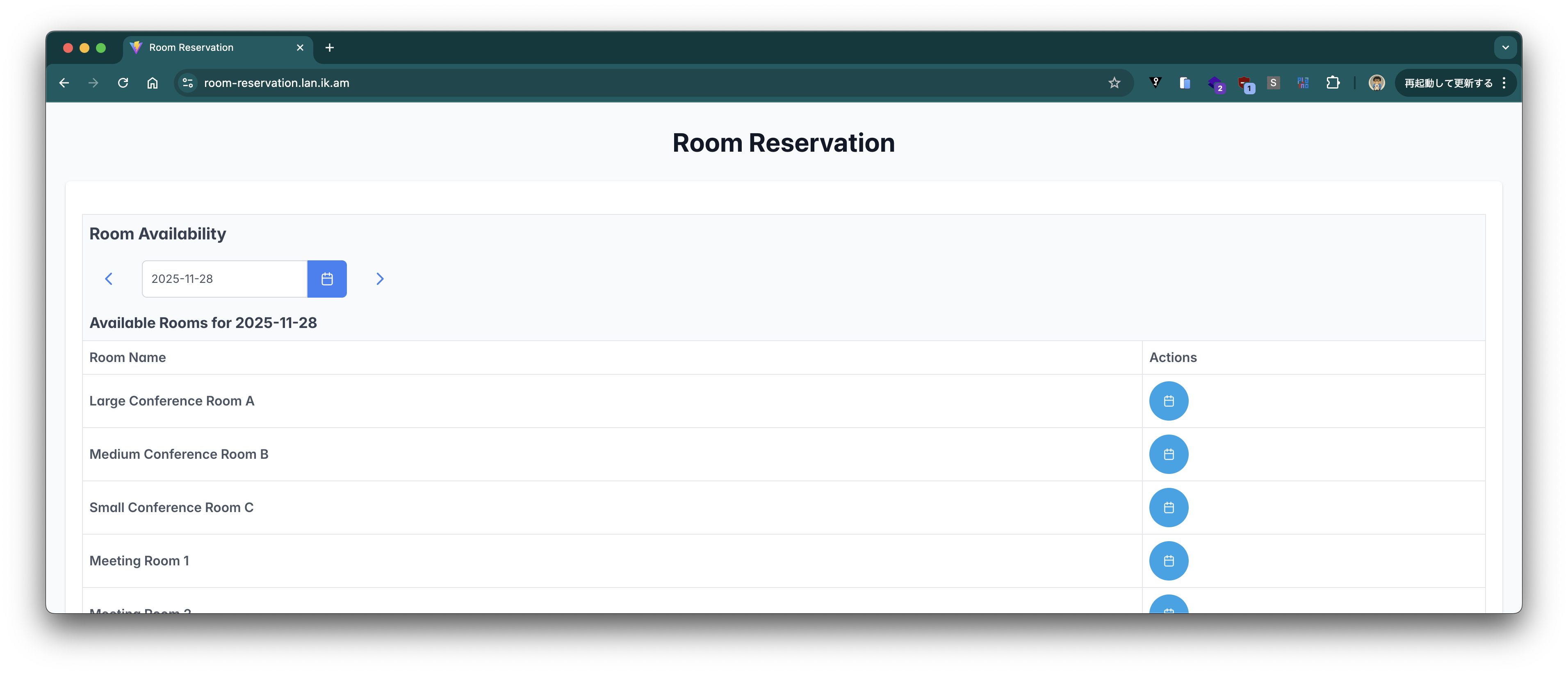
Ingressがない場合は、Serviceに対するport-forwardingでこのアプリ (http://localhost:8080) にアクセスします。
kubectl port-forward -n demo svc/room-reservation 8080:8080
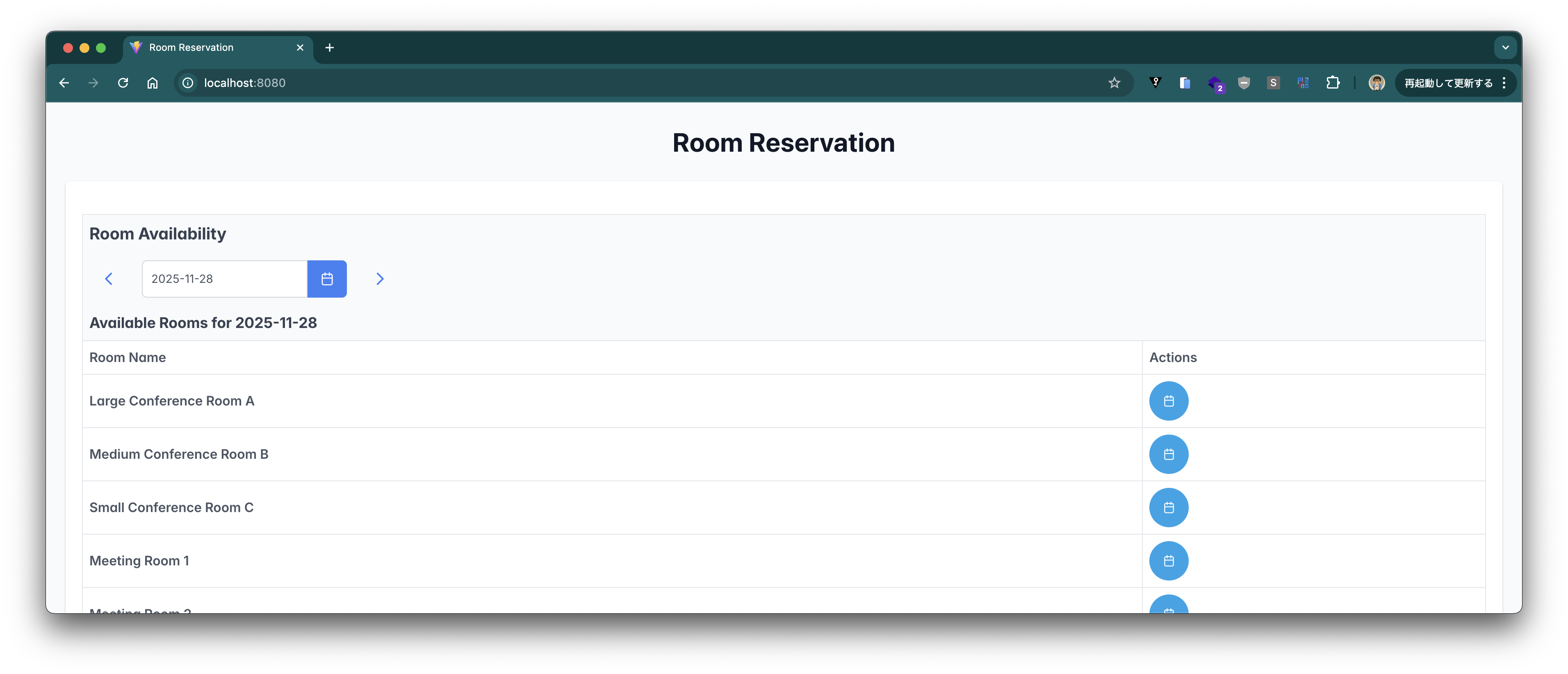
部屋の予約ができることを確認します。

この部屋の予約情報をREST APIで取得します。(dateとroomIdパラメータを変更してください。)
$ curl "https://room-reservation.lan.ik.am/api/reservations?date=2025-11-28&roomId=018422b2-4843-7a62-935b-b4e65649de3f"
# or
$ curl "http://localhost:8080/api/reservations?date=2025-11-28&roomId=018422b2-4843-7a62-935b-b4e65649de3f"

[{"reservationId":"019ac989-d981-7d1c-acf0-aed4ea19035e","roomId":"018422b2-4843-7a62-935b-b4e65649de3f","date":"2025-11-28","startTime":"09:00:00","endTime":"11:00:00","purpose":"Team Meeting","userId":"018422b2-4843-7a62-935b-b4e65649de46"}]
このAPIに対して、vegetaを使って負荷をかけてみます。vegetaは次のコマンドでインストールできます。
brew install vegeta
次のコマンドで負荷をかけます。kubectl port-forward -n demo svc/room-reservation 8080:8080を実行している前提です。
echo "GET http://localhost:8080/api/reservations?date=2025-11-28&roomId=018422b2-4843-7a62-935b-b4e65649de3f" | vegeta attack -duration=10s | tee results.bin | vegeta report
全てステータスコード200で返ればOKです。
Requests      [total, rate, throughput]         500, 50.10, 49.98
Duration      [total, attack, wait]             10.005s, 9.979s, 25.081ms
Latencies     [min, mean, 50, 90, 95, 99, max]  12.846ms, 20.438ms, 18.752ms, 26.455ms, 28.479ms, 46.112ms, 89.53ms
Bytes In      [total, mean]                     1000, 2.00
Bytes Out     [total, mean]                     0, 0.00
Success       [ratio]                           100.00%
Status Codes  [code:count]                      200:500
Error Set:
次に負荷をかけている最中にこのPatroniクラスタをアップデートしてみます。次のコマンドで120秒負荷をかけます。
echo "GET http://localhost:8080/api/reservations?date=2025-11-28&roomId=018422b2-4843-7a62-935b-b4e65649de3f" | vegeta attack -duration=120s | tee results.bin | vegeta report
/tmp/room-reservation-db.yamlを編集し、例えば、次のようにPostgresのメモリを少しだけ変更してみます。
  resources:
    data:
      limits:
        memory: 1025Mi
      requests:
        memory: 1025Mi
別のターミナルでPatroniクラスタを更新します。
kubectl apply -f /tmp/room-reservation-db.yaml -n demo
vegetaの負荷テスト結果は次の通りです。5%ほどが500エラーです。
Requests      [total, rate, throughput]         6000, 50.01, 47.38
Duration      [total, attack, wait]             2m0s, 2m0s, 13.718ms
Latencies     [min, mean, 50, 90, 95, 99, max]  6.81ms, 207.614ms, 21.618ms, 657.208ms, 2.011s, 2.07s, 2.506s
Bytes In      [total, mean]                     1440990, 240.16
Bytes Out     [total, mean]                     0, 0.00
Success       [ratio]                           94.75%
Status Codes  [code:count]                      200:5685  500:315
Error Set:
500
次のようなエラーログを確認できました。
{
  "@timestamp": "2025-11-29T10:12:08.453672643Z",
  "log": {
    "level": "ERROR",
    "logger": "com.example.problem.ProblemControllerAdvice"
  },
  "process": {
    "pid": 1,
    "thread": {
      "name": "tomcat-handler-11865"
    }
  },
  "service": {
    "name": "room-reservation",
    "version": "0.0.1.cbcf650054bfac1562d473eed1aded84b020a4e7",
    "node": {}
  },
  "message": "Unexpected runtime error occurred!",
  "traceId": "d3a7566524db016b5cce9a155bd1d6e0",
  "spanId": "115a387db4dd469b",
  "error": {
    "type": "org.springframework.transaction.CannotCreateTransactionException",
    "message": "Could not open JDBC Connection for transaction",
    "stack_trace": "org.springframework.transaction.CannotCreateTransactionException: Could not open JDBC Connection for transaction\n\tat org.springframework.jdbc.datasource.DataSourceTransactionManager.doBegin(DataSourceTransactionManager.java:313)\n\tat org.springframework.transaction.support.AbstractPlatformTransactionManager.startTransaction(AbstractPlatformTransactionManager.java:532)\n\tat org.springframework.transaction.support.AbstractPlatformTransactionManager.getTransaction(AbstractPlatformTransactionManager.java:405)\n\tat org.springframework.transaction.interceptor.TransactionAspectSupport.createTransactionIfNecessary(TransactionAspectSupport.java:639)\n\tat org.springframework.transaction.interceptor.TransactionAspectSupport.invokeWithinTransaction(TransactionAspectSupport.java:374)\n\tat org.springframework.transaction.interceptor.TransactionInterceptor.invoke(TransactionInterceptor.java:119)\n\tat org.springframework.aop.framework.ReflectiveMethodInvocation.proceed(ReflectiveMethodInvocation.java:184)\n\tat org.springframework.aop.framework.CglibAopProxy$DynamicAdvisedInterceptor.intercept(CglibAopProxy.java:728)\n\tat com.example.reservation.query.ReservationViewRepository$$SpringCGLIB$$0.findByRoomIdAndDate(<generated>)\n\tat com.example.reservation.query.ReservationService.findByRoomIdAndDate(ReservationService.java:74)\n\tat java.base/jdk.internal.reflect.DirectMethodHandleAccessor.invoke(Unknown Source)\n\tat java.base/java.lang.reflect.Method.invoke(Unknown Source)\n\tat org.springframework.aop.support.AopUtils.invokeJoinpointUsingReflection(AopUtils.java:359)\n\tat org.springframework.aop.framework.ReflectiveMethodInvocation.invokeJoinpoint(ReflectiveMethodInvocation.java:196)\n\tat org.springframework.aop.framework.ReflectiveMethodInvocation.proceed(ReflectiveMethodInvocation.java:163)\n\tat org.springframework.aop.aspectj.MethodInvocationProceedingJoinPoint.proceed(MethodInvocationProceedingJoinPoint.java:89)\n\tat com.example.config.ServiceLogAspect.logServiceMethod(ServiceLogAspect.java:37)\n\tat java.base/jdk.internal.reflect.DirectMethodHandleAccessor.invoke(Unknown Source)\n\tat java.base/java.lang.reflect.Method.invoke(Unknown Source)\n\tat org.springframework.aop.support.AopUtils.invokeJoinpointUsingReflection(AopUtils.java:359)\n\tat org.springframework.aop.framework.ReflectiveMethodInvocation.invokeJoinpoint(ReflectiveMethodInvocation.java:196)\n\tat org.springframework.aop.framework.ReflectiveMethodInvocation.proceed(ReflectiveMethodInvocation.java:163)\n\tat org.springframework.modulith.observability.ModuleEntryInterceptor.invoke(ModuleEntryInterceptor.java:91)\n\tat org.springframework.aop.framework.ReflectiveMethodInvocation.proceed(ReflectiveMethodInvocation.java:184)\n\tat org.springframework.aop.framework.CglibAopProxy$DynamicAdvisedInterceptor.intercept(CglibAopProxy.java:728)\n\tat com.example.config.ServiceLogAspect$$SpringCGLIB$$0.logServiceMethod(<generated>)\n\tat java.base/jdk.internal.reflect.DirectMethodHandleAccessor.invoke(Unknown Source)\n\tat java.base/java.lang.reflect.Method.invoke(Unknown Source)\n\tat org.springframework.aop.aspectj.AbstractAspectJAdvice.invokeAdviceMethodWithGivenArgs(AbstractAspectJAdvice.java:642)\n\tat org.springframework.aop.aspectj.AbstractAspectJAdvice.invokeAdviceMethod(AbstractAspectJAdvice.java:632)\n\tat org.springframework.aop.aspectj.AspectJAroundAdvice.invoke(AspectJAroundAdvice.java:71)\n\tat org.springframework.aop.framework.ReflectiveMethodInvocation.proceed(ReflectiveMethodInvocation.java:173)\n\tat org.springframework.aop.interceptor.ExposeInvocationInterceptor.invoke(ExposeInvocationInterceptor.java:97)\n\tat org.springframework.aop.framework.ReflectiveMethodInvocation.proceed(ReflectiveMethodInvocation.java:184)\n\tat org.springframework.aop.framework.CglibAopProxy$DynamicAdvisedInterceptor.intercept(CglibAopProxy.java:728)\n\tat com.example.reservation.query.ReservationService$$SpringCGLIB$$0.findByRoomIdAndDate(<generated>)\n\tat com.example.reservation.web.ReservationController.findReservation(ReservationController.java:47)\n\tat java.base/jdk.internal.reflect.DirectMethodHandleAccessor.invoke(Unknown Source)\n\tat java.base/java.lang.reflect.Method.invoke(Unknown Source)\n\tat org.springframework.aop.support.AopUtils.invokeJoinpointUsingReflection(AopUtils.java:359)\n\tat org.springframework.aop.framework.ReflectiveMethodInvocation.invokeJoinpoint(ReflectiveMethodInvocation.java:196)\n\tat org.springframework.aop.framework.ReflectiveMethodInvocation.proceed(ReflectiveMethodInvocation.java:163)\n\tat org.springframework.modulith.observability.ModuleEntryInterceptor.invoke(ModuleEntryInterceptor.java:91)\n\tat org.springframework.aop.framework.ReflectiveMethodInvocation.proceed(ReflectiveMethodInvocation.java:184)\n\tat org.springframework.aop.framework.CglibAopProxy$DynamicAdvisedInterceptor.intercept(CglibAopProxy.java:728)\n\tat com.example.reservation.web.ReservationController$$SpringCGLIB$$0.findReservation(<generated>)\n\tat java.base/jdk.internal.reflect.DirectMethodHandleAccessor.invoke(Unknown Source)\n\tat java.base/java.lang.reflect.Method.invoke(Unknown Source)\n\tat org.springframework.web.method.support.InvocableHandlerMethod.doInvoke(InvocableHandlerMethod.java:258)\n\tat org.springframework.web.method.support.InvocableHandlerMethod.invokeForRequest(InvocableHandlerMethod.java:191)\n\tat org.springframework.web.servlet.mvc.method.annotation.ServletInvocableHandlerMethod.invokeAndHandle(ServletInvocableHandlerMethod.java:118)\n\tat org.springframework.web.servlet.mvc.method.annotation.RequestMappingHandlerAdapter.invokeHandlerMethod(RequestMappingHandlerAdapter.java:986)\n\tat org.springframework.web.servlet.mvc.method.annotation.RequestMappingHandlerAdapter.handleInternal(RequestMappingHandlerAdapter.java:891)\n\tat org.springframework.web.servlet.mvc.method.AbstractHandlerMethodAdapter.handle(AbstractHandlerMethodAdapter.java:87)\n\tat org.springframework.web.servlet.DispatcherServlet.doDispatch(DispatcherServlet.java:1089)\n\tat org.springframework.web.servlet.DispatcherServlet.doService(DispatcherServlet.java:979)\n\tat org.springframework.web.servlet.FrameworkServlet.processRequest(FrameworkServlet.java:1014)\n\tat org.springframework.web.servlet.FrameworkServlet.doGet(FrameworkServlet.java:903)\n\tat jakarta.servlet.http.HttpServlet.service(HttpServlet.java:564)\n\tat org.springframework.web.servlet.FrameworkServlet.service(FrameworkServlet.java:885)\n\tat jakarta.servlet.http.HttpServlet.service(HttpServlet.java:658)\n\tat org.apache.catalina.core.ApplicationFilterChain.internalDoFilter(ApplicationFilterChain.java:195)\n\tat org.apache.catalina.core.ApplicationFilterChain.doFilter(ApplicationFilterChain.java:140)\n\tat org.apache.tomcat.websocket.server.WsFilter.doFilter(WsFilter.java:51)\n\tat org.apache.catalina.core.ApplicationFilterChain.internalDoFilter(ApplicationFilterChain.java:164)\n\tat org.apache.catalina.core.ApplicationFilterChain.doFilter(ApplicationFilterChain.java:140)\n\tat org.zalando.logbook.servlet.LogbookFilter.doFilter(LogbookFilter.java:76)\n\tat org.zalando.logbook.servlet.HttpFilter.doFilter(HttpFilter.java:32)\n\tat org.apache.catalina.core.ApplicationFilterChain.internalDoFilter(ApplicationFilterChain.java:164)\n\tat org.apache.catalina.core.ApplicationFilterChain.doFilter(ApplicationFilterChain.java:140)\n\tat org.springframework.web.filter.RequestContextFilter.doFilterInternal(RequestContextFilter.java:100)\n\tat org.springframework.web.filter.OncePerRequestFilter.doFilter(OncePerRequestFilter.java:116)\n\tat org.apache.catalina.core.ApplicationFilterChain.internalDoFilter(ApplicationFilterChain.java:164)\n\tat org.apache.catalina.core.ApplicationFilterChain.doFilter(ApplicationFilterChain.java:140)\n\tat org.springframework.web.filter.FormContentFilter.doFilterInternal(FormContentFilter.java:93)\n\tat org.springframework.web.filter.OncePerRequestFilter.doFilter(OncePerRequestFilter.java:116)\n\tat org.apache.catalina.core.ApplicationFilterChain.internalDoFilter(ApplicationFilterChain.java:164)\n\tat org.apache.catalina.core.ApplicationFilterChain.doFilter(ApplicationFilterChain.java:140)\n\tat org.springframework.web.filter.ServerHttpObservationFilter.doFilterInternal(ServerHttpObservationFilter.java:114)\n\tat org.springframework.web.filter.OncePerRequestFilter.doFilter(OncePerRequestFilter.java:116)\n\tat org.apache.catalina.core.ApplicationFilterChain.internalDoFilter(ApplicationFilterChain.java:164)\n\tat org.apache.catalina.core.ApplicationFilterChain.doFilter(ApplicationFilterChain.java:140)\n\tat org.springframework.web.filter.CharacterEncodingFilter.doFilterInternal(CharacterEncodingFilter.java:201)\n\tat org.springframework.web.filter.OncePerRequestFilter.doFilter(OncePerRequestFilter.java:116)\n\tat org.apache.catalina.core.ApplicationFilterChain.internalDoFilter(ApplicationFilterChain.java:164)\n\tat org.apache.catalina.core.ApplicationFilterChain.doFilter(ApplicationFilterChain.java:140)\n\tat org.apache.catalina.core.StandardWrapperValve.invoke(StandardWrapperValve.java:167)\n\tat org.apache.catalina.core.StandardContextValve.invoke(StandardContextValve.java:90)\n\tat org.apache.catalina.authenticator.AuthenticatorBase.invoke(AuthenticatorBase.java:483)\n\tat org.apache.catalina.core.StandardHostValve.invoke(StandardHostValve.java:116)\n\tat org.apache.catalina.valves.ErrorReportValve.invoke(ErrorReportValve.java:93)\n\tat org.apache.catalina.core.StandardEngineValve.invoke(StandardEngineValve.java:74)\n\tat org.apache.catalina.valves.RemoteIpValve.invoke(RemoteIpValve.java:732)\n\tat org.apache.catalina.connector.CoyoteAdapter.service(CoyoteAdapter.java:344)\n\tat org.apache.coyote.http11.Http11Processor.service(Http11Processor.java:398)\n\tat org.apache.coyote.AbstractProcessorLight.process(AbstractProcessorLight.java:63)\n\tat org.apache.coyote.AbstractProtocol$ConnectionHandler.process(AbstractProtocol.java:903)\n\tat org.apache.tomcat.util.net.NioEndpoint$SocketProcessor.doRun(NioEndpoint.java:1769)\n\tat org.apache.tomcat.util.net.SocketProcessorBase.run(SocketProcessorBase.java:52)\n\tat java.base/java.lang.VirtualThread.run(Unknown Source)\nCaused by: java.sql.SQLTransientConnectionException: HikariPool-1 - Connection is not available, request timed out after 2000ms (total=0, active=0, idle=0, waiting=100)\n\tat com.zaxxer.hikari.pool.HikariPool.createTimeoutException(HikariPool.java:709)\n\tat com.zaxxer.hikari.pool.HikariPool.getConnection(HikariPool.java:188)\n\tat com.zaxxer.hikari.pool.HikariPool.getConnection(HikariPool.java:146)\n\tat com.zaxxer.hikari.HikariDataSource.getConnection(HikariDataSource.java:127)\n\tat org.springframework.jdbc.datasource.DataSourceTransactionManager.doBegin(DataSourceTransactionManager.java:269)\n\t... 99 common frames omitted\nCaused by: org.postgresql.util.PSQLException: Connection attempt timed out.\n\tat org.postgresql.Driver$ConnectThread.getResult(Driver.java:412)\n\tat org.postgresql.Driver.connect(Driver.java:305)\n\tat com.zaxxer.hikari.util.DriverDataSource.getConnection(DriverDataSource.java:139)\n\tat com.zaxxer.hikari.pool.PoolBase.newConnection(PoolBase.java:368)\n\tat com.zaxxer.hikari.pool.PoolBase.newPoolEntry(PoolBase.java:205)\n\tat com.zaxxer.hikari.pool.HikariPool.createPoolEntry(HikariPool.java:483)\n\tat com.zaxxer.hikari.pool.HikariPool$PoolEntryCreator.call(HikariPool.java:747)\n\tat com.zaxxer.hikari.pool.HikariPool$PoolEntryCreator.call(HikariPool.java:726)\n\tat java.base/java.util.concurrent.FutureTask.run(Unknown Source)\n\tat java.base/java.util.concurrent.ThreadPoolExecutor.runWorker(Unknown Source)\n\tat java.base/java.util.concurrent.ThreadPoolExecutor$Worker.run(Unknown Source)\n\tat java.base/java.lang.Thread.run(Unknown Source)\n"
  },
  "ecs": {
    "version": "8.11"
  }
}
次のコマンドで負荷テストの結果をグラフ化します。
cat results.bin | vegeta plot > plot.html
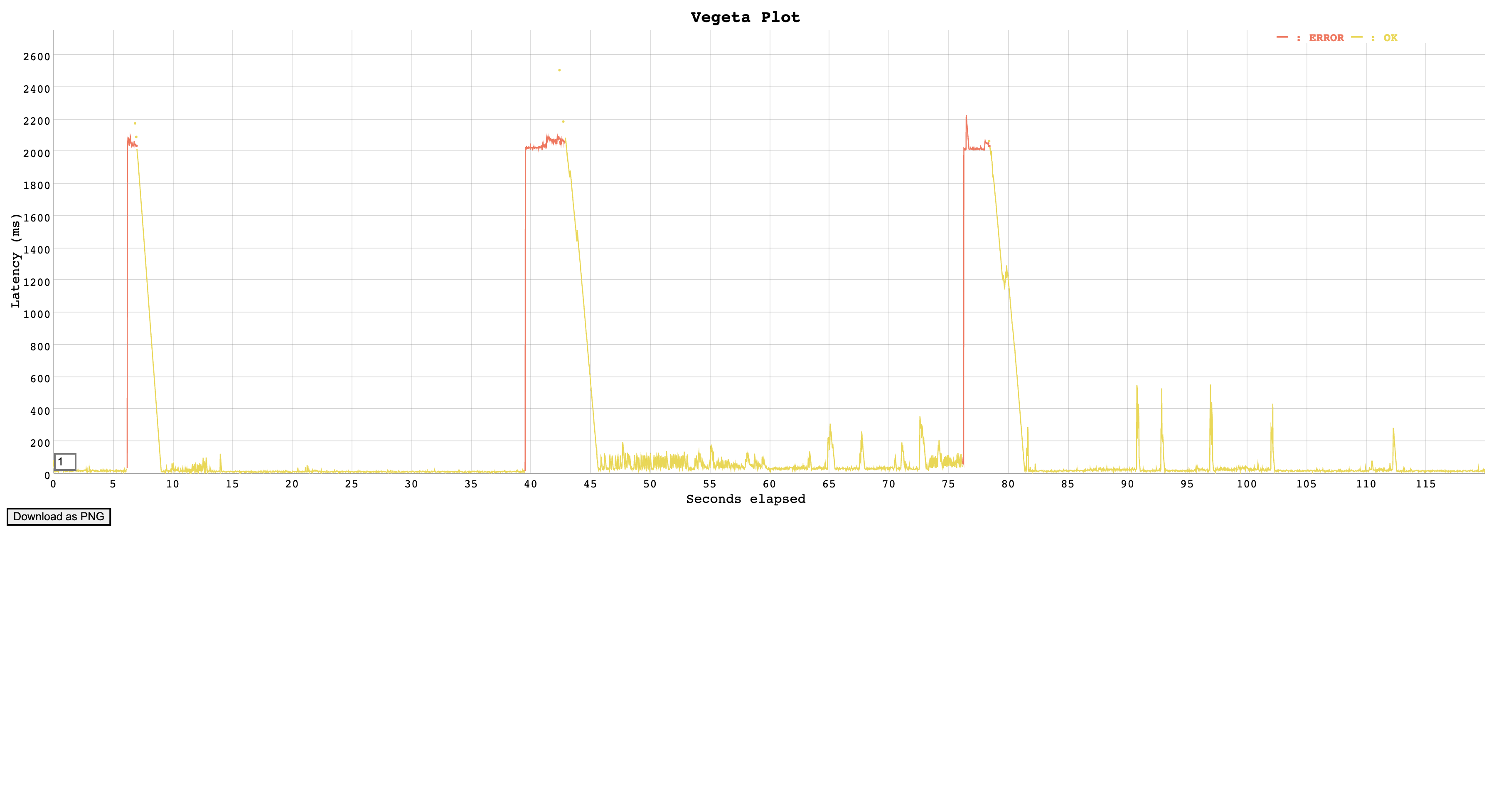
- primaryが切断され、read replica(1)がprimaryに昇格。primaryだったノードはread replica(3)に降格
- 昇格したprimaryが切断され、read replica(2)がprimaryに昇格
- 昇格したprimaryが切断され、read replica(3)がprimaryに昇格
の間にエラーが発生していたと思われます。
Read Replicaに対するRoutingを設定
アプリのダウンタイムを短くするため、参照形のアクセスはRead Replicaにroutingされるようにアプリ側を設定します。
このアプリには次の定義が含まれています。
- https://github.com/categolj/room-reservation/blob/cbcf650054bfac1562d473eed1aded84b020a4e7/src/main/java/com/example/config/ReadOnlyTransactionRoutingDataSource.java
- https://github.com/categolj/room-reservation/blob/cbcf650054bfac1562d473eed1aded84b020a4e7/src/main/java/com/example/config/DataSourceConfig.java
spring.datasource.*プロパティ同様にread-replica.datasource.*プロパティを設定すると@Transactional(readOnly = true)アノテーションが設定されたコードはRead Replicaにアクセスするようになります。
そこでspring.datasource.*プロパティは引き続きSpring Cloud Bindingで自動設定させつつ、
read-replica.datasource.urlread-replica.datasource.usernameread-replica.datasource.password
プロパティはread-onlyなエンドポイントに対する接続情報が設定されるように環境変数を設定します。
cat <<'EOF' > room-reservation-values.yaml
---
applicationName: room-reservation
deployment:
  image:
    repository: ghcr.io/categolj/room-reservation
    tag: jvm
    pullPolicy: Always
  ports:
  - name: http
    containerPort: 8080
    protocol: TCP
  env:
    SERVICE_BINDING_ROOT:
      value: /bindings
    read-replica.datasource.url:
      value: jdbc:postgresql://${k8s.bindings.room-reservation-db.database}-read-only:${k8s.bindings.room-reservation-db.port}/${k8s.bindings.room-reservation-db.database}
    read-replica.datasource.username:
      value: ${spring.datasource.username}
    read-replica.datasource.password:
      value: ${spring.datasource.password}
    jdbc.datasource-proxy.enabled:
      value: "false"
    spring.datasource.hikari.data-source-properties.sslmode:
      value: require
    logging.structured.format.console:
      value: ecs
    logging.level.root:
      value: error
  volumeMounts:
    room-reservation-db:
      mountPath: /bindings/room-reservation-db
  volumes:
    room-reservation-db:
      secret:
        secretName: room-reservation-db-app-user-db-secret
  resources:
    limits:
      memory: 1024Mi
    requests:
      memory: 1024Mi
  livenessProbe:
    enabled: true
    httpGet:
      path: /actuator/health/liveness
      port: 8080
      scheme: HTTP
  readinessProbe:
    enabled: true
    httpGet:
      path: /actuator/health/readiness
      port: 8080
      scheme: HTTP
  containerSecurityContext:
    allowPrivilegeEscalation: false
    capabilities:
      drop:
      - ALL
    readOnlyRootFilesystem: false
    runAsNonRoot: true
    runAsUser: 1002
    seccompProfile:
      type: RuntimeDefault
  affinity:
    podAntiAffinity:
      preferredDuringSchedulingIgnoredDuringExecution:
      - podAffinityTerm:
          labelSelector:
            matchLabels:
              app.kubernetes.io/part-of: room-reservation
          topologyKey: kubernetes.io/hostname
        weight: 1
ingress:
  enabled: true
  annotations:
    cert-manager.io/cluster-issuer: letsencrypt
  hosts:
  - host: room-reservation.lan.ik.am
    paths:
    - path: /
      pathType: Prefix
  tls:
  - hosts:
    - room-reservation.lan.ik.am
    secretName: room-reservation-tls
---
EOF
次のコマンドでデプロイします。
helm upgrade --install room-reservation stakater/application -n demo -f room-reservation-values.yaml --wait
Tip
このアプリはdatasource-proxyを使用していましたが、データソースのroutingが想定通りに動作しなかったため、jdbc.datasource-proxy.enabled=falseを設定してProxyを無効にしました。
設定変更後に、再びvegetaで負荷を与えます。
echo "GET http://localhost:8080/api/reservations?date=2025-11-28&roomId=018422b2-4843-7a62-935b-b4e65649de3f" | vegeta attack -duration=90s | tee results.bin | vegeta report
別のターミナルでPatroniクラスタを更新します。変更したメモリを元に戻して、applyしましょう。
kubectl apply -f /tmp/room-reservation-db.yaml -n demo
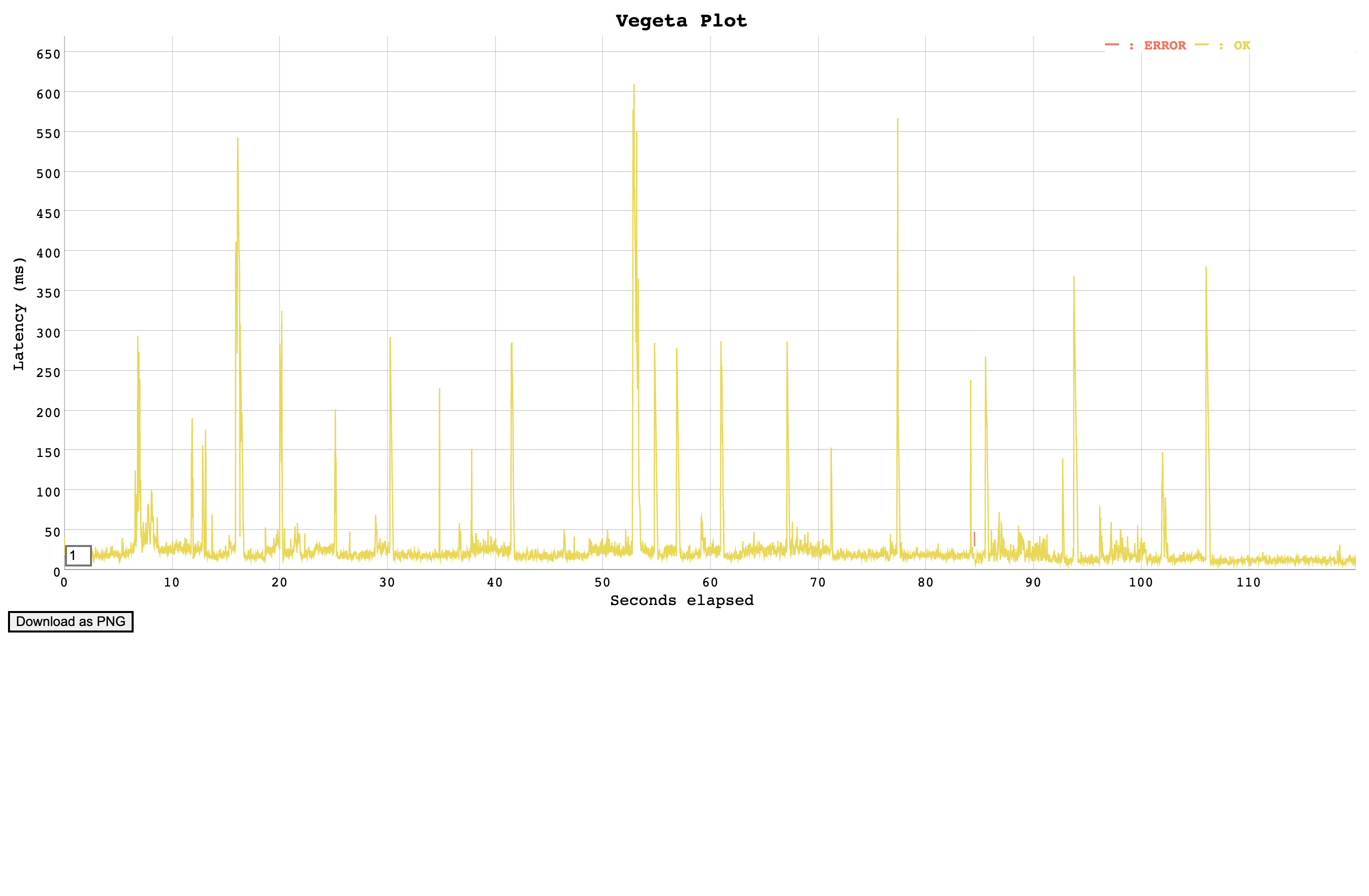
vegetaの負荷テスト結果は次の通りです。エラーが503の2件になりました。 (件数は実行時の条件によって変わるでしょう。)
Requests      [total, rate, throughput]         6000, 50.01, 49.99
Duration      [total, attack, wait]             2m0s, 2m0s, 12.602ms
Latencies     [min, mean, 50, 90, 95, 99, max]  6.813ms, 29.719ms, 19.347ms, 35.162ms, 67.051ms, 287.953ms, 609.905ms
Bytes In      [total, mean]                     12382, 2.06
Bytes Out     [total, mean]                     0, 0.00
Success       [ratio]                           99.97%
Status Codes  [code:count]                      200:5998  503:2
Error Set:
503
グラフは次の通りです。80-90秒あたりに一瞬エラーが発生しています。
次のエラーログを確認できました。
{
  "@timestamp": "2025-11-29T12:03:42.527566205Z",
  "log": {
    "level": "ERROR",
    "logger": "com.example.problem.ProblemControllerAdvice"
  },
  "process": {
    "pid": 1,
    "thread": {
      "name": "tomcat-handler-4863"
    }
  },
  "service": {
    "name": "room-reservation",
    "version": "0.0.1.cbcf650054bfac1562d473eed1aded84b020a4e7",
    "node": {}
  },
  "message": "There is a problem with database access.",
  "traceId": "bc811b274e300785c0e5e3afff39dbba",
  "spanId": "b9816fca5faa3788",
  "error": {
    "type": "org.springframework.dao.DataAccessResourceFailureException",
    "message": "PreparedStatementCallback; SQL [SELECT reservation_id,\n    room_id,\n    date,\n    start_time,\n    end_time,\n    purpose,\n    user_id\nFROM reservation_view\nWHERE room_id = ? AND date = ?]; FATAL: terminating connection due to administrator command",
    "stack_trace": "org.springframework.dao.DataAccessResourceFailureException: PreparedStatementCallback; SQL [SELECT reservation_id,\n    room_id,\n    date,\n    start_time,\n    end_time,\n    purpose,\n    user_id\nFROM reservation_view\nWHERE room_id = ? AND date = ?]; FATAL: terminating connection due to administrator command\n\tat org.springframework.jdbc.support.SQLStateSQLExceptionTranslator.doTranslate(SQLStateSQLExceptionTranslator.java:121)\n\tat org.springframework.jdbc.support.AbstractFallbackSQLExceptionTranslator.translate(AbstractFallbackSQLExceptionTranslator.java:107)\n\tat org.springframework.jdbc.support.AbstractFallbackSQLExceptionTranslator.translate(AbstractFallbackSQLExceptionTranslator.java:116)\n\tat org.springframework.jdbc.core.JdbcTemplate.translateException(JdbcTemplate.java:1556)\n\tat org.springframework.jdbc.core.JdbcTemplate.execute(JdbcTemplate.java:677)\n\tat org.springframework.jdbc.core.JdbcTemplate.query(JdbcTemplate.java:723)\n\tat org.springframework.jdbc.core.JdbcTemplate.query(JdbcTemplate.java:748)\n\tat org.springframework.jdbc.core.JdbcTemplate.query(JdbcTemplate.java:804)\n\tat org.springframework.jdbc.core.namedparam.NamedParameterJdbcTemplate.query(NamedParameterJdbcTemplate.java:218)\n\tat org.springframework.jdbc.core.simple.DefaultJdbcClient$DefaultStatementSpec$NamedParamMappedQuerySpec.list(DefaultJdbcClient.java:366)\n\tat com.example.reservation.query.ReservationViewRepository.findByRoomIdAndDate(ReservationViewRepository.java:49)\n\tat java.base/jdk.internal.reflect.DirectMethodHandleAccessor.invoke(Unknown Source)\n\tat java.base/java.lang.reflect.Method.invoke(Unknown Source)\n\tat org.springframework.aop.support.AopUtils.invokeJoinpointUsingReflection(AopUtils.java:359)\n\tat org.springframework.aop.framework.ReflectiveMethodInvocation.invokeJoinpoint(ReflectiveMethodInvocation.java:196)\n\tat org.springframework.aop.framework.ReflectiveMethodInvocation.proceed(ReflectiveMethodInvocation.java:163)\n\tat org.springframework.dao.support.PersistenceExceptionTranslationInterceptor.invoke(PersistenceExceptionTranslationInterceptor.java:138)\n\tat org.springframework.aop.framework.ReflectiveMethodInvocation.proceed(ReflectiveMethodInvocation.java:184)\n\tat org.springframework.transaction.interceptor.TransactionAspectSupport.invokeWithinTransaction(TransactionAspectSupport.java:380)\n\tat org.springframework.transaction.interceptor.TransactionInterceptor.invoke(TransactionInterceptor.java:119)\n\tat org.springframework.aop.framework.ReflectiveMethodInvocation.proceed(ReflectiveMethodInvocation.java:184)\n\tat org.springframework.aop.framework.CglibAopProxy$DynamicAdvisedInterceptor.intercept(CglibAopProxy.java:728)\n\tat com.example.reservation.query.ReservationViewRepository$$SpringCGLIB$$0.findByRoomIdAndDate(<generated>)\n\tat com.example.reservation.query.ReservationService.findByRoomIdAndDate(ReservationService.java:74)\n\tat java.base/jdk.internal.reflect.DirectMethodHandleAccessor.invoke(Unknown Source)\n\tat java.base/java.lang.reflect.Method.invoke(Unknown Source)\n\tat org.springframework.aop.support.AopUtils.invokeJoinpointUsingReflection(AopUtils.java:359)\n\tat org.springframework.aop.framework.ReflectiveMethodInvocation.invokeJoinpoint(ReflectiveMethodInvocation.java:196)\n\tat org.springframework.aop.framework.ReflectiveMethodInvocation.proceed(ReflectiveMethodInvocation.java:163)\n\tat org.springframework.aop.aspectj.MethodInvocationProceedingJoinPoint.proceed(MethodInvocationProceedingJoinPoint.java:89)\n\tat com.example.config.ServiceLogAspect.logServiceMethod(ServiceLogAspect.java:37)\n\tat java.base/jdk.internal.reflect.DirectMethodHandleAccessor.invoke(Unknown Source)\n\tat java.base/java.lang.reflect.Method.invoke(Unknown Source)\n\tat org.springframework.aop.support.AopUtils.invokeJoinpointUsingReflection(AopUtils.java:359)\n\tat org.springframework.aop.framework.ReflectiveMethodInvocation.invokeJoinpoint(ReflectiveMethodInvocation.java:196)\n\tat org.springframework.aop.framework.ReflectiveMethodInvocation.proceed(ReflectiveMethodInvocation.java:163)\n\tat org.springframework.modulith.observability.ModuleEntryInterceptor.invoke(ModuleEntryInterceptor.java:91)\n\tat org.springframework.aop.framework.ReflectiveMethodInvocation.proceed(ReflectiveMethodInvocation.java:184)\n\tat org.springframework.aop.framework.CglibAopProxy$DynamicAdvisedInterceptor.intercept(CglibAopProxy.java:728)\n\tat com.example.config.ServiceLogAspect$$SpringCGLIB$$0.logServiceMethod(<generated>)\n\tat java.base/jdk.internal.reflect.DirectMethodHandleAccessor.invoke(Unknown Source)\n\tat java.base/java.lang.reflect.Method.invoke(Unknown Source)\n\tat org.springframework.aop.aspectj.AbstractAspectJAdvice.invokeAdviceMethodWithGivenArgs(AbstractAspectJAdvice.java:642)\n\tat org.springframework.aop.aspectj.AbstractAspectJAdvice.invokeAdviceMethod(AbstractAspectJAdvice.java:632)\n\tat org.springframework.aop.aspectj.AspectJAroundAdvice.invoke(AspectJAroundAdvice.java:71)\n\tat org.springframework.aop.framework.ReflectiveMethodInvocation.proceed(ReflectiveMethodInvocation.java:173)\n\tat org.springframework.aop.interceptor.ExposeInvocationInterceptor.invoke(ExposeInvocationInterceptor.java:97)\n\tat org.springframework.aop.framework.ReflectiveMethodInvocation.proceed(ReflectiveMethodInvocation.java:184)\n\tat org.springframework.aop.framework.CglibAopProxy$DynamicAdvisedInterceptor.intercept(CglibAopProxy.java:728)\n\tat com.example.reservation.query.ReservationService$$SpringCGLIB$$0.findByRoomIdAndDate(<generated>)\n\tat com.example.reservation.web.ReservationController.findReservation(ReservationController.java:47)\n\tat java.base/jdk.internal.reflect.DirectMethodHandleAccessor.invoke(Unknown Source)\n\tat java.base/java.lang.reflect.Method.invoke(Unknown Source)\n\tat org.springframework.aop.support.AopUtils.invokeJoinpointUsingReflection(AopUtils.java:359)\n\tat org.springframework.aop.framework.ReflectiveMethodInvocation.invokeJoinpoint(ReflectiveMethodInvocation.java:196)\n\tat org.springframework.aop.framework.ReflectiveMethodInvocation.proceed(ReflectiveMethodInvocation.java:163)\n\tat org.springframework.modulith.observability.ModuleEntryInterceptor.invoke(ModuleEntryInterceptor.java:91)\n\tat org.springframework.aop.framework.ReflectiveMethodInvocation.proceed(ReflectiveMethodInvocation.java:184)\n\tat org.springframework.aop.framework.CglibAopProxy$DynamicAdvisedInterceptor.intercept(CglibAopProxy.java:728)\n\tat com.example.reservation.web.ReservationController$$SpringCGLIB$$0.findReservation(<generated>)\n\tat java.base/jdk.internal.reflect.DirectMethodHandleAccessor.invoke(Unknown Source)\n\tat java.base/java.lang.reflect.Method.invoke(Unknown Source)\n\tat org.springframework.web.method.support.InvocableHandlerMethod.doInvoke(InvocableHandlerMethod.java:258)\n\tat org.springframework.web.method.support.InvocableHandlerMethod.invokeForRequest(InvocableHandlerMethod.java:191)\n\tat org.springframework.web.servlet.mvc.method.annotation.ServletInvocableHandlerMethod.invokeAndHandle(ServletInvocableHandlerMethod.java:118)\n\tat org.springframework.web.servlet.mvc.method.annotation.RequestMappingHandlerAdapter.invokeHandlerMethod(RequestMappingHandlerAdapter.java:986)\n\tat org.springframework.web.servlet.mvc.method.annotation.RequestMappingHandlerAdapter.handleInternal(RequestMappingHandlerAdapter.java:891)\n\tat org.springframework.web.servlet.mvc.method.AbstractHandlerMethodAdapter.handle(AbstractHandlerMethodAdapter.java:87)\n\tat org.springframework.web.servlet.DispatcherServlet.doDispatch(DispatcherServlet.java:1089)\n\tat org.springframework.web.servlet.DispatcherServlet.doService(DispatcherServlet.java:979)\n\tat org.springframework.web.servlet.FrameworkServlet.processRequest(FrameworkServlet.java:1014)\n\tat org.springframework.web.servlet.FrameworkServlet.doGet(FrameworkServlet.java:903)\n\tat jakarta.servlet.http.HttpServlet.service(HttpServlet.java:564)\n\tat org.springframework.web.servlet.FrameworkServlet.service(FrameworkServlet.java:885)\n\tat jakarta.servlet.http.HttpServlet.service(HttpServlet.java:658)\n\tat org.apache.catalina.core.ApplicationFilterChain.internalDoFilter(ApplicationFilterChain.java:195)\n\tat org.apache.catalina.core.ApplicationFilterChain.doFilter(ApplicationFilterChain.java:140)\n\tat org.apache.tomcat.websocket.server.WsFilter.doFilter(WsFilter.java:51)\n\tat org.apache.catalina.core.ApplicationFilterChain.internalDoFilter(ApplicationFilterChain.java:164)\n\tat org.apache.catalina.core.ApplicationFilterChain.doFilter(ApplicationFilterChain.java:140)\n\tat org.zalando.logbook.servlet.LogbookFilter.doFilter(LogbookFilter.java:76)\n\tat org.zalando.logbook.servlet.HttpFilter.doFilter(HttpFilter.java:32)\n\tat org.apache.catalina.core.ApplicationFilterChain.internalDoFilter(ApplicationFilterChain.java:164)\n\tat org.apache.catalina.core.ApplicationFilterChain.doFilter(ApplicationFilterChain.java:140)\n\tat org.springframework.web.filter.RequestContextFilter.doFilterInternal(RequestContextFilter.java:100)\n\tat org.springframework.web.filter.OncePerRequestFilter.doFilter(OncePerRequestFilter.java:116)\n\tat org.apache.catalina.core.ApplicationFilterChain.internalDoFilter(ApplicationFilterChain.java:164)\n\tat org.apache.catalina.core.ApplicationFilterChain.doFilter(ApplicationFilterChain.java:140)\n\tat org.springframework.web.filter.FormContentFilter.doFilterInternal(FormContentFilter.java:93)\n\tat org.springframework.web.filter.OncePerRequestFilter.doFilter(OncePerRequestFilter.java:116)\n\tat org.apache.catalina.core.ApplicationFilterChain.internalDoFilter(ApplicationFilterChain.java:164)\n\tat org.apache.catalina.core.ApplicationFilterChain.doFilter(ApplicationFilterChain.java:140)\n\tat org.springframework.web.filter.ServerHttpObservationFilter.doFilterInternal(ServerHttpObservationFilter.java:114)\n\tat org.springframework.web.filter.OncePerRequestFilter.doFilter(OncePerRequestFilter.java:116)\n\tat org.apache.catalina.core.ApplicationFilterChain.internalDoFilter(ApplicationFilterChain.java:164)\n\tat org.apache.catalina.core.ApplicationFilterChain.doFilter(ApplicationFilterChain.java:140)\n\tat org.springframework.web.filter.CharacterEncodingFilter.doFilterInternal(CharacterEncodingFilter.java:201)\n\tat org.springframework.web.filter.OncePerRequestFilter.doFilter(OncePerRequestFilter.java:116)\n\tat org.apache.catalina.core.ApplicationFilterChain.internalDoFilter(ApplicationFilterChain.java:164)\n\tat org.apache.catalina.core.ApplicationFilterChain.doFilter(ApplicationFilterChain.java:140)\n\tat org.apache.catalina.core.StandardWrapperValve.invoke(StandardWrapperValve.java:167)\n\tat org.apache.catalina.core.StandardContextValve.invoke(StandardContextValve.java:90)\n\tat org.apache.catalina.authenticator.AuthenticatorBase.invoke(AuthenticatorBase.java:483)\n\tat org.apache.catalina.core.StandardHostValve.invoke(StandardHostValve.java:116)\n\tat org.apache.catalina.valves.ErrorReportValve.invoke(ErrorReportValve.java:93)\n\tat org.apache.catalina.core.StandardEngineValve.invoke(StandardEngineValve.java:74)\n\tat org.apache.catalina.valves.RemoteIpValve.invoke(RemoteIpValve.java:732)\n\tat org.apache.catalina.connector.CoyoteAdapter.service(CoyoteAdapter.java:344)\n\tat org.apache.coyote.http11.Http11Processor.service(Http11Processor.java:398)\n\tat org.apache.coyote.AbstractProcessorLight.process(AbstractProcessorLight.java:63)\n\tat org.apache.coyote.AbstractProtocol$ConnectionHandler.process(AbstractProtocol.java:903)\n\tat org.apache.tomcat.util.net.NioEndpoint$SocketProcessor.doRun(NioEndpoint.java:1769)\n\tat org.apache.tomcat.util.net.SocketProcessorBase.run(SocketProcessorBase.java:52)\n\tat java.base/java.lang.VirtualThread.run(Unknown Source)\nCaused by: org.postgresql.util.PSQLException: FATAL: terminating connection due to administrator command\n\tat org.postgresql.core.v3.QueryExecutorImpl.receiveErrorResponse(QueryExecutorImpl.java:2734)\n\tat org.postgresql.core.v3.QueryExecutorImpl.processResults(QueryExecutorImpl.java:2421)\n\tat org.postgresql.core.v3.QueryExecutorImpl.execute(QueryExecutorImpl.java:372)\n\tat org.postgresql.jdbc.PgStatement.executeInternal(PgStatement.java:518)\n\tat org.postgresql.jdbc.PgStatement.execute(PgStatement.java:435)\n\tat org.postgresql.jdbc.PgPreparedStatement.executeWithFlags(PgPreparedStatement.java:196)\n\tat org.postgresql.jdbc.PgPreparedStatement.executeQuery(PgPreparedStatement.java:139)\n\tat com.zaxxer.hikari.pool.ProxyPreparedStatement.executeQuery(ProxyPreparedStatement.java:52)\n\tat com.zaxxer.hikari.pool.HikariProxyPreparedStatement.executeQuery(HikariProxyPreparedStatement.java)\n\tat org.springframework.jdbc.core.JdbcTemplate$1.doInPreparedStatement(JdbcTemplate.java:732)\n\tat org.springframework.jdbc.core.JdbcTemplate.execute(JdbcTemplate.java:658)\n\t... 109 common frames omitted\n"
  },
  "ecs": {
    "version": "8.11"
  }
}
FATAL: terminating connection due to administrator commandというエラーメッセージからわかるように、アクセスしているread replicaへのコネクションが再起動によって切断された"瞬断"が数件発生しただけのようです。
別のread replicaへのコネクションの復旧は瞬時に行われているようです。アクセスしているread replicaが先に再起動するか、後に再起動するかでエラーの回数は変わると思います。
ちなみにこのエラー(DataAccessResourceFailureException)はRetryで救済可能でしょう。
参照系のみですが、ダウンタイムはかなり改善されました。
Patroniを使ったTanzu for Postgres on Kubernetesを試しました。アプリ側の設定次第ではPostgresアップデート時のダウンタイムをかなり小さく抑えられそうです。