Tanzu Kubernetes Grid 1.1をAWSにインストールするメモ
本記事は、Tanzu Kubernetes Grid (TKG) 1.1.2をAWSにインストールするメモです。
TKGはCluster API(clusterctl)のラッパーのようなプロダクトです。
Cluster APIには
- Management Cluster
- Workload Cluster
という2種類のKubernetes Clusterがあります。
Workload ClusterはManagement Clusterによってライフサイクルを管理されます。
つまり、Kubernetesで管理されるKubernetes Clusterです。
では、Kubernetesを管理するKubernetesは誰が管理するのでしょうか?
...Kubernetesです😅
TKGではManagement ClusterはKindによってbootstrapされます。
つまり Kind -> Management Cluster -> Workload Clusterという親子関係でKubernetes Clusterが管理されるため、 Cluster APIは次のような亀のロゴになっています。
Cluster APIについてより知りたい場合は、↓の資料や
次のKubeAcademyの動画を見ると良いです。
- https://kube.academy/lessons/bootstrapping-cluster-api-part-1-concepts-components-and-terminology
- https://kube.academy/lessons/bootstrapping-cluster-api-part-2-creating-a-cluster-on-aws-with-cluster-api
Table of contents
CLIのインストール
https://my.vmware.com/en/web/vmware/downloads/details?downloadGroup=TKG-112&productId=988&rPId=48121
から
- clusterawsadm for Mac v0.5.4
- VMware Tanzu Kubernetes Grid CLI for Mac
をダウンロードして次のようにインストールしてください。
gunzip tkg-darwin-amd64-v1.1.2-vmware.1.gz
gunzip clusterawsadm-darwin-amd64-v0.5.4-vmware.1.gz

mv tkg-darwin-amd64-v1.1.2-vmware.1 /usr/local/bin/tkg
mv clusterawsadm-darwin-amd64-v0.5.4-vmware.1 /usr/local/bin/clusterawsadm

chmod +x /usr/local/bin/tkg
chmod +x /usr/local/bin/clusterawsadm
その他、Dockerが必要です。
clusterawsadmはgithubからもダウンロードできます。
次のバージョンで動作確認しています。
$ tkg version
Client:
	Version: v1.1.2
	Git commit: c1db5bed7bc95e2ba32cf683c50525cdff0f2396

$ clusterawsadm version
clusterawsadm version: &version.Info{Major:"", Minor:"", GitVersion:"", GitCommit:"", GitTreeState:"", BuildDate:"", GoVersion:"go1.13.6", AwsSdkVersion:"v1.31.3", Compiler:"gc", Platform:"darwin/amd64"}
次のコマンドを実行すると設定ファイル用のディレクトリが生成されます。
tkg get management-cluster
次のようなディレクトリが作成します。
$ find ~/.tkg
/Users/toshiaki/.tkg
/Users/toshiaki/.tkg/bom
/Users/toshiaki/.tkg/bom/bom-1.1.2+vmware.1.yaml
/Users/toshiaki/.tkg/bom/bom-tkg-1.0.0.yaml
/Users/toshiaki/.tkg/bom/bom-1.17.6+vmware.1.yaml
/Users/toshiaki/.tkg/bom/bom-1.1.0+vmware.1.yaml
/Users/toshiaki/.tkg/providers
/Users/toshiaki/.tkg/providers/control-plane-kubeadm
/Users/toshiaki/.tkg/providers/control-plane-kubeadm/v0.3.6
/Users/toshiaki/.tkg/providers/control-plane-kubeadm/v0.3.6/control-plane-components.yaml
/Users/toshiaki/.tkg/providers/control-plane-kubeadm/v0.3.5
/Users/toshiaki/.tkg/providers/control-plane-kubeadm/v0.3.5/control-plane-components.yaml
/Users/toshiaki/.tkg/providers/control-plane-kubeadm/v0.3.3
/Users/toshiaki/.tkg/providers/control-plane-kubeadm/v0.3.3/control-plane-components.yaml
/Users/toshiaki/.tkg/providers/providers.md5sum
/Users/toshiaki/.tkg/providers/infrastructure-vsphere
/Users/toshiaki/.tkg/providers/infrastructure-vsphere/v0.6.4
/Users/toshiaki/.tkg/providers/infrastructure-vsphere/v0.6.4/infrastructure-components.yaml
/Users/toshiaki/.tkg/providers/infrastructure-vsphere/v0.6.4/cluster-template-dev.yaml
/Users/toshiaki/.tkg/providers/infrastructure-vsphere/v0.6.4/cluster-template-prod.yaml
/Users/toshiaki/.tkg/providers/infrastructure-vsphere/v0.6.3
/Users/toshiaki/.tkg/providers/infrastructure-vsphere/v0.6.3/infrastructure-components.yaml
/Users/toshiaki/.tkg/providers/infrastructure-vsphere/v0.6.3/cluster-template-dev.yaml
/Users/toshiaki/.tkg/providers/infrastructure-vsphere/v0.6.3/cluster-template-prod.yaml
/Users/toshiaki/.tkg/providers/infrastructure-vsphere/v0.6.5
/Users/toshiaki/.tkg/providers/infrastructure-vsphere/v0.6.5/infrastructure-components.yaml
/Users/toshiaki/.tkg/providers/infrastructure-vsphere/v0.6.5/cluster-template-dev.yaml
/Users/toshiaki/.tkg/providers/infrastructure-vsphere/v0.6.5/cluster-template-prod.yaml
/Users/toshiaki/.tkg/providers/cluster-api
/Users/toshiaki/.tkg/providers/cluster-api/v0.3.6
/Users/toshiaki/.tkg/providers/cluster-api/v0.3.6/core-components.yaml
/Users/toshiaki/.tkg/providers/cluster-api/v0.3.5
/Users/toshiaki/.tkg/providers/cluster-api/v0.3.5/core-components.yaml
/Users/toshiaki/.tkg/providers/cluster-api/v0.3.3
/Users/toshiaki/.tkg/providers/cluster-api/v0.3.3/core-components.yaml
/Users/toshiaki/.tkg/providers/config.yaml
/Users/toshiaki/.tkg/providers/bootstrap-kubeadm
/Users/toshiaki/.tkg/providers/bootstrap-kubeadm/v0.3.6
/Users/toshiaki/.tkg/providers/bootstrap-kubeadm/v0.3.6/bootstrap-components.yaml
/Users/toshiaki/.tkg/providers/bootstrap-kubeadm/v0.3.5
/Users/toshiaki/.tkg/providers/bootstrap-kubeadm/v0.3.5/bootstrap-components.yaml
/Users/toshiaki/.tkg/providers/bootstrap-kubeadm/v0.3.3
/Users/toshiaki/.tkg/providers/bootstrap-kubeadm/v0.3.3/bootstrap-components.yaml
/Users/toshiaki/.tkg/providers/infrastructure-aws
/Users/toshiaki/.tkg/providers/infrastructure-aws/v0.5.4
/Users/toshiaki/.tkg/providers/infrastructure-aws/v0.5.4/infrastructure-components.yaml
/Users/toshiaki/.tkg/providers/infrastructure-aws/v0.5.4/cluster-template-dev.yaml
/Users/toshiaki/.tkg/providers/infrastructure-aws/v0.5.4/cluster-template-prod.yaml
/Users/toshiaki/.tkg/providers/infrastructure-aws/v0.5.3
/Users/toshiaki/.tkg/providers/infrastructure-aws/v0.5.3/infrastructure-components.yaml
/Users/toshiaki/.tkg/providers/infrastructure-aws/v0.5.3/cluster-template-dev.yaml
/Users/toshiaki/.tkg/providers/infrastructure-aws/v0.5.3/cluster-template-prod.yaml
/Users/toshiaki/.tkg/providers/infrastructure-aws/v0.5.2
/Users/toshiaki/.tkg/providers/infrastructure-aws/v0.5.2/infrastructure-components.yaml
/Users/toshiaki/.tkg/providers/infrastructure-aws/v0.5.2/cluster-template-dev.yaml
/Users/toshiaki/.tkg/providers/infrastructure-aws/v0.5.2/cluster-template-prod.yaml
/Users/toshiaki/.tkg/providers/infrastructure-tkg-service-vsphere
/Users/toshiaki/.tkg/providers/infrastructure-tkg-service-vsphere/v1.0.0
/Users/toshiaki/.tkg/providers/infrastructure-tkg-service-vsphere/v1.0.0/cluster-template-dev.yaml
/Users/toshiaki/.tkg/providers/infrastructure-tkg-service-vsphere/v1.0.0/cluster-template-prod.yaml
/Users/toshiaki/.tkg/config.yaml
AWSのIAMリソース作成
clusterawsadmでTKG(で使われるCluster API)で必要なIAMリソースを作成します。
export AWS_ACCESS_KEY_ID=****
export AWS_SECRET_ACCESS_KEY=****
export AWS_REGION=ap-northeast-1

$ clusterawsadm alpha bootstrap create-stack
Attempting to create CloudFormation stack cluster-api-provider-aws-sigs-k8s-io

Following resources are in the stack:

Resource                  |Type                                                                                |Status
AWS::IAM::Group           |bootstrapper.cluster-api-provider-aws.sigs.k8s.io                                   |CREATE_COMPLETE
AWS::IAM::InstanceProfile |control-plane.cluster-api-provider-aws.sigs.k8s.io                                  |CREATE_COMPLETE
AWS::IAM::InstanceProfile |controllers.cluster-api-provider-aws.sigs.k8s.io                                    |CREATE_COMPLETE
AWS::IAM::InstanceProfile |nodes.cluster-api-provider-aws.sigs.k8s.io                                          |CREATE_COMPLETE
AWS::IAM::ManagedPolicy   |arn:aws:iam::120200614459:policy/control-plane.cluster-api-provider-aws.sigs.k8s.io |CREATE_COMPLETE
AWS::IAM::ManagedPolicy   |arn:aws:iam::120200614459:policy/nodes.cluster-api-provider-aws.sigs.k8s.io         |CREATE_COMPLETE
AWS::IAM::ManagedPolicy   |arn:aws:iam::120200614459:policy/controllers.cluster-api-provider-aws.sigs.k8s.io   |CREATE_COMPLETE
AWS::IAM::Role            |control-plane.cluster-api-provider-aws.sigs.k8s.io                                  |CREATE_COMPLETE
AWS::IAM::Role            |controllers.cluster-api-provider-aws.sigs.k8s.io                                    |CREATE_COMPLETE
AWS::IAM::Role            |nodes.cluster-api-provider-aws.sigs.k8s.io                                          |CREATE_COMPLETE
AWS::IAM::User            |bootstrapper.cluster-api-provider-aws.sigs.k8s.io                                   |CREATE_COMPLETE
SSH Keyの作成
TKGで作成されるVM用のSSH Keyを作成します。
export AWS_SSH_KEY_NAME=tkg-sandbox
aws ec2 create-key-pair --key-name tkg-sandbox --output json | jq .KeyMaterial -r > tkg-sandbox.pem
Management ClusterをAWSに作成
TKGでWorkload Clusterを作成するための、Management Clusterを作成します。
ドキュメントではGUIを使ってインストールすることを推奨されていますが、CLIでインストールします。
次のコマンドで必要な環境変数を設定します。
export AWS_CREDENTIALS=$(aws iam create-access-key --user-name bootstrapper.cluster-api-provider-aws.sigs.k8s.io --output json)

cat <<EOF > tkg-env.sh
export AWS_ACCESS_KEY_ID=$(echo $AWS_CREDENTIALS | jq .AccessKey.AccessKeyId -r)
export AWS_SECRET_ACCESS_KEY=$(echo $AWS_CREDENTIALS | jq .AccessKey.SecretAccessKey -r)
export AWS_B64ENCODED_CREDENTIALS=$(clusterawsadm alpha bootstrap encode-aws-credentials)
EOF

source tkg-env.sh
AWSの情報をManagement Cluster用の設定ファイル(~/.tkg/config.yaml)に追記します。
cat <<EOF >> ~/.tkg/config.yaml
AWS_REGION: ${AWS_REGION}
AWS_NODE_AZ: ${AWS_REGION}a
AWS_PRIVATE_NODE_CIDR: 10.0.0.0/24
AWS_PUBLIC_NODE_CIDR: 10.0.1.0/24
AWS_PUBLIC_SUBNET_ID:
AWS_PRIVATE_SUBNET_ID:
AWS_SSH_KEY_NAME: ${AWS_SSH_KEY_NAME}
AWS_VPC_ID:
AWS_VPC_CIDR: 10.0.0.0/16
CLUSTER_CIDR: 100.96.0.0/11
CONTROL_PLANE_MACHINE_TYPE: t3.small
NODE_MACHINE_TYPE: t3.medium
EOF
次のコマンドでManagement Clusterを作成します。Control Planeの台数はdev planが1台、prodが3台になります。
tkg init --infrastructure aws --name tkg-sandbox --plan dev
tkg initでKindクラスタ作成、clusterctl init、clusterclt config、kubectl apply相当の処理が行われます。
次のようなログが出力されます。
Logs of the command execution can also be found at: /tmp/tkg-20200816T071656435755588.log

Validating the pre-requisites...

Setting up management cluster...
Validating configuration...
Using infrastructure provider aws:v0.5.4
Generating cluster configuration...
Setting up bootstrapper...
Bootstrapper created. Kubeconfig: /root/.kube-tkg/tmp/config_cYHcgTDa
Installing providers on bootstrapper...
Fetching providers
Installing cert-manager
Waiting for cert-manager to be available...
Installing Provider="cluster-api" Version="v0.3.6" TargetNamespace="capi-system"
Installing Provider="bootstrap-kubeadm" Version="v0.3.6" TargetNamespace="capi-kubeadm-bootstrap-system"
Installing Provider="control-plane-kubeadm" Version="v0.3.6" TargetNamespace="capi-kubeadm-control-plane-system"
Installing Provider="infrastructure-aws" Version="v0.5.4" TargetNamespace="capa-system"
Start creating management cluster...
Saving management cluster kuebconfig into /root/.kube/config
Installing providers on management cluster...
Fetching providers
Installing cert-manager
Waiting for cert-manager to be available...
Installing Provider="cluster-api" Version="v0.3.6" TargetNamespace="capi-system"
Installing Provider="bootstrap-kubeadm" Version="v0.3.6" TargetNamespace="capi-kubeadm-bootstrap-system"
Installing Provider="control-plane-kubeadm" Version="v0.3.6" TargetNamespace="capi-kubeadm-control-plane-system"
Installing Provider="infrastructure-aws" Version="v0.5.4" TargetNamespace="capa-system"
Waiting for the management cluster to get ready for move...
Moving all Cluster API objects from bootstrap cluster to management cluster...
Performing move...
Discovering Cluster API objects
Moving Cluster API objects Clusters=1
Creating objects in the target cluster
Deleting objects from the source cluster
Context set for management cluster tkg-sandbox as 'tkg-sandbox-admin@tkg-sandbox'.

Management cluster created!


You can now create your first workload cluster by running the following:

  tkg create cluster [name] --kubernetes-version=[version] --plan=[plan]
EC2上には次のVMが作成されています。

VPCやNAT Gatewayもconfig.yamlに合わせて作成されます。


tkg get management-clusterコマンドでManagement Cluster一覧を取得できます。
$ tkg get management-cluster
 MANAGEMENT-CLUSTER-NAME  CONTEXT-NAME
 tkg-sandbox *            tkg-sandbox-admin@tkg-sandbox
tkg get cluster --include-management-clusterコマンドでWorkload Cluster及びManagement Cluster一覧を取得できます。
$ tkg get cluster --include-management-cluster
   NAME         NAMESPACE   STATUS   CONTROLPLANE  WORKERS  KUBERNETES
   tkg-sandbox  tkg-system  running  1/1           1/1      v1.18.3+vmware.1
Management Clusterにkubectlコマンドでアクセスしてみます。
$ kubectl config use-context tkg-sandbox-admin@tkg-sandbox
$ kubectl cluster-info
Kubernetes master is running at https://tkg-sandbox-apiserver-831815079.ap-northeast-1.elb.amazonaws.com:6443
KubeDNS is running at https://tkg-sandbox-apiserver-831815079.ap-northeast-1.elb.amazonaws.com:6443/api/v1/namespaces/kube-system/services/kube-dns:dns/proxy

To further debug and diagnose cluster problems, use 'kubectl cluster-info dump'.
$ kubectl get node -o wide
NAME                                            STATUS   ROLES    AGE   VERSION            INTERNAL-IP   EXTERNAL-IP   OS-IMAGE         KERNEL-VERSION                  CONTAINER-RUNTIME
ip-10-0-0-108.ap-northeast-1.compute.internal   Ready    master   93m   v1.18.3+vmware.1   10.0.0.108    <none>        Amazon Linux 2   4.14.181-140.257.amzn2.x86_64   containerd://1.3.4
ip-10-0-0-28.ap-northeast-1.compute.internal    Ready    <none>   92m   v1.18.3+vmware.1   10.0.0.28     <none>        Amazon Linux 2   4.14.181-140.257.amzn2.x86_64   containerd://1.3.4

$ kubectl get pod -A -o wide
NAMESPACE                           NAME                                                                    READY   STATUS    RESTARTS   AGE   IP                NODE                                            NOMINATED NODE   READINESS GATES
capa-system                         capa-controller-manager-86cbf677bc-5j5zr                                2/2     Running   0          94m   100.119.52.4      ip-10-0-0-108.ap-northeast-1.compute.internal   <none>           <none>
capi-kubeadm-bootstrap-system       capi-kubeadm-bootstrap-controller-manager-6857dfc668-gsw7p              2/2     Running   0          94m   100.100.223.199   ip-10-0-0-28.ap-northeast-1.compute.internal    <none>           <none>
capi-kubeadm-control-plane-system   capi-kubeadm-control-plane-controller-manager-85f4885cf5-59rkq          2/2     Running   0          94m   100.100.223.201   ip-10-0-0-28.ap-northeast-1.compute.internal    <none>           <none>
capi-system                         capi-controller-manager-5df8c8fb59-w4rbt                                2/2     Running   0          94m   100.100.223.197   ip-10-0-0-28.ap-northeast-1.compute.internal    <none>           <none>
capi-webhook-system                 capa-controller-manager-555b87ddbd-vs4m6                                2/2     Running   0          94m   100.100.223.202   ip-10-0-0-28.ap-northeast-1.compute.internal    <none>           <none>
capi-webhook-system                 capi-controller-manager-7d8d9b87b8-v2gpw                                2/2     Running   0          94m   100.100.223.196   ip-10-0-0-28.ap-northeast-1.compute.internal    <none>           <none>
capi-webhook-system                 capi-kubeadm-bootstrap-controller-manager-dff99d987-sg8dm               2/2     Running   0          94m   100.100.223.198   ip-10-0-0-28.ap-northeast-1.compute.internal    <none>           <none>
capi-webhook-system                 capi-kubeadm-control-plane-controller-manager-6cc995dd6c-7l5pk          2/2     Running   0          94m   100.100.223.200   ip-10-0-0-28.ap-northeast-1.compute.internal    <none>           <none>
cert-manager                        cert-manager-b56b4dc78-z9vcs                                            1/1     Running   0          96m   100.100.223.194   ip-10-0-0-28.ap-northeast-1.compute.internal    <none>           <none>
cert-manager                        cert-manager-cainjector-6b54f84d85-rz5sj                                1/1     Running   0          96m   100.100.223.193   ip-10-0-0-28.ap-northeast-1.compute.internal    <none>           <none>
cert-manager                        cert-manager-webhook-6fbc6d7449-k9zml                                   1/1     Running   0          96m   100.100.223.195   ip-10-0-0-28.ap-northeast-1.compute.internal    <none>           <none>
kube-system                         calico-kube-controllers-54fd4b48dd-z6fdb                                1/1     Running   0          96m   100.119.52.2      ip-10-0-0-108.ap-northeast-1.compute.internal   <none>           <none>
kube-system                         calico-node-5k4j6                                                       1/1     Running   0          95m   10.0.0.28         ip-10-0-0-28.ap-northeast-1.compute.internal    <none>           <none>
kube-system                         calico-node-rm8xx                                                       1/1     Running   0          96m   10.0.0.108        ip-10-0-0-108.ap-northeast-1.compute.internal   <none>           <none>
kube-system                         coredns-dbbffcb66-7hp22                                                 1/1     Running   0          96m   100.119.52.3      ip-10-0-0-108.ap-northeast-1.compute.internal   <none>           <none>
kube-system                         coredns-dbbffcb66-q7zqj                                                 1/1     Running   0          96m   100.119.52.1      ip-10-0-0-108.ap-northeast-1.compute.internal   <none>           <none>
kube-system                         etcd-ip-10-0-0-108.ap-northeast-1.compute.internal                      1/1     Running   0          96m   10.0.0.108        ip-10-0-0-108.ap-northeast-1.compute.internal   <none>           <none>
kube-system                         kube-apiserver-ip-10-0-0-108.ap-northeast-1.compute.internal            1/1     Running   0          96m   10.0.0.108        ip-10-0-0-108.ap-northeast-1.compute.internal   <none>           <none>
kube-system                         kube-controller-manager-ip-10-0-0-108.ap-northeast-1.compute.internal   1/1     Running   0          96m   10.0.0.108        ip-10-0-0-108.ap-northeast-1.compute.internal   <none>           <none>
kube-system                         kube-proxy-879rs                                                        1/1     Running   0          95m   10.0.0.28         ip-10-0-0-28.ap-northeast-1.compute.internal    <none>           <none>
kube-system                         kube-proxy-h7ckg                                                        1/1     Running   0          96m   10.0.0.108        ip-10-0-0-108.ap-northeast-1.compute.internal   <none>           <none>
kube-system                         kube-scheduler-ip-10-0-0-108.ap-northeast-1.compute.internal            1/1     Running   0          96m   10.0.0.108        ip-10-0-0-108.ap-northeast-1.compute.internal   <none>           <none>
Cluster APIのリソースも見てみます。
$ kubectl get cluster -A
NAMESPACE    NAME          PHASE
tkg-system   tkg-sandbox   Provisioned

$ kubectl get machinedeployment -A
NAMESPACE    NAME               PHASE     REPLICAS   AVAILABLE   READY
tkg-system   tkg-sandbox-md-0   Running   1          1           1

$ kubectl get machineset -A
NAMESPACE    NAME                          REPLICAS   AVAILABLE   READY
tkg-system   tkg-sandbox-md-0-75d49d8447   1          1           1

$ kubectl get machine -A
NAMESPACE    NAME                                PROVIDERID                                   PHASE
tkg-system   tkg-sandbox-control-plane-8ldnq     aws:///ap-northeast-1a/i-042acfd83946a4758   Running
tkg-system   tkg-sandbox-md-0-75d49d8447-bqvd7   aws:///ap-northeast-1a/i-0d04c2727bf7727f7   Running

$ kubectl get machinehealthcheck -A
NAMESPACE    NAME          MAXUNHEALTHY   EXPECTEDMACHINES   CURRENTHEALTHY
tkg-system   tkg-sandbox   100%           1                  1

$ kubectl get kubeadmcontrolplane -A
NAMESPACE    NAME                        READY   INITIALIZED   REPLICAS   READY REPLICAS   UPDATED REPLICAS   UNAVAILABLE REPLICAS
tkg-system   tkg-sandbox-control-plane   true    true

$ kubectl get kubeadmconfigtemplate -A
NAMESPACE    NAME               AGE
tkg-system   tkg-sandbox-md-0   3h59m
AWS実装のリソースも見てみます。
$ kubectl get awscluster -A
NAMESPACE    NAME          CLUSTER       READY   VPC                     BASTION IP
tkg-system   tkg-sandbox   tkg-sandbox   true    vpc-0b1166959b313d695   52.193.190.32

$ kubectl get awsmachine -A
NAMESPACE    NAME                              CLUSTER       STATE     READY   INSTANCEID                                   MACHINE
tkg-system   tkg-sandbox-control-plane-t8w2g   tkg-sandbox   running   true    aws:///ap-northeast-1a/i-042acfd83946a4758   tkg-sandbox-control-plane-8ldnq
tkg-system   tkg-sandbox-md-0-gdfk8            tkg-sandbox   running   true    aws:///ap-northeast-1a/i-0d04c2727bf7727f7   tkg-sandbox-md-0-75d49d8447-bqvd7

$ kubectl get awsmachinetemplate -A
NAMESPACE    NAME                        AGE
tkg-system   tkg-sandbox-control-plane   4h
tkg-system   tkg-sandbox-md-0            4h
Workload Clusterを作成
対象のManagement Clusterをtkg set management-clusterで指定します。1つしかなければ不要です。
$ tkg set management-cluster tkg-sandbox
The current management cluster context is switched to tkg-sandbox
対象となっているManagement Clusterをtkg set management-clusterで確認できます。*がついているクラスタが対象です。
$ tkg get management-cluster
 MANAGEMENT-CLUSTER-NAME  CONTEXT-NAME
 tkg-sandbox *            tkg-sandbox-admin@tkg-sandbox
tkg create clusterでWorkload Clusterを作成します。
tkg create cluster demo --plan dev
次のようなログが出力されます。
Logs of the command execution can also be found at: /var/folders/76/vg4pyy253pbgwzncmx2mb1gh0000gq/T/tkg-20200816T203809287331044.log
Validating configuration...
Creating workload cluster 'demo'...
Waiting for cluster to be initialized...
Waiting for cluster nodes to be available...

Workload cluster 'demo' created
EC2上には次のVMが作成されています。
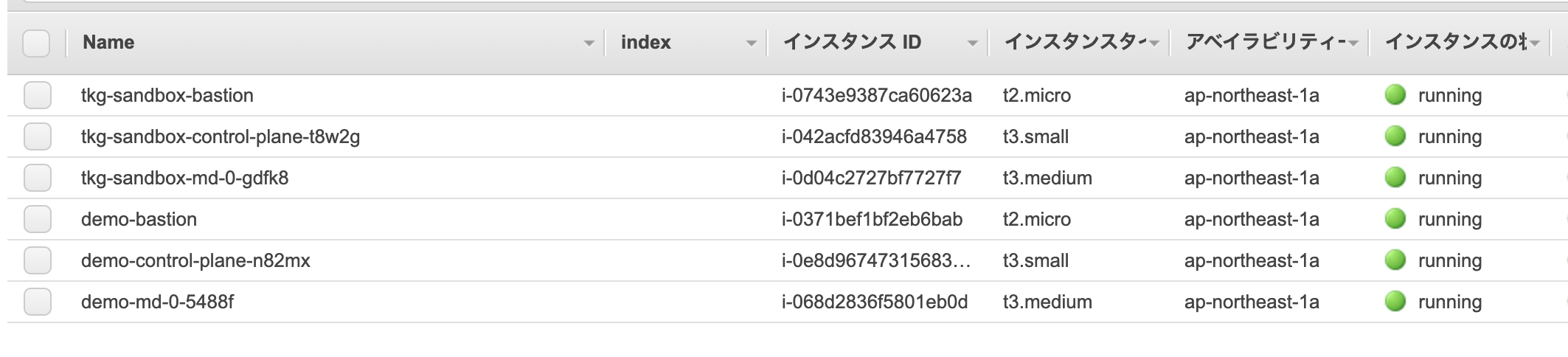
Workload Cluster用にも専用のVPCやNAT Gatewayがconfig.yamlに合わせて作成されます。


Workload ClusterをManagement Clusterと同じVPCに作成する方法は後述します。
tkg get clusterでWorkload Clusterを確認できます。
$ tkg get cluster
 NAME  NAMESPACE  STATUS   CONTROLPLANE  WORKERS  KUBERNETES
 demo  default    running  1/1           1/1      v1.18.3+vmware.1
Cluster APIのリソースを確認します。
$ kubectl get cluster -A
NAMESPACE    NAME          PHASE
default      demo          Provisioned
tkg-system   tkg-sandbox   Provisioned

$ kubectl get machinedeployment -A
NAMESPACE    NAME               PHASE     REPLICAS   AVAILABLE   READY
default      demo-md-0          Running   1          1           1
tkg-system   tkg-sandbox-md-0   Running   1          1           1

$ kubectl get machineset -A
NAMESPACE    NAME                          REPLICAS   AVAILABLE   READY
default      demo-md-0-558dbbdfdc          1          1           1
tkg-system   tkg-sandbox-md-0-75d49d8447   1          1           1

$ kubectl get machine -A
NAMESPACE    NAME                                PROVIDERID                                   PHASE
default      demo-control-plane-r4rkt            aws:///ap-northeast-1a/i-0e8d967473156836d   Running
default      demo-md-0-558dbbdfdc-xctfb          aws:///ap-northeast-1a/i-068d2836f5801eb0d   Running
tkg-system   tkg-sandbox-control-plane-8ldnq     aws:///ap-northeast-1a/i-042acfd83946a4758   Running
tkg-system   tkg-sandbox-md-0-75d49d8447-bqvd7   aws:///ap-northeast-1a/i-0d04c2727bf7727f7   Running

$ kubectl get machinehealthcheck -A
NAMESPACE    NAME          MAXUNHEALTHY   EXPECTEDMACHINES   CURRENTHEALTHY
default      demo          100%           1                  1
tkg-system   tkg-sandbox   100%           1                  1

$ kubectl get kubeadmcontrolplane -A
NAMESPACE    NAME                        READY   INITIALIZED   REPLICAS   READY REPLICAS   UPDATED REPLICAS   UNAVAILABLE REPLICAS
default      demo-control-plane          true    true          1          1                1
tkg-system   tkg-sandbox-control-plane   true    true          1          1                1

$ kubectl get kubeadmconfigtemplate -A
NAMESPACE    NAME               AGE
default      demo-md-0          21m
tkg-system   tkg-sandbox-md-0   4h29m

$ kubectl get awscluster -A
NAMESPACE    NAME          CLUSTER       READY   VPC                     BASTION IP
default      demo          demo          true    vpc-03c82dac6a9aabf5a   52.69.53.60
tkg-system   tkg-sandbox   tkg-sandbox   true    vpc-0b1166959b313d695   52.193.190.32

$ kubectl get awsmachine -A
NAMESPACE    NAME                              CLUSTER       STATE     READY   INSTANCEID                                   MACHINE
default      demo-control-plane-n82mx          demo          running   true    aws:///ap-northeast-1a/i-0e8d967473156836d   demo-control-plane-r4rkt
default      demo-md-0-5488f                   demo          running   true    aws:///ap-northeast-1a/i-068d2836f5801eb0d   demo-md-0-558dbbdfdc-xctfb
tkg-system   tkg-sandbox-control-plane-t8w2g   tkg-sandbox   running   true    aws:///ap-northeast-1a/i-042acfd83946a4758   tkg-sandbox-control-plane-8ldnq
tkg-system   tkg-sandbox-md-0-gdfk8            tkg-sandbox   running   true    aws:///ap-northeast-1a/i-0d04c2727bf7727f7   tkg-sandbox-md-0-75d49d8447-bqvd7

$ kubectl get awsmachinetemplate -A
NAMESPACE    NAME                        AGE
default      demo-control-plane          21m
default      demo-md-0                   21m
tkg-system   tkg-sandbox-control-plane   4h29m
tkg-system   tkg-sandbox-md-0            4h29m
Workload Cluster demoのconfigを取得して、Current Contextに設定します。
tkg get credentials demo
kubectl config use-context demo-admin@demo
Workload Cluster demoを確認します。
$ kubectl cluster-info
Kubernetes master is running at https://demo-apiserver-929202159.ap-northeast-1.elb.amazonaws.com:6443
KubeDNS is running at https://demo-apiserver-929202159.ap-northeast-1.elb.amazonaws.com:6443/api/v1/namespaces/kube-system/services/kube-dns:dns/proxy

To further debug and diagnose cluster problems, use 'kubectl cluster-info dump'.

$ kubectl get node -o wide
NAME                                            STATUS   ROLES    AGE   VERSION            INTERNAL-IP   EXTERNAL-IP   OS-IMAGE         KERNEL-VERSION                  CONTAINER-RUNTIME
ip-10-0-0-176.ap-northeast-1.compute.internal   Ready    master   39m   v1.18.3+vmware.1   10.0.0.176    <none>        Amazon Linux 2   4.14.181-140.257.amzn2.x86_64   containerd://1.3.4
ip-10-0-0-18.ap-northeast-1.compute.internal    Ready    <none>   38m   v1.18.3+vmware.1   10.0.0.18     <none>        Amazon Linux 2   4.14.181-140.257.amzn2.x86_64   containerd://1.3.4

$ kubectl get pod -A -o wide
NAMESPACE     NAME                                                                    READY   STATUS    RESTARTS   AGE   IP                NODE                                            NOMINATED NODE   READINESS GATES
kube-system   calico-kube-controllers-54fd4b48dd-nvbn8                                1/1     Running   0          40m   100.125.242.195   ip-10-0-0-176.ap-northeast-1.compute.internal   <none>           <none>
kube-system   calico-node-t8mls                                                       1/1     Running   0          40m   10.0.0.18         ip-10-0-0-18.ap-northeast-1.compute.internal    <none>           <none>
kube-system   calico-node-wttxn                                                       1/1     Running   0          40m   10.0.0.176        ip-10-0-0-176.ap-northeast-1.compute.internal   <none>           <none>
kube-system   coredns-dbbffcb66-2pg8v                                                 1/1     Running   0          41m   100.125.242.194   ip-10-0-0-176.ap-northeast-1.compute.internal   <none>           <none>
kube-system   coredns-dbbffcb66-76chs                                                 1/1     Running   0          41m   100.125.242.193   ip-10-0-0-176.ap-northeast-1.compute.internal   <none>           <none>
kube-system   etcd-ip-10-0-0-176.ap-northeast-1.compute.internal                      1/1     Running   0          41m   10.0.0.176        ip-10-0-0-176.ap-northeast-1.compute.internal   <none>           <none>
kube-system   kube-apiserver-ip-10-0-0-176.ap-northeast-1.compute.internal            1/1     Running   0          41m   10.0.0.176        ip-10-0-0-176.ap-northeast-1.compute.internal   <none>           <none>
kube-system   kube-controller-manager-ip-10-0-0-176.ap-northeast-1.compute.internal   1/1     Running   0          41m   10.0.0.176        ip-10-0-0-176.ap-northeast-1.compute.internal   <none>           <none>
kube-system   kube-proxy-g2bgf                                                        1/1     Running   0          40m   10.0.0.18         ip-10-0-0-18.ap-northeast-1.compute.internal    <none>           <none>
kube-system   kube-proxy-tvtf2                                                        1/1     Running   0          41m   10.0.0.176        ip-10-0-0-176.ap-northeast-1.compute.internal   <none>           <none>
kube-system   kube-scheduler-ip-10-0-0-176.ap-northeast-1.compute.internal            1/1     Running   0          41m   10.0.0.176        ip-10-0-0-176.ap-northeast-1.compute.internal   <none>           <none>
動作確認用にサンプルアプリをデプロイします。
kubectl create deployment demo --image=making/hello-cnb --dry-run -o=yaml > /tmp/deployment.yaml
echo --- >> /tmp/deployment.yaml
kubectl create service loadbalancer demo --tcp=80:8080 --dry-run -o=yaml >> /tmp/deployment.yaml
kubectl apply -f /tmp/deployment.yaml
PodとServiceを確認します。
$ kubectl get pod,svc -l app=demo
NAME                        READY   STATUS    RESTARTS   AGE
pod/demo-84b79888b4-df2zz   1/1     Running   0          91s

NAME           TYPE           CLUSTER-IP      EXTERNAL-IP                                                                   PORT(S)        AGE
service/demo   LoadBalancer   10.97.118.247   a8ee5042f3fea494b880d599f6f92267-379929389.ap-northeast-1.elb.amazonaws.com   80:30183/TCP   91s
アプリにアクセスします。
$ curl http://a8ee5042f3fea494b880d599f6f92267-379929389.ap-northeast-1.elb.amazonaws.com/actuator/health
{"status":"UP","groups":["liveness","readiness"]}
デプロイしたリソースを削除します。
kubectl delete -f /tmp/deployment.yaml
Workload Clusterを削除
いったんdemo Workload Clusterを削除します。
tkg delete cluster demo -y
tkg get clusterを確認するとSTATUSがdeletingになります。
$ tkg get cluster
 NAME  NAMESPACE  STATUS    CONTROLPLANE  WORKERS  KUBERNETES
 demo  default    deleting
しばらくするとtkg get clusterの結果からdemoが消えます。
$ tkg get cluster
 NAME  NAMESPACE  STATUS  CONTROLPLANE  WORKERS  KUBERNETES
Workload ClusterをManagement Clusterと同じVPC/Subnetに作成
次にWorkload ClusterをManagement Clusterと同じVPC/Subnetに作成します。Bastion VMやNAT GatewayをManagement Clusterと共用できます。
~/.tkg/config.yamlを編集し、次の箇所を設定します。
# ... (略) ...
AWS_PUBLIC_SUBNET_ID: <Management ClusterのPublic Subnet ID>
AWS_PRIVATE_SUBNET_ID: <Management ClusterのPrivate Subnet ID>
AWS_SSH_KEY_NAME: tkg-sandbox
AWS_VPC_ID: <Management ClusterのVPC ID>
# ... (略) ...
次の図の例だと、

~/.tkg/config.yamlは次のようになります。
# ... (略) ...
AWS_PUBLIC_SUBNET_ID: subnet-06054c4866dafd2ad
AWS_PRIVATE_SUBNET_ID: subnet-01061ff8fbb3eb50f
AWS_SSH_KEY_NAME: tkg-sandbox
AWS_VPC_ID: vpc-0b1166959b313d695
# ... (略) ...
このConfigを使ってWorkload Clusterを作成します。
tkg create cluster demo --plan dev
EC2上のVMを確認するとWorkload Cluster用のBastionがいないことを確認できます。

VPCもNAT Gatewayも一つのままです。


AWSClusterとAWSMachineは次のようになります。
$ kubectl get awscluster -A
NAMESPACE    NAME          CLUSTER       READY   VPC                     BASTION IP
default      demo          demo          true    vpc-0b1166959b313d695
tkg-system   tkg-sandbox   tkg-sandbox   true    vpc-0b1166959b313d695   52.193.190.32

$ kubectl get awsmachine -A
NAMESPACE    NAME                              CLUSTER       STATE     READY   INSTANCEID                                   MACHINE
default      demo-control-plane-ctcft          demo          running   true    aws:///ap-northeast-1a/i-09c433f3993b0ea8b   demo-control-plane-9jndn
default      demo-md-0-s6cqm                   demo          running   true    aws:///ap-northeast-1a/i-0750a5c8002f880c8   demo-md-0-558dbbdfdc-48fps
tkg-system   tkg-sandbox-control-plane-t8w2g   tkg-sandbox   running   true    aws:///ap-northeast-1a/i-042acfd83946a4758   tkg-sandbox-control-plane-8ldnq
tkg-system   tkg-sandbox-md-0-gdfk8            tkg-sandbox   running   true    aws:///ap-northeast-1a/i-0d04c2727bf7727f7   tkg-sandbox-md-0-75d49d8447-bqvd7
先ほどと同じように、Workload Cluster demoのconfigを取得して、Current Contextに設定します。
tkg get credentials demo
kubectl config use-context demo-admin@demo
Workload Cluster demoを確認します。
$ kubectl cluster-info
Kubernetes master is running at https://demo-apiserver-1921586626.ap-northeast-1.elb.amazonaws.com:6443
KubeDNS is running at https://demo-apiserver-1921586626.ap-northeast-1.elb.amazonaws.com:6443/api/v1/namespaces/kube-system/services/kube-dns:dns/proxy

$ kubectl get node -o wide
NAME                                            STATUS   ROLES    AGE   VERSION            INTERNAL-IP   EXTERNAL-IP   OS-IMAGE         KERNEL-VERSION                  CONTAINER-RUNTIME
ip-10-0-0-116.ap-northeast-1.compute.internal   Ready    <none>   18m   v1.18.3+vmware.1   10.0.0.116    <none>        Amazon Linux 2   4.14.181-140.257.amzn2.x86_64   containerd://1.3.4
ip-10-0-0-177.ap-northeast-1.compute.internal   Ready    master   20m   v1.18.3+vmware.1   10.0.0.177    <none>        Amazon Linux 2   4.14.181-140.257.amzn2.x86_64   containerd://1.3.4
Workload Clusterのスケールアウト
tkg scale clusterコマンドでWorkload Clusterをスケールアウトできます。
tkg scale cluster demo -w 3
Workerが3台に増えたことが確認できます。
kubectl get node -o wide
NAME                                            STATUS   ROLES    AGE   VERSION            INTERNAL-IP   EXTERNAL-IP   OS-IMAGE         KERNEL-VERSION                  CONTAINER-RUNTIME
ip-10-0-0-11.ap-northeast-1.compute.internal    Ready    <none>   54s   v1.18.3+vmware.1   10.0.0.11     <none>        Amazon Linux 2   4.14.181-140.257.amzn2.x86_64   containerd://1.3.4
ip-10-0-0-116.ap-northeast-1.compute.internal   Ready    <none>   21m   v1.18.3+vmware.1   10.0.0.116    <none>        Amazon Linux 2   4.14.181-140.257.amzn2.x86_64   containerd://1.3.4
ip-10-0-0-135.ap-northeast-1.compute.internal   Ready    <none>   39s   v1.18.3+vmware.1   10.0.0.135    <none>        Amazon Linux 2   4.14.181-140.257.amzn2.x86_64   containerd://1.3.4
ip-10-0-0-177.ap-northeast-1.compute.internal   Ready    master   22m   v1.18.3+vmware.1   10.0.0.177    <none>        Amazon Linux 2   4.14.181-140.257.amzn2.x86_64   containerd://1.3.4
Clusterの削除
次のコマンドでWorkload Clusterを削除します。
tkg delete cluster demo -y
Workload Clusterが削除された後、Management Clusterを削除します。
source tkg-env.sh
tkg delete management-cluster tkg-sandbox -y
Management Clusterの削除はKindが使われます。
TKGでAWS上にKubernetesクラスタを作成しました。
tkgコマンド(+ Cluster API)により一貫した手法でAWSでもvSphereでも同じようにクラスタを作成・管理できるため、
マルチクラウドでKubernetesを管理している場合は特に有用だと思います。
AzureとGCPは今後対応するようです。