kpack on kind (K8s in Docker)でBuild Serviceによるコンテナイメージ管理をスモールスタート
TUNA-JP Advent Calendar 2021 その2の20日目のエントリです。
Spring Fest 2021 で"Cloud Native Buildpacksで作る至高のコンテナイメージ for Spring Boot~ おそらくあなたの知らないBuildpack活用法 ~"という話をしました(スライド 、動画)。
このセッション中でCloud Native Buildpacksによるコンテナイメージのビルド・アップデートをk8s上で一括で行う kpack を紹介しました。 またコンテナイメージをビルドしたいだけなのに、k8sを運用するのは億劫だという方のために使った次のスライドでkindを使ってスモールスタートする方法を紹介しました。
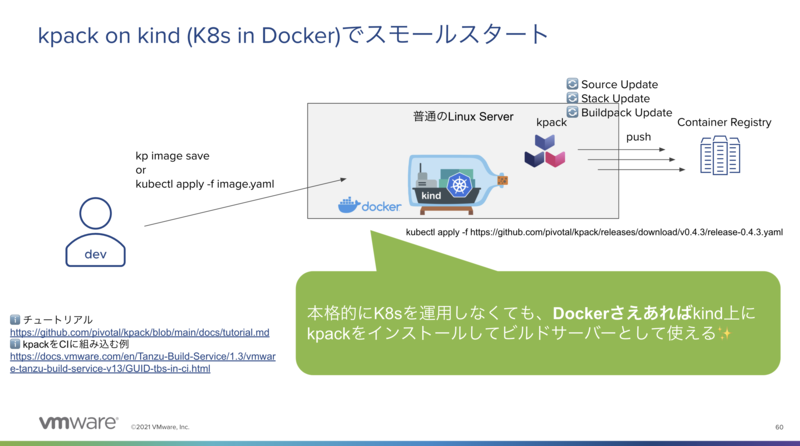
この方法であれば余ったLinuxサーバー上にDockerをインストールするだけで、k8sを本格的に運用することなくkpackにコンテナイメージのビルドを任せることができます。
本記事ではこのkpack on kindの環境を構築する方法をメモします。
目次
Dockerのインストール
Ubuntuの例を示します。
- https://docs.docker.com/engine/install/ubuntu/
- https://docs.docker.com/engine/install/linux-postinstall/
の通りです。rootユーザーで以下を実行します。
apt-get install ca-certificates curl gnupg lsb-release -y
rm -f /usr/share/keyrings/docker-archive-keyring.gpg
curl -fsSL https://download.docker.com/linux/ubuntu/gpg | gpg --dearmor -o /usr/share/keyrings/docker-archive-keyring.gpg
echo "deb [arch=$(dpkg --print-architecture) signed-by=/usr/share/keyrings/docker-archive-keyring.gpg] https://download.docker.com/linux/ubuntu $(lsb_release -cs) stable" | sudo tee /etc/apt/sources.list.d/docker.list > /dev/null
apt-get update
apt-get install docker-ce docker-ce-cli containerd.io -y

groupadd docker
usermod -aG docker jumpbox
この設定の後、sshで再ログインが必要です。
kindクラスタの作成
まずは kind クラスタを作成します。
kindコマンドを次のようにインストールします。
curl -Lo ./kind https://kind.sigs.k8s.io/dl/v0.11.1/kind-linux-amd64
chmod +x ./kind
sudo mv ./kind /usr/local/bin/kind
今回はkpackでコンテナイメージをビルドしたい開発者がkindのk8sクラスタにアクセスできる必要があります。 kindはデフォルトではインストールした端末内からのみアクセスできますが、 開発者がLinuxにsshでログインしてkpackにアクセスするのは不便なので、kindのクラスタを他の端末からもアクセスできるようにします。
今回kindをインストールするサーバーのIPアドレスは次の通り、192.168.11.239です。
$ ifconfig eth0 | grep inet | awk '{print $2}'
192.168.11.239
次の設定ファイルを作成します。apiServerAddressを他の端末からアクセス可能なIPアドレスに設定するのがポイントです。
cat <<EOF > kind.yaml
kind: Cluster
apiVersion: kind.x-k8s.io/v1alpha4
networking:
  apiServerAddress: "192.168.11.239"
  apiServerPort: 6443
EOF
次のコマンドでkindクラスタを作成します。
kind create cluster --config kind.yaml
今回は簡易的に全開発者を信用してadminのkubeconfigを配る運用とします。次のコマンドでkubeconfigを取得します。
kind get kubeconfig
次のようなYAMLが得られます。
apiVersion: v1
clusters:
- cluster:
    certificate-authority-data: LS0tLS1CRUd....
    server: https://192.168.11.239:6443
  name: kind-kind
contexts:
- context:
    cluster: kind-kind
    user: kind-kind
  name: kind-kind
current-context: kind-kind
kind: Config
preferences: {}
users:
- name: kind-kind
  user:
    client-certificate-data: LS0tLS1CRUd...
    client-key-data: LS0tLS1CRUdJTiBSU0E...
このYAMLを開発者の端末に保存します。ここでは$HOME/kind.yamlに保存します。
次のように、環境変数KUBECONFIGにこのパスを設定します。
export KUBECONFIG=$HOME/kind.yaml
次のように kubectl がkindのクラスタにアクセスできます。
$ kubectl cluster-info
Kubernetes control plane is running at https://192.168.11.239:6443
CoreDNS is running at https://192.168.11.239:6443/api/v1/namespaces/kube-system/services/kube-dns:dns/proxy

To further debug and diagnose cluster problems, use 'kubectl cluster-info dump'.

$ kubectl get node -owide
NAME                 STATUS   ROLES                  AGE   VERSION   INTERNAL-IP   EXTERNAL-IP   OS-IMAGE       KERNEL-VERSION     CONTAINER-RUNTIME
kind-control-plane   Ready    control-plane,master   78m   v1.21.1   172.19.0.2    <none>        Ubuntu 21.04   5.4.0-91-generic   containerd://1.5.2

$ kubectl get pod -A -owide
NAMESPACE            NAME                                         READY   STATUS    RESTARTS   AGE     IP           NODE                 NOMINATED NODE   READINESS GATES
kube-system          coredns-558bd4d5db-4vjlx                     1/1     Running   0          9m49s   10.244.0.3   kind-control-plane   <none>           <none>
kube-system          coredns-558bd4d5db-m4qtm                     1/1     Running   0          9m50s   10.244.0.4   kind-control-plane   <none>           <none>
kube-system          etcd-kind-control-plane                      1/1     Running   0          9m54s   172.19.0.2   kind-control-plane   <none>           <none>
kube-system          kindnet-4d644                                1/1     Running   0          9m50s   172.19.0.2   kind-control-plane   <none>           <none>
kube-system          kube-apiserver-kind-control-plane            1/1     Running   0          9m54s   172.19.0.2   kind-control-plane   <none>           <none>
kube-system          kube-controller-manager-kind-control-plane   1/1     Running   0          9m54s   172.19.0.2   kind-control-plane   <none>           <none>
kube-system          kube-proxy-kk489                             1/1     Running   0          9m50s   172.19.0.2   kind-control-plane   <none>           <none>
kube-system          kube-scheduler-kind-control-plane            1/1     Running   0          9m54s   172.19.0.2   kind-control-plane   <none>           <none>
local-path-storage   local-path-provisioner-547f784dff-fcxzf      1/1     Running   0          9m50s   10.244.0.2   kind-control-plane   <none>           <none>
kpackのインストール
kubectlがkindクラスタを指している状態で、次のコマンドによりkpackをインストールします。ここではkpack 0.5.0を使用します。
kubectl apply -f https://github.com/pivotal/kpack/releases/download/v0.5.0/release-0.5.0.yaml
しばらくすると、次のように kpack namespaceに2つPodが立ち上がります。
$ kubectl get pod -A
NAMESPACE            NAME                                         READY   STATUS    RESTARTS   AGE
kpack                kpack-controller-5865df8c5f-sx4dl            1/1     Running   0          22s
kpack                kpack-webhook-65995b9f8f-wjsh7               1/1     Running   0          21s
kube-system          coredns-558bd4d5db-4vjlx                     1/1     Running   0          11m
kube-system          coredns-558bd4d5db-m4qtm                     1/1     Running   0          11m
kube-system          etcd-kind-control-plane                      1/1     Running   0          11m
kube-system          kindnet-4d644                                1/1     Running   0          11m
kube-system          kube-apiserver-kind-control-plane            1/1     Running   0          11m
kube-system          kube-controller-manager-kind-control-plane   1/1     Running   0          11m
kube-system          kube-proxy-kk489                             1/1     Running   0          11m
kube-system          kube-scheduler-kind-control-plane            1/1     Running   0          11m
local-path-storage   local-path-provisioner-547f784dff-fcxzf      1/1     Running   0          11m
kpackの設定
今回のビルドシステムで使用するClusterStore (サポートするBuildpackのコレクション)、ClusterStack (OSのベースイメージ)、ClusterBuilder (ClusterStoreとClusterStackの組み合わせ)を定義します。
ClusterBuilderリソースによってCloud Native Buildpacksのbuilderが作成されます。このbuilderはコンテナレジストリにpushされます。 push先のコンテナレジストリとして今回はghcr.ioを使用します。次のアカウントを使用します。
export GITHUB_USERNAME=making
export GITHUB_API_TOKEN=*************

docker login ghcr.io -u ${GITHUB_USERNAME} -p ${GITHUB_API_TOKEN}
次のコマンドで、このレジストリのcredentialsをSecretに登録し、Service Accountのsecrets及びimagePullSecretsに設定します。
cat <<EOF > dockerconfig.yaml
apiVersion: v1
kind: Secret
metadata:
  name: regsecret
  namespace: default
type: kubernetes.io/dockerconfigjson
stringData:
  .dockerconfigjson: |
    {
      "auths": {
        "https://ghcr.io": {
          "username": "${GITHUB_USERNAME}",
          "password": "${GITHUB_API_TOKEN}"
        }
      }
    }
EOF
kubectl apply -f dockerconfig.yaml
kubectl patch -n default serviceaccount default -p "{\"secrets\":[{\"name\":\"regsecret\"}],\"imagePullSecrets\":[{\"name\":\"regsecret\"}]}"
ghcr.io以外のコンテナレジストリを使用する場合は適宜変更してください。
AWS Elastic Container Registry (ECR)を使用する場合は、パスワードが定期的に切れるので、以下のような仕組みを使用して定期的にパスワード更新が必要です。
次のようにClusterStore、ClusterStack、ClusterBuilderを定義します。 今回はJava Buildpackのみインストールします。
cat <<EOF > clusterbuilder.yaml
apiVersion: kpack.io/v1alpha2
kind: ClusterStore
metadata:
  name: default
spec:
  sources:
  - image: gcr.io/paketo-buildpacks/java:6.2.1
---
apiVersion: kpack.io/v1alpha2
kind: ClusterStack
metadata:
  name: base
spec:
  id: io.buildpacks.stacks.bionic
  buildImage:
    image: paketobuildpacks/build:1.1.38-base-cnb
  runImage:
    image: paketobuildpacks/run:1.1.38-base-cnb
---
apiVersion: kpack.io/v1alpha2
kind: ClusterBuilder
metadata:
  name: base
spec:
  tag: ghcr.io/${GITHUB_USERNAME}/kpack/clusterbuilder:base
  stack:
    name: base
    kind: ClusterStack
  store:
    name: default
    kind: ClusterStore
  serviceAccountRef:
    name: default
    namespace: default
  order:
  - group:
    - id: paketo-buildpacks/java
EOF
kubectl apply -f clusterbuilder.yaml
ここではbuildpackもstackも特定のバージョンをタグで固定しています。定義時はバージョンを固定した方が管理しやすいです。
しばらくすると、builderが作成され、次のコマンドのようにclusterbuilderの結果でイメージ名を確認できます。
$ kubectl get clusterbuilder
NAME   LATESTIMAGE                                                                                                        READY
base   ghcr.io/making/kpack/clusterbuilder:base@sha256:294048d99b113c675f8417a406e5a34593034be0ec0f18ca2aa4d9a84c9aa3f7   True
ClusterBuilderの詳細を見ると、builderに含まれるBuildpackやStackの情報を見ることができます。
$ kubectl get clusterbuilder base -oyaml
apiVersion: kpack.io/v1alpha2
kind: ClusterBuilder
metadata:
  annotations:
    kubectl.kubernetes.io/last-applied-configuration: |
      {"apiVersion":"kpack.io/v1alpha2","kind":"ClusterBuilder","metadata":{"annotations":{},"name":"base"},"spec":{"order":[{"group":[{"id":"paketo-buildpacks/java","version":"6.2.1"}]}],"serviceAccountRef":{"name":"default","namespace":"default"},"stack":{"kind":"ClusterStack","name":"base"},"store":{"kind":"ClusterStore","name":"default"},"tag":"ghcr.io/making/kpack/clusterbuilder:base"}}
  creationTimestamp: "2021-12-20T14:26:30Z"
  generation: 4
  name: base
  resourceVersion: "4732"
  uid: ecc4eed8-9e25-446c-88e9-9c48c392fe86
spec:
  order:
  - group:
    - id: paketo-buildpacks/java
      version: 6.2.1
  serviceAccountRef:
    name: default
    namespace: default
  stack:
    kind: ClusterStack
    name: base
  store:
    kind: ClusterStore
    name: default
  tag: ghcr.io/making/kpack/clusterbuilder:base
status:
  builderMetadata:
  - homepage: https://github.com/paketo-buildpacks/bellsoft-liberica
    id: paketo-buildpacks/bellsoft-liberica
    version: 9.0.1
  - homepage: https://github.com/paketo-buildpacks/spring-boot
    id: paketo-buildpacks/spring-boot
    version: 5.2.0
  - homepage: https://github.com/paketo-buildpacks/apache-tomcat
    id: paketo-buildpacks/apache-tomcat
    version: 7.0.2
  - homepage: https://github.com/paketo-buildpacks/google-stackdriver
    id: paketo-buildpacks/google-stackdriver
    version: 5.1.0
  - homepage: https://github.com/paketo-buildpacks/ca-certificates
    id: paketo-buildpacks/ca-certificates
    version: 3.0.1
  - homepage: https://github.com/paketo-buildpacks/azure-application-insights
    id: paketo-buildpacks/azure-application-insights
    version: 5.1.1
  - homepage: https://github.com/paketo-buildpacks/procfile
    id: paketo-buildpacks/procfile
    version: 5.0.1
  - homepage: https://github.com/paketo-buildpacks/encrypt-at-rest
    id: paketo-buildpacks/encrypt-at-rest
    version: 4.0.1
  - homepage: https://github.com/paketo-buildpacks/maven
    id: paketo-buildpacks/maven
    version: 6.0.1
  - homepage: https://github.com/paketo-buildpacks/sbt
    id: paketo-buildpacks/sbt
    version: 6.0.2
  - homepage: https://github.com/paketo-buildpacks/gradle
    id: paketo-buildpacks/gradle
    version: 6.0.1
  - homepage: https://github.com/paketo-buildpacks/clojure-tools
    id: paketo-buildpacks/clojure-tools
    version: 2.0.1
  - homepage: https://github.com/paketo-buildpacks/leiningen
    id: paketo-buildpacks/leiningen
    version: 4.0.1
  - homepage: https://github.com/paketo-buildpacks/watchexec
    id: paketo-buildpacks/watchexec
    version: 2.0.1
  - homepage: https://github.com/paketo-buildpacks/syft
    id: paketo-buildpacks/syft
    version: 1.2.0
  - homepage: https://github.com/paketo-buildpacks/executable-jar
    id: paketo-buildpacks/executable-jar
    version: 6.0.1
  - homepage: https://github.com/paketo-buildpacks/dist-zip
    id: paketo-buildpacks/dist-zip
    version: 5.0.1
  - homepage: https://github.com/paketo-buildpacks/environment-variables
    id: paketo-buildpacks/environment-variables
    version: 4.0.1
  - homepage: https://github.com/paketo-buildpacks/image-labels
    id: paketo-buildpacks/image-labels
    version: 4.0.1
  - homepage: https://github.com/paketo-buildpacks/java
    id: paketo-buildpacks/java
    version: 6.2.1
  conditions:
  - lastTransitionTime: "2021-12-20T14:31:10Z"
    status: "True"
    type: Ready
  latestImage: ghcr.io/making/kpack/clusterbuilder:base@sha256:294048d99b113c675f8417a406e5a34593034be0ec0f18ca2aa4d9a84c9aa3f7
  observedGeneration: 4
  observedStackGeneration: 1
  observedStoreGeneration: 2
  order:
  - group:
    - id: paketo-buildpacks/java
      version: 6.2.1
  os: linux
  stack:
    id: io.buildpacks.stacks.bionic
    runImage: index.docker.io/paketobuildpacks/run@sha256:f9e78e309fe5af1d376d3ce4593e3d25260604e4a62430dad7ec65b11289cf89
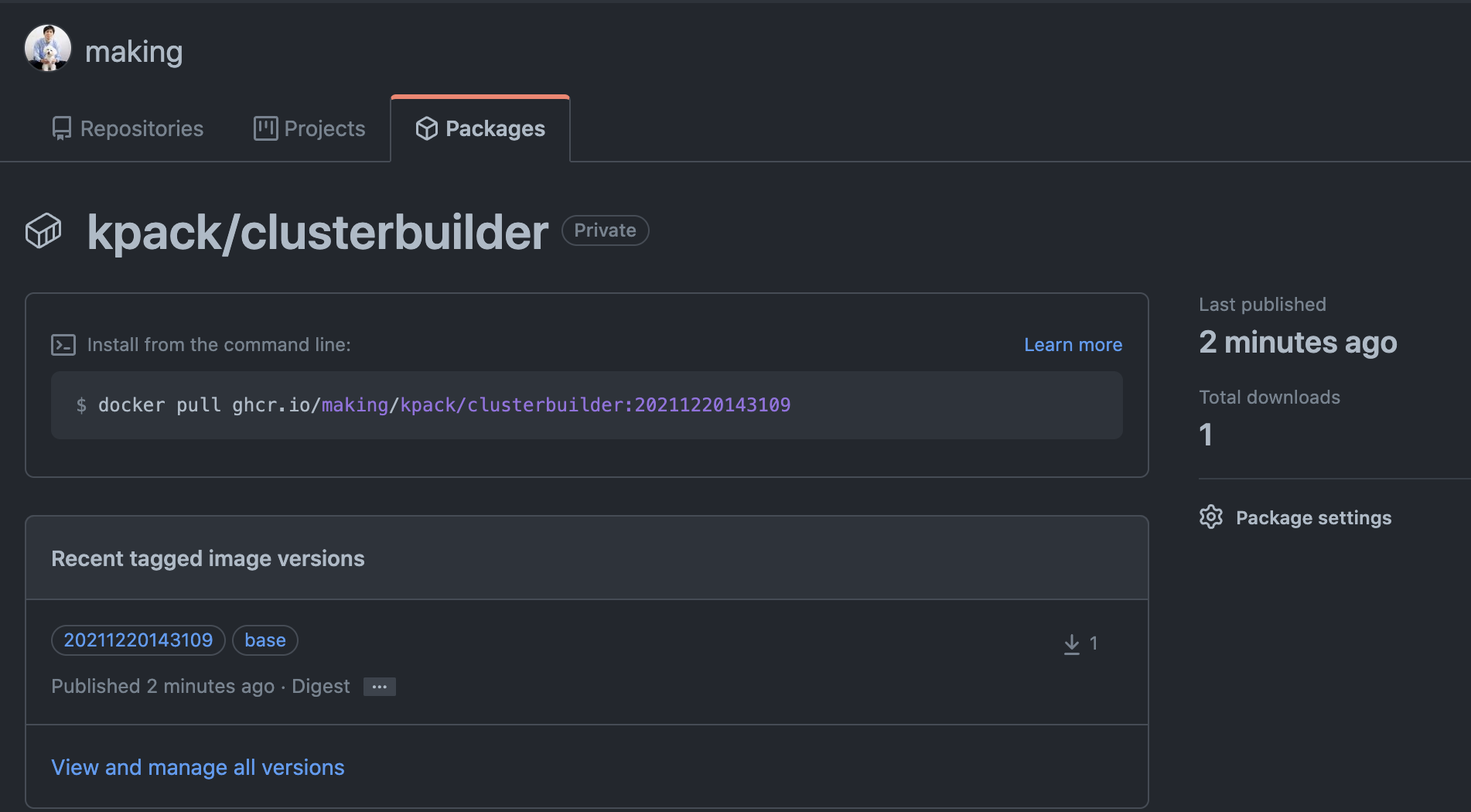
ghcr.io上でもbuilderがpushされていることを確認できます。
Imageの作成
早速kpackでイメージを作成します。ここでは次のサンプルアプリをビルドします。必要に応じてforkしてください。
https://github.com/making/reward-dining
kp CLIを使うことkpackにImageリソース作成が簡単に行えます。
こちら からバイナリをダウンロードしてPATHの通ったディレクトリに配置してください。
次のコマンドでkpackにImageリソースを作成ます。
kp image save reward-dining --tag ghcr.io/${GITHUB_USERNAME}/reward-dining --git https://github.com/making/reward-dining.git --git-revision main --watch
次のようなログが出力され、コンテナイメージのビルドが始まります。初回はダウンロード待ちなどで完了までに時間がかかります。二回目以降はキャッシュが働くので速くなります。
Creating Image Resource...
Image Resource "reward-dining" created
===> PREPARE
Build reason(s): CONFIG
CONFIG:
	resources: {}
	- source: {}
	+ source:
	+   git:
	+     revision: 4518c9348168be38c8b91da4380d82e1a9b5e58e
	+     url: https://github.com/making/reward-dining.git
Loading secret for "https://ghcr.io" from secret "regsecret" at location "/var/build-secrets/regsecret"
Cloning "https://github.com/making/reward-dining.git" @ "4518c9348168be38c8b91da4380d82e1a9b5e58e"...
Successfully cloned "https://github.com/making/reward-dining.git" @ "4518c9348168be38c8b91da4380d82e1a9b5e58e" in path "/workspace"
===> ANALYZE
Previous image with name "ghcr.io/making/reward-dining" not found
===> DETECT
8 of 19 buildpacks participating
paketo-buildpacks/ca-certificates   3.0.1
paketo-buildpacks/bellsoft-liberica 9.0.1
paketo-buildpacks/syft              1.2.0
paketo-buildpacks/maven             6.0.1
paketo-buildpacks/executable-jar    6.0.1
paketo-buildpacks/apache-tomcat     7.0.2
paketo-buildpacks/dist-zip          5.0.1
paketo-buildpacks/spring-boot       5.2.0
===> RESTORE
===> BUILD

Paketo CA Certificates Buildpack 3.0.1
  https://github.com/paketo-buildpacks/ca-certificates
  Launch Helper: Contributing to layer
    Creating /layers/paketo-buildpacks_ca-certificates/helper/exec.d/ca-certificates-helper

Paketo BellSoft Liberica Buildpack 9.0.1
  https://github.com/paketo-buildpacks/bellsoft-liberica
  Build Configuration:
    $BP_JVM_TYPE                 JRE             the JVM type - JDK or JRE
    $BP_JVM_VERSION              11              the Java version
  Launch Configuration:
    $BPL_DEBUG_ENABLED           false           enables Java remote debugging support
    $BPL_DEBUG_PORT              8000            configure the remote debugging port
    $BPL_DEBUG_SUSPEND           false           configure whether to suspend execution until a debugger has attached
    $BPL_HEAP_DUMP_PATH                          write heap dumps on error to this path
    $BPL_JAVA_NMT_ENABLED        true            enables Java Native Memory Tracking (NMT)
    $BPL_JAVA_NMT_LEVEL          summary         configure level of NMT, summary or detail
    $BPL_JFR_ARGS                                configure custom Java Flight Recording (JFR) arguments
    $BPL_JFR_ENABLED             false           enables Java Flight Recording (JFR)
    $BPL_JMX_ENABLED             false           enables Java Management Extensions (JMX)
    $BPL_JMX_PORT                5000            configure the JMX port
    $BPL_JVM_HEAD_ROOM           0               the headroom in memory calculation
    $BPL_JVM_LOADED_CLASS_COUNT  35% of classes  the number of loaded classes in memory calculation
    $BPL_JVM_THREAD_COUNT        250             the number of threads in memory calculation
    $JAVA_TOOL_OPTIONS                           the JVM launch flags
  BellSoft Liberica JDK 11.0.13: Contributing to layer
    Downloading from https://github.com/bell-sw/Liberica/releases/download/11.0.13+8/bellsoft-jdk11.0.13+8-linux-amd64.tar.gz
    Verifying checksum
    Expanding to /layers/paketo-buildpacks_bellsoft-liberica/jdk
    Adding 128 container CA certificates to JVM truststore
    Writing env.build/JAVA_HOME.override
    Writing env.build/JDK_HOME.override
  BellSoft Liberica JRE 11.0.13: Contributing to layer
    Downloading from https://github.com/bell-sw/Liberica/releases/download/11.0.13+8/bellsoft-jre11.0.13+8-linux-amd64.tar.gz
    Verifying checksum
    Expanding to /layers/paketo-buildpacks_bellsoft-liberica/jre
    Adding 128 container CA certificates to JVM truststore
    Writing env.launch/BPI_APPLICATION_PATH.default
    Writing env.launch/BPI_JVM_CACERTS.default
    Writing env.launch/BPI_JVM_CLASS_COUNT.default
    Writing env.launch/BPI_JVM_SECURITY_PROVIDERS.default
    Writing env.launch/JAVA_HOME.default
    Writing env.launch/JAVA_TOOL_OPTIONS.append
    Writing env.launch/JAVA_TOOL_OPTIONS.delim
    Writing env.launch/MALLOC_ARENA_MAX.default
  Launch Helper: Contributing to layer
    Creating /layers/paketo-buildpacks_bellsoft-liberica/helper/exec.d/active-processor-count
    Creating /layers/paketo-buildpacks_bellsoft-liberica/helper/exec.d/java-opts
    Creating /layers/paketo-buildpacks_bellsoft-liberica/helper/exec.d/jvm-heap
    Creating /layers/paketo-buildpacks_bellsoft-liberica/helper/exec.d/link-local-dns
    Creating /layers/paketo-buildpacks_bellsoft-liberica/helper/exec.d/memory-calculator
    Creating /layers/paketo-buildpacks_bellsoft-liberica/helper/exec.d/openssl-certificate-loader
    Creating /layers/paketo-buildpacks_bellsoft-liberica/helper/exec.d/security-providers-configurer
    Creating /layers/paketo-buildpacks_bellsoft-liberica/helper/exec.d/jmx
    Creating /layers/paketo-buildpacks_bellsoft-liberica/helper/exec.d/jfr
    Creating /layers/paketo-buildpacks_bellsoft-liberica/helper/exec.d/nmt
    Creating /layers/paketo-buildpacks_bellsoft-liberica/helper/exec.d/security-providers-classpath-9
    Creating /layers/paketo-buildpacks_bellsoft-liberica/helper/exec.d/debug-9
  Java Security Properties: Contributing to layer
    Writing env.launch/JAVA_SECURITY_PROPERTIES.default
    Writing env.launch/JAVA_TOOL_OPTIONS.append
    Writing env.launch/JAVA_TOOL_OPTIONS.delim

Paketo Syft Buildpack 1.2.0
  https://github.com/paketo-buildpacks/syft
    Downloading from https://github.com/anchore/syft/releases/download/v0.32.0/syft_0.32.0_linux_amd64.tar.gz
    Verifying checksum

Paketo Maven Buildpack 6.0.1
  https://github.com/paketo-buildpacks/maven
  Build Configuration:
    $BP_MAVEN_BUILD_ARGUMENTS  -Dmaven.test.skip=true package  the arguments to pass to Maven
    $BP_MAVEN_BUILT_ARTIFACT   target/*.[ejw]ar                the built application artifact explicitly.  Supersedes $BP_MAVEN_BUILT_MODULE
    $BP_MAVEN_BUILT_MODULE                                     the module to find application artifact in
    $BP_MAVEN_POM_FILE         pom.xml                         the location of the main pom.xml file, relative to the application root
    Creating cache directory /home/cnb/.m2
  Compiled Application: Contributing to layer
    Executing mvnw --batch-mode -Dmaven.test.skip=true package
      [INFO] Scanning for projects...
      [INFO] Downloading from spring-releases: https://repo.spring.io/release/org/springframework/boot/spring-boot-starter-parent/2.5.6/spring-boot-starter-parent-2.5.6.pom
      [INFO] Downloaded from spring-releases: https://repo.spring.io/release/org/springframework/boot/spring-boot-starter-parent/2.5.6/spring-boot-starter-parent-2.5.6.pom (8.6 kB at 2.4 kB/s)
      ....
      [INFO] Downloaded from central: https://repo.maven.apache.org/maven2/org/apache/commons/commons-lang3/3.7/commons-lang3-3.7.jar (500 kB at 229 kB/s)
      [INFO] Replacing main artifact with repackaged archive
      [INFO] ------------------------------------------------------------------------
      [INFO] BUILD SUCCESS
      [INFO] ------------------------------------------------------------------------
      [INFO] Total time:  04:48 min
      [INFO] Finished at: 2021-12-20T14:46:43Z
      [INFO] ------------------------------------------------------------------------
  Removing source code

Paketo Executable JAR Buildpack 6.0.1
  https://github.com/paketo-buildpacks/executable-jar
  Class Path: Contributing to layer
    Writing env/CLASSPATH.delim
    Writing env/CLASSPATH.prepend
  Process types:
    executable-jar: java org.springframework.boot.loader.JarLauncher (direct)
    task:           java org.springframework.boot.loader.JarLauncher (direct)
    web:            java org.springframework.boot.loader.JarLauncher (direct)

Paketo Spring Boot Buildpack 5.2.0
  https://github.com/paketo-buildpacks/spring-boot
  Creating slices from layers index
    dependencies
    spring-boot-loader
    snapshot-dependencies
    application
  Launch Helper: Contributing to layer
    Creating /layers/paketo-buildpacks_spring-boot/helper/exec.d/spring-cloud-bindings
  Spring Cloud Bindings 1.8.0: Contributing to layer
    Downloading from https://repo.spring.io/release/org/springframework/cloud/spring-cloud-bindings/1.8.0/spring-cloud-bindings-1.8.0.jar
    Verifying checksum
    Copying to /layers/paketo-buildpacks_spring-boot/spring-cloud-bindings
  Web Application Type: Contributing to layer
    Servlet web application detected
    Writing env.launch/BPL_JVM_THREAD_COUNT.default
  4 application slices
  Image labels:
    org.opencontainers.image.title
    org.opencontainers.image.version
    org.springframework.boot.version
===> EXPORT
Adding layer 'paketo-buildpacks/ca-certificates:helper'
Adding layer 'paketo-buildpacks/bellsoft-liberica:helper'
Adding layer 'paketo-buildpacks/bellsoft-liberica:java-security-properties'
Adding layer 'paketo-buildpacks/bellsoft-liberica:jre'
Adding layer 'paketo-buildpacks/executable-jar:classpath'
Adding layer 'paketo-buildpacks/spring-boot:helper'
Adding layer 'paketo-buildpacks/spring-boot:spring-cloud-bindings'
Adding layer 'paketo-buildpacks/spring-boot:web-application-type'
Adding layer 'launch.sbom'
Adding 5/5 app layer(s)
Adding layer 'launcher'
Adding layer 'config'
Adding layer 'process-types'
Adding label 'io.buildpacks.lifecycle.metadata'
Adding label 'io.buildpacks.build.metadata'
Adding label 'io.buildpacks.project.metadata'
Adding label 'org.opencontainers.image.title'
Adding label 'org.opencontainers.image.version'
Adding label 'org.springframework.boot.version'
Setting default process type 'web'
Saving ghcr.io/making/reward-dining...
*** Images (sha256:33e56e7c8970793aeb38e3d53781028ca08a86a3caf9fd9a51c80f76062da3d6):
      ghcr.io/making/reward-dining
      ghcr.io/making/reward-dining:b1.20211220.144029
Adding cache layer 'paketo-buildpacks/bellsoft-liberica:jdk'
Adding cache layer 'paketo-buildpacks/syft:syft'
Adding cache layer 'paketo-buildpacks/maven:application'
Adding cache layer 'paketo-buildpacks/maven:cache'
Adding cache layer 'cache.sbom'
===> COMPLETION
Build successful
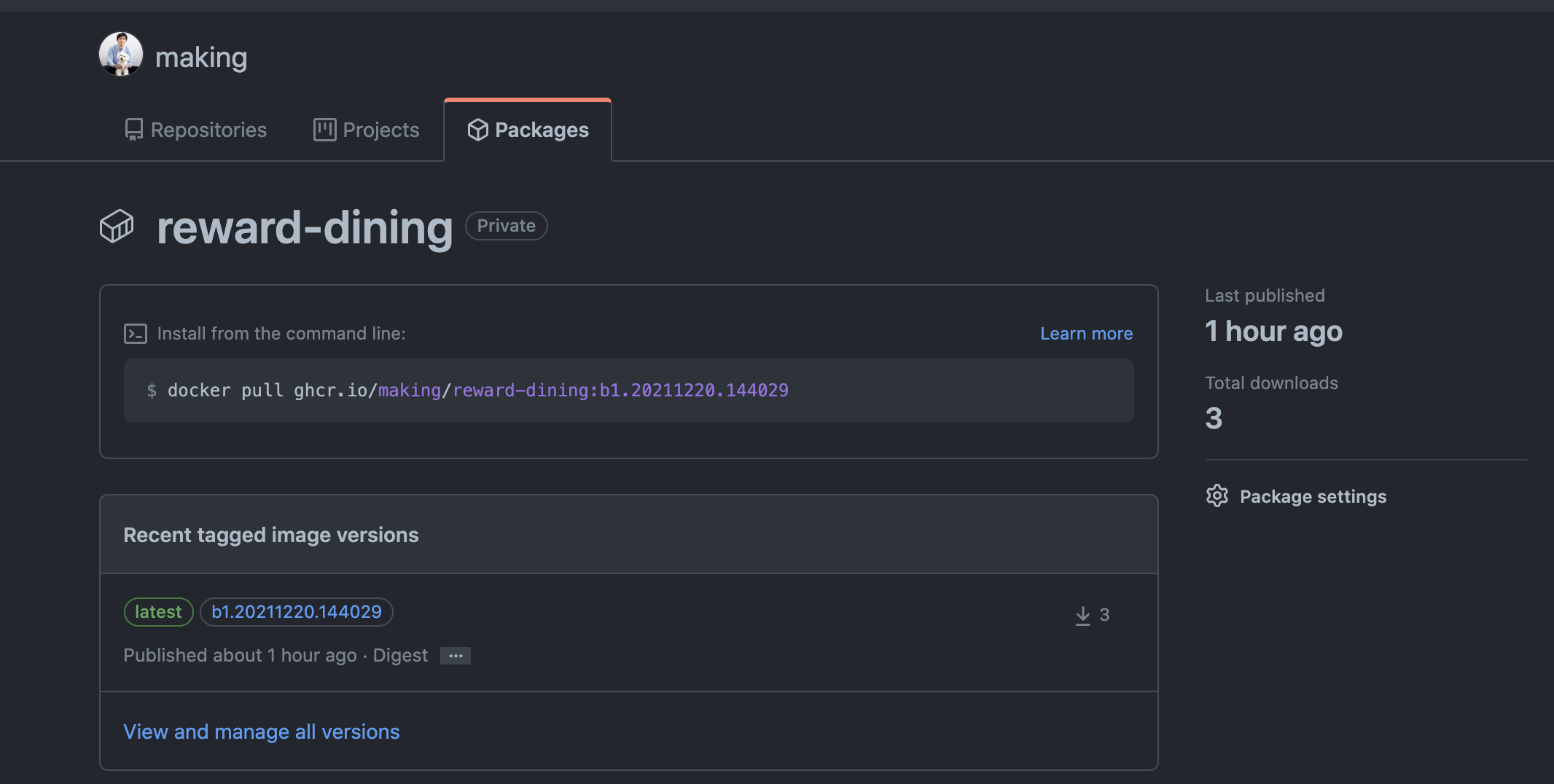
ログからghcr.io/making/reward-dining:b1.20211220.144029というコンテナイメージが作成されたことがわかります。
dockerでこのイメージを起動しましょう。
docker run --rm -p 8080:8080 ghcr.io/${GITHUB_USERNAME}/reward-dining
次のログが出力され、アプリが起動します。
Setting Active Processor Count to 8
Calculated JVM Memory Configuration: -XX:MaxDirectMemorySize=10M -Xmx429124K -XX:MaxMetaspaceSize=107451K -XX:ReservedCodeCacheSize=240M -Xss1M (Total Memory: 1G, Thread Count: 250, Loaded Class Count: 16557, Headroom: 0%)
Enabling Java Native Memory Tracking
Adding 128 container CA certificates to JVM truststore
Spring Cloud Bindings Enabled
Picked up JAVA_TOOL_OPTIONS: -Djava.security.properties=/layers/paketo-buildpacks_bellsoft-liberica/java-security-properties/java-security.properties -XX:+ExitOnOutOfMemoryError -XX:ActiveProcessorCount=8 -XX:MaxDirectMemorySize=10M -Xmx429124K -XX:MaxMetaspaceSize=107451K -XX:ReservedCodeCacheSize=240M -Xss1M -XX:+UnlockDiagnosticVMOptions -XX:NativeMemoryTracking=summary -XX:+PrintNMTStatistics -Dorg.springframework.cloud.bindings.boot.enable=true

  .   ____          _            __ _ _
 /\\ / ___'_ __ _ _(_)_ __  __ _ \ \ \ \
( ( )\___ | '_ | '_| | '_ \/ _` | \ \ \ \
 \\/  ___)| |_)| | | | | || (_| |  ) ) ) )
  '  |____| .__|_| |_|_| |_\__, | / / / /
 =========|_|==============|___/=/_/_/_/
 :: Spring Boot ::                (v2.5.6)

2021-12-20 14:54:00.536  INFO [reward-dining,,] 1 --- [           main] l.m.r.RewardDiningApplication            : Starting RewardDiningApplication v0.0.1-SNAPSHOT using Java 11.0.13 on 929fefdf40e3 with PID 1 (/workspace/BOOT-INF/classes started by cnb in /workspace)
2021-12-20 14:54:00.540  INFO [reward-dining,,] 1 --- [           main] l.m.r.RewardDiningApplication            : No active profile set, falling back to default profiles: default
2021-12-20 14:54:01.544  INFO [reward-dining,,] 1 --- [           main] o.s.cloud.context.scope.GenericScope     : BeanFactory id=183768df-74c8-321a-88bd-1a0c94396110
2021-12-20 14:54:02.089  INFO [reward-dining,,] 1 --- [           main] o.s.b.w.embedded.tomcat.TomcatWebServer  : Tomcat initialized with port(s): 8080 (http)
2021-12-20 14:54:02.098  INFO [reward-dining,,] 1 --- [           main] o.apache.catalina.core.StandardService   : Starting service [Tomcat]
2021-12-20 14:54:02.098  INFO [reward-dining,,] 1 --- [           main] org.apache.catalina.core.StandardEngine  : Starting Servlet engine: [Apache Tomcat/9.0.54]
2021-12-20 14:54:02.153  INFO [reward-dining,,] 1 --- [           main] o.a.c.c.C.[Tomcat].[localhost].[/]       : Initializing Spring embedded WebApplicationContext
2021-12-20 14:54:02.153  INFO [reward-dining,,] 1 --- [           main] w.s.c.ServletWebServerApplicationContext : Root WebApplicationContext: initialization completed in 1572 ms
2021-12-20 14:54:02.727  INFO [reward-dining,,] 1 --- [           main] com.zaxxer.hikari.HikariDataSource       : HikariPool-1 - Starting...
2021-12-20 14:54:02.892  INFO [reward-dining,,] 1 --- [           main] com.zaxxer.hikari.HikariDataSource       : HikariPool-1 - Start completed.
2021-12-20 14:54:03.483  INFO [reward-dining,,] 1 --- [           main] o.s.b.a.w.s.WelcomePageHandlerMapping    : Adding welcome page template: index
2021-12-20 14:54:03.786  INFO [reward-dining,,] 1 --- [           main] o.s.b.a.e.web.EndpointLinksResolver      : Exposing 1 endpoint(s) beneath base path '/actuator'
2021-12-20 14:54:03.814  INFO [reward-dining,,] 1 --- [           main] o.s.s.web.DefaultSecurityFilterChain     : Will secure Mvc [pattern='/resources/**'] with []
2021-12-20 14:54:03.861  INFO [reward-dining,,] 1 --- [           main] o.s.s.web.DefaultSecurityFilterChain     : Will secure any request with [org.springframework.security.web.context.request.async.WebAsyncManagerIntegrationFilter@718ad3a6, org.springframework.security.web.context.SecurityContextPersistenceFilter@575d48db, org.springframework.security.web.header.HeaderWriterFilter@3c9ef37b, org.springframework.web.filter.CommonsRequestLoggingFilter@603c2dee, org.springframework.security.web.csrf.CsrfFilter@54737322, org.springframework.security.web.authentication.logout.LogoutFilter@4efed0e0, org.springframework.security.web.authentication.UsernamePasswordAuthenticationFilter@73aae7a, org.springframework.security.web.savedrequest.RequestCacheAwareFilter@495e8a3, org.springframework.security.web.servletapi.SecurityContextHolderAwareRequestFilter@3a3bc0da, org.springframework.security.web.authentication.AnonymousAuthenticationFilter@50d666a2, org.springframework.security.web.session.SessionManagementFilter@51f4439e, org.springframework.security.web.access.ExceptionTranslationFilter@5b895e76, org.springframework.security.web.access.intercept.FilterSecurityInterceptor@6fc28e5b]
2021-12-20 14:54:04.042  INFO [reward-dining,,] 1 --- [           main] o.s.b.w.embedded.tomcat.TomcatWebServer  : Tomcat started on port(s): 8080 (http) with context path ''
2021-12-20 14:54:04.060  INFO [reward-dining,,] 1 --- [           main] l.m.r.RewardDiningApplication            : Started RewardDiningApplication in 3.939 seconds (JVM running for 4.287)
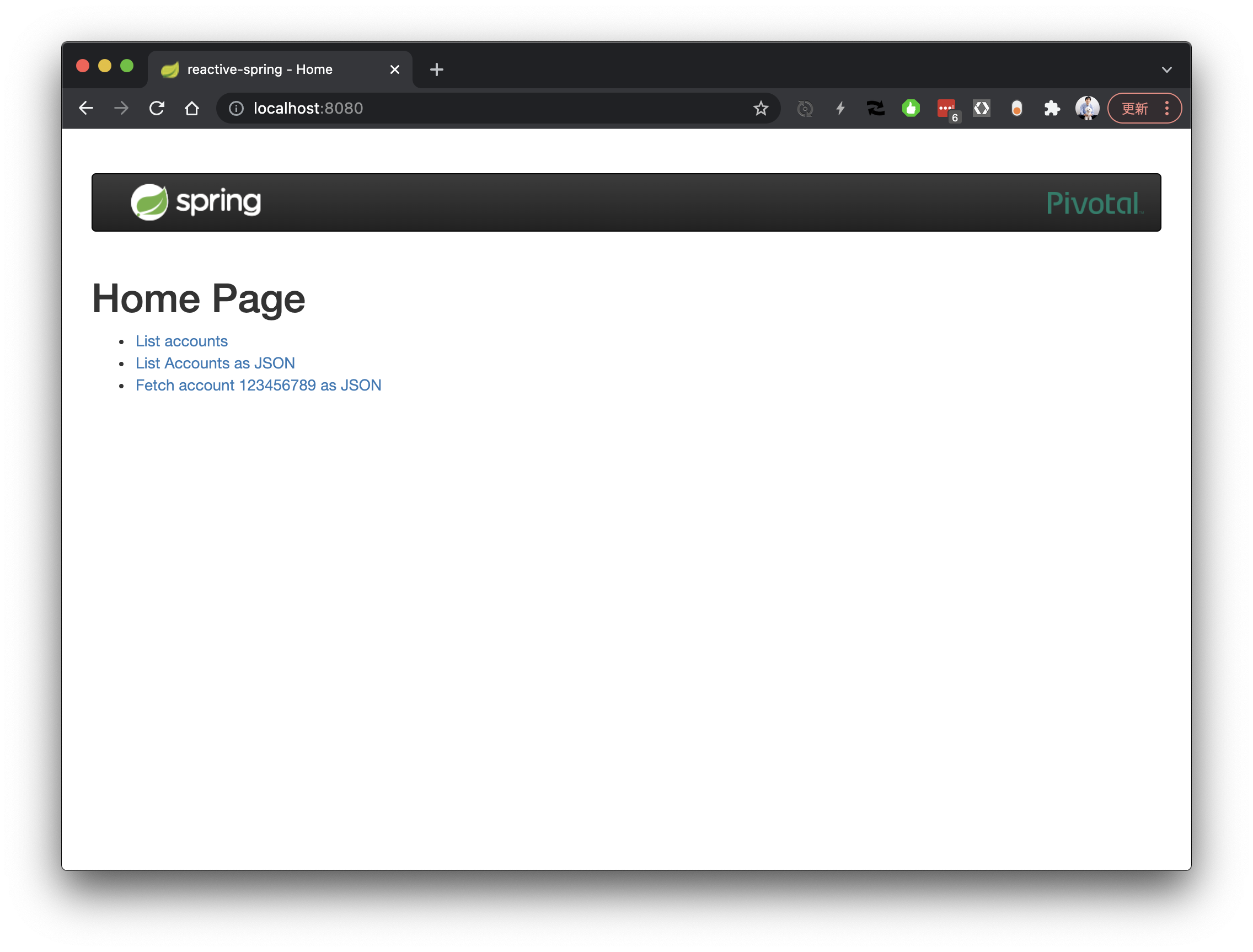
ブラウザで http://localhost:8080 にアクセスすると次のような画面が表示されます。
kpackによって管理されているImageやBuild結果はkp CLIで次のように確認できます。
$ kp image list
NAME             READY    LATEST REASON    LATEST IMAGE                                                                                            NAMESPACE
reward-dining    True     CONFIG           ghcr.io/making/reward-dining@sha256:33e56e7c8970793aeb38e3d53781028ca08a86a3caf9fd9a51c80f76062da3d6    default

$ kp build list
BUILD    STATUS     BUILT IMAGE                                                                                             REASON    IMAGE RESOURCE
1        SUCCESS    ghcr.io/making/reward-dining@sha256:33e56e7c8970793aeb38e3d53781028ca08a86a3caf9fd9a51c80f76062da3d6    CONFIG    reward-dining
kubectlでも次のように確認できます。
$ kubectl get image,build
NAME                           LATESTIMAGE                                                                                            READY
image.kpack.io/reward-dining   ghcr.io/making/reward-dining@sha256:33e56e7c8970793aeb38e3d53781028ca08a86a3caf9fd9a51c80f76062da3d6   True

NAME                                   IMAGE                                                                                                  SUCCEEDED
build.kpack.io/reward-dining-build-1   ghcr.io/making/reward-dining@sha256:33e56e7c8970793aeb38e3d53781028ca08a86a3caf9fd9a51c80f76062da3d6   True
ソースコードのアップデート
https://github.com/making/reward-dining/commit/60ae941452421948a4d4432ab025ea56a09ce843 のコミットでSpring Bootのバージョンを2.5.6から2.5.7にアップデートしました。
Image作成の際に--git-branch mainを指定しており、このブランチにコミットが追加されると、そのソースコードに対して自動でビルドが行われます。
コミットの後、しばらくすると、次のようにSTATUSがBUILDINGがbuildリソースが作成されます。
$ kp build list
BUILD    STATUS      BUILT IMAGE                                                                                             REASON    IMAGE RESOURCE
1        SUCCESS     ghcr.io/making/reward-dining@sha256:33e56e7c8970793aeb38e3d53781028ca08a86a3caf9fd9a51c80f76062da3d6    CONFIG    reward-dining
2        BUILDING
次のコマンドでbuildのログを確認できます。
$ kp build logs reward-dining -b 2
===> PREPARE
Build reason(s): COMMIT
COMMIT:
	- 4518c9348168be38c8b91da4380d82e1a9b5e58e
	+ 60ae941452421948a4d4432ab025ea56a09ce843
Loading secret for "https://ghcr.io" from secret "regsecret" at location "/var/build-secrets/regsecret"
Cloning "https://github.com/making/reward-dining.git" @ "60ae941452421948a4d4432ab025ea56a09ce843"...
Successfully cloned "https://github.com/making/reward-dining.git" @ "60ae941452421948a4d4432ab025ea56a09ce843" in path "/workspace"
===> ANALYZE
===> DETECT
8 of 19 buildpacks participating
paketo-buildpacks/ca-certificates   3.0.1
paketo-buildpacks/bellsoft-liberica 9.0.1
paketo-buildpacks/syft              1.2.0
paketo-buildpacks/maven             6.0.1
paketo-buildpacks/executable-jar    6.0.1
paketo-buildpacks/apache-tomcat     7.0.2
paketo-buildpacks/dist-zip          5.0.1
paketo-buildpacks/spring-boot       5.2.0
===> RESTORE
Restoring metadata for "paketo-buildpacks/ca-certificates:helper" from app image
Restoring metadata for "paketo-buildpacks/bellsoft-liberica:helper" from app image
Restoring metadata for "paketo-buildpacks/bellsoft-liberica:java-security-properties" from app image
Restoring metadata for "paketo-buildpacks/bellsoft-liberica:jre" from app image
Restoring metadata for "paketo-buildpacks/bellsoft-liberica:jdk" from cache
Restoring metadata for "paketo-buildpacks/syft:syft" from cache
Restoring metadata for "paketo-buildpacks/maven:cache" from cache
Restoring metadata for "paketo-buildpacks/maven:application" from cache
Restoring metadata for "paketo-buildpacks/spring-boot:helper" from app image
Restoring metadata for "paketo-buildpacks/spring-boot:spring-cloud-bindings" from app image
Restoring metadata for "paketo-buildpacks/spring-boot:web-application-type" from app image
Restoring data for "paketo-buildpacks/bellsoft-liberica:jdk" from cache
Restoring data for "paketo-buildpacks/syft:syft" from cache
Restoring data for "paketo-buildpacks/maven:application" from cache
Restoring data for "paketo-buildpacks/maven:cache" from cache
===> BUILD

Paketo CA Certificates Buildpack 3.0.1
  https://github.com/paketo-buildpacks/ca-certificates
  Launch Helper: Reusing cached layer

Paketo BellSoft Liberica Buildpack 9.0.1
  https://github.com/paketo-buildpacks/bellsoft-liberica
  Build Configuration:
    $BP_JVM_TYPE                 JRE             the JVM type - JDK or JRE
    $BP_JVM_VERSION              11              the Java version
  Launch Configuration:
    $BPL_DEBUG_ENABLED           false           enables Java remote debugging support
    $BPL_DEBUG_PORT              8000            configure the remote debugging port
    $BPL_DEBUG_SUSPEND           false           configure whether to suspend execution until a debugger has attached
    $BPL_HEAP_DUMP_PATH                          write heap dumps on error to this path
    $BPL_JAVA_NMT_ENABLED        true            enables Java Native Memory Tracking (NMT)
    $BPL_JAVA_NMT_LEVEL          summary         configure level of NMT, summary or detail
    $BPL_JFR_ARGS                                configure custom Java Flight Recording (JFR) arguments
    $BPL_JFR_ENABLED             false           enables Java Flight Recording (JFR)
    $BPL_JMX_ENABLED             false           enables Java Management Extensions (JMX)
    $BPL_JMX_PORT                5000            configure the JMX port
    $BPL_JVM_HEAD_ROOM           0               the headroom in memory calculation
    $BPL_JVM_LOADED_CLASS_COUNT  35% of classes  the number of loaded classes in memory calculation
    $BPL_JVM_THREAD_COUNT        250             the number of threads in memory calculation
    $JAVA_TOOL_OPTIONS                           the JVM launch flags
  BellSoft Liberica JDK 11.0.13: Reusing cached layer
  BellSoft Liberica JRE 11.0.13: Reusing cached layer
  Launch Helper: Reusing cached layer
  Java Security Properties: Reusing cached layer

Paketo Syft Buildpack 1.2.0
  https://github.com/paketo-buildpacks/syft

Paketo Maven Buildpack 6.0.1
  https://github.com/paketo-buildpacks/maven
  Build Configuration:
    $BP_MAVEN_BUILD_ARGUMENTS  -Dmaven.test.skip=true package  the arguments to pass to Maven
    $BP_MAVEN_BUILT_ARTIFACT   target/*.[ejw]ar                the built application artifact explicitly.  Supersedes $BP_MAVEN_BUILT_MODULE
    $BP_MAVEN_BUILT_MODULE                                     the module to find application artifact in
    $BP_MAVEN_POM_FILE         pom.xml                         the location of the main pom.xml file, relative to the application root
    Creating cache directory /home/cnb/.m2
  Compiled Application: Contributing to layer
    Executing mvnw --batch-mode -Dmaven.test.skip=true package
      [INFO] Scanning for projects...
      [INFO] Downloading from spring-releases: https://repo.spring.io/release/org/springframework/boot/spring-boot-starter-parent/2.5.7/spring-boot-starter-parent-2.5.7.pom
      ...
      [INFO] Replacing main artifact with repackaged archive
      [INFO] ------------------------------------------------------------------------
      [INFO] BUILD SUCCESS
      [INFO] ------------------------------------------------------------------------
      [INFO] Total time:  28.577 s
      [INFO] Finished at: 2021-12-20T16:13:56Z
      [INFO] ------------------------------------------------------------------------
  Removing source code

Paketo Executable JAR Buildpack 6.0.1
  https://github.com/paketo-buildpacks/executable-jar
  Class Path: Contributing to layer
    Writing env/CLASSPATH.delim
    Writing env/CLASSPATH.prepend
  Process types:
    executable-jar: java org.springframework.boot.loader.JarLauncher (direct)
    task:           java org.springframework.boot.loader.JarLauncher (direct)
    web:            java org.springframework.boot.loader.JarLauncher (direct)

Paketo Spring Boot Buildpack 5.2.0
  https://github.com/paketo-buildpacks/spring-boot
  Creating slices from layers index
    dependencies
    spring-boot-loader
    snapshot-dependencies
    application
  Launch Helper: Reusing cached layer
  Spring Cloud Bindings 1.8.0: Reusing cached layer
  Web Application Type: Contributing to layer
    Servlet web application detected
    Writing env.launch/BPL_JVM_THREAD_COUNT.default
  4 application slices
  Image labels:
    org.opencontainers.image.title
    org.opencontainers.image.version
    org.springframework.boot.version
===> EXPORT
Reusing layers from image 'ghcr.io/making/reward-dining@sha256:33e56e7c8970793aeb38e3d53781028ca08a86a3caf9fd9a51c80f76062da3d6'
Reusing layer 'paketo-buildpacks/ca-certificates:helper'
Reusing layer 'paketo-buildpacks/bellsoft-liberica:helper'
Reusing layer 'paketo-buildpacks/bellsoft-liberica:java-security-properties'
Reusing layer 'paketo-buildpacks/bellsoft-liberica:jre'
Reusing layer 'paketo-buildpacks/executable-jar:classpath'
Reusing layer 'paketo-buildpacks/spring-boot:helper'
Reusing layer 'paketo-buildpacks/spring-boot:spring-cloud-bindings'
Reusing layer 'paketo-buildpacks/spring-boot:web-application-type'
Adding layer 'launch.sbom'
Reusing 3/5 app layer(s)
Adding 2/5 app layer(s)
Reusing layer 'launcher'
Adding layer 'config'
Reusing layer 'process-types'
Adding label 'io.buildpacks.lifecycle.metadata'
Adding label 'io.buildpacks.build.metadata'
Adding label 'io.buildpacks.project.metadata'
Adding label 'org.opencontainers.image.title'
Adding label 'org.opencontainers.image.version'
Adding label 'org.springframework.boot.version'
Setting default process type 'web'
Saving ghcr.io/making/reward-dining...
*** Images (sha256:2e2bcde16dafc093fc732abf8a880ffa710912cc48c37dccabd59ddf6005928f):
      ghcr.io/making/reward-dining
      ghcr.io/making/reward-dining:b2.20211220.161253
Reusing cache layer 'paketo-buildpacks/bellsoft-liberica:jdk'
Reusing cache layer 'paketo-buildpacks/syft:syft'
Adding cache layer 'paketo-buildpacks/maven:application'
Adding cache layer 'paketo-buildpacks/maven:cache'
Reusing cache layer 'cache.sbom'
===> COMPLETION
Build successful
ghcr.io/making/reward-dining:b2.20211220.161253というイメージが作成されました。
キャッシュが効いているので一回目よりもビルドが早く終わりました。
imageまたはbuildリソースを確認すると、次のようにLATEST REASON/REASONがCOMMITになっていることが分かります。これはwatchしているbranchに新規のコミットが追加されたことをトリガーにビルドが始まったことを意味します。
$ kp image list
NAME             READY    LATEST REASON    LATEST IMAGE                                                                                            NAMESPACE
reward-dining    True     COMMIT           ghcr.io/making/reward-dining@sha256:2e2bcde16dafc093fc732abf8a880ffa710912cc48c37dccabd59ddf6005928f    default

$ kp build list
BUILD    STATUS     BUILT IMAGE                                                                                             REASON    IMAGE RESOURCE
1        SUCCESS    ghcr.io/making/reward-dining@sha256:33e56e7c8970793aeb38e3d53781028ca08a86a3caf9fd9a51c80f76062da3d6    CONFIG    reward-dining
2        SUCCESS    ghcr.io/making/reward-dining@sha256:2e2bcde16dafc093fc732abf8a880ffa710912cc48c37dccabd59ddf6005928f    COMMIT    reward-dining
kpackでソースコードの変更に追従してイメージの自動ビルドができることを確認できました。
この機能は便利ですが、CIと連携したい場合は、例えばユニットテストが完了した後にコンテナイメージをビルドしたいと思うので、その場合はbranchのwatchはやめて、
次のようにgitのcommitを指定して毎コミットCIジョブとしてkpコマンドを実行するのが良いです。
# Jenkinsの例
kp image save reward-dining --tag ghcr.io/${GITHUB_USERNAME}/reward-dining --git https://github.com/making/reward-dining.git --git-revision ${GIT_COMMIT} --watch

# GitLab CIの例
kp image save reward-dining --tag ghcr.io/${GITHUB_USERNAME}/reward-dining --git https://github.com/making/reward-dining.git --git-revision ${CI_COMMIT_SHA} --watch

# GitHub Actionsの例
kp image save reward-dining --tag ghcr.io/${GITHUB_USERNAME}/reward-dining --git https://github.com/making/reward-dining.git --git-revision ${GITHUB_SHA} --watch
詳細は次のドキュメントを確認してください。
https://docs.vmware.com/en/Tanzu-Build-Service/1.3/vmware-tanzu-build-service-v13/GUID-tbs-in-ci.html
ClusterStackのアップデート
ClusterStackをアップデートします。OSのベースイメージの脆弱性Fixなどを想定します。
初回は1.1.38-base-cnbというタグのイメージを使用したので、今回は次のバージョンの1.1.39-base-cnbを使用します。
次のコマンドでClusterStackをアップデートします。
cat <<EOF > clusterstack.yaml
apiVersion: kpack.io/v1alpha2
kind: ClusterStack
metadata:
  name: base
spec:
  id: io.buildpacks.stacks.bionic
  buildImage:
    image: paketobuildpacks/build:1.1.39-base-cnb
  runImage:
    image: paketobuildpacks/run:1.1.39-base-cnb
EOF
kubectl apply -f clusterstack.yaml
しばらくすると次のように新たにbuildリソースが作成されます。
$ kp build list
BUILD    STATUS      BUILT IMAGE                                                                                             REASON    IMAGE RESOURCE
1        SUCCESS     ghcr.io/making/reward-dining@sha256:33e56e7c8970793aeb38e3d53781028ca08a86a3caf9fd9a51c80f76062da3d6    CONFIG    reward-dining
2        SUCCESS     ghcr.io/making/reward-dining@sha256:2e2bcde16dafc093fc732abf8a880ffa710912cc48c37dccabd59ddf6005928f    COMMIT    reward-dining
3        BUILDING                                                                                                            STACK     reward-dining
次のコマンドでログを確認すると、ベースイメージのrebaseが行われていることがわかります。
$ kp build logs reward-dining -b 3
===> REBASE
Build reason(s): STACK
STACK:
	- sha256:f9e78e309fe5af1d376d3ce4593e3d25260604e4a62430dad7ec65b11289cf89
	+ sha256:50c74ebc95c169ea54ee4650d39d3c71d0fc738a3f0ad89b23d646cfd9ea36f2
Loading secret for "https://ghcr.io" from secret "regsecret" at location "/var/build-secrets/regsecret"
*** Images (sha256:4d21a374a74c6411040c140da0e052b79b402d1288c2d888e78bf2a6c1ddaa95):
      ghcr.io/making/reward-dining
      ghcr.io/making/reward-dining:b3.20211220.165203

*** Digest: sha256:4d21a374a74c6411040c140da0e052b79b402d1288c2d888e78bf2a6c1ddaa95
===> COMPLETION
Build successful
ghcr.io/making/reward-dining:b3.20211220.165203というイメージが、ベースイメージが自動でアップデートされた新しいイメージです。
imageまたはbuildリソースを確認すると、次のようにLATEST REASON/REASONがSTACKになっていることが分かります。ベースイメージの変更に伴ったリソースの更新であることを意味します。
$ kp build list
BUILD    STATUS     BUILT IMAGE                                                                                             REASON    IMAGE RESOURCE
1        SUCCESS    ghcr.io/making/reward-dining@sha256:33e56e7c8970793aeb38e3d53781028ca08a86a3caf9fd9a51c80f76062da3d6    CONFIG    reward-dining
2        SUCCESS    ghcr.io/making/reward-dining@sha256:2e2bcde16dafc093fc732abf8a880ffa710912cc48c37dccabd59ddf6005928f    COMMIT    reward-dining
3        SUCCESS    ghcr.io/making/reward-dining@sha256:4d21a374a74c6411040c140da0e052b79b402d1288c2d888e78bf2a6c1ddaa95    STACK     reward-dining

$ kp image list
NAME             READY    LATEST REASON    LATEST IMAGE                                                                                            NAMESPACE
reward-dining    True     STACK            ghcr.io/making/reward-dining@sha256:4d21a374a74c6411040c140da0e052b79b402d1288c2d888e78bf2a6c1ddaa95    default
ClusterBuilderも更新されます。
$ kubectl get clusterbuilder
NAME   LATESTIMAGE                                                                                                        READY
base   ghcr.io/making/kpack/clusterbuilder:base@sha256:accced241e26b3ce3dd3eaf2305812e4d5e9479a3b6e80ad4acb27b90f4e4265   True
このようにClusterStackを更新するだけで新しいOSイメージを使用したコンテナイメージを自動で作成することができます。 これはkpackで管理しているimageのうち同じClusterStackを使用しているもの全てが対象になるので、一括でイメージをよりセキュアにすることができ、管理が楽になります。
ClusterStackのアップデート
ClusterStackの更新と同じようにClusterStoreをアップデートします。Buildpackにアップデートがあった場合にこの作業を行います。
初回はJava Buildpackのイメージにgcr.io/paketo-buildpacks/java:6.2.1を使用したので、今回は次のバージョンのgcr.io/paketo-buildpacks/java:6.3.0を使用します。
cat <<EOF > clusterstore.yaml
apiVersion: kpack.io/v1alpha2
kind: ClusterStore
metadata:
  name: default
spec:
  sources:
  - image: gcr.io/paketo-buildpacks/java:6.3.0
EOF
kubectl apply -f clusterstore.yaml
しばらくすると次のように新たにbuildリソースが作成されます。
$ kp build list
BUILD    STATUS      BUILT IMAGE                                                                                             REASON       IMAGE RESOURCE
1        SUCCESS     ghcr.io/making/reward-dining@sha256:33e56e7c8970793aeb38e3d53781028ca08a86a3caf9fd9a51c80f76062da3d6    CONFIG       reward-dining
2        SUCCESS     ghcr.io/making/reward-dining@sha256:2e2bcde16dafc093fc732abf8a880ffa710912cc48c37dccabd59ddf6005928f    COMMIT       reward-dining
3        SUCCESS     ghcr.io/making/reward-dining@sha256:4d21a374a74c6411040c140da0e052b79b402d1288c2d888e78bf2a6c1ddaa95    STACK        reward-dining
4        BUILDING                                                                                                            BUILDPACK    reward-dining
次のコマンドでログを確認すると、Buildpackの更新(この例ではpaketo-buildpacks/syft 1.2.0 -> 1.3.0)によって再ビルドが行われていることがわかります。
ソースコードに変更はないので、Maven Buildは実行されていません。
$ kp build logs reward-dining -b 4
===> PREPARE
Build reason(s): BUILDPACK
BUILDPACK:
	- - id: paketo-buildpacks/syft
	-   version: 1.2.0
Loading secret for "https://ghcr.io" from secret "regsecret" at location "/var/build-secrets/regsecret"
Cloning "https://github.com/making/reward-dining.git" @ "60ae941452421948a4d4432ab025ea56a09ce843"...
Successfully cloned "https://github.com/making/reward-dining.git" @ "60ae941452421948a4d4432ab025ea56a09ce843" in path "/workspace"
===> ANALYZE
===> DETECT
8 of 19 buildpacks participating
paketo-buildpacks/ca-certificates   3.0.1
paketo-buildpacks/bellsoft-liberica 9.0.1
paketo-buildpacks/syft              1.3.0
paketo-buildpacks/maven             6.0.1
paketo-buildpacks/executable-jar    6.0.1
paketo-buildpacks/apache-tomcat     7.0.2
paketo-buildpacks/dist-zip          5.0.1
paketo-buildpacks/spring-boot       5.2.0
===> RESTORE
Restoring metadata for "paketo-buildpacks/ca-certificates:helper" from app image
Restoring metadata for "paketo-buildpacks/bellsoft-liberica:helper" from app image
Restoring metadata for "paketo-buildpacks/bellsoft-liberica:java-security-properties" from app image
Restoring metadata for "paketo-buildpacks/bellsoft-liberica:jre" from app image
Restoring metadata for "paketo-buildpacks/bellsoft-liberica:jdk" from cache
Restoring metadata for "paketo-buildpacks/syft:syft" from cache
Restoring metadata for "paketo-buildpacks/maven:application" from cache
Restoring metadata for "paketo-buildpacks/maven:cache" from cache
Restoring metadata for "paketo-buildpacks/spring-boot:web-application-type" from app image
Restoring metadata for "paketo-buildpacks/spring-boot:helper" from app image
Restoring metadata for "paketo-buildpacks/spring-boot:spring-cloud-bindings" from app image
Restoring data for "paketo-buildpacks/bellsoft-liberica:jdk" from cache
Restoring data for "paketo-buildpacks/syft:syft" from cache
Restoring data for "paketo-buildpacks/maven:application" from cache
Restoring data for "paketo-buildpacks/maven:cache" from cache
===> BUILD

Paketo CA Certificates Buildpack 3.0.1
  https://github.com/paketo-buildpacks/ca-certificates
  Launch Helper: Reusing cached layer

Paketo BellSoft Liberica Buildpack 9.0.1
  https://github.com/paketo-buildpacks/bellsoft-liberica
  Build Configuration:
    $BP_JVM_TYPE                 JRE             the JVM type - JDK or JRE
    $BP_JVM_VERSION              11              the Java version
  Launch Configuration:
    $BPL_DEBUG_ENABLED           false           enables Java remote debugging support
    $BPL_DEBUG_PORT              8000            configure the remote debugging port
    $BPL_DEBUG_SUSPEND           false           configure whether to suspend execution until a debugger has attached
    $BPL_HEAP_DUMP_PATH                          write heap dumps on error to this path
    $BPL_JAVA_NMT_ENABLED        true            enables Java Native Memory Tracking (NMT)
    $BPL_JAVA_NMT_LEVEL          summary         configure level of NMT, summary or detail
    $BPL_JFR_ARGS                                configure custom Java Flight Recording (JFR) arguments
    $BPL_JFR_ENABLED             false           enables Java Flight Recording (JFR)
    $BPL_JMX_ENABLED             false           enables Java Management Extensions (JMX)
    $BPL_JMX_PORT                5000            configure the JMX port
    $BPL_JVM_HEAD_ROOM           0               the headroom in memory calculation
    $BPL_JVM_LOADED_CLASS_COUNT  35% of classes  the number of loaded classes in memory calculation
    $BPL_JVM_THREAD_COUNT        250             the number of threads in memory calculation
    $JAVA_TOOL_OPTIONS                           the JVM launch flags
  BellSoft Liberica JDK 11.0.13: Reusing cached layer
  BellSoft Liberica JRE 11.0.13: Reusing cached layer
  Launch Helper: Reusing cached layer
  Java Security Properties: Reusing cached layer

Paketo Syft Buildpack 1.3.0
  https://github.com/paketo-buildpacks/syft
    Downloading from https://github.com/anchore/syft/releases/download/v0.33.0/syft_0.33.0_linux_amd64.tar.gz
    Verifying checksum
    Writing env.build/SYFT_CHECK_FOR_APP_UPDATE.default

Paketo Maven Buildpack 6.0.1
  https://github.com/paketo-buildpacks/maven
  Build Configuration:
    $BP_MAVEN_BUILD_ARGUMENTS  -Dmaven.test.skip=true package  the arguments to pass to Maven
    $BP_MAVEN_BUILT_ARTIFACT   target/*.[ejw]ar                the built application artifact explicitly.  Supersedes $BP_MAVEN_BUILT_MODULE
    $BP_MAVEN_BUILT_MODULE                                     the module to find application artifact in
    $BP_MAVEN_POM_FILE         pom.xml                         the location of the main pom.xml file, relative to the application root
    Creating cache directory /home/cnb/.m2
  Compiled Application: Reusing cached layer
  Removing source code

Paketo Executable JAR Buildpack 6.0.1
  https://github.com/paketo-buildpacks/executable-jar
  Class Path: Contributing to layer
    Writing env/CLASSPATH.delim
    Writing env/CLASSPATH.prepend
  Process types:
    executable-jar: java org.springframework.boot.loader.JarLauncher (direct)
    task:           java org.springframework.boot.loader.JarLauncher (direct)
    web:            java org.springframework.boot.loader.JarLauncher (direct)

Paketo Spring Boot Buildpack 5.2.0
  https://github.com/paketo-buildpacks/spring-boot
  Creating slices from layers index
    dependencies
    spring-boot-loader
    snapshot-dependencies
    application
  Launch Helper: Reusing cached layer
  Spring Cloud Bindings 1.8.0: Reusing cached layer
  Web Application Type: Reusing cached layer
  4 application slices
  Image labels:
    org.opencontainers.image.title
    org.opencontainers.image.version
    org.springframework.boot.version
===> EXPORT
Reusing layers from image 'ghcr.io/making/reward-dining@sha256:4d21a374a74c6411040c140da0e052b79b402d1288c2d888e78bf2a6c1ddaa95'
Reusing layer 'paketo-buildpacks/ca-certificates:helper'
Reusing layer 'paketo-buildpacks/bellsoft-liberica:helper'
Reusing layer 'paketo-buildpacks/bellsoft-liberica:java-security-properties'
Reusing layer 'paketo-buildpacks/bellsoft-liberica:jre'
Reusing layer 'paketo-buildpacks/executable-jar:classpath'
Reusing layer 'paketo-buildpacks/spring-boot:helper'
Reusing layer 'paketo-buildpacks/spring-boot:spring-cloud-bindings'
Reusing layer 'paketo-buildpacks/spring-boot:web-application-type'
Adding layer 'launch.sbom'
Reusing 5/5 app layer(s)
Reusing layer 'launcher'
Adding layer 'config'
Reusing layer 'process-types'
Adding label 'io.buildpacks.lifecycle.metadata'
Adding label 'io.buildpacks.build.metadata'
Adding label 'io.buildpacks.project.metadata'
Adding label 'org.opencontainers.image.title'
Adding label 'org.opencontainers.image.version'
Adding label 'org.springframework.boot.version'
Setting default process type 'web'
Saving ghcr.io/making/reward-dining...
*** Images (sha256:2ac64a823ea6d527a8943e067a6201c3bd0507689c789e58e4fa73dd0140a600):
      ghcr.io/making/reward-dining
      ghcr.io/making/reward-dining:b4.20211220.170207
Reusing cache layer 'paketo-buildpacks/bellsoft-liberica:jdk'
Adding cache layer 'paketo-buildpacks/syft:syft'
Reusing cache layer 'paketo-buildpacks/maven:application'
Reusing cache layer 'paketo-buildpacks/maven:cache'
Adding cache layer 'cache.sbom'
===> COMPLETION
Build successful
ghcr.io/making/reward-dining:b4.20211220.170207というイメージが、Buildpackがアップデートされた新しいイメージです。
imageまたはbuildリソースを確認すると、次のようにLATEST REASON/REASONがBUILDPACKになっていることが分かります。Buildpackの変更に伴ったリソースの更新であることを意味します。
$ kp build list
BUILD    STATUS     BUILT IMAGE                                                                                             REASON       IMAGE RESOURCE
1        SUCCESS    ghcr.io/making/reward-dining@sha256:33e56e7c8970793aeb38e3d53781028ca08a86a3caf9fd9a51c80f76062da3d6    CONFIG       reward-dining
2        SUCCESS    ghcr.io/making/reward-dining@sha256:2e2bcde16dafc093fc732abf8a880ffa710912cc48c37dccabd59ddf6005928f    COMMIT       reward-dining
3        SUCCESS    ghcr.io/making/reward-dining@sha256:4d21a374a74c6411040c140da0e052b79b402d1288c2d888e78bf2a6c1ddaa95    STACK        reward-dining
4        SUCCESS    ghcr.io/making/reward-dining@sha256:2ac64a823ea6d527a8943e067a6201c3bd0507689c789e58e4fa73dd0140a600    BUILDPACK    reward-dining

$ kp image list
NAME             READY    LATEST REASON    LATEST IMAGE                                                                                            NAMESPACE
reward-dining    True     BUILDPACK        ghcr.io/making/reward-dining@sha256:2ac64a823ea6d527a8943e067a6201c3bd0507689c789e58e4fa73dd0140a600    default
Buildpackが更新されたことでイメージの再ビルドが行われることがわかりました。 例えばJavaのバージョンが11.0.12 -> 11.0.13に上がった場合にコンテナイメージを自動で作成することができます。(メジャーバージョンは固定です)
kpackをkind上で簡単に構築することができました。またkpackを使ってイメージの自動更新ができることを確認できました。
kpackにイメージを管理してもらうことでセキュアなイメージを作り続けることができるので、kind上でまずはスモールスタートしてはいかがでしょうか。
エンタープライズ版が必要になれば Tanzu Build Service をお求めください。