Trying Spring gRPC 1.0
Note
2026-01-13 Updated to Spring gRPC 1.0 version
Spring gRPC is an official Spring project for using gRPC in Spring applications. Using Spring gRPC, you can integrate gRPC services into Spring Boot applications.
At the time of writing this article, the Spring gRPC version is 1.0.1. It is used together with Spring Boot 4.0. The Spring gRPC Auto Configuration group is scheduled to be integrated into Spring Boot 4.1 at version 1.1.
We will create a Hello World app and introduce the basic usage of Spring gRPC.
Table of Contents
Creating a gRPC Server with Spring gRPC
First, let's create a gRPC Server that implements Hello World.
Spring gRPC allows you to choose between a Netty-based standalone server and a Servlet-based server using GrpcServlet.
The Servlet-based server can provide services on the same port as regular Spring MVC.
Note that currently, when using Spring WebFlux, you cannot provide gRPC and HTTP on the same port (spring-grpc#19).
This time we will create a Servlet-based server. When using Spring Initializr, if you select "Spring Web" and "Spring gRPC" at the same time, Servlet-based configuration dependencies are automatically added.
Create a new project using Spring Initializr with the following command.
curl -s https://start.spring.io/starter.tgz \
       -d artifactId=demo-grpc-server \
       -d name=demo-grpc-server \
       -d baseDir=demo-grpc-server  \
       -d packageName=com.example \
       -d dependencies=spring-grpc,web,actuator,configuration-processor,prometheus,opentelemetry,native \
       -d type=maven-project \
       -d applicationName=DemoGrpcServerApplication | tar -xzvf -
cd demo-grpc-server
Next, create a Protocol Buffers schema file. Here we use the sample from the gRPC documentation.
However, in this article, we will not implement client-to-server streaming (LotsOfGreetings) and bidirectional streaming (BidiHello).
cat <<EOF > src/main/proto/hello.proto
syntax = "proto3";

package com.example;

option java_package = "com.example.proto";
option java_outer_classname = "HelloServiceProto";
option java_multiple_files = true;

service HelloService {
  rpc SayHello (HelloRequest) returns (HelloResponse);
  rpc LotsOfReplies (HelloRequest) returns (stream HelloResponse);
  rpc LotsOfGreetings(stream HelloRequest) returns (HelloResponse);
  rpc BidiHello(stream HelloRequest) returns (stream HelloResponse);
}

message HelloRequest {
  string greeting = 1;
}

message HelloResponse {
  string reply = 1;
}
EOF
First, compile to generate Java code from the proto file. The protobuf-maven-plugin for generating Protocol Buffers Java code is automatically added when creating a project from Spring Initializr.
./mvnw compile
Check the generated files with the following command.
$ find target/generated-sources/protobuf -type f
target/generated-sources/protobuf/com/example/proto/HelloServiceProto.java
target/generated-sources/protobuf/com/example/proto/HelloRequest.java
target/generated-sources/protobuf/com/example/proto/HelloResponseOrBuilder.java
target/generated-sources/protobuf/com/example/proto/HelloRequestOrBuilder.java
target/generated-sources/protobuf/com/example/proto/HelloServiceGrpc.java
target/generated-sources/protobuf/com/example/proto/HelloResponse.java
Next, implement the gRPC service. Create a class that inherits from HelloServiceGrpc.HelloServiceImplBase and override the gRPC methods.
By adding the @Service annotation, it is registered in Spring's DI container and automatically registered with the gRPC server.
cat<<EOF>src/main/java/com/example/HelloService.java
package com.example;

import com.example.proto.HelloRequest;
import com.example.proto.HelloResponse;
import com.example.proto.HelloServiceGrpc;
import io.grpc.stub.StreamObserver;
import org.slf4j.Logger;
import org.slf4j.LoggerFactory;
import org.springframework.stereotype.Service;

@Service
public class HelloService extends HelloServiceGrpc.HelloServiceImplBase {

	private final Logger log = LoggerFactory.getLogger(HelloService.class);

	@Override
	public void sayHello(HelloRequest request, StreamObserver<HelloResponse> responseObserver) {
		log.info("sayHello");
		HelloResponse response = HelloResponse.newBuilder()
			.setReply(String.format("Hello %s!", request.getGreeting()))
			.build();
		responseObserver.onNext(response);
		responseObserver.onCompleted();
	}

	@Override
	public void lotsOfReplies(HelloRequest request, StreamObserver<HelloResponse> responseObserver) {
		log.info("lotsOfReplies");
		for (int i = 0; i < 10; i++) {
			HelloResponse response = HelloResponse.newBuilder()
				.setReply(String.format("[%05d] Hello %s!", i, request.getGreeting()))
				.build();
			responseObserver.onNext(response);
		}
		responseObserver.onCompleted();
	}

}
EOF
We added the OpenTelemetry module when creating the project, but since we won't send metrics via OTLP this time, let's set management.otlp.metrics.export.enabled=false.
cat <<EOF >> src/main/resources/application.properties
management.otlp.metrics.export.enabled=false
EOF
Start the application. Since we're using a Servlet-based server this time, you can access the gRPC service on the default port 8080.
./mvnw spring-boot:run
To access the gRPC service from the command line, install grpcurl.
brew install grpcurl
First, use the gRPC reflection service to get a list of gRPC services. The reflection service is automatically registered when creating a project from Spring Initializr.
$ grpcurl --plaintext localhost:8080 list

demo.HelloService
grpc.health.v1.Health
grpc.reflection.v1.ServerReflection
Confirm that the Health check service is registered. Spring gRPC includes a gRPC Health Check implementation by default.
Check the method list of the Health check service.
$ grpcurl --plaintext localhost:8080 describe grpc.health.v1.Health

grpc.health.v1.Health is a service:
service Health {
  rpc Check ( .grpc.health.v1.HealthCheckRequest ) returns ( .grpc.health.v1.HealthCheckResponse );
  rpc Watch ( .grpc.health.v1.HealthCheckRequest ) returns ( stream .grpc.health.v1.HealthCheckResponse );
}
Execute the Check method to confirm the status of the gRPC service.
$ grpcurl --plaintext localhost:8080 grpc.health.v1.Health/Check
{
  "status": "SERVING"
}
Now, let's check the methods of the implemented com.example.HelloService service.
$ grpcurl --plaintext localhost:8080 describe com.example.HelloService

com.example.HelloService is a service:
service HelloService {
  rpc BidiHello ( stream .com.example.HelloRequest ) returns ( stream .com.example.HelloResponse );
  rpc LotsOfGreetings ( stream .com.example.HelloRequest ) returns ( .com.example.HelloResponse );
  rpc LotsOfReplies ( .com.example.HelloRequest ) returns ( stream .com.example.HelloResponse );
  rpc SayHello ( .com.example.HelloRequest ) returns ( .com.example.HelloResponse );
}
Let's execute the SayHello method. The request is specified in JSON format. The --plaintext option is specified when not using TLS.
$ grpcurl -d '{"greeting":"John Doe"}' --plaintext localhost:8080 com.example.HelloService/SayHello
{
  "reply": "Hello John Doe!"
}
Next, execute the LotsOfReplies method. This is a server streaming method.
$ grpcurl -d '{"greeting":"John Doe"}' --plaintext localhost:8080 com.example.HelloService/LotsOfReplies
{
  "reply": "[00000] Hello John Doe!"
}
{
  "reply": "[00001] Hello John Doe!"
}
{
  "reply": "[00002] Hello John Doe!"
}
{
  "reply": "[00003] Hello John Doe!"
}
{
  "reply": "[00004] Hello John Doe!"
}
{
  "reply": "[00005] Hello John Doe!"
}
{
  "reply": "[00006] Hello John Doe!"
}
{
  "reply": "[00007] Hello John Doe!"
}
{
  "reply": "[00008] Hello John Doe!"
}
{
  "reply": "[00009] Hello John Doe!"
}
Now that we've confirmed the service operation with grpcurl, let's test the gRPC service.
In Spring gRPC, gRPC service client stubs are also automatically registered, so you can use them by @Autowired in test classes.
As shown below, you can easily implement Integration Tests for gRPC service methods using Spring Boot's testing features.
Note that client stubs are automatically registered only when using a channel named default-channel, and only for BlockingStub.
If you want to register something other than BlockingStub, you can register gRPC clients using the @ImportGrpcClients annotation.
cat<<'EOF'> src/test/java/com/example/HelloServiceTest.java
package com.example;

import com.example.proto.HelloRequest;
import com.example.proto.HelloResponse;
import com.example.proto.HelloServiceGrpc;
import com.google.common.collect.Streams;
import java.util.Iterator;
import java.util.List;
import org.junit.jupiter.api.Test;
import org.springframework.beans.factory.annotation.Autowired;
import org.springframework.boot.test.context.SpringBootTest;

import static org.assertj.core.api.Assertions.assertThat;

@SpringBootTest(webEnvironment = SpringBootTest.WebEnvironment.RANDOM_PORT,
		properties = "spring.grpc.client.default-channel.address=static://0.0.0.0:${local.server.port}")
class HelloServiceTest {

	@Autowired
	HelloServiceGrpc.HelloServiceBlockingStub stub;

	@Test
	void sayHello() {
		HelloResponse response = this.stub.sayHello(HelloRequest.newBuilder().setGreeting("John Doe").build());
		assertThat(response.getReply()).isEqualTo("Hello John Doe!");
	}

	@Test
	void lotsOfReplies() {
		Iterator<HelloResponse> response = this.stub
			.lotsOfReplies(HelloRequest.newBuilder().setGreeting("John Doe").build());
		List<String> replies = Streams.stream(response).map(HelloResponse::getReply).toList();
		assertThat(replies).containsExactly("[00000] Hello John Doe!", "[00001] Hello John Doe!",
				"[00002] Hello John Doe!", "[00003] Hello John Doe!", "[00004] Hello John Doe!",
				"[00005] Hello John Doe!", "[00006] Hello John Doe!", "[00007] Hello John Doe!",
				"[00008] Hello John Doe!", "[00009] Hello John Doe!");
	}

}
EOF
Run the tests and confirm that all succeed.
./mvnw test
Creating a gRPC Client with Spring gRPC
Next, let's create a gRPC client application and integrate it with the server.
First, create a new project using Spring Initializr as before and build the client-side application.
cd ..
curl -s https://start.spring.io/starter.tgz \
       -d artifactId=demo-grpc-client \
       -d name=demo-grpc-client \
       -d baseDir=demo-grpc-client  \
       -d packageName=com.example \
       -d dependencies=spring-grpc,web,actuator,configuration-processor,prometheus,opentelemetry,native \
       -d type=maven-project \
       -d applicationName=DemoGrpcClientApplication | tar -xzvf -
cd demo-grpc-client
At the time of writing this article, it seems that gRPC Client dependencies cannot be added from Spring Initializr, so open pom.xml and change
		<dependency>
			<groupId>org.springframework.grpc</groupId>
			<artifactId>spring-grpc-server-web-spring-boot-starter</artifactId>
		</dependency>
to
		<dependency>
			<groupId>org.springframework.grpc</groupId>
			<artifactId>spring-grpc-client-spring-boot-starter</artifactId>
		</dependency>
You can also replace it with sed as follows.
sed -i.bak 's/spring-grpc-server-web-spring-boot-starter/spring-grpc-client-spring-boot-starter/g' pom.xml
Next, create the same Protocol Buffers schema file as on the server side.
cat <<EOF > src/main/proto/hello.proto
syntax = "proto3";

package com.example;

option java_package = "com.example.proto";
option java_outer_classname = "HelloServiceProto";
option java_multiple_files = true;

service HelloService {
  rpc SayHello (HelloRequest) returns (HelloResponse);
  rpc LotsOfReplies (HelloRequest) returns (stream HelloResponse);
  rpc LotsOfGreetings(stream HelloRequest) returns (HelloResponse);
  rpc BidiHello(stream HelloRequest) returns (stream HelloResponse);
}

message HelloRequest {
  string greeting = 1;
}

message HelloResponse {
  string reply = 1;
}
EOF
Compile and generate stub code.
./mvnw compile
Next, implement a Spring MVC controller using the gRPC stub. Similar to the server-side test, when using BlockingStub with the default-channel channel,
the client stub is automatically registered in the DI container and can be injected.
cat <<EOF > src/main/java/com/example/HelloController.java
package com.example;

import com.example.proto.HelloRequest;
import com.example.proto.HelloResponse;
import com.example.proto.HelloServiceGrpc;
import com.google.common.collect.Streams;
import java.util.Iterator;
import java.util.List;
import org.springframework.web.bind.annotation.GetMapping;
import org.springframework.web.bind.annotation.RequestParam;
import org.springframework.web.bind.annotation.RestController;

@RestController
public class HelloController {

	private final HelloServiceGrpc.HelloServiceBlockingStub helloServiceStub;

	public HelloController(HelloServiceGrpc.HelloServiceBlockingStub helloServiceStub) {
		this.helloServiceStub = helloServiceStub;
	}

	@GetMapping(path = "/")
	public Reply sayHello(@RequestParam String greeting) {
		HelloResponse response = helloServiceStub.sayHello(HelloRequest.newBuilder().setGreeting(greeting).build());
		return new Reply(response.getReply());
	}

	@GetMapping(path = "/lots-of-replies")
	public List<Reply> lotsOfReplies(@RequestParam String greeting) {
		Iterator<HelloResponse> replies = helloServiceStub
			.lotsOfReplies(HelloRequest.newBuilder().setGreeting(greeting).build());
		return Streams.stream(replies).map(r -> new Reply(r.getReply())).toList();
	}

	public record Reply(String reply) {
	}

}
EOF
Add the following properties.
cat <<EOF >> src/main/resources/application.properties
server.port=8082
spring.grpc.client.default-channel.address=static://localhost:8080
management.otlp.metrics.export.enabled=false
EOF
Start the client application.
./mvnw spring-boot:run
Send a curl request to the client application started on port 8082.
$ curl -s "http://localhost:8082?greeting=John%20Doe" | jq .
{
  "reply": "Hello John Doe!"
}
$ curl -s "http://localhost:8082/lots-of-replies?greeting=John%20Doe" | jq .
[
  {
    "reply": "[00000] Hello John Doe!"
  },
  {
    "reply": "[00001] Hello John Doe!"
  },
  {
    "reply": "[00002] Hello John Doe!"
  },
  {
    "reply": "[00003] Hello John Doe!"
  },
  {
    "reply": "[00004] Hello John Doe!"
  },
  {
    "reply": "[00005] Hello John Doe!"
  },
  {
    "reply": "[00006] Hello John Doe!"
  },
  {
    "reply": "[00007] Hello John Doe!"
  },
  {
    "reply": "[00008] Hello John Doe!"
  },
  {
    "reply": "[00009] Hello John Doe!"
  }
]
You can see that the gRPC service response was returned via the client.
Observability Integration with Micrometer
Spring gRPC also supports Observability with Micrometer out of the box.
In this article, we use OpenTelemetry for Tracing and export Metrics with Prometheus.
Start Zipkin as an OTLP Tracing Receiver with the following command.
docker run --name zipkin -d -p 9411:9411 -e UI_ENABLED=true ghcr.io/openzipkin-contrib/zipkin-otel
Next, add the following properties to application.properties for both server and client.
cat <<EOF >> src/main/resources/application.properties
management.endpoints.web.exposure.include=health,info,prometheus
management.tracing.sampling.probability=1.0
management.opentelemetry.tracing.export.otlp.endpoint=http://localhost:9411/v1/traces
management.opentelemetry.tracing.export.otlp.compression=gzip
EOF
Restart both server and client, and send the following requests.
curl -s "http://localhost:8082?greeting=John%20Doe"
curl -s "http://localhost:8082/lots-of-replies?greeting=John%20Doe" | jq .
Access http://localhost:9411 to open the Zipkin UI. You can see the following traces.
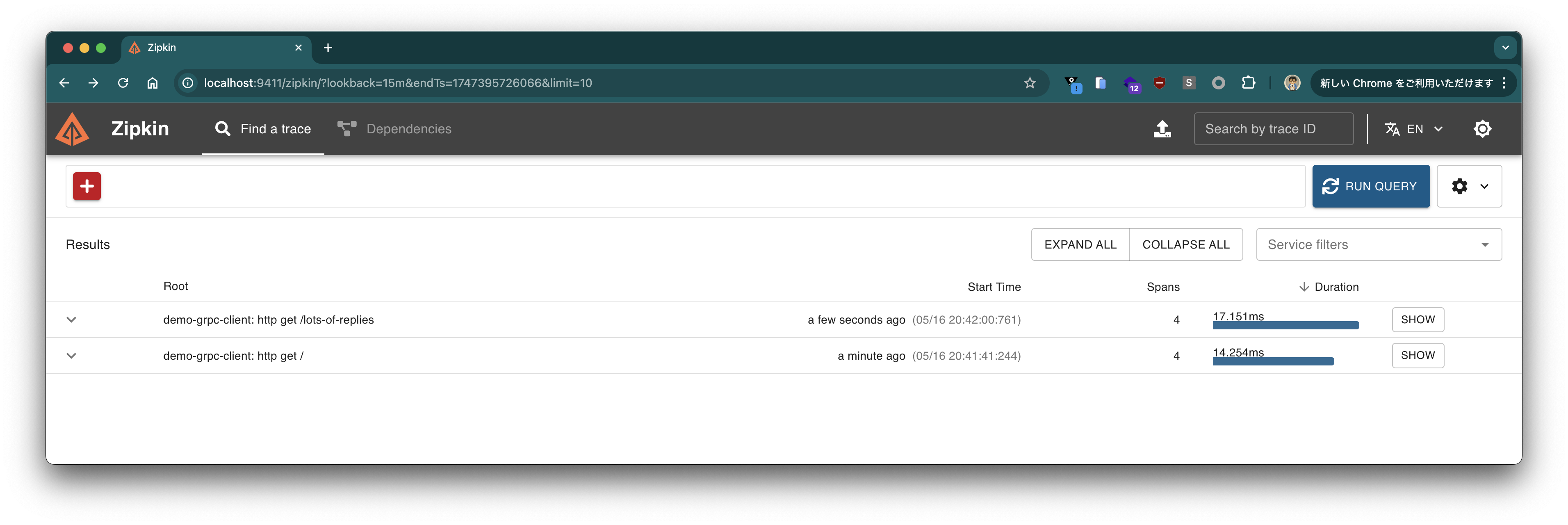
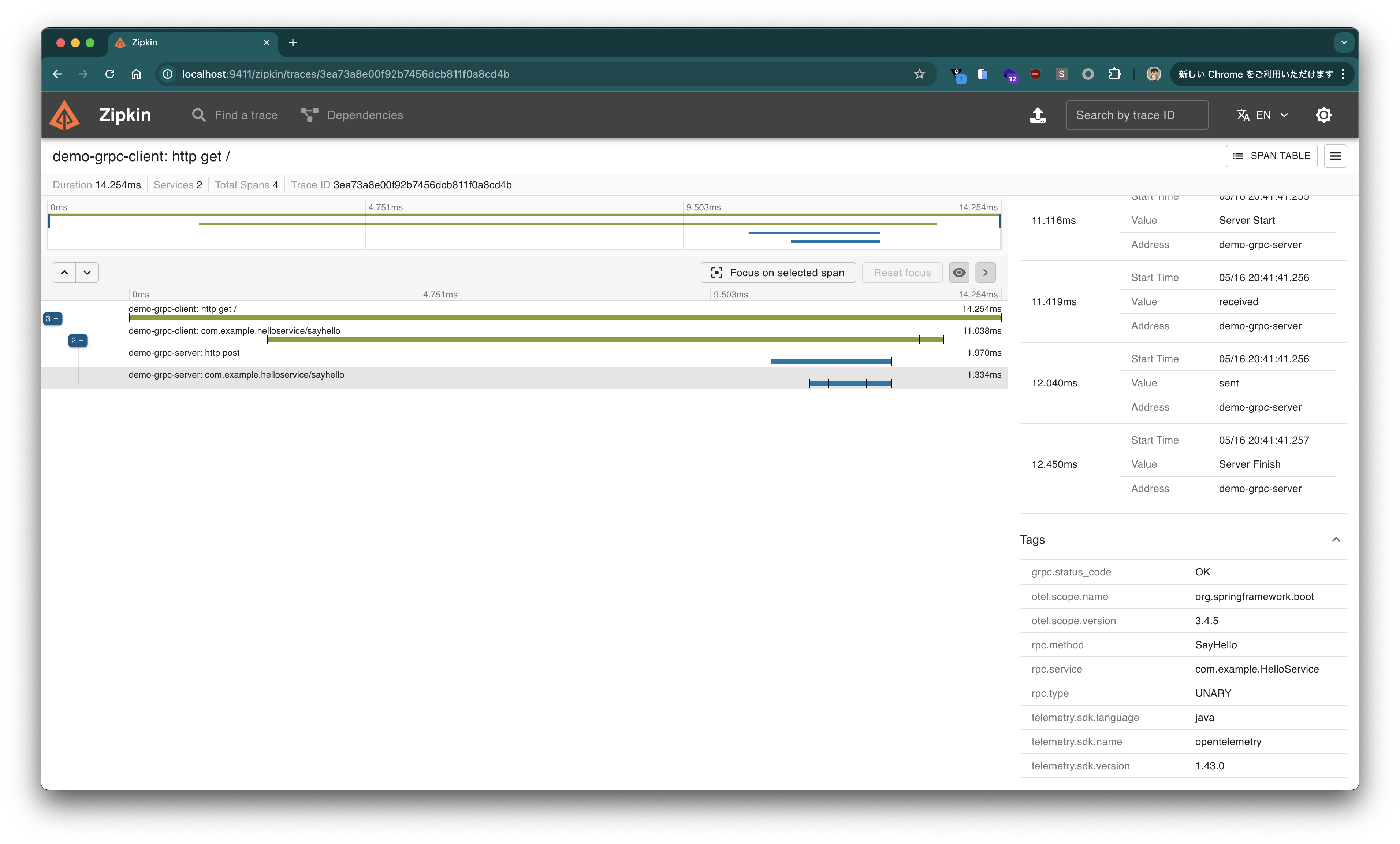

You can see that traces of gRPC methods are confirmed for both server and client.
Next, check the Prometheus Metrics endpoint.
$ curl -s http://localhost:8080/actuator/prometheus | grep grpc | grep -v '^disk'
# HELP grpc_server_active_seconds
# TYPE grpc_server_active_seconds summary
grpc_server_active_seconds_count{grpc_status_code="UNKNOWN",rpc_method="LotsOfReplies",rpc_service="com.example.HelloService",rpc_type="SERVER_STREAMING"} 0
grpc_server_active_seconds_sum{grpc_status_code="UNKNOWN",rpc_method="LotsOfReplies",rpc_service="com.example.HelloService",rpc_type="SERVER_STREAMING"} 0.0
grpc_server_active_seconds_count{grpc_status_code="UNKNOWN",rpc_method="SayHello",rpc_service="com.example.HelloService",rpc_type="UNARY"} 0
grpc_server_active_seconds_sum{grpc_status_code="UNKNOWN",rpc_method="SayHello",rpc_service="com.example.HelloService",rpc_type="UNARY"} 0.0
# HELP grpc_server_active_seconds_max
# TYPE grpc_server_active_seconds_max gauge
grpc_server_active_seconds_max{grpc_status_code="UNKNOWN",rpc_method="LotsOfReplies",rpc_service="com.example.HelloService",rpc_type="SERVER_STREAMING"} 0.0
grpc_server_active_seconds_max{grpc_status_code="UNKNOWN",rpc_method="SayHello",rpc_service="com.example.HelloService",rpc_type="UNARY"} 0.0
# HELP grpc_server_received_total
# TYPE grpc_server_received_total counter
grpc_server_received_total{grpc_status_code="UNKNOWN",rpc_method="LotsOfReplies",rpc_service="com.example.HelloService",rpc_type="SERVER_STREAMING"} 1.0
grpc_server_received_total{grpc_status_code="UNKNOWN",rpc_method="SayHello",rpc_service="com.example.HelloService",rpc_type="UNARY"} 1.0
# HELP grpc_server_seconds
# TYPE grpc_server_seconds summary
grpc_server_seconds_count{error="none",grpc_status_code="OK",rpc_method="LotsOfReplies",rpc_service="com.example.HelloService",rpc_type="SERVER_STREAMING"} 1
grpc_server_seconds_sum{error="none",grpc_status_code="OK",rpc_method="LotsOfReplies",rpc_service="com.example.HelloService",rpc_type="SERVER_STREAMING"} 0.003178875
grpc_server_seconds_count{error="none",grpc_status_code="OK",rpc_method="SayHello",rpc_service="com.example.HelloService",rpc_type="UNARY"} 1
grpc_server_seconds_sum{error="none",grpc_status_code="OK",rpc_method="SayHello",rpc_service="com.example.HelloService",rpc_type="UNARY"} 0.009552291
# HELP grpc_server_seconds_max
# TYPE grpc_server_seconds_max gauge
grpc_server_seconds_max{error="none",grpc_status_code="OK",rpc_method="LotsOfReplies",rpc_service="com.example.HelloService",rpc_type="SERVER_STREAMING"} 0.003178875
grpc_server_seconds_max{error="none",grpc_status_code="OK",rpc_method="SayHello",rpc_service="com.example.HelloService",rpc_type="UNARY"} 0.009552291
# HELP grpc_server_sent_total
# TYPE grpc_server_sent_total counter
grpc_server_sent_total{grpc_status_code="UNKNOWN",rpc_method="LotsOfReplies",rpc_service="com.example.HelloService",rpc_type="SERVER_STREAMING"} 10.0
grpc_server_sent_total{grpc_status_code="UNKNOWN",rpc_method="SayHello",rpc_service="com.example.HelloService",rpc_type="UNARY"} 1.0
$ curl -s http://localhost:8082/actuator/prometheus | grep grpc | grep -v '^disk'
# HELP grpc_client_active_seconds
# TYPE grpc_client_active_seconds summary
grpc_client_active_seconds_count{grpc_status_code="UNKNOWN",rpc_method="LotsOfReplies",rpc_service="com.example.HelloService",rpc_type="SERVER_STREAMING"} 0
grpc_client_active_seconds_sum{grpc_status_code="UNKNOWN",rpc_method="LotsOfReplies",rpc_service="com.example.HelloService",rpc_type="SERVER_STREAMING"} 0.0
grpc_client_active_seconds_count{grpc_status_code="UNKNOWN",rpc_method="SayHello",rpc_service="com.example.HelloService",rpc_type="UNARY"} 0
grpc_client_active_seconds_sum{grpc_status_code="UNKNOWN",rpc_method="SayHello",rpc_service="com.example.HelloService",rpc_type="UNARY"} 0.0
# HELP grpc_client_active_seconds_max
# TYPE grpc_client_active_seconds_max gauge
grpc_client_active_seconds_max{grpc_status_code="UNKNOWN",rpc_method="LotsOfReplies",rpc_service="com.example.HelloService",rpc_type="SERVER_STREAMING"} 0.0
grpc_client_active_seconds_max{grpc_status_code="UNKNOWN",rpc_method="SayHello",rpc_service="com.example.HelloService",rpc_type="UNARY"} 0.0
# HELP grpc_client_received_total
# TYPE grpc_client_received_total counter
grpc_client_received_total{grpc_status_code="UNKNOWN",rpc_method="LotsOfReplies",rpc_service="com.example.HelloService",rpc_type="SERVER_STREAMING"} 10.0
grpc_client_received_total{grpc_status_code="UNKNOWN",rpc_method="SayHello",rpc_service="com.example.HelloService",rpc_type="UNARY"} 1.0
# HELP grpc_client_seconds
# TYPE grpc_client_seconds summary
grpc_client_seconds_count{error="none",grpc_status_code="OK",rpc_method="LotsOfReplies",rpc_service="com.example.HelloService",rpc_type="SERVER_STREAMING"} 1
grpc_client_seconds_sum{error="none",grpc_status_code="OK",rpc_method="LotsOfReplies",rpc_service="com.example.HelloService",rpc_type="SERVER_STREAMING"} 0.00535025
grpc_client_seconds_count{error="none",grpc_status_code="OK",rpc_method="SayHello",rpc_service="com.example.HelloService",rpc_type="UNARY"} 1
grpc_client_seconds_sum{error="none",grpc_status_code="OK",rpc_method="SayHello",rpc_service="com.example.HelloService",rpc_type="UNARY"} 0.104690708
# HELP grpc_client_seconds_max
# TYPE grpc_client_seconds_max gauge
grpc_client_seconds_max{error="none",grpc_status_code="OK",rpc_method="LotsOfReplies",rpc_service="com.example.HelloService",rpc_type="SERVER_STREAMING"} 0.00535025
grpc_client_seconds_max{error="none",grpc_status_code="OK",rpc_method="SayHello",rpc_service="com.example.HelloService",rpc_type="UNARY"} 0.104690708
# HELP grpc_client_sent_total
# TYPE grpc_client_sent_total counter
grpc_client_sent_total{grpc_status_code="UNKNOWN",rpc_method="LotsOfReplies",rpc_service="com.example.HelloService",rpc_type="SERVER_STREAMING"} 1.0
grpc_client_sent_total{grpc_status_code="UNKNOWN",rpc_method="SayHello",rpc_service="com.example.HelloService",rpc_type="UNARY"} 1.0
You can see that metrics starting with grpc_server_* and grpc_client_* are confirmed.
Introducing Reactive Programming with Reactor
The standard gRPC Java API uses callback-based StreamObserver for streaming processing, but this tends to result in verbose code when performing complex stream operations. Spring gRPC provides integration with Reactor, allowing you to implement gRPC services more declaratively and concisely using Reactive APIs.
To use Reactor, add the following dependencies and plugin configuration. By using reactive-grpc developed by Salesforce, Reactor-based gRPC stubs are automatically generated.
    <dependency>
      <groupId>io.projectreactor</groupId>
      <artifactId>reactor-core</artifactId>
    </dependency>
    <dependency>
      <groupId>com.salesforce.servicelibs</groupId>
      <artifactId>reactor-grpc-stub</artifactId>
    </dependency>
    <dependency>
        <groupId>io.projectreactor</groupId>
        <artifactId>reactor-test</artifactId>
        <scope>test</scope>
    </dependency>
<plugin>
    <groupId>io.github.ascopes</groupId>
    <artifactId>protobuf-maven-plugin</artifactId>
    <version>4.0.3</version>
    <configuration>
        <protoc>${protobuf-java.version}</protoc>
        <binaryMavenPlugins>
            <binaryMavenPlugin>
                <groupId>io.grpc</groupId>
                <artifactId>protoc-gen-grpc-java</artifactId>
                <version>${grpc.version}</version>
                <options>@generated=omit</options>
            </binaryMavenPlugin>
        </binaryMavenPlugins>
        <!-- !!!! -->
        <jvmMavenPlugins>
            <jvmMavenPlugin>
                <groupId>com.salesforce.servicelibs</groupId>
                <artifactId>reactor-grpc</artifactId>
                <version>1.2.4</version>
            </jvmMavenPlugin>
        </jvmMavenPlugins>
        <!-- !!!! -->
    </configuration>
    <executions>
        <execution>
            <id>generate</id>
            <goals>
                <goal>generate</goal>
            </goals>
        </execution>
    </executions>
</plugin>
Recompile both server and client to generate Reactor-based code.
./mvnw clean compile
When you check the generated code, you can see that a class called ReactorHelloServiceGrpc has been generated.
$ find target/generated-sources/protobuf -type f
target/generated-sources/protobuf/com/example/proto/HelloServiceProto.java
target/generated-sources/protobuf/com/example/proto/ReactorHelloServiceGrpc.java
target/generated-sources/protobuf/com/example/proto/HelloRequest.java
target/generated-sources/protobuf/com/example/proto/HelloResponseOrBuilder.java
target/generated-sources/protobuf/com/example/proto/HelloRequestOrBuilder.java
target/generated-sources/protobuf/com/example/proto/HelloServiceGrpc.java
target/generated-sources/protobuf/com/example/proto/HelloResponse.java
By using this Reactor-based gRPC stub on the client side, you can utilize asynchronous and reactive APIs. It can also be used with Servlet-based Spring MVC.
cat <<EOF > src/main/java/com/example/HelloController.java
package com.example;

import com.example.proto.HelloRequest;
import com.example.proto.ReactorHelloServiceGrpc;
import org.springframework.web.bind.annotation.GetMapping;
import org.springframework.web.bind.annotation.RequestParam;
import org.springframework.web.bind.annotation.RestController;
import reactor.core.publisher.Flux;
import reactor.core.publisher.Mono;

@RestController
public class HelloController {

	private final ReactorHelloServiceGrpc.ReactorHelloServiceStub helloServiceStub;

	public HelloController(ReactorHelloServiceGrpc.ReactorHelloServiceStub helloServiceStub) {
		this.helloServiceStub = helloServiceStub;
	}

	@GetMapping(path = "/")
	public Mono<Reply> sayHello(@RequestParam String greeting) {
		return helloServiceStub.sayHello(HelloRequest.newBuilder().setGreeting(greeting).build())
			.map(r -> new Reply(r.getReply()));
	}

	@GetMapping(path = "/lots-of-replies")
	public Flux<Reply> lotsOfReplies(@RequestParam String greeting) {
		return helloServiceStub.lotsOfReplies(HelloRequest.newBuilder().setGreeting(greeting).build())
			.map(r -> new Reply(r.getReply()));
	}

	public record Reply(String reply) {
	}

}
EOF
When using Reactor-based gRPC stubs, you need to register them in the DI container using the @ImportGrpcClients annotation, so create a GrpcConfig class as follows.
cat <<EOF > src/main/java/com/example/GrpcConfig.java
package com.example;

import com.example.proto.ReactorHelloServiceGrpc;
import org.springframework.context.annotation.Configuration;
import org.springframework.grpc.client.ImportGrpcClients;

@Configuration(proxyBeanMethods = false)
@ImportGrpcClients(types = ReactorHelloServiceGrpc.ReactorHelloServiceStub.class)
public class GrpcConfig {

}
EOF
Restart the client and send the following requests.
$ curl -s "http://localhost:8082?greeting=John%20Doe" | jq .
{
  "reply": "Hello John Doe!"
}
$ curl -s "http://localhost:8082/lots-of-replies?greeting=John%20Doe" | jq .
[
  {
    "reply": "[00000] Hello John Doe!"
  },
  {
    "reply": "[00001] Hello John Doe!"
  },
  {
    "reply": "[00002] Hello John Doe!"
  },
  {
    "reply": "[00003] Hello John Doe!"
  },
  {
    "reply": "[00004] Hello John Doe!"
  },
  {
    "reply": "[00005] Hello John Doe!"
  },
  {
    "reply": "[00006] Hello John Doe!"
  },
  {
    "reply": "[00007] Hello John Doe!"
  },
  {
    "reply": "[00008] Hello John Doe!"
  },
  {
    "reply": "[00009] Hello John Doe!"
  }
]
When returning with Flux type, you can return responses in formats more suitable for "Streaming" such as newline-delimited JSON format or Server-Sent Events format.
$ curl "http://localhost:8082/lots-of-replies?greeting=John%20Doe" -H "Accept: application/x-ndjson"
{"reply":"[00000] Hello John Doe!"}
{"reply":"[00001] Hello John Doe!"}
{"reply":"[00002] Hello John Doe!"}
{"reply":"[00003] Hello John Doe!"}
{"reply":"[00004] Hello John Doe!"}
{"reply":"[00005] Hello John Doe!"}
{"reply":"[00006] Hello John Doe!"}
{"reply":"[00007] Hello John Doe!"}
{"reply":"[00008] Hello John Doe!"}
{"reply":"[00009] Hello John Doe!"}
$ curl "http://localhost:8082/lots-of-replies?greeting=hello" -H "Accept: text/event-stream"
data:{"reply":"[00000] Hello John Doe!"}

data:{"reply":"[00001] Hello John Doe!"}

data:{"reply":"[00002] Hello John Doe!"}

data:{"reply":"[00003] Hello John Doe!"}

data:{"reply":"[00004] Hello John Doe!"}

data:{"reply":"[00005] Hello John Doe!"}

data:{"reply":"[00006] Hello John Doe!"}

data:{"reply":"[00007] Hello John Doe!"}

data:{"reply":"[00008] Hello John Doe!"}

data:{"reply":"[00009] Hello John Doe!"}
Let's also implement Reactor-based APIs on the server side.
cat<<EOF >src/main/java/com/example/HelloService.java
package com.example;

import com.example.proto.HelloRequest;
import com.example.proto.HelloResponse;
import com.example.proto.ReactorHelloServiceGrpc;
import org.slf4j.Logger;
import org.slf4j.LoggerFactory;
import org.springframework.stereotype.Service;
import reactor.core.publisher.Flux;
import reactor.core.publisher.Mono;

@Service
public class HelloService extends ReactorHelloServiceGrpc.HelloServiceImplBase {

	private final Logger log = LoggerFactory.getLogger(HelloService.class);

	@Override
	public Mono<HelloResponse> sayHello(Mono<HelloRequest> request) {
		log.info("sayHello");
		return request
			.map(req -> HelloResponse.newBuilder().setReply(String.format("Hello %s!", req.getGreeting())).build());
	}

	// Also possible with the following
	//@Override
	//public Mono<HelloResponse> sayHello(HelloRequest request) {
	//	log.info("sayHello");
	//	return Mono
	//		.just(HelloResponse.newBuilder().setReply(String.format("Hello %s!", request.getGreeting())).build());
	//}

	@Override
	public Flux<HelloResponse> lotsOfReplies(Mono<HelloRequest> request) {
		log.info("lotsOfReplies");
		return request.flatMapMany(req -> Flux.range(0, 10)
			.map(i -> HelloResponse.newBuilder()
				.setReply(String.format("[%05d] Hello %s!", i, req.getGreeting()))
				.build()));
	}

}
EOF
Since this example doesn't perform full-scale streaming processing, it's hard to feel the difference, but I think using Reactor would make it easier to describe processing when implementing complex streaming processing.
The existing tests should still pass as is.
./mvnw test
Let's rewrite the test code to use Reactor-based APIs. The @ImportGrpcClients configuration is required.
cat<<'EOF' >src/test/java/com/example/HelloServiceTest.java
package com.example;

import com.example.proto.HelloRequest;
import com.example.proto.HelloResponse;
import com.example.proto.ReactorHelloServiceGrpc;
import org.junit.jupiter.api.Test;
import org.springframework.beans.factory.annotation.Autowired;
import org.springframework.boot.test.context.SpringBootTest;
import org.springframework.grpc.client.ImportGrpcClients;
import reactor.core.publisher.Flux;
import reactor.core.publisher.Mono;
import reactor.test.StepVerifier;

import static org.assertj.core.api.Assertions.assertThat;

@SpringBootTest(webEnvironment = SpringBootTest.WebEnvironment.RANDOM_PORT,
		properties = "spring.grpc.client.default-channel.address=0.0.0.0:${local.server.port}")
@ImportGrpcClients(types = ReactorHelloServiceGrpc.ReactorHelloServiceStub.class)
class HelloServiceTest {

	@Autowired
	ReactorHelloServiceGrpc.ReactorHelloServiceStub stub;

	@Test
	void sayHello() {
		Mono<HelloResponse> response = this.stub.sayHello(HelloRequest.newBuilder().setGreeting("John Doe").build());
		StepVerifier.create(response)
			.assertNext(r -> assertThat(r.getReply()).isEqualTo("Hello John Doe!"))
			.verifyComplete();
	}

	@Test
	void lotsOfReplies() {
		Flux<HelloResponse> response = this.stub
			.lotsOfReplies(HelloRequest.newBuilder().setGreeting("John Doe").build());
		StepVerifier.create(response)
			.assertNext(r -> assertThat(r.getReply()).isEqualTo("[00000] Hello John Doe!"))
			.assertNext(r -> assertThat(r.getReply()).isEqualTo("[00001] Hello John Doe!"))
			.assertNext(r -> assertThat(r.getReply()).isEqualTo("[00002] Hello John Doe!"))
			.assertNext(r -> assertThat(r.getReply()).isEqualTo("[00003] Hello John Doe!"))
			.assertNext(r -> assertThat(r.getReply()).isEqualTo("[00004] Hello John Doe!"))
			.assertNext(r -> assertThat(r.getReply()).isEqualTo("[00005] Hello John Doe!"))
			.assertNext(r -> assertThat(r.getReply()).isEqualTo("[00006] Hello John Doe!"))
			.assertNext(r -> assertThat(r.getReply()).isEqualTo("[00007] Hello John Doe!"))
			.assertNext(r -> assertThat(r.getReply()).isEqualTo("[00008] Hello John Doe!"))
			.assertNext(r -> assertThat(r.getReply()).isEqualTo("[00009] Hello John Doe!"))
			.verifyComplete();
	}

}
EOF
Please confirm that the tests succeed with this as well.
./mvnw test
Client stubs for testing gRPC can be either Blocking or Reactor-based.
Native Image Build
Spring gRPC supports native image builds with GraalVM. Native image builds significantly reduce startup time and memory usage.
Build native images using GraalVM with the following command for both server and client:
./mvnw native:compile -Pnative
Once the native image build is successful, start the server and client with the following commands.
$ ./target/demo-grpc-server

  .   ____          _            __ _ _
 /\\ / ___'_ __ _ _(_)_ __  __ _ \ \ \ \
( ( )\___ | '_ | '_| | '_ \/ _` | \ \ \ \
 \\/  ___)| |_)| | | | | || (_| |  ) ) ) )
  '  |____| .__|_| |_|_| |_\__, | / / / /
 =========|_|==============|___/=/_/_/_/

 :: Spring Boot ::                (v4.0.1)

2026-01-13T14:53:23.556+09:00  INFO 10471 --- [demo-grpc-server] [           main] [                                                 ] com.example.DemoGrpcServerApplication    : Starting AOT-processed DemoGrpcServerApplication using Java 25.0.1 with PID 10471 (/private/tmp/demo-grpc-server/target/demo-grpc-server started by toshiaki in /private/tmp/demo-grpc-server)
2026-01-13T14:53:23.556+09:00  INFO 10471 --- [demo-grpc-server] [           main] [                                                 ] com.example.DemoGrpcServerApplication    : No active profile set, falling back to 1 default profile: "default"
2026-01-13T14:53:23.578+09:00  INFO 10471 --- [demo-grpc-server] [           main] [                                                 ] o.s.boot.tomcat.TomcatWebServer          : Tomcat initialized with port 8080 (http)
2026-01-13T14:53:23.579+09:00  INFO 10471 --- [demo-grpc-server] [           main] [                                                 ] o.apache.catalina.core.StandardService   : Starting service [Tomcat]
2026-01-13T14:53:23.579+09:00  INFO 10471 --- [demo-grpc-server] [           main] [                                                 ] o.apache.catalina.core.StandardEngine    : Starting Servlet engine: [Apache Tomcat/11.0.15]
2026-01-13T14:53:23.601+09:00  INFO 10471 --- [demo-grpc-server] [           main] [                                                 ] b.w.c.s.WebApplicationContextInitializer : Root WebApplicationContext: initialization completed in 44 ms
2026-01-13T14:53:23.637+09:00  INFO 10471 --- [demo-grpc-server] [           main] [                                                 ] toConfiguration$GrpcServletConfiguration : Registering gRPC service: com.example.HelloService
2026-01-13T14:53:23.637+09:00  INFO 10471 --- [demo-grpc-server] [           main] [                                                 ] toConfiguration$GrpcServletConfiguration : Registering gRPC service: grpc.reflection.v1.ServerReflection
2026-01-13T14:53:23.637+09:00  INFO 10471 --- [demo-grpc-server] [           main] [                                                 ] toConfiguration$GrpcServletConfiguration : Registering gRPC service: grpc.health.v1.Health
2026-01-13T14:53:23.712+09:00  WARN 10471 --- [demo-grpc-server] [           main] [                                                 ] i.m.c.i.binder.jvm.JvmGcMetrics          : GC notifications will not be available because no GarbageCollectorMXBean of the JVM provides any. GCs=[young generation scavenger, complete scavenger]
2026-01-13T14:53:23.715+09:00  INFO 10471 --- [demo-grpc-server] [           main] [                                                 ] o.s.b.a.e.web.EndpointLinksResolver      : Exposing 3 endpoints beneath base path '/actuator'
2026-01-13T14:53:23.767+09:00  INFO 10471 --- [demo-grpc-server] [           main] [                                                 ] o.s.boot.tomcat.TomcatWebServer          : Tomcat started on port 8080 (http) with context path '/'
2026-01-13T14:53:23.768+09:00  INFO 10471 --- [demo-grpc-server] [           main] [                                                 ] com.example.DemoGrpcServerApplication    : Started DemoGrpcServerApplication in 0.235 seconds (process running for 0.281)
$ ./target/demo-grpc-client

  .   ____          _            __ _ _
 /\\ / ___'_ __ _ _(_)_ __  __ _ \ \ \ \
( ( )\___ | '_ | '_| | '_ \/ _` | \ \ \ \
 \\/  ___)| |_)| | | | | || (_| |  ) ) ) )
  '  |____| .__|_| |_|_| |_\__, | / / / /
 =========|_|==============|___/=/_/_/_/

 :: Spring Boot ::                (v4.0.1)

2026-01-13T14:53:47.629+09:00  INFO 10507 --- [demo-grpc-client] [           main] [                                                 ] com.example.DemoGrpcClientApplication    : Starting AOT-processed DemoGrpcClientApplication using Java 25.0.1 with PID 10507 (/private/tmp/demo-grpc-client/target/demo-grpc-client started by toshiaki in /private/tmp/demo-grpc-client)
2026-01-13T14:53:47.629+09:00  INFO 10507 --- [demo-grpc-client] [           main] [                                                 ] com.example.DemoGrpcClientApplication    : No active profile set, falling back to 1 default profile: "default"
2026-01-13T14:53:47.639+09:00  INFO 10507 --- [demo-grpc-client] [           main] [                                                 ] o.s.boot.tomcat.TomcatWebServer          : Tomcat initialized with port 8082 (http)
2026-01-13T14:53:47.640+09:00  INFO 10507 --- [demo-grpc-client] [           main] [                                                 ] o.apache.catalina.core.StandardService   : Starting service [Tomcat]
2026-01-13T14:53:47.640+09:00  INFO 10507 --- [demo-grpc-client] [           main] [                                                 ] o.apache.catalina.core.StandardEngine    : Starting Servlet engine: [Apache Tomcat/11.0.15]
2026-01-13T14:53:47.644+09:00  INFO 10507 --- [demo-grpc-client] [           main] [                                                 ] b.w.c.s.WebApplicationContextInitializer : Root WebApplicationContext: initialization completed in 15 ms
2026-01-13T14:53:47.664+09:00  WARN 10507 --- [demo-grpc-client] [           main] [                                                 ] i.m.c.i.binder.jvm.JvmGcMetrics          : GC notifications will not be available because no GarbageCollectorMXBean of the JVM provides any. GCs=[young generation scavenger, complete scavenger]
2026-01-13T14:53:47.664+09:00  INFO 10507 --- [demo-grpc-client] [           main] [                                                 ] o.s.b.a.e.web.EndpointLinksResolver      : Exposing 3 endpoints beneath base path '/actuator'
2026-01-13T14:53:47.678+09:00  INFO 10507 --- [demo-grpc-client] [           main] [                                                 ] o.s.boot.tomcat.TomcatWebServer          : Tomcat started on port 8082 (http) with context path '/'
2026-01-13T14:53:47.678+09:00  INFO 10507 --- [demo-grpc-client] [           main] [                                                 ] com.example.DemoGrpcClientApplication    : Started DemoGrpcClientApplication in 0.059 seconds (process running for 0.071)
The startup time is significantly reduced.
We tried the basic features of Spring gRPC. It has become easy to integrate gRPC with Spring. Spring gRPC also supports Spring Security. Next, I would like to try authentication using Spring Security.