Notes on Installing Tanzu Greenplum on Kubernetes 1.0
Greenplum on Kubernetes 1.0 has been released, so I'll give it a try. This time, I'll install it on MicroK8s running on private network.
Table of Contents
Downloading Tanzu Greenplum on Kubernetes 1.0
Tanzu Greenplum on Kubernetes 1.0 can be downloaded from the following link (license registration probably required):
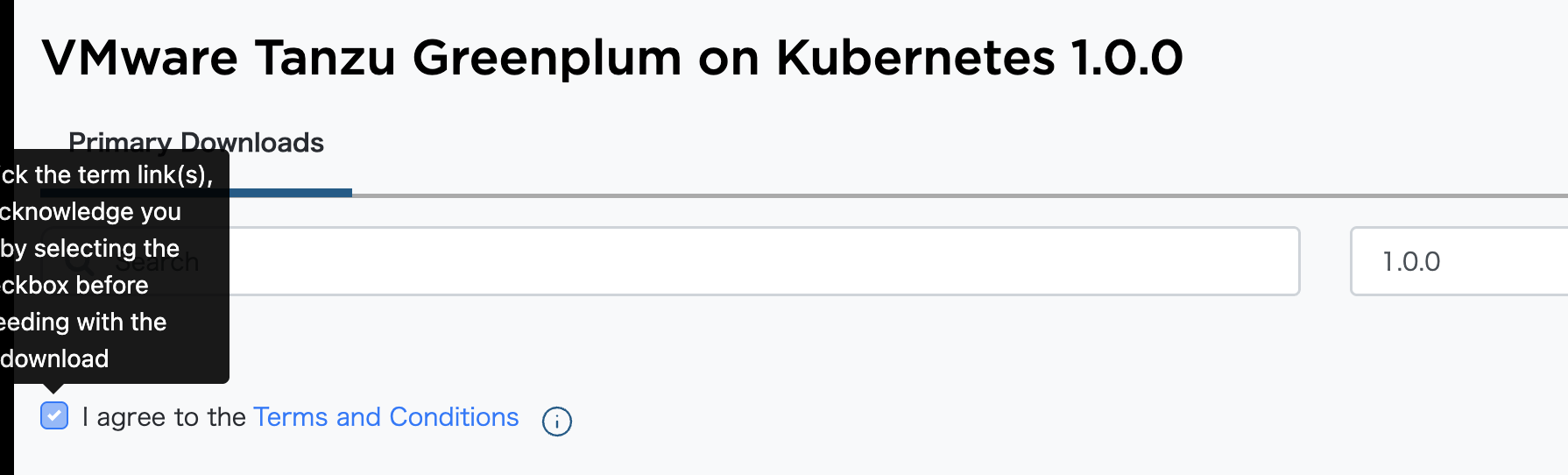
Click the "Terms and Conditions" link, then check "I agree ...".
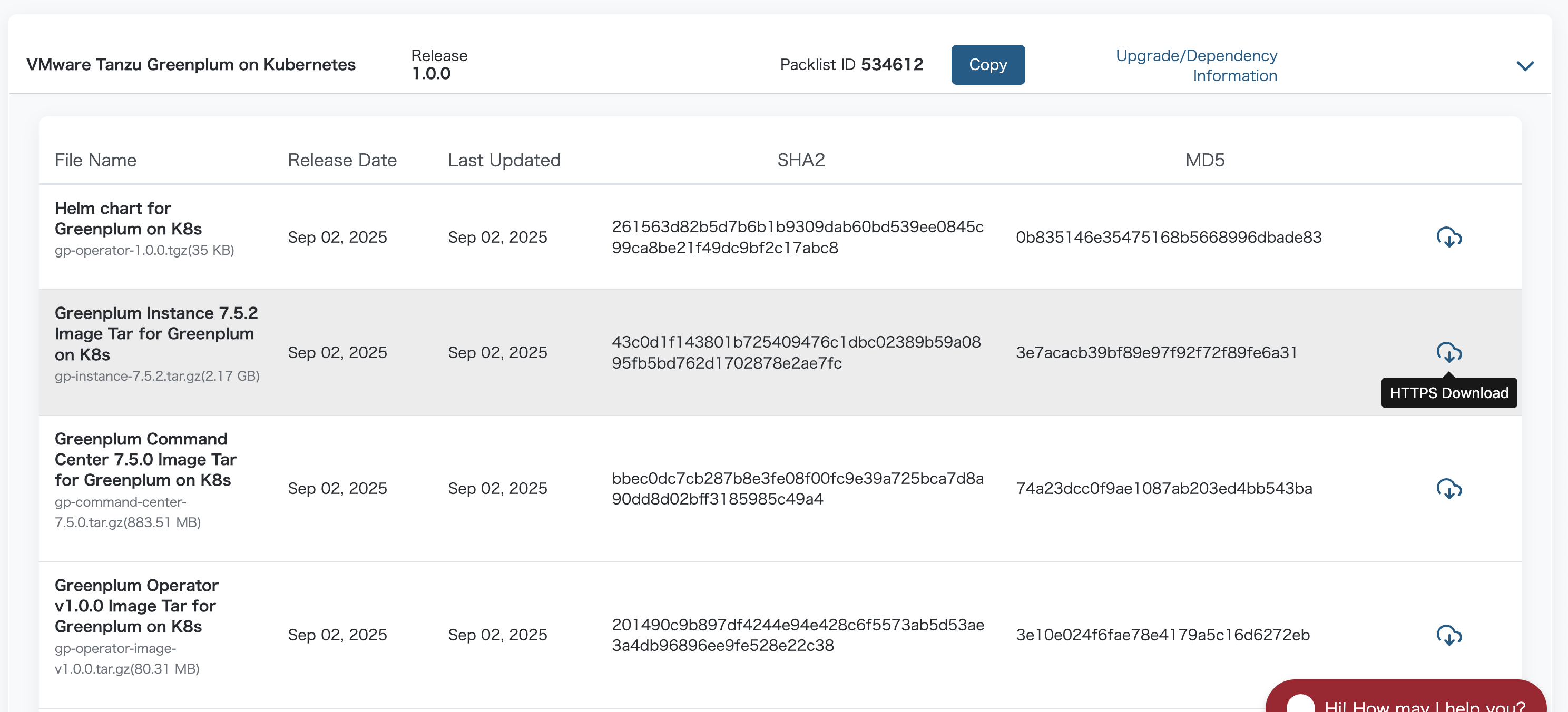
Download the following files:
- gp-command-center-7.5.0.tar.gz
- gp-instance-7.5.2.tar.gz
- gp-operator-1.0.0.tgz
- gp-operator-image-v1.0.0.tar.gz
Relocating Tanzu Greenplum on Kubernetes 1.0
After downloading, load the following three images into local Docker:
docker load -i gp-operator-image-v1.0.0.tar.gz
docker load -i gp-instance-7.5.2.tar.gz
docker load -i gp-command-center-7.5.0.tar.gz
This time, I'll push to a self-hosted container registry on a private network before installation. Please be careful that the push destination should be on a private network to avoid potential EULA violations.
REGISTRY_HOSTNAME=my-private-registry.example.com
REGISTRY_USERNAME=your-username
REGISTRY_PASSWORD=your-password
docker login ${REGISTRY_HOSTNAME} -u ${REGISTRY_USERNAME} -p ${REGISTRY_PASSWORD}
Tag and push the images with the following commands:
DESTINATION_REPOSITORY=${REGISTRY_HOSTNAME}

docker tag tds-greenplum-docker-prod-local.usw1.packages.broadcom.com/greenplum/gp-operator/gp-operator:v1.0.0 ${DESTINATION_REPOSITORY}/greenplum/gp-operator/greenplum-operator:v1.0.0
docker push ${DESTINATION_REPOSITORY}/greenplum/gp-operator/greenplum-operator:v1.0.0

docker tag tds-greenplum-docker-prod-local.usw1.packages.broadcom.com/greenplum/gp-operator/gp-instance:7.5.2 ${DESTINATION_REPOSITORY}/greenplum/gp-operator/gp-instance:7.5.2
docker push ${DESTINATION_REPOSITORY}/greenplum/gp-operator/gp-instance:7.5.2

docker tag tds-greenplum-docker-prod-local.usw1.packages.broadcom.com/greenplum/gp-operator/gp-command-center:7.5.0 ${DESTINATION_REPOSITORY}/greenplum/gp-operator/gp-command-center:7.5.0
docker push ${DESTINATION_REPOSITORY}/greenplum/gp-operator/gp-command-center:7.5.0
Although not required, I'll also push the Helm chart to GitHub Container Registry:
helm push ./gp-operator-1.0.0.tgz oci://${DESTINATION_REPOSITORY}/greenplum/gp-operator
Installing Greenplum Operator
Check the default values of the Helm Chart:
$ helm show values oci://${DESTINATION_REPOSITORY}/greenplum/gp-operator/gp-operator --version 1.0.0
Pulled: my-private-registry.example.com/gp-operator/gp-operator:1.0.0
Digest: sha256:af0787eef38e853458c0b211c14a0ad41b01a71eb925dd9f980ece60c719b433
controllerManager:
  operator:
    args:
    - --leader-elect
    - --health-probe-bind-address=:8081
    - --metrics-bind-address=:8443
    - --webhook-cert-path=/tmp/k8s-webhook-server/serving-certs
    containerSecurityContext:
      allowPrivilegeEscalation: false
      capabilities:
        drop:
        - ALL
    env:
      certManagerClusterIssuerName: ""
      certManagerNamespace: cert-manager
    image:
      repository: ${DESTINATION_REPOSITORY}/greenplum/gp-operator/gp-operator
      tag: v1.0.0
    imagePullPolicy: Always
    resources:
      limits:
        cpu: 200m
        memory: 500Mi
      requests:
        cpu: 200m
        memory: 500Mi
  podSecurityContext:
    runAsNonRoot: true
  replicas: 1
  serviceAccount:
    annotations: {}
imagePullSecrets: []
kubernetesClusterDomain: cluster.local
metricsService:
  ports:
  - name: https
    port: 8443
    protocol: TCP
    targetPort: 8443
  type: ClusterIP
webhookService:
  ports:
  - port: 443
    protocol: TCP
    targetPort: 9443
  type: ClusterIP
Create a values file to change the image to the relocated one:
cat <<EOF > gp-operator-values.yaml
---
controllerManager:
  operator:
    image:
      repository: ${DESTINATION_REPOSITORY}/greenplum/gp-operator/greenplum-operator
      tag: v1.0.0
    resources:
      requests:
        cpu: 100m
        memory: 128Mi
imagePullSecrets:
- name: gp-operator-registry-secret
---
EOF
Create the Secret specified in imagePullSecrets:
kubectl create namespace gpdb
kubectl create secret docker-registry gp-operator-registry-secret \
    --docker-server=${REGISTRY_HOSTNAME} \
    --docker-username=${REGISTRY_USERNAME} \
    --docker-password="${REGISTRY_PASSWORD}" \
    -n gpdb
Check the Helm Chart template:
helm template gp-operator oci://${DESTINATION_REPOSITORY}/greenplum/gp-operator/gp-operator -n gpdb --version 1.0.0 -f gp-operator-values.yaml
Install Greenplum Operator:
helm upgrade --install \
  -n gpdb \
  gp-operator \
  oci://${DESTINATION_REPOSITORY}/greenplum/gp-operator/gp-operator \
  -f gp-operator-values.yaml \
  --version 1.0.0 \
  --wait
Verify that the GP Operator Pod is running:
$ kubectl get pod -n gpdb
NAME                                              READY   STATUS    RESTARTS   AGE
gp-operator-controller-manager-86985f94f7-czlkc   1/1     Running   0          35s
Verify that the GP Operator CRDs have been created:
$ kubectl api-resources --api-group=greenplum.data.tanzu.vmware.com
NAME                       SHORTNAMES   APIVERSION                           NAMESPACED   KIND
greenplumbackuplocations                greenplum.data.tanzu.vmware.com/v1   true         GreenplumBackupLocation
greenplumbackups           gpbackup     greenplum.data.tanzu.vmware.com/v1   true         GreenplumBackup
greenplumclusters          gp           greenplum.data.tanzu.vmware.com/v1   true         GreenplumCluster
greenplumcommandcenters    gpcc         greenplum.data.tanzu.vmware.com/v1   true         GreenplumCommandCenter
greenplumrestores          gprestore    greenplum.data.tanzu.vmware.com/v1   true         GreenplumRestore
greenplumversions                       greenplum.data.tanzu.vmware.com/v1   false        GreenplumVersion
Creating a Greenplum Cluster
Once the GP Operator installation is complete, create a Greenplum Cluster. First, create a Greenplum Version:
cat <<EOF > greenplumversion-7.5.2.yaml
---
apiVersion: greenplum.data.tanzu.vmware.com/v1
kind: GreenplumVersion
metadata:
  name: greenplumversion-7.5.2
spec:
  dbVersion: 7.5.2
  image: ${DESTINATION_REPOSITORY}/greenplum/gp-operator/gp-instance:7.5.2
  operatorVersion: 1.0.0
  extensions:
  - name: postgis
    version: 3.3.2
  - name: greenplum_backup_restore
    version: 1.31.0
  gpcc:
    version: 7.5.0
    image: ${DESTINATION_REPOSITORY}/greenplum/gp-operator/gp-command-center:7.5.0
---
EOF

kubectl apply -f greenplumversion-7.5.2.yaml
Create a namespace for the Greenplum Cluster and create a secret for image pulling:
kubectl create namespace demo
kubectl create secret docker-registry gp-operator-registry-secret \
    --docker-server=${REGISTRY_HOSTNAME} \
    --docker-username=${REGISTRY_USERNAME} \
    --docker-password="${REGISTRY_PASSWORD}" \
    -n demo
Create the Greenplum Cluster manifest. This time, I'll configure it with 1 Coordinator node and 2 Segment nodes:
cat <<EOF > gp-demo.yaml
---
apiVersion: greenplum.data.tanzu.vmware.com/v1
kind: GreenplumCluster
metadata:
  name: gp-demo
  namespace: demo
spec:
  version: greenplumversion-7.5.2
  imagePullSecrets:
  - gp-operator-registry-secret
  coordinator:
    storageClassName: microk8s-hostpath
    service:
      type: LoadBalancer
    storage: 1Gi
  global:
    gucSettings:
    - key: wal_level
      value: logical
  segments:
    count: 2
    storageClassName: microk8s-hostpath
    storage: 10Gi
---
EOF

kubectl apply -f gp-demo.yaml
After a while, the following resources will be created:
$ kubectl get gp,sts,pod,svc,pvc -n demo -owide
NAME                                                       STATUS    AGE
greenplumcluster.greenplum.data.tanzu.vmware.com/gp-demo   Running   7m58s

NAME                                   READY   AGE     CONTAINERS   IMAGES
statefulset.apps/gp-demo-coordinator   1/1     7m6s    instance     my-private-registry.example.com/greenplum/gp-operator/gp-instance:7.5.2
statefulset.apps/gp-demo-segment       2/2     6m56s   instance     my-private-registry.example.com/greenplum/gp-operator/gp-instance:7.5.2

NAME                        READY   STATUS    RESTARTS   AGE     IP             NODE     NOMINATED NODE   READINESS GATES
pod/gp-demo-coordinator-0   1/1     Running   0          7m6s    10.1.173.177   cherry   <none>           <none>
pod/gp-demo-segment-0       1/1     Running   0          6m56s   10.1.173.178   cherry   <none>           <none>
pod/gp-demo-segment-1       1/1     Running   0          6m43s   10.1.42.171    banana   <none>           <none>

NAME                           TYPE           CLUSTER-IP       EXTERNAL-IP      PORT(S)          AGE     SELECTOR
service/gp-demo-headless-svc   ClusterIP      None             <none>           <none>           7m7s    cluster-name=gp-demo,cluster-namespace=demo
service/gp-demo-svc            LoadBalancer   10.152.183.135   192.168.11.241   5432:30917/TCP   3m45s   cluster-name=gp-demo,cluster-namespace=demo,type=coordinator

NAME                                                STATUS   VOLUME                                     CAPACITY   ACCESS MODES   STORAGECLASS        VOLUMEATTRIBUTESCLASS   AGE     VOLUMEMODE
persistentvolumeclaim/state-gp-demo-coordinator-0   Bound    pvc-790a5953-33e1-4f7e-875f-7fba41386016   1Gi        RWO            microk8s-hostpath   <unset>                 7m6s    Filesystem
persistentvolumeclaim/state-gp-demo-segment-0       Bound    pvc-2c114171-13b9-4dd6-b6c7-037018f52843   10Gi       RWO            microk8s-hostpath   <unset>                 6m56s   Filesystem
persistentvolumeclaim/state-gp-demo-segment-1       Bound    pvc-1a458596-9e4d-408d-a200-f16fb643c292   10Gi       RWO            microk8s-hostpath   <unset>                 6m43s   Filesystem
Verification
Connect to port 5432 on the LoadBalancer's EXTERNAL-IP. The password for the gpadmin user is stored in a Secret:
$ kubectl get secret -n demo gp-demo-creds -ojson | jq '.data | map_values(@base64d)'
{
  "gpadmin": "8mOJ2tYC9e4AIu"
}
Connect with the following command:
$ psql postgresql://gpadmin:8mOJ2tYC9e4AIu@192.168.11.241:5432/postgres
psql (17.0, server 12.22)
SSL connection (protocol: TLSv1.3, cipher: TLS_AES_256_GCM_SHA384, compression: off, ALPN: none)
Type "help" for help.

postgres=#
The initial state is as follows:
postgres=# \l
                                               List of databases
   Name    |  Owner  | Encoding | Locale Provider | Collate | Ctype | Locale | ICU Rules |  Access privileges
-----------+---------+----------+-----------------+---------+-------+--------+-----------+---------------------
 postgres  | gpadmin | UTF8     | libc            | C       | C     |        |           |
 template0 | gpadmin | UTF8     | libc            | C       | C     |        |           | =c/gpadmin         +
           |         |          |                 |         |       |        |           | gpadmin=CTc/gpadmin
 template1 | gpadmin | UTF8     | libc            | C       | C     |        |           | =c/gpadmin         +
           |         |          |                 |         |       |        |           | gpadmin=CTc/gpadmin
(3 rows)
The available extensions are as follows. Extensions like pgvector for vector search and h3, a geographic indexing system used by Uber, are available:
postgres=# SELECT * FROM pg_available_extensions ORDER BY name;
             name             |    default_version    | installed_version |                                                       comment
------------------------------+-----------------------+-------------------+---------------------------------------------------------------------------------------------------------------------
 address_standardizer         | 3.3.2                 |                   | Used to parse an address into constituent elements. Generally used to support geocoding address normalization step.
 address_standardizer_data_us | 3.3.2                 |                   | Address Standardizer US dataset example
 advanced_password_check      | 1.4                   |                   | Advanced Password Check
 anon                         | 2.1.0                 |                   | Anonymization & Data Masking for PostgreSQL
 btree_gin                    | 1.3                   |                   | support for indexing common datatypes in GIN
 citext                       | 1.6                   |                   | data type for case-insensitive character strings
 dataflow                     | 1.0                   |                   | Extension which provides extra formatters and types for dataflow
 dblink                       | 1.2                   |                   | connect to other PostgreSQL databases from within a database
 diskquota                    | 2.3                   |                   | Disk Quota Main Program
 file_fdw                     | 1.0                   |                   | foreign-data wrapper for flat file access
 fuzzystrmatch                | 1.1                   |                   | determine similarities and distance between strings
 gp_distribution_policy       | 1.0                   |                   | check distribution policy in a GPDB cluster
 gp_exttable_fdw              | 1.0                   | 1.0               | External Table Foreign Data Wrapper for Greenplum
 gp_internal_tools            | 1.0.0                 |                   | Different internal tools for Greenplum
 gp_legacy_string_agg         | 1.0.0                 |                   | Legacy one-argument string_agg implementation for Greenplum
 gp_sparse_vector             | 1.0.1                 |                   | SParse vector implementation for GreenPlum
 gp_toolkit                   | 1.18                  | 1.18              | various GPDB administrative views/functions
 gp_wlm                       | 0.1                   |                   | Greenplum Workload Manager Extension
 gpss                         | 1.0                   |                   | Extension which implements kinds of gpss formaters and protocol buffer
 greenplum_fdw                | 1.1                   |                   | foreign-data wrapper for remote greenplum servers
 h3                           | 4.1.3                 |                   | H3 bindings for PostgreSQL
 h3_postgis                   | 4.1.3                 |                   | H3 PostGIS integration
 hll                          | 2.16                  |                   | type for storing hyperloglog data
 hstore                       | 1.6                   |                   | data type for storing sets of (key, value) pairs
 ip4r                         | 2.4                   |                   |
 isn                          | 1.2                   |                   | data types for international product numbering standards
 ltree                        | 1.1                   |                   | data type for hierarchical tree-like structures
 metrics_collector            | 1.0                   |                   | Greenplum Metrics Collector Extension
 orafce                       | 4.9.1                 |                   | Functions and operators that emulate a subset of functions and packages from the Oracle RDBMS
 orafce_ext                   | 1.0                   |                   |
 pageinspect                  | 1.9                   |                   | inspect the contents of database pages at a low level
 pg_buffercache               | 1.4.1                 |                   | examine the shared buffer cache
 pg_cron                      | 1.6                   |                   | Job scheduler for PostgreSQL
 pg_hint_plan                 | 1.3.9                 |                   |
 pg_trgm                      | 1.4                   |                   | text similarity measurement and index searching based on trigrams
 pgaudit                      | 7.0                   |                   | provides auditing functionality
 pgcrypto                     | 1.3                   |                   | cryptographic functions
 pgml                         | 2.8.5+greenplum.2.0.0 |                   | pgml:  Created by the PostgresML team
 pgrouting                    | 3.6.2                 |                   | pgRouting Extension
 plperl                       | 1.0                   |                   | PL/Perl procedural language
 plperlu                      | 1.0                   |                   | PL/PerlU untrusted procedural language
 plpgsql                      | 1.0                   | 1.0               | PL/pgSQL procedural language
 plpython3u                   | 1.0                   |                   | PL/Python3U untrusted procedural language
 pointcloud                   | 1.2.5                 |                   | data type for lidar point clouds
 pointcloud_postgis           | 1.2.5                 |                   | integration for pointcloud LIDAR data and PostGIS geometry data
 postgis                      | 3.3.2                 |                   | PostGIS geometry and geography spatial types and functions
 postgis_raster               | 3.3.2                 |                   | PostGIS raster types and functions
 postgis_tiger_geocoder       | 3.3.2                 |                   | PostGIS tiger geocoder and reverse geocoder
 postgres_fdw                 | 1.0                   |                   | foreign-data wrapper for remote PostgreSQL servers
 sslinfo                      | 1.2                   |                   | information about SSL certificates
 tablefunc                    | 1.0                   |                   | functions that manipulate whole tables, including crosstab
 timestamp9                   | 1.3.0                 |                   | timestamp nanosecond resolution
 uuid-ossp                    | 1.1                   |                   | generate universally unique identifiers (UUIDs)
 vector                       | 0.7.0                 |                   | vector data type and ivfflat and hnsw access methods
(54 rows)
Execute the following SQL to insert test data:
CREATE TABLE IF NOT EXISTS organization
(
    organization_id   BIGINT PRIMARY KEY,
    organization_name VARCHAR(255) NOT NULL
);
INSERT INTO organization(organization_id, organization_name) VALUES(1, 'foo');
INSERT INTO organization(organization_id, organization_name) VALUES(2, 'bar');
Check the data:
select organization_id,organization_name,gp_segment_id from organization;
By default, data is distributed by Primary Key. You can check which segment the data is placed on using the gp_segment_id column:
organization_id | organization_name | gp_segment_id
-----------------+-------------------+---------------
               2 | bar               |             0
               1 | foo               |             1
(2 rows)
Let's also try vector search using pgvector:
CREATE EXTENSION vector;
CREATE TABLE items (id bigserial PRIMARY KEY, embedding vector(3));
INSERT INTO items (embedding) VALUES ('[1,2,3]'), ('[4,5,6]');
Check the data:
SELECT * FROM items ORDER BY embedding <-> '[3,1,2]' LIMIT 5;
Vector search worked:
 id | embedding
----+-----------
  1 | [1,2,3]
  2 | [4,5,6]
(2 rows)
Creating Greenplum Command Center
Next, create Greenplum Command Center:
cat <<EOF > gpcc-demo.yaml
apiVersion: greenplum.data.tanzu.vmware.com/v1
kind: GreenplumCommandCenter
metadata:
  name: gpcc-demo
  namespace: demo
spec:
  storageClassName: microk8s-hostpath
  greenplumClusterName: gp-demo
  storage: 2Gi
  service:
    type: LoadBalancer
EOF

kubectl apply -f gpcc-demo.yaml
After a while, the following resources will be created:
$ kubectl get gp,sts,pod,svc,secret,pvc -n demo -owide
NAME                                                       STATUS    AGE
greenplumcluster.greenplum.data.tanzu.vmware.com/gp-demo   Running   10m

NAME                                   READY   AGE     CONTAINERS       IMAGES
statefulset.apps/gp-demo-coordinator   1/1     10m     instance         my-private-registry.example.com/greenplum/gp-operator/gp-instance:7.5.2
statefulset.apps/gp-demo-segment       2/2     9m55s   instance         my-private-registry.example.com/greenplum/gp-operator/gp-instance:7.5.2
statefulset.apps/gpcc-demo-cc-app      1/1     4m26s   command-center   my-private-registry.example.com/greenplum/gp-operator/gp-command-center:7.5.0

NAME                        READY   STATUS    RESTARTS   AGE     IP             NODE     NOMINATED NODE   READINESS GATES
pod/gp-demo-coordinator-0   1/1     Running   0          10m     10.1.42.175    banana   <none>           <none>
pod/gp-demo-segment-0       1/1     Running   0          9m55s   10.1.173.185   cherry   <none>           <none>
pod/gp-demo-segment-1       1/1     Running   0          9m48s   10.1.42.177    banana   <none>           <none>
pod/gpcc-demo-cc-app-0      1/1     Running   0          4m26s   10.1.42.179    banana   <none>           <none>

NAME                           TYPE           CLUSTER-IP       EXTERNAL-IP      PORT(S)                         AGE     SELECTOR
service/gp-demo-headless-svc   ClusterIP      None             <none>           <none>                          10m     cluster-name=gp-demo,cluster-namespace=demo
service/gp-demo-svc            LoadBalancer   10.152.183.204   192.168.11.241   5432:32002/TCP                  8m14s   cluster-name=gp-demo,cluster-namespace=demo,type=coordinator
service/gpcc-demo-cc-svc       LoadBalancer   10.152.183.75    192.168.11.242   8443:32144/TCP,8080:30307/TCP   3m36s   cluster-name=gp-demo,cluster-namespace=demo,type=command-center

NAME                                 TYPE                             DATA   AGE
secret/gemfire-registry-secret       kubernetes.io/dockerconfigjson   1      78d
secret/gp-demo-client-cert-secret    kubernetes.io/tls                3      25h
secret/gp-demo-creds                 Opaque                           1      8m58s
secret/gp-demo-server-cert-secret    kubernetes.io/tls                3      25h
secret/gp-demo-ssh-key               Opaque                           2      10m
secret/gp-operator-registry-secret   kubernetes.io/dockerconfigjson   1      26h
secret/gpcc-demo-cc-creds            Opaque                           1      3m36s

NAME                                                      STATUS   VOLUME                                     CAPACITY   ACCESS MODES   STORAGECLASS        VOLUMEATTRIBUTESCLASS   AGE     VOLUMEMODE
persistentvolumeclaim/command-center-gpcc-demo-cc-app-0   Bound    pvc-5be921dd-d668-489c-80ca-8248db0cd4be   2Gi        RWO            microk8s-hostpath   <unset>                 4m26s   Filesystem
persistentvolumeclaim/state-gp-demo-coordinator-0         Bound    pvc-6bc2b6b0-4b13-47c0-ad1f-6c1ca47aada0   1Gi        RWO            microk8s-hostpath   <unset>                 10m     Filesystem
persistentvolumeclaim/state-gp-demo-segment-0             Bound    pvc-7a634b8d-5dd6-4f8d-a81d-bf2ec41c4029   10Gi       RWO            microk8s-hostpath   <unset>                 9m55s   Filesystem
persistentvolumeclaim/state-gp-demo-segment-1             Bound    pvc-436ed5cb-8449-468c-8bb6-f16a64317b81   10Gi       RWO            microk8s-hostpath   <unset>                 9m48s   Filesystem
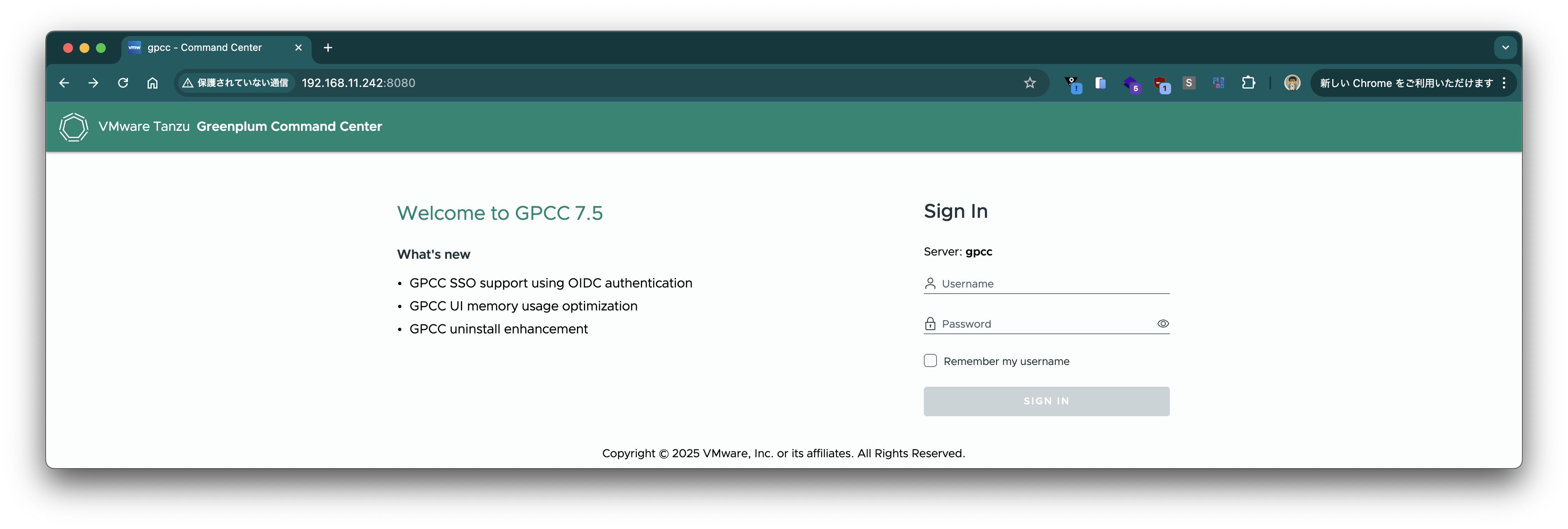
Connect to port 8080 on the LoadBalancer's EXTERNAL-IP:
The password for the gpmon user is stored in a Secret:
$ kubectl get secret -n demo gpcc-demo-cc-creds  -ojson | jq '.data | map_values(@base64d)'
{
  "gpmon": "6PXN0s7xdfyLp9"
}
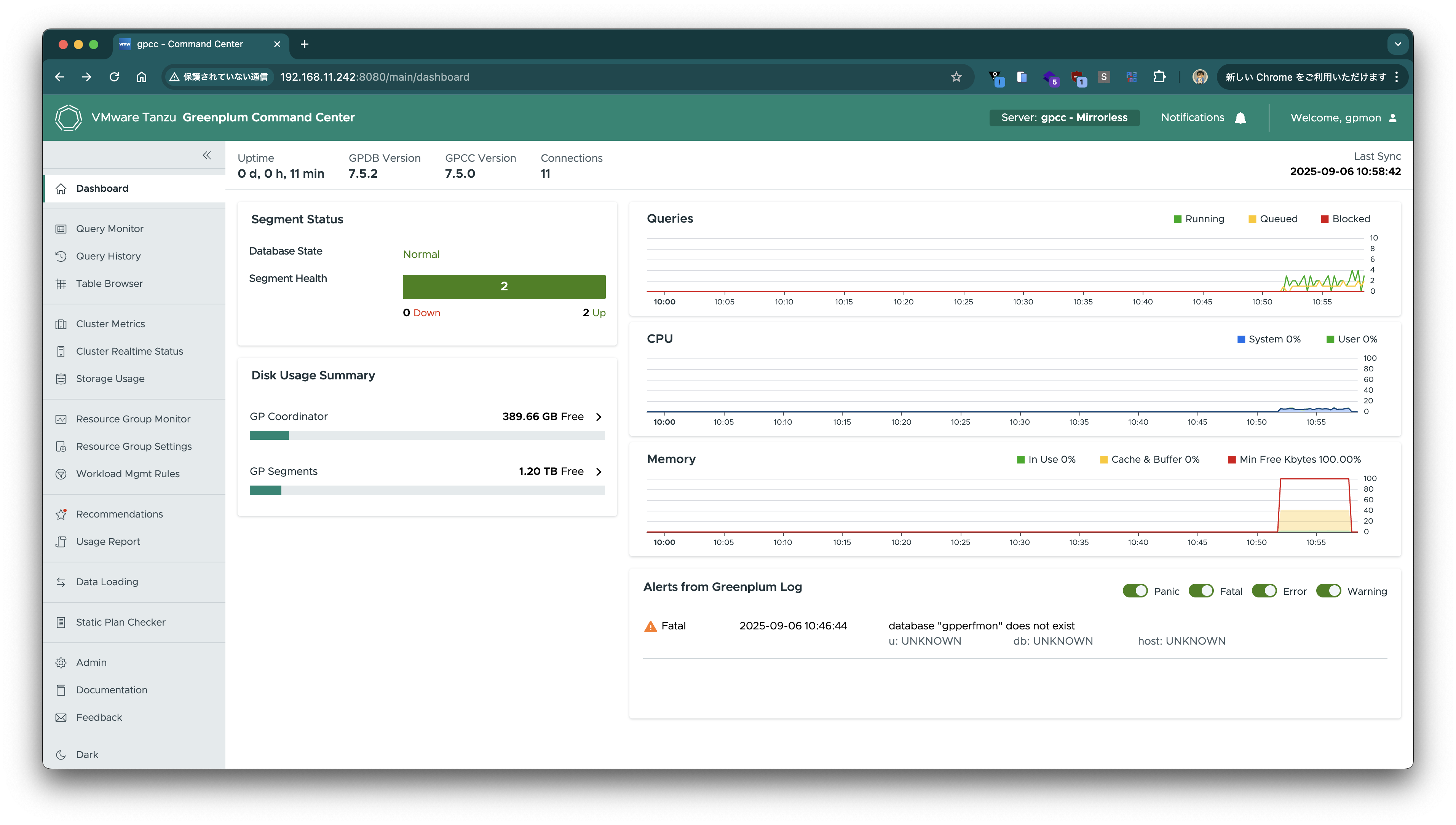
It's great that monitoring can be set up so easily.
Deleting Resources
kubectl delete -f gpcc-demo.yaml
kubectl delete -f gp-demo.yaml
helm uninstall -n gpdb gp-operator --wait
I tried Greenplum on Kubernetes 1.0. Since it's the initial version, I think there are still many areas for improvement, but it's good that Greenplum has become easier to try out. I look forward to future version updates.