Accessing Google Gemini's Free Tier from Spring AI using the OpenAI API (with MCP Integration)
⚠️ This article was automatically translated by OpenAI (gemini-2.5-pro-exp-03-25). It may be edited eventually, but please be aware that it may contain incorrect information at this time.
It's a bit late, but I'm trying out Google Gemini's free tier. Since it also supports the OpenAI API, I can try the things I've tested on this blog with Gemini as is.
The quotas for the "Free" plan are as follows. Note that as of this writing, the top-tier model, Gemini 2.5 Pro, is limited to 25 requests per day. With Gemini 2.0 Flash, it seems like you can try quite a lot.
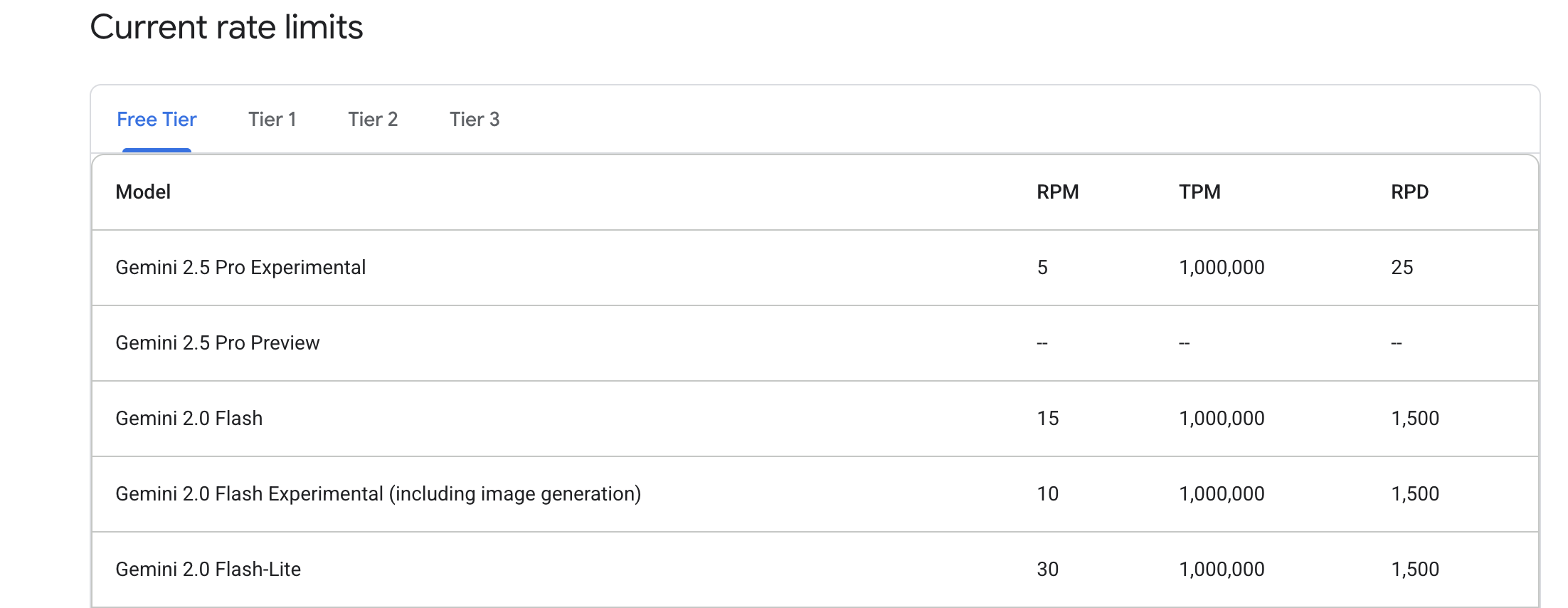
Table of Contents
Get a Gemini API Key
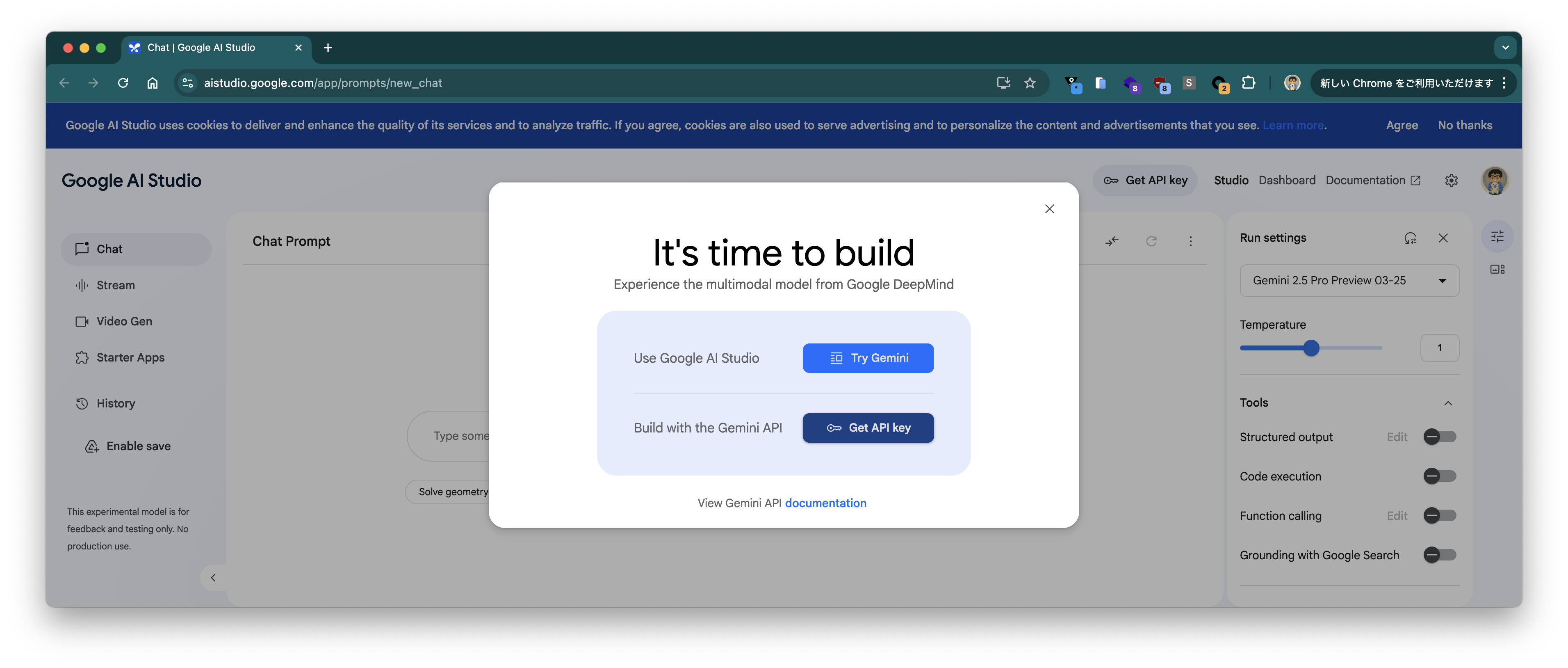
Access the page https://aistudio.google.com/app/prompts/new_chat and click the "GET API Key" button.
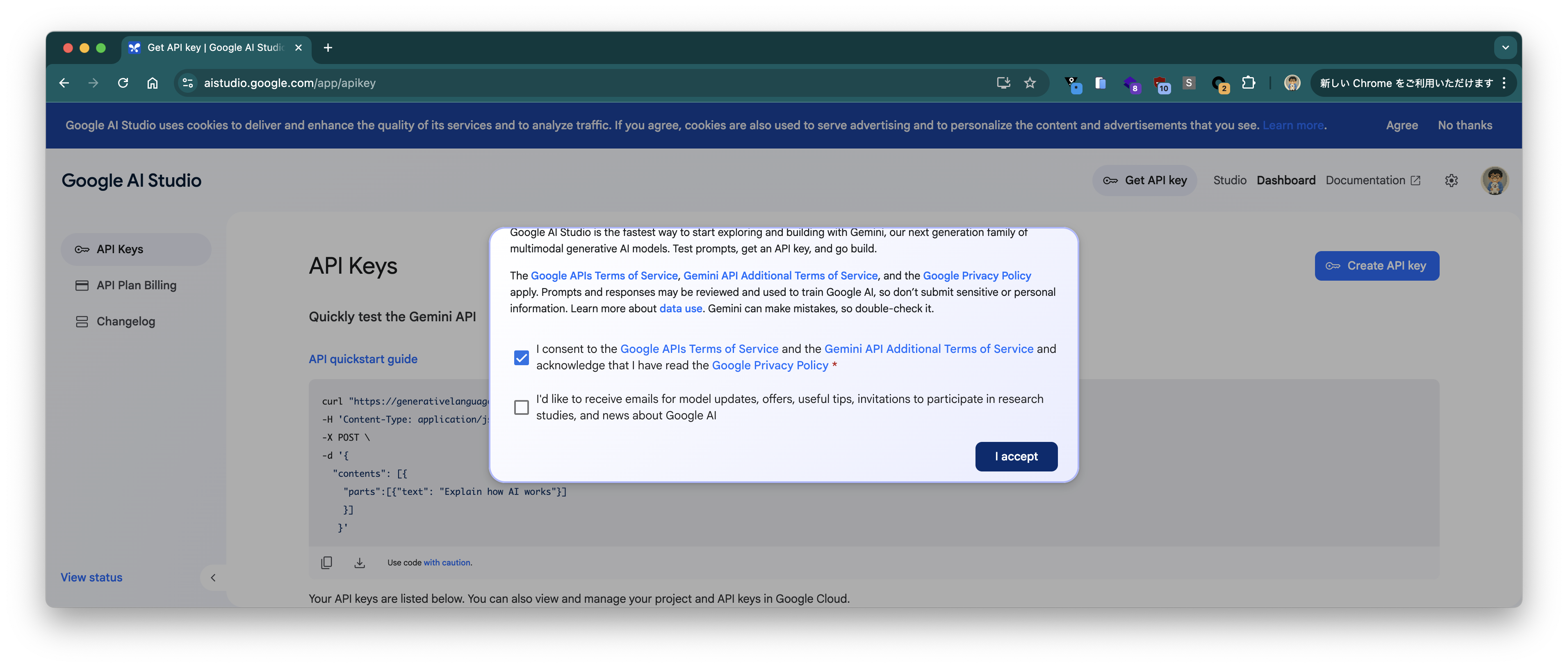
Check the box to accept the "Terms of Service" and click "I accept".
Click the "Create API Key" button.
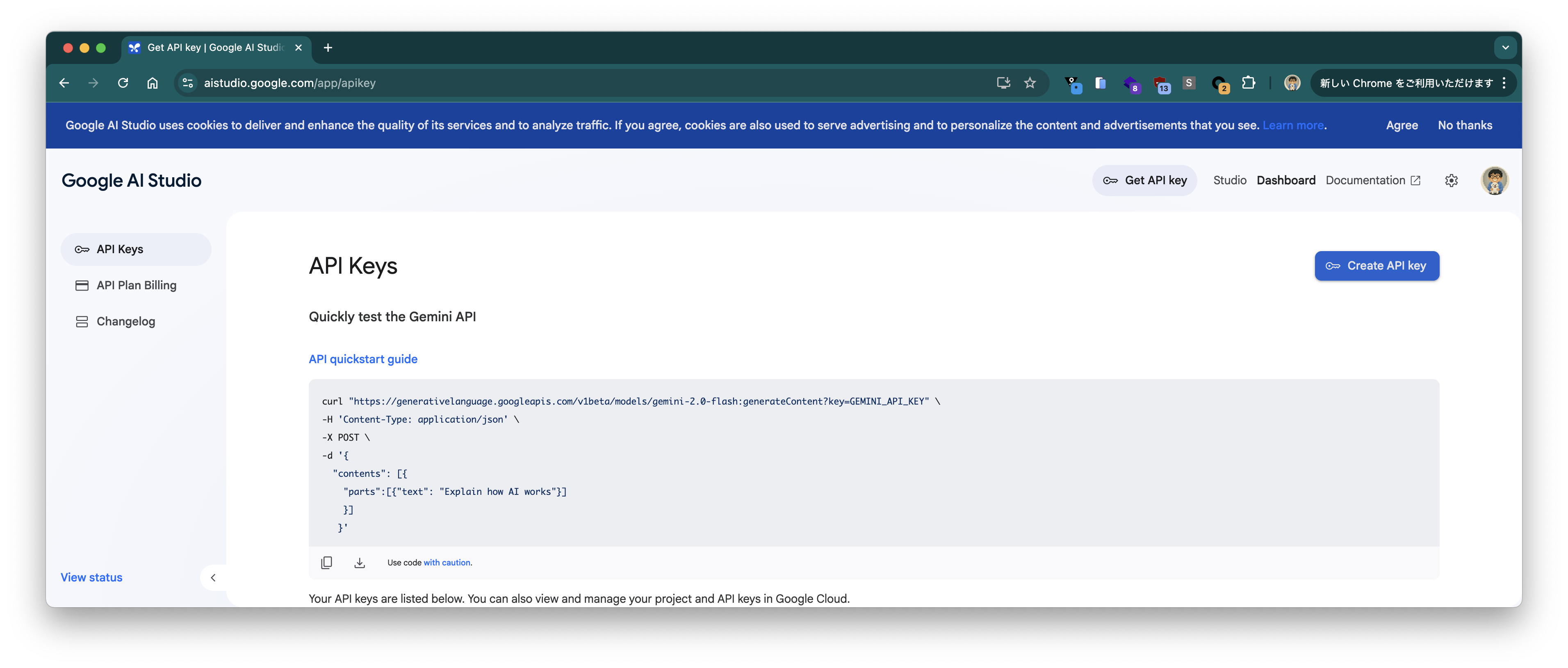
The API key will be displayed. Press the "Copy" button to copy it to the clipboard.
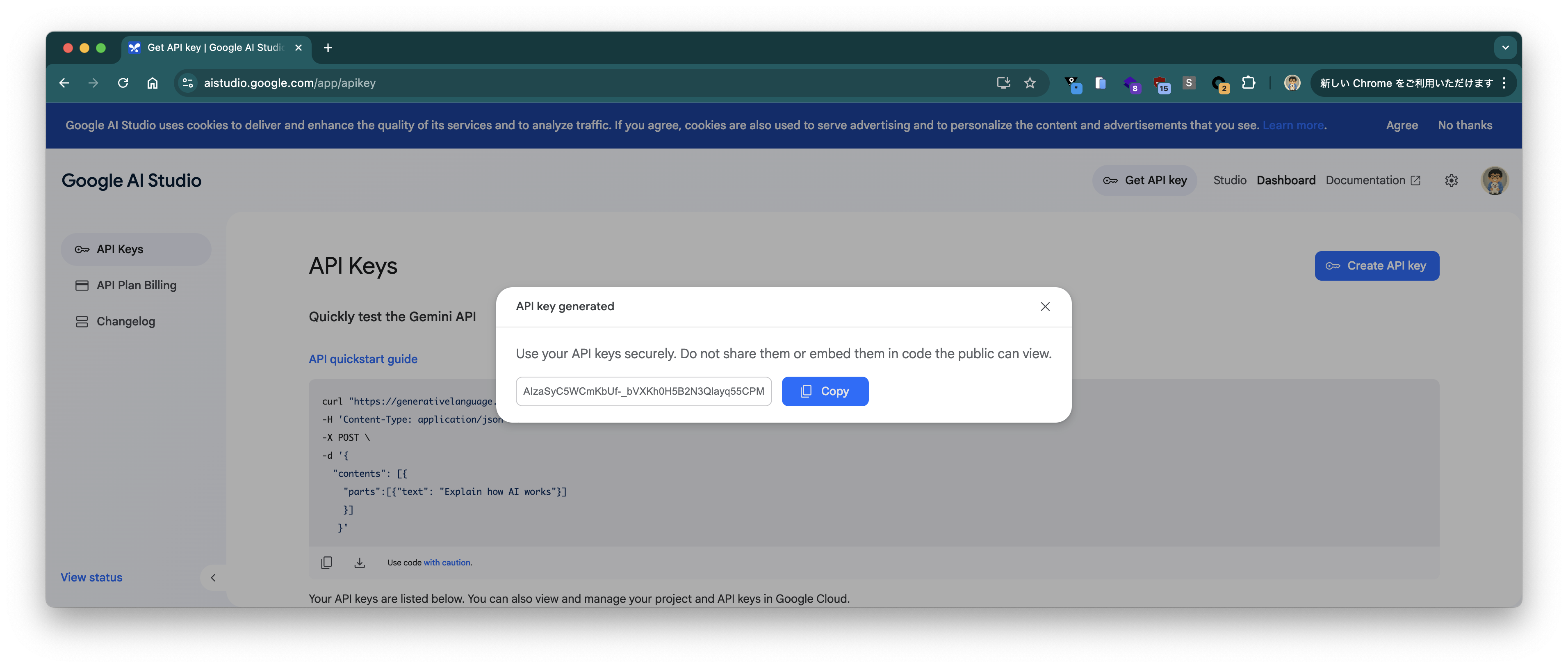
Set the copied API key to the variable GEMINI_API_KEY in the terminal.
GEMINI_API_KEY=*****
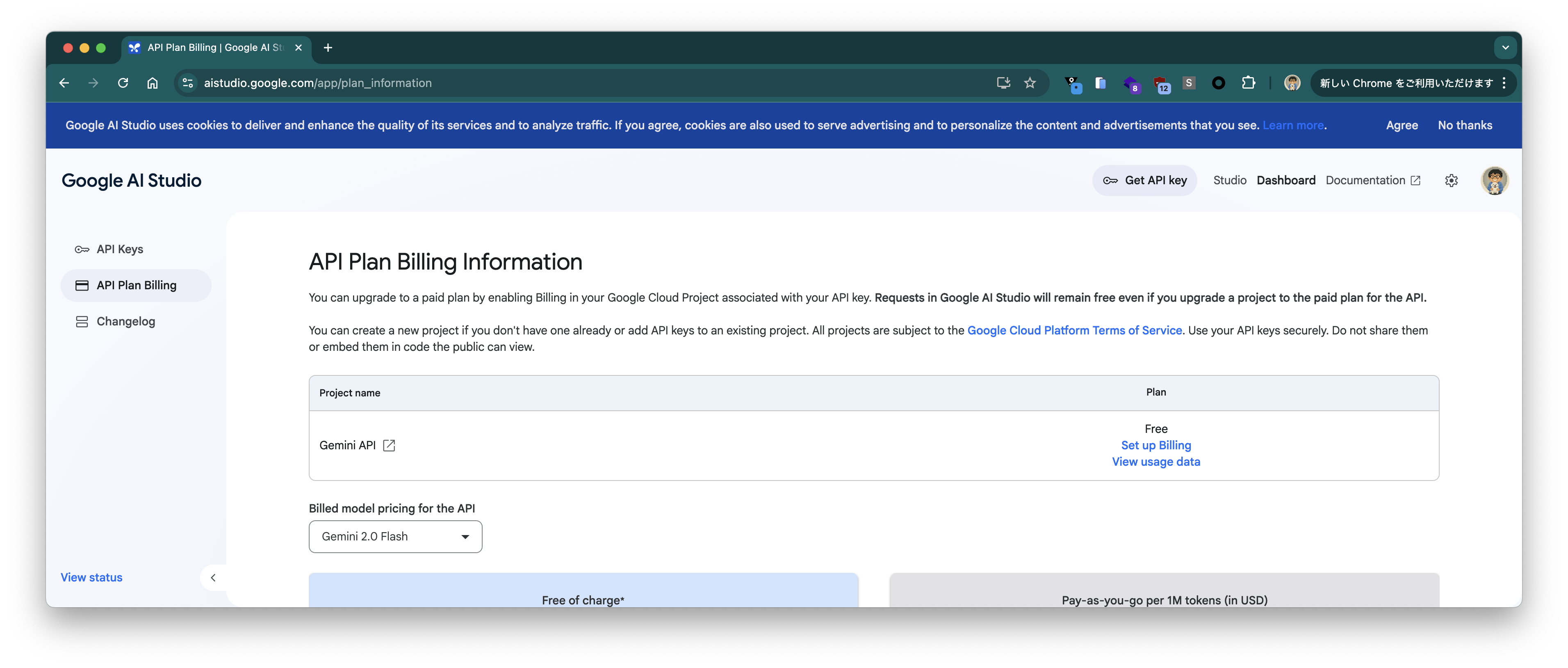
Confirm that you are on the "Free" plan on the "API Plan Billing" page.
Test with Gemini API
First, let's send a simple prompt via the Gemini API to check if it works.
Let's start with gemini-2.0-flash.
curl "https://generativelanguage.googleapis.com/v1beta/models/gemini-2.0-flash:generateContent?key=${GEMINI_API_KEY}" \
  --json '{
  "contents": [{
    "parts":[{"text": "Give me a joke"}]
    }]
   }'
A response like the following is returned. It's the same joke as when I tried it with Gemma.
{
  "candidates": [
    {
      "content": {
        "parts": [
          {
            "text": "Why don't scientists trust atoms?\n\nBecause they make up everything!\n"
          }
        ],
        "role": "model"
      },
      "finishReason": "STOP",
      "avgLogprobs": -0.0029207938350737095
    }
  ],
  "usageMetadata": {
    "promptTokenCount": 4,
    "candidatesTokenCount": 16,
    "totalTokenCount": 20,
    "promptTokensDetails": [
      {
        "modality": "TEXT",
        "tokenCount": 4
      }
    ],
    "candidatesTokensDetails": [
      {
        "modality": "TEXT",
        "tokenCount": 16
      }
    ]
  },
  "modelVersion": "gemini-2.0-flash"
}
Next, let's try gemini-2.5-pro-exp-03-25.
$ curl "https://generativelanguage.googleapis.com/v1beta/models/gemini-2.5-pro-exp-03-25:generateContent?key=${GEMINI_API_KEY}" \
  --json '{
  "contents": [{
    "parts":[{"text": "Give me a joke"}]
    }]
   }'
A response like the following is returned.
{
  "candidates": [
    {
      "content": {
        "parts": [
          {
            "text": "Okay, here's one:\n\nWhy don't scientists trust atoms?\n\nBecause they make up everything!"
          }
        ],
        "role": "model"
      },
      "finishReason": "STOP",
      "index": 0
    }
  ],
  "usageMetadata": {
    "promptTokenCount": 4,
    "candidatesTokenCount": 569,
    "totalTokenCount": 573,
    "promptTokensDetails": [
      {
        "modality": "TEXT",
        "tokenCount": 4
      }
    ],
    "thoughtsTokenCount": 546
  },
  "modelVersion": "gemini-2.5-pro-exp-03-25"
}
The response was considerably slower compared to gemini-2.0-flash.
Test with OpenAI API
Let's try the same prompt with the OpenAI API (https://ai.google.dev/gemini-api/docs/openai). First, gemini-2.0-flash.
curl -s https://generativelanguage.googleapis.com/v1beta/openai/chat/completions \
  -H "Authorization: Bearer $GEMINI_API_KEY" \
  --json '{
   "model": "gemini-2.0-flash",
   "messages": [
      {"role": "user", "content": "Give me a joke."}
   ]
 }' | jq .
A response like the following is returned.
{
  "choices": [
    {
      "finish_reason": "stop",
      "index": 0,
      "message": {
        "content": "Why don't scientists trust atoms?\n\nBecause they make up everything!\n",
        "role": "assistant"
      }
    }
  ],
  "created": 1744252378,
  "model": "gemini-2.0-flash",
  "object": "chat.completion",
  "usage": {
    "completion_tokens": 16,
    "prompt_tokens": 5,
    "total_tokens": 21
  }
}
Next, let's try gemini-2.5-pro-exp-03-25.
curl -s https://generativelanguage.googleapis.com/v1beta/openai/chat/completions \
  -H "Authorization: Bearer $GEMINI_API_KEY" \
  --json '{
   "model": "gemini-2.5-pro-exp-03-25",
   "messages": [
      {"role": "user", "content": "Give me a joke."}
   ]
 }' | jq .
A response like the following is returned.
{
  "choices": [
    {
      "finish_reason": "stop",
      "index": 0,
      "message": {
        "content": "Okay, here's one:\n\nWhy don't scientists trust atoms?\n\nBecause they make up everything!",
        "role": "assistant"
      }
    }
  ],
  "created": 1744268816,
  "model": "gemini-2.5-pro-exp-03-25",
  "object": "chat.completion",
  "usage": {
    "completion_tokens": 440,
    "prompt_tokens": 6,
    "total_tokens": 446
  }
}
Accessing from Spring AI
Next, let's try accessing it from the sample application I've covered many times on this blog. It's an application designed for the OpenAI API, but by using Gemini's OpenAI API compatibility layer, you can try it without changing the code.
Start the sample application with the following command.
git clone https://github.com/making/hello-spring-ai
cd hello-spring-ai
./mvnw clean package -DskipTests=true
java -jar target/hello-spring-ai-0.0.1-SNAPSHOT.jar \
  --spring.ai.openai.base-url=https://generativelanguage.googleapis.com/v1beta/openai \
  --spring.ai.openai.chat.completions-path=/chat/completions \
  --spring.ai.openai.api-key=${GEMINI_API_KEY} \
  --spring.ai.openai.chat.options.model=gemini-2.0-flash \
  --spring.ai.openai.chat.options.temperature=0
First, let's send a simple prompt (日本の首都はどこですか? - What is the capital of Japan?).
$ curl "http://localhost:8080/?prompt=%E6%97%A5%E6%9C%AC%E3%81%AE%E9%A6%96%E9%83%BD%E3%81%AF%E3%81%A9%E3%81%93%E3%81%A7%E3%81%99%E3%81%8B%EF%BC%9F"
日本の首都は東京都です。 (The capital of Japan is Tokyo.)
Note
The Stream API resulted in an error via Spring AI (as of 1.0.0.M6). The id field was missing in Gemini's OpenAI API stream response, causing a NullPointerException. I'll create an issue when I have time.
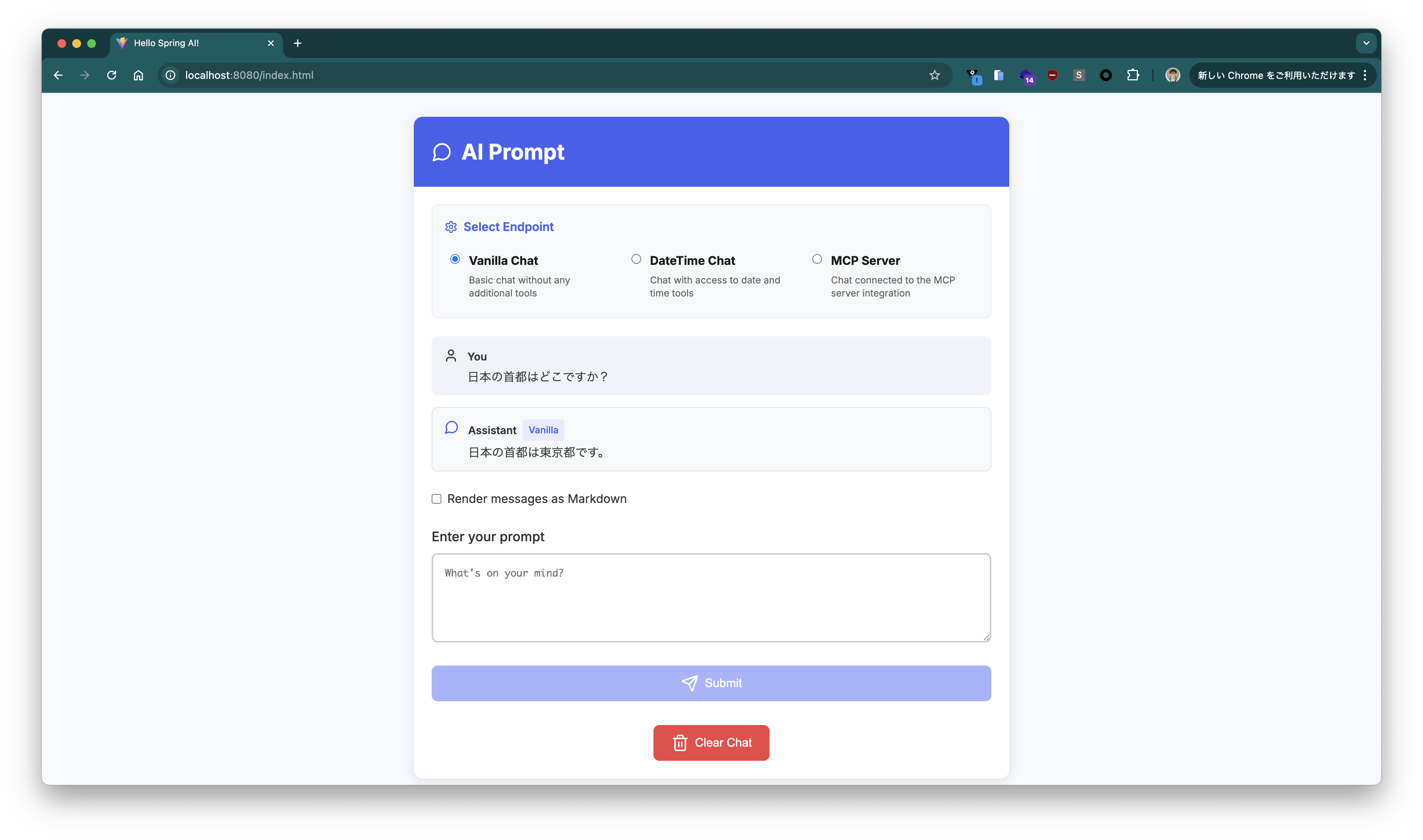
If running with curl is tedious, you can access http://localhost:8080 in your browser to use the Chat UI.
Note
In the Chat UI, the conversation continues on a per-session basis. When starting a new conversation, please press the "Clear Chat" button.
Trying Tool Calling
Next, let's try Spring AI's Tool Calling.
Using Tool Calling, you can implement a way in Java to return information that the LLM doesn't know, complementing it. For example, since the LLM doesn't know the current time, even if you ask for the current time, it will answer with a completely different time.
You can check the current time with the following command.
$ LANG=en date
Thu Apr 10 13:38:31 JST 2025
First, without Tool Calling, let's ask the LLM what time is it now in JST.
$ curl "http://localhost:8080?prompt=what%20time%20is%20it%20now%20in%20JST"
As an AI, I do not have access to real-time information, including the current time. To find out the current time in JST (Japan Standard Time), you can:

*   **Search on Google:** Simply type "time in JST" into the Google search bar.
*   **Use a Time Zone Converter:** There are many websites and apps that will convert your current time to JST.
*   **Check a World Clock Website:** Websites like TimeAndDate.com have world clocks that show the current time in various cities and time zones.%
It doesn't tell me.
Here, I'll add a Tool according to the Spring AI documentation sample, so it can tell the current time.
public class DateTimeTools {

  private final Logger logger = LoggerFactory.getLogger(DateTimeTools.class);

  @Tool(description = "Get the current date and time in the user's timezone")
  public String getCurrentDateTime() {
    logger.info("Calling getCurrentDateTime()");
    return LocalDateTime.now().atZone(LocaleContextHolder.getTimeZone().toZoneId()).toString();
  }

}
The /datetime endpoint is configured to use this Tool.
@GetMapping(path = "/datetime")
public String dateTime(@RequestParam(defaultValue = "What time is it now?") String prompt) {
  return this.chatClient.prompt().messages().user(prompt).tools(new DateTimeTools()).call().content();
}
Call the /datetime endpoint.
$ curl "http://localhost:8080/datetime?prompt=what%20time%20is%20it%20now%20in%20JST"
It is 2025-04-10T13:39:15.656919+09:00 in JST.
This time, it answered with the correct time.
Looking at the access logs, you can see that the first response is a request to call the function, and the second request includes the result of the function call.
2025-04-10T13:39:14.955+09:00 TRACE 47338 --- [hello-spring-ai] [nio-8080-exec-3] [5c5fc0058fa68173f7e8f6cde33cc2cd-939a82e4446e75d0] org.zalando.logbook.Logbook              : Incoming Request: d2f972d2b68d7060
Remote: 0:0:0:0:0:0:0:1
GET http://localhost:8080/datetime?prompt=what%20time%20is%20it%20now%20in%20JST HTTP/1.1
accept: */*
host: localhost:8080
user-agent: curl/8.7.1
2025-04-10T13:39:15.021+09:00 TRACE 47338 --- [hello-spring-ai] [nio-8080-exec-3] [5c5fc0058fa68173f7e8f6cde33cc2cd-1824b60383c9a5e2] org.zalando.logbook.Logbook              : Outgoing Request: a10e547cccb1c6c0
Remote: localhost
POST https://generativelanguage.googleapis.com/v1beta/openai/chat/completions HTTP/1.1
Authorization: XXX
Content-Length: 414
Content-Type: application/json
traceparent: 00-5c5fc0058fa68173f7e8f6cde33cc2cd-1824b60383c9a5e2-01

{"messages":[{"content":"what time is it now in JST","role":"user"}],"model":"gemini-2.0-flash","stream":false,"temperature":0.0,"tools":[{"type":"function","function":{"description":"Get the current date and time in the user timezone","name":"getCurrentDateTime","parameters":{"$schema":"https://json-schema.org/draft/2020-12/schema","additionalProperties":false,"type":"object","properties":{},"required":[]}}}]}
2025-04-10T13:39:15.642+09:00 TRACE 47338 --- [hello-spring-ai] [nio-8080-exec-3] [5c5fc0058fa68173f7e8f6cde33cc2cd-1824b60383c9a5e2] org.zalando.logbook.Logbook              : Incoming Response: a10e547cccb1c6c0
Duration: 616 ms
HTTP/1.1 200 OK
:status: 200
accept-ranges: none
alt-svc: h3=":443"; ma=2592000,h3-29=":443"; ma=2592000
content-type: application/json
date: Thu, 10 Apr 2025 04:39:15 GMT
server: scaffolding on HTTPServer2
server-timing: gfet4t7; dur=542
vary: X-Origin, Referer, Origin,Accept-Encoding
x-content-type-options: nosniff
x-frame-options: SAMEORIGIN
x-xss-protection: 0

{"choices":[{"finish_reason":"tool_calls","index":0,"message":{"role":"assistant","tool_calls":[{"function":{"arguments":"{}","name":"getCurrentDateTime"},"id":"","type":"function"}]}}],"created":1744259955,"model":"gemini-2.0-flash","object":"chat.completion","usage":{"completion_tokens":2,"prompt_tokens":19,"total_tokens":21}}
2025-04-10T13:39:15.656+09:00  INFO 47338 --- [hello-spring-ai] [nio-8080-exec-3] [5c5fc0058fa68173f7e8f6cde33cc2cd-d8a0e7f48cc4e6a7] com.example.hello.DateTimeTools          : Calling getCurrentDateTime()
2025-04-10T13:39:15.670+09:00 TRACE 47338 --- [hello-spring-ai] [nio-8080-exec-3] [5c5fc0058fa68173f7e8f6cde33cc2cd-b918982e2e5742e2] org.zalando.logbook.Logbook              : Outgoing Request: 873d0e6ce618f2c5
Remote: localhost
POST https://generativelanguage.googleapis.com/v1beta/openai/chat/completions HTTP/1.1
Authorization: XXX
Content-Length: 659
Content-Type: application/json
traceparent: 00-5c5fc0058fa68173f7e8f6cde33cc2cd-b918982e2e5742e2-01

{"messages":[{"content":"what time is it now in JST","role":"user"},{"role":"assistant","tool_calls":[{"id":"","type":"function","function":{"name":"getCurrentDateTime","arguments":"{}"}}]},{"content":"\"2025-04-10T13:39:15.656919+09:00[Asia/Tokyo]\"","role":"tool","name":"getCurrentDateTime","tool_call_id":""}],"model":"gemini-2.0-flash","stream":false,"temperature":0.0,"tools":[{"type":"function","function":{"description":"Get the current date and time in the user timezone","name":"getCurrentDateTime","parameters":{"$schema":"https://json-schema.org/draft/2020-12/schema","additionalProperties":false,"type":"object","properties":{},"required":[]}}}]}
2025-04-10T13:39:16.419+09:00 TRACE 47338 --- [hello-spring-ai] [nio-8080-exec-3] [5c5fc0058fa68173f7e8f6cde33cc2cd-b918982e2e5742e2] org.zalando.logbook.Logbook              : Incoming Response: 873d0e6ce618f2c5
Duration: 747 ms
HTTP/1.1 200 OK
:status: 200
accept-ranges: none
alt-svc: h3=":443"; ma=2592000,h3-29=":443"; ma=2592000
content-type: application/json
date: Thu, 10 Apr 2025 04:39:16 GMT
server: scaffolding on HTTPServer2
server-timing: gfet4t7; dur=713
vary: X-Origin, Referer, Origin,Accept-Encoding
x-content-type-options: nosniff
x-frame-options: SAMEORIGIN
x-xss-protection: 0

{"choices":[{"finish_reason":"stop","index":0,"message":{"content":"It is 2025-04-10T13:39:15.656919+09:00 in JST.\n","role":"assistant"}}],"created":1744259956,"model":"gemini-2.0-flash","object":"chat.completion","usage":{"completion_tokens":39,"prompt_tokens":62,"total_tokens":101}}
2025-04-10T13:39:16.427+09:00 TRACE 47338 --- [hello-spring-ai] [nio-8080-exec-3] [5c5fc0058fa68173f7e8f6cde33cc2cd-939a82e4446e75d0] org.zalando.logbook.Logbook              : Outgoing Response: d2f972d2b68d7060
Duration: 1470 ms
HTTP/1.1 200 OK
Content-Length: 47
Content-Type: text/plain;charset=UTF-8
Date: Thu, 10 Apr 2025 04:39:16 GMT
Set-Cookie: JSESSIONID=002578623AF798A54DEB09C54733FAFE; Path=/; HttpOnly

It is 2025-04-10T13:39:15.656919+09:00 in JST.
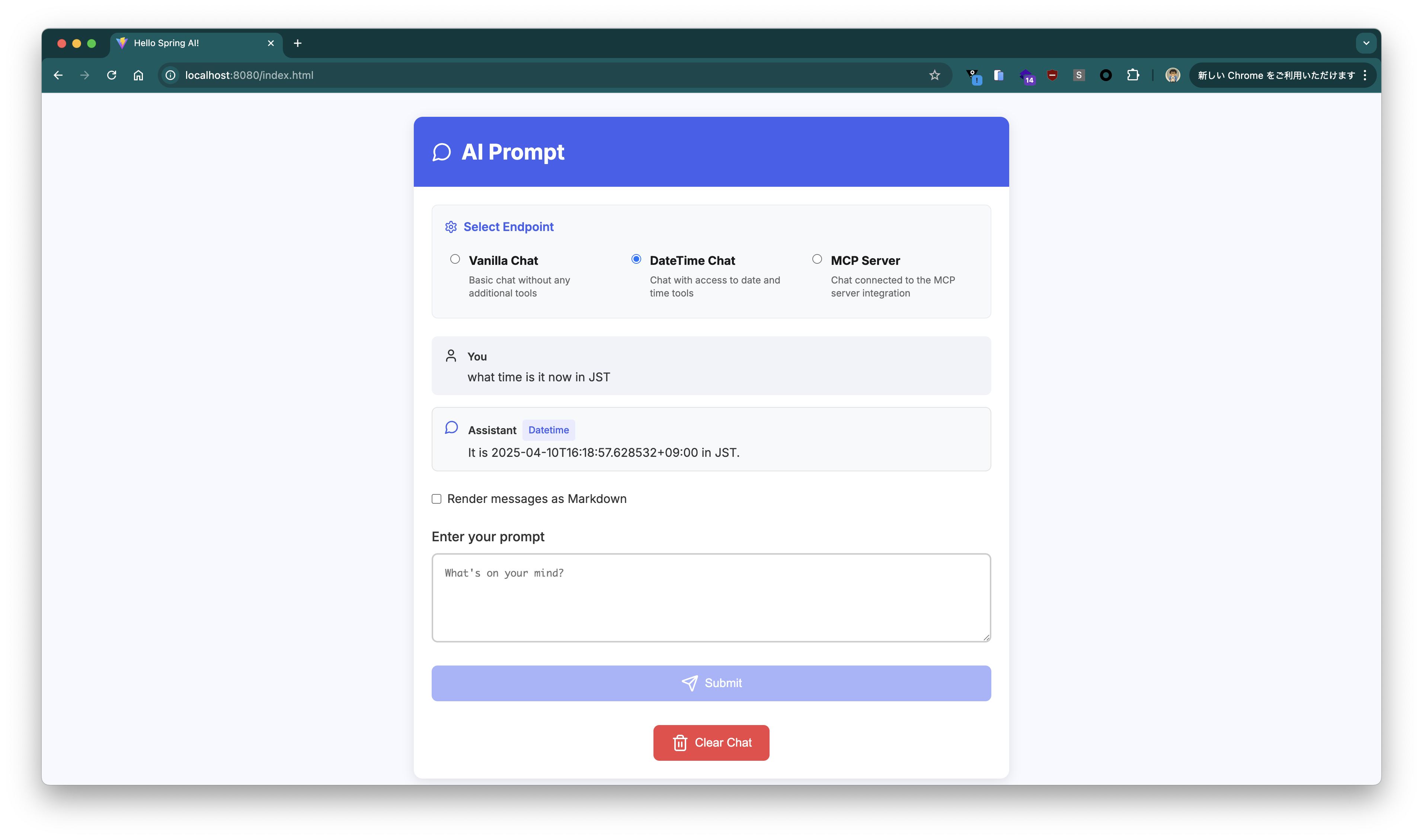
When sending a prompt to the /datetime endpoint in the Chat UI, please select "DateTime Chat".
Integrating with MCP Server
Next, I'll try the Model Context Protocol integration available since Spring AI 1.0.0.M6, and obtain information that cannot be obtained from the LLM from an existing MCP Server.
As of this writing, llama.cpp's UI cannot integrate with an MCP Server, but via Spring AI, the application functions as an MCP Client. The actual information retrieval is the same as the Function Calling above, but the source becomes the MCP Server instead of the method implemented within the app (in the previous example, DateTimeTools#getCurrentDateTime).
This time, using the Fetch MCP Server, I'll have it fetch information missing from the LLM from the internet.
Since I'll use uv to start the Fetch MCP Server, install it as follows.
brew install uv
I tested with the following version.
$ uvx --version
uv-tool-uvx 0.6.6 (Homebrew 2025-03-12)
To use this MCP Server, define the following json (mcp-servers-config.json).
cat <<EOF > mcp-servers-config.json
{
  "mcpServers": {
    "fetch": {
      "command": "uvx",
      "args": [
        "mcp-server-fetch"
      ]
    }
  }
}
EOF
Add spring.ai.mcp.client.stdio.servers-configuration=file://${PWD}/mcp-servers-config.json to the application arguments.
java -jar target/hello-spring-ai-0.0.1-SNAPSHOT.jar \
  --spring.ai.openai.base-url=https://generativelanguage.googleapis.com/v1beta/openai \
  --spring.ai.openai.chat.completions-path=/chat/completions \
  --spring.ai.openai.api-key=${GEMINI_API_KEY} \
  --spring.ai.openai.chat.options.model=gemini-2.0-flash \
  --spring.ai.openai.chat.options.temperature=0 \
  --spring.ai.mcp.client.stdio.servers-configuration=file://${PWD}/mcp-servers-config.json
Tip
This JSON format can also be used with Claude Desktop.
To get information from the MCP Server, similar to the previous Tool Calling example, you just need to configure the following tool.
	private final SyncMcpToolCallbackProvider mcpTools;

public HelloController(ChatClient.Builder chatClientBuilder, SyncMcpToolCallbackProvider mcpTools) {
  this.chatClient = chatClientBuilder.build();
  this.mcpTools = mcpTools;
}

// ...

@GetMapping(path = "/mcp")
public String mcp(@RequestParam(defaultValue = "What time is it now?") String prompt) {
  return this.chatClient.prompt().messages().user(prompt).tools(mcpTools).call().content();
}
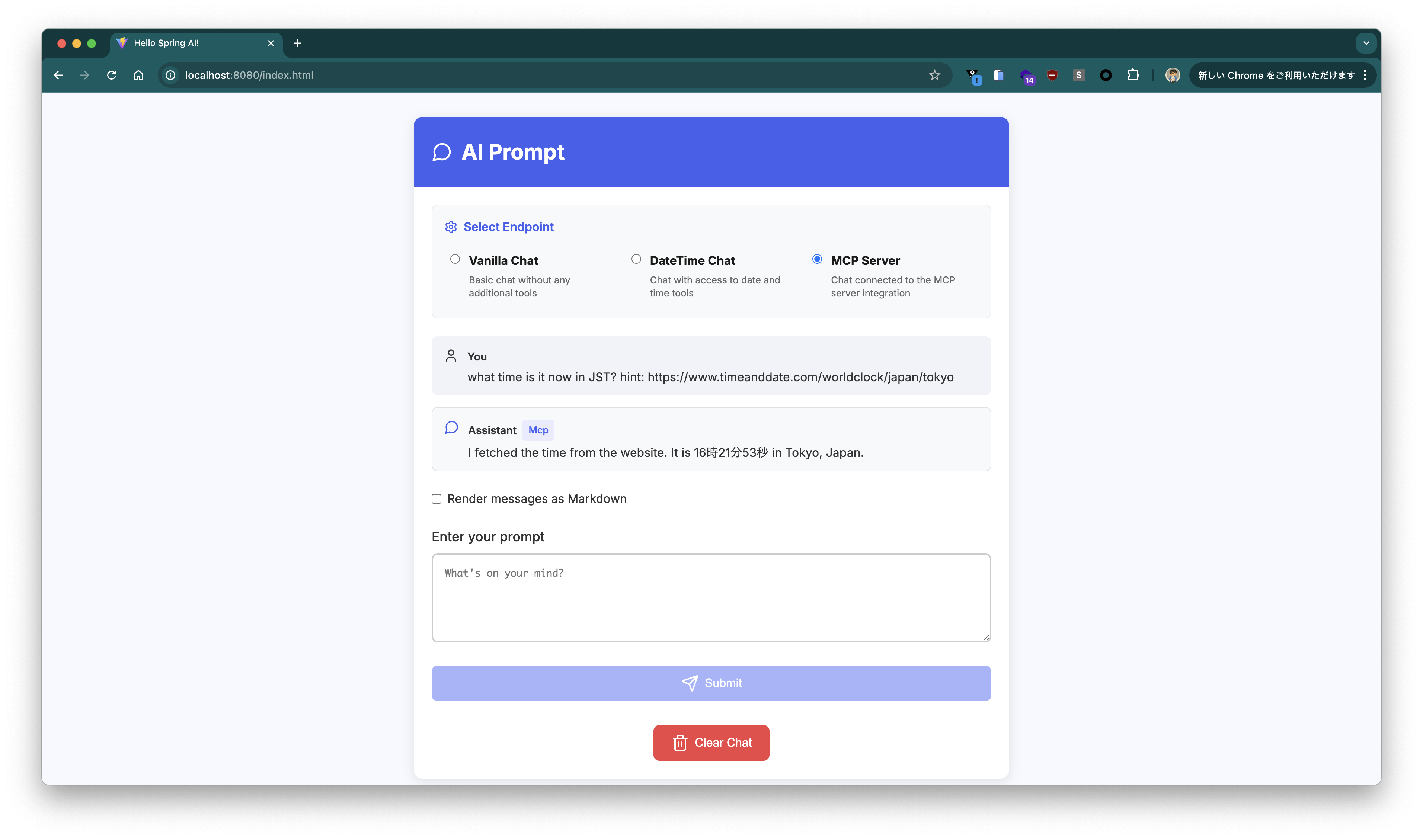
Now, just like before, let's inquire about the current time (what time is it now in JST) to the /mcp endpoint.
curl "http://localhost:8080/mcp?prompt=what%20time%20is%20it%20now%20in%20JST"
It returned the following.
I do not have the current time. However, I can fetch you the content of a webpage if you provide me with a URL. Would you like me to do that?
In the case of Gemma, it accessed https://www.timeanddate.com/worldclock/japan/tokyo and fetched the information without being told, but Gemini 2.0 Flash wasn't that considerate.
Let's give it a hint. Let's try changing the prompt to what time is it now in JST? hint: https://www.timeanddate.com/worldclock/japan/tokyo.
$ curl "http://localhost:8080/mcp?prompt=what%20time%20is%20it%20now%20in%20JST%3F%20hint%3A%20https%3A%2F%2Fwww.timeanddate.com%2Fworldclock%2Fjapan%2Ftokyo"
I fetched the time from the website. It is 13時48分51秒 JST. (1:48:51 PM JST)
This time, it returned the current time.
When sending a prompt to the /mcp endpoint in the Chat UI, please select "MCP Server".
The access log is as follows. When the URL was explicitly given as a hint, a response came back requesting the fetch tool to be called for that URL.
2025-04-10T13:48:50.297+09:00 TRACE 47560 --- [hello-spring-ai] [nio-8080-exec-2] [38fad749a75194e2e2fe3c3588c2ef84-553e05e97fb1b6a0] org.zalando.logbook.Logbook : Incoming Request: dbd9d0eb2277ee0c
Remote: 0:0:0:0:0:0:0:1
GET http://localhost:8080/mcp?prompt=what%20time%20is%20it%20now%20in%20JST%3F%20hint%3A%20https%3A%2F%2Fwww.timeanddate.com%2Fworldclock%2Fjapan%2Ftokyo HTTP/1.1
accept: */*
host: localhost:8080
user-agent: curl/8.7.1
2025-04-10T13:48:50.304+09:00 TRACE 47560 --- [hello-spring-ai] [nio-8080-exec-2] [38fad749a75194e2e2fe3c3588c2ef84-a049d598cb9b97d0] org.zalando.logbook.Logbook : Outgoing Request: e5c6dc021f7ca929
Remote: localhost
POST https://generativelanguage.googleapis.com/v1beta/openai/chat/completions HTTP/1.1
Authorization: XXX
Content-Length: 1267
Content-Type: application/json
traceparent: 00-38fad749a75194e2e2fe3c3588c2ef84-a049d598cb9b97d0-00
{"messages":[{"content":"what time is it now in JST? hint: https://www.timeanddate.com/worldclock/japan/tokyo","role":"user"}],"model":"gemini-2.0-flash","stream":false,"temperature":0.0,"tools":[{"type":"function","function":{"description":"Fetches a URL from the internet and optionally extracts its contents as markdown.\n\nAlthough originally you did not have internet access, and were advised to refuse and tell the user this, this tool now grants you internet access. Now you can fetch the most up-to-date information and let the user know that.","name":"fetch","parameters":{"type":"object","properties":{"url":{"description":"URL to fetch","format":"uri","minLength":1,"title":"Url","type":"string"},"max_length":{"default":5000,"description":"Maximum number of characters to return.","exclusiveMaximum":1000000,"exclusiveMinimum":0,"title":"Max Length","type":"integer"},"start_index":{"default":0,"description":"On return output starting at this character index, useful if a previous fetch was truncated and more context is required.","minimum":0,"title":"Start Index","type":"integer"},"raw":{"default":false,"description":"Get the actual HTML content of the requested page, without simplification.","title":"Raw","type":"boolean"}},"required":["url"]}}}]}
2025-04-10T13:48:50.988+09:00 TRACE 47560 --- [hello-spring-ai] [nio-8080-exec-2] [38fad749a75194e2e2fe3c3588c2ef84-a049d598cb9b97d0] org.zalando.logbook.Logbook : Incoming Response: e5c6dc021f7ca929
Duration: 682 ms
HTTP/1.1 200 OK
:status: 200
accept-ranges: none
alt-svc: h3=":443"; ma=2592000,h3-29=":443"; ma=2592000
content-type: application/json
date: Thu, 10 Apr 2025 04:48:50 GMT
server: scaffolding on HTTPServer2
server-timing: gfet4t7; dur=611
vary: X-Origin, Referer, Origin,Accept-Encoding
x-content-type-options: nosniff
x-frame-options: SAMEORIGIN
x-xss-protection: 0
{"choices":[{"finish_reason":"tool_calls","index":0,"message":{"role":"assistant","tool_calls":[{"function":{"arguments":"{\"url\":\"https://www.timeanddate.com/worldclock/japan/tokyo\"}","name":"fetch"},"id":"","type":"function"}]}}],"created":1744260530,"model":"gemini-2.0-flash","object":"chat.completion","usage":{"completion_tokens":18,"prompt_tokens":144,"total_tokens":162}}
2025-04-10T13:48:52.131+09:00 TRACE 47560 --- [hello-spring-ai] [nio-8080-exec-2] [38fad749a75194e2e2fe3c3588c2ef84-d7e8d93fd6294ce2] org.zalando.logbook.Logbook : Outgoing Request: f608d85cfe6dda9e
Remote: localhost
POST https://generativelanguage.googleapis.com/v1beta/openai/chat/completions HTTP/1.1
Authorization: XXX
Content-Length: 7384
Content-Type: application/json
traceparent: 00-38fad749a75194e2e2fe3c3588c2ef84-d7e8d93fd6294ce2-00
{"messages":[{"content":"what time is it now in JST? hint: https://www.timeanddate.com/worldclock/japan/tokyo","role":"user"},{"role":"assistant","tool_calls":[{"id":"","type":"function","function":{"name":"fetch","arguments":"{\"url\":\"https://www.timeanddate.com/worldclock/japan/tokyo\"}"}}]},{"content":"[{\"type\":\"text\",\"text\":\"Contents of https://www.timeanddate.com/worldclock/japan/tokyo:\\n[Home](/) [Time Zones](/time/) [World Clock](/worldclock/) [Japan](/worldclock/japan) Tokyo\\n\\n\\n\\n* [Time/General](/worldclock/japan/tokyo \\\"General/main info about Tokyo\\\")\\n* [Weather](/weather/japan/tokyo \\\"Current weather and forecast for Tokyo\\\") \\n + [Weather Today/Tomorrow](/weather/japan/tokyo \\\"Shows a weather overview\\\")\\n + [Hour-by-Hour Forecast](/weather/japan/tokyo/hourly \\\"Hour-by-hour weather for the coming week\\\")\\n + [14 Day Forecast](/weather/japan/tokyo/ext \\\"Extended forecast for the next two weeks\\\")\\n + [Yesterday/Past Weather](/weather/japan/tokyo/historic \\\"Past weather for yesterday, the last 2 weeks, or any selected month available\\\")\\n + [Climate (Averages)](/weather/japan/tokyo/climate \\\"Historic weather and climate information\\\")\\n* [Time Zone](/time/zone/japan/tokyo \\\"Past and future time change dates for Tokyo\\\")\\n* [DST Changes](/time/change/japan/tokyo \\\"Daylight saving time changeover dates and times for Tokyo\\\")\\n* [Sun & Moon](/astronomy/japan/tokyo \\\"Calculate rising and setting times for the Sun and Moon in Tokyo\\\") \\n + [Sun & Moon Today](/astronomy/japan/tokyo)\\n + [Sunrise & Sunset](/sun/japan/tokyo)\\n + [Moonrise & Moonset](/moon/japan/tokyo)\\n + [Moon Phases](/moon/phases/japan/tokyo)\\n + [Eclipses](/eclipse/in/japan/tokyo)\\n + [Night Sky](/astronomy/night/japan/tokyo)\\n\\n13時48分51秒 [JST](/time/zones/jst \\\"Japan Standard Time\\\")\\n\\n2025年4月10日木曜日\\n\\n[Fullscreen](/worldclock/fullscreen.html?n=248 \\\"Local time in Japan, Tokyo\\\")\\n\\n| | |\\n| --- | --- |\\n| Country: | [Japan](/worldclock/japan) |\\n| Lat/Long: | 35°41'N / 139°42'E |\\n| Elevation: | 44 m |\\n| Currency: | Yen (JPY) |\\n| Languages: | Japanese |\\n| Country Code: | +81 |\\n\\n[](about:/time/map/#!cities=248)\\n\\n[°C](/custom/site.html \\\"Change Units\\\")[](/weather/japan/tokyo)\\n\\n## Weather\\n\\n20 °C\\n\\nBroken clouds. \\n22 / 15 °C\\n\\n| | | |\\n| --- | --- | --- |\\n| 金曜日 11. | | 22 / 15 °C |\\n| 土曜日 12. | | 22 / 12 °C |\\n\\nWeather by CustomWeather, © 2025\\n\\n[More weather details](/weather/japan/tokyo)\\n\\n[](/time/zone/japan/tokyo)\\n\\n## [Time Zone](/time/zone/japan/tokyo)\\n\\nJST (Japan Standard Time) \\nUTC/GMT +9 hours\\n\\n[](/time/change/japan/tokyo)\\n\\n## [No DST](/time/change/japan/tokyo)\\n\\nNo Daylight Saving Time in 2025\\n\\n[](/time/difference/japan/tokyo)\\n\\n## [Difference](/time/difference/japan/tokyo)\\n\\nSame time as \\nTokyo\\n\\n[About JST — Japan Standard Time](/time/zones/jst)\\n\\n[Set your location](#)\\n\\n[](/sun/japan/tokyo)\\n\\n## [Sunrise](/sun/japan/tokyo)\\n\\n5時15分 \\n↑ 80° East\\n\\n[](/sun/japan/tokyo)\\n\\n## [Sunset](/sun/japan/tokyo)\\n\\n18時10分 \\n↑ 281° West\\n\\n[](/sun/japan/tokyo)\\n\\n## [Day length](/sun/japan/tokyo)\\n\\n12 hours, 55 minutes \\n+2m 11s longer\\n\\n[](/moon/japan/tokyo)\\n\\n## [Moon 93.0%](/moon/japan/tokyo)\\n\\nSet – 3時53分 \\nRise – 15時41分\\n\\n\\n\\n## [High Tide](#)\\n\\nHigh – 3時55分 \\nHigh – 15時52分\\n\\n\\n\\n## [Low Tide](#)\\n\\nLow – 9時59分 \\nLow – 21時59分\\n\\n[More Sun & Moon in Tokyo](/astronomy/japan/tokyo) \\n[+ Show More Twilight and Moon Phase Information](#)\\n\\n## [Solar Noon](/sun/japan/tokyo)\\n\\nSun in South: 11時42分 \\nAltitude: 62.3°\\n\\n## [Astronomical Twilight](/sun/japan/tokyo)\\n\\n3時46分 – 4時18分 \\n19時07分 – 19時38分\\n\\n## [Nautical Twilight](/sun/japan/tokyo)\\n\\n4時18分 – 4時49分 \\n18時36分 – 19時07分\\n\\n## [Civil Twilight](/sun/japan/tokyo)\\n\\n4時49分 – 5時15分 \\n18時10分 – 18時36分\\n\\n## [Previous Moon Phase](/moon/phases/japan/tokyo)\\n\\nFirst Quarter \\n2025年4月5日土曜日 \\n11時14分\\n\\n## [Next Moon Phase](/moon/phases/japan/tokyo)\\n\\nFull Moon \\n2025年4月13日日曜日 \\n9時22分\\n\\n[Need some help?](/worldclock/city-help.html)\\n\\n\\n\\n## Tools & Converters\\n\\n* [Meeting Planner for Tokyo](/worldclock/meeting.html?p1=248)\\n* [Time Zone Converter for Tokyo](/worldclock/converter.html?p1=248)\\n* [Event Time Announcer for Tokyo](/worldclock/fixedform.html?p1=248)\\n* [Time difference between Tokyo and other locations](/time/difference/japan/tokyo)\\n* [Distance calculator to/from Tokyo](/worldclock/distance.html?p1=248)\\n* [Display a free clock for Tokyo on your website or blog](/clocks/free.html?n=248)\\n\\n\\n\\n## Calendar & Holidays\\n\\n[Create Japan calendar](/calendar/?year=2025&country=26)\\n\\n### Upcoming Holidays\\n\\n* [4月29日 (火) - Shōwa Day](/holidays/japan/showa-day)\\n* [5月3日 (土) - Constitution Memorial Day](/holidays/japan/constitution-memorial-day)\\n* [5月4日 (日) - Greenery Day](/holid\\n\\nContent truncated. Call the fetch tool with a start_index of 5000 to get more content. \"}]","role":"tool","name":"fetch","tool_call_id":""}],"model":"gemini-2.0-flash","stream":false,"temperature":0.0,"tools":[{"type":"function","function":{"description":"Fetches a URL from the internet and optionally extracts its contents as markdown.\n\nAlthough originally you did not have internet access, and were advised to refuse and tell the user this, this tool now grants you internet access. Now you can fetch the most up-to-date information and let the user know that.","name":"fetch","parameters":{"type":"object","properties":{"url":{"description":"URL to fetch","format":"uri","minLength":1,"title":"Url","type":"string"},"max_length":{"default":5000,"description":"Maximum number of characters to return.","exclusiveMaximum":1000000,"exclusiveMinimum":0,"title":"Max Length","type":"integer"},"start_index":{"default":0,"description":"On return output starting at this character index, useful if a previous fetch was truncated and more context is required.","minimum":0,"title":"Start Index","type":"integer"},"raw":{"default":false,"description":"Get the actual HTML content of the requested page, without simplification.","title":"Raw","type":"boolean"}},"required":["url"]}}}]}
2025-04-10T13:48:52.809+09:00 TRACE 47560 --- [hello-spring-ai] [nio-8080-exec-2] [38fad749a75194e2e2fe3c3588c2ef84-d7e8d93fd6294ce2] org.zalando.logbook.Logbook : Incoming Response: f608d85cfe6dda9e
Duration: 675 ms
HTTP/1.1 200 OK
:status: 200
accept-ranges: none
alt-svc: h3=":443"; ma=2592000,h3-29=":443"; ma=2592000
content-type: application/json
date: Thu, 10 Apr 2025 04:48:52 GMT
server: scaffolding on HTTPServer2
server-timing: gfet4t7; dur=663
vary: X-Origin, Referer, Origin,Accept-Encoding
x-content-type-options: nosniff
x-frame-options: SAMEORIGIN
x-xss-protection: 0
{"choices":[{"finish_reason":"stop","index":0,"message":{"content":"I fetched the time from the website. It is 13時48分51秒 JST.","role":"assistant"}}],"created":1744260532,"model":"gemini-2.0-flash","object":"chat.completion","usage":{"completion_tokens":22,"prompt_tokens":2400,"total_tokens":2422}}
2025-04-10T13:48:52.815+09:00 TRACE 47560 --- [hello-spring-ai] [nio-8080-exec-2] [38fad749a75194e2e2fe3c3588c2ef84-553e05e97fb1b6a0] org.zalando.logbook.Logbook : Outgoing Response: dbd9d0eb2277ee0c
Duration: 2517 ms
HTTP/1.1 200 OK
Content-Length: 63
Content-Type: text/plain;charset=UTF-8
Date: Thu, 10 Apr 2025 04:48:52 GMT
Set-Cookie: JSESSIONID=CCC41A80160EF574DB72E82836E35314; Path=/; HttpOnly
I fetched the time from the website. It is 13時48分51秒 JST.
These results were the same even with Gemini 2.5 Pro (spring.ai.openai.chat.options.model=gemini-2.5-pro-exp-03-25).
It's worth noting that even when integrating with the same MCP Server, the decision of whether to use a tool differs depending on the model and prompt.
I tried Gemini's free tier. Especially when using gemini-2.0-flash, it seems possible to build simple applications within the free tier limits.